PHP recognizes the three dots symbol (…) as the spread operator. The spread operator is also sometimes called the splat operator. This operator was first introduced in PHP version 7.4. It can be effectively used in many cases such as unpacking arrays.
Example 1
In the example below, the elements in $arr1 are inserted in $arr2 after a list of its own elements.
The Spread operator can be used more than once in an expression. For example, in the following code, a third array is created by expanding the elements of two arrays.
However, the use of (…) operator is much more efficient as it avoids the overhead a function call.
Example 4
PHP 8.1.0 also introduced another feature that allows using named arguments after unpacking the arguments. Instead of providing a value to each of the arguments individually, the values from an array will be unpacked into the corresponding arguments, using … (three dots) before the array.
Open Compiler
<?php
   function  myfunction($x, $y, $z=30) {
  echo "x = $x  y = $y  z = $z";   }

   myfunction(...[10, 20], z:30);
?>
It will produce the following output −
x = 10 y = 20 z = 30
Example 5
In the following example, the return value of a function is an array. The array elements are then spread and unpacked.
You would use conditional operators in PHP when there is a need to set a value depending on conditions. It is also known as ternary operator. It first evaluates an expression for a true or false value and then executes one of the two given statements depending upon the result of the evaluation.
Ternary operators offer a concise way to write conditional expressions. They consist of three parts: the condition, the value to be returned if the condition evaluates to true, and the value to be returned if the condition evaluates to false.
Operator
Description
Example
? :
Conditional Expression
If Condition is true ? Then value X : Otherwise value Y
Syntax
The syntax is as follows −
condition ? value_if_true : value_if_false
Ternary operators are especially useful for shortening if-else statements into a single line. You can use a ternary operator to assign different values to a variable based on a condition without needing multiple lines of code. It can improve the readability of the code.
However, you should use ternary operators judiciously, else you will end up making the code too complex for others to understand.
Example
Try the following example to understand how the conditional operator works in PHP. Copy and paste the following PHP program in test.php file and keep it in your PHP Server’s document root and browse it using any browser.
Open Compiler
<?php
   $a = 10;
   $b = 20;

   /* If condition is true then assign a to result otheriwse b */
   $result = ($a > $b ) ? $a :$b;

   echo "TEST1 : Value of result is $result \n";

   /* If condition is true then assign a to result otheriwse b */
   $result = ($a < $b ) ? $a :$b;

   echo "TEST2 : Value of result is $result";
?>
It will produce the following output −
TEST1 : Value of result is 20
TEST2 : Value of result is 10
PHP defines the following set of symbols to be used as operators on array data types −
Symbol
Example
Name
Result
+
$a + $b
Union
Union of $a and $b.
==
$a == $b
Equality
TRUE if $a and $b have the same key/value pairs.
===
$a === $b
Identity
TRUE if $a and $b have the same key/value pairs in the same order and of the same types.
!=
$a != $b
Inequality
TRUE if $a is not equal to $b.
<>
$a <> $b
Inequality
TRUE if $a is not equal to $b.
!==
$a !== $b
Non identity
TRUE if $a is not identical to $b.
The Union operator appends the right-hand array appended to left-hand array. If a key exists in both arrays, the elements from the left-hand array will be used, and the matching elements from the right-hand array will be ignored.
Example: Union Opeator in PHP
The following example shows how you can use the union operator in PHP −
Two arrays are said to be equal if they have the same key-value pairs.
In the following example, we have an indexed array and other associative array with keys corresponding to index of elements in first. Hence, both are equal.
You can use assignment operators in PHP to assign values to variables. Assignment operators are shorthand notations to perform arithmetic or other operations while assigning a value to a variable. For instance, the “=” operator assigns the value on the right-hand side to the variable on the left-hand side.
Additionally, there are compound assignment operators like +=, -= , *=, /=, and %= which combine arithmetic operations with assignment. For example, “$x += 5” is a shorthand for “$x = $x + 5”, incrementing the value of $x by 5. Assignment operators offer a concise way to update variables based on their current values.
The following table highligts the assignment operators that are supported by PHP −
Operator
Description
Example
=
Simple assignment operator. Assigns values from right side operands to left side operand
C = A + B will assign value of A + B into C
+=
Add AND assignment operator. It adds right operand to the left operand and assign the result to left operand
C += A is equivalent to C = C + A
-=
Subtract AND assignment operator. It subtracts right operand from the left operand and assign the result to left operand
C -= A is equivalent to C = C – A
*=
Multiply AND assignment operator. It multiplies right operand with the left operand and assign the result to left operand
C *= A is equivalent to C = C * A
/=
Divide AND assignment operator. It divides left operand with the right operand and assign the result to left operand
C /= A is equivalent to C = C / A
%=
Modulus AND assignment operator. It takes modulus using two operands and assign the result to left operand
C %= A is equivalent to C = C % A
Example
The following example shows how you can use these assignment operators in PHP −
In PHP, logical operators are used to combine conditional statements. These operators allow you to create more complex conditions by combining multiple conditions together.
Logical operators are generally used in conditional statements such as if, while, and for loops to control the flow of program execution based on specific conditions.
The following table highligts the logical operators that are supported by PHP.
Assume variable $a holds 10 and variable $b holds 20, then −
Operator
Description
Example
and
Called Logical AND operator. If both the operands are true then condition becomes true.
(A and B) is true
or
Called Logical OR Operator. If any of the two operands are non zero then condition becomes true.
(A or B) is true
&&
Called Logical AND operator. The AND operator returns true if both the left and right operands are true.
(A && B) is true
||
Called Logical OR Operator. If any of the two operands are non zero then condition becomes true.
(A || B) is true
!
Called Logical NOT Operator. Use to reverses the logical state of its operand. If a condition is true then Logical NOT operator will make false.
!(A && B) is false
Example
The following example shows how you can use these logical operators in PHP −
Open Compiler
<?php
   $a = 42;
   $b = 0;

   if ($a && $b) {
  echo "TEST1 : Both a and b are true \n";   } else {
  echo "TEST1 : Either a or b is false \n";   }

   if ($a and $b) {
  echo "TEST2 : Both a and b are true \n";   } else {
  echo "TEST2 : Either a or b is false \n";   }

   if ($a || $b) {
  echo "TEST3 : Either a or b is true \n";   } else {
  echo "TEST3 : Both a and b are false \n";   }

   if ($a or $b) {
  echo "TEST4 : Either a or b is true \n";   } else {
  echo "TEST4 : Both a and b are false \n";   }

   $a = 10;
   $b = 20;

   if ($a) {
  echo "TEST5 : a is true \n";   } else {
  echo "TEST5 : a is false \n";   }

   if ($b) {
  echo "TEST6 : b is true \n";   } else {
  echo "TEST6 : b is false \n";   }

   if (!$a) {
  echo "TEST7 : a is true \n";   } else {
  echo "TEST7 : a is false \n";   }

   if (!$b) {
  echo "TEST8 : b is true \n";   } else {
  echo "TEST8 : b is false";   }
?>
It will produce the following output −
TEST1 : Either a or b is false
TEST2 : Either a or b is false
TEST3 : Either a or b is true
TEST4 : Either a or b is true
TEST5 : a is true
TEST6 : b is true
TEST7 : a is false
TEST8 : b is false
In PHP, Comparison operators are used to compare two values and determine their relationship. These operators return a Boolean value, either True or False, based on the result of the comparison.
The following table highligts the comparison operators that are supported by PHP. Assume variable $a holds 10 and variable $b holds 20, then −
Operator
Description
Example
==
Checks if the value of two operands are equal or not, if yes then condition becomes true.
($a == $b) is not true
!=
Checks if the value of two operands are equal or not, if values are not equal then condition becomes true.
($a != $b) is true
>
Checks if the value of left operand is greater than the value of right operand, if yes then condition becomes true.
($a > $b) is false
<
Checks if the value of left operand is less than the value of right operand, if yes then condition becomes true.
($a < $b) is true
>=
Checks if the value of left operand is greater than or equal to the value of right operand, if yes then condition becomes true.
($a >= $b) is false
<=
Checks if the value of left operand is less than or equal to the value of right operand, if yes then condition becomes true.
($a <= $b) is true
Additionally, these operators can also be combined with logical operators (&&, ||, !) to form complex conditions for decision making in PHP programs.
Example
The following example shows how you can use these comparison operators in PHP −
Open Compiler
<?php
   $a = 42;
   $b = 20;

   if ($a == $b) {
  echo "TEST1 : a is equal to b \n";   } else {
  echo "TEST1 : a is not equal to b \n";   }

   if ($a > $b) {
  echo "TEST2 : a is greater than  b \n";   } else {
  echo "TEST2 : a is not greater than b \n";   }

   if ($a < $b) {
  echo "TEST3 : a is less than  b \n";   } else {
  echo "TEST3 : a is not less than b \n";   }

   if ($a != $b) {
  echo "TEST4 : a is not equal to b \n";   } else {
  echo "TEST4 : a is equal to b \n";   }

   if ($a >= $b) {
  echo "TEST5 : a is either greater than or equal to b \n";   } else {
  echo "TEST5 : a is neither greater than nor equal to b \n";   }
   if ($a <= $b) {
  echo "TEST6 : a is either less than or equal to b \n";   } else {
  echo "TEST6 : a is neither less than nor equal to b";   }
?>
It will produce the following output −
TEST1 : a is not equal to b
TEST2 : a is greater than b
TEST3 : a is not less than b
TEST4 : a is not equal to b
TEST5 : a is either greater than or equal to b
TEST6 : a is neither less than nor equal to b
As in any programming language, PHP also has operators which are symbols (sometimes keywords) that are predefined to perform certain commonly required operations on one or more operands.
For example, using the expression “4 + 5” is equal to 9. Here “4” and “5” are called operands and “+” is called an operator.
We have the following types of operators in PHP −
Arithmetic Operators
Comparison Operators
Logical Operators
Assignment Operators
String Operators
Array Operators
Conditional (or Ternary Operators)
This chapter will provide an overview of how you can use these operators in PHP. In the subsequent chapters, we will take a closer look at each of the operators and how they work.
Arithmetic Operators in PHP
We use Arithmetic operators to perform mathematical operations like addition, subtraction, multiplication, division, etc. on the given operands. Arithmetic operators (excluding the increment and decrement operators) always work on two operands, however the type of these operands should be the same.
The following table highligts the arithmetic operators that are supported by PHP. Assume variable “$a” holds 42 and variable “$b” holds 20 −
Operator
Description
Example
+
Adds two operands
$a + $b = 62
–
Subtracts second operand from the first
$a – $b = 22
*
Multiply both operands
$a * $b = 840
/
Divide numerator by de-numerator
$a / $b = 2.1
%
Modulus Operator and remainder of after an integer division
$a % $b = 2
++
Increment operator, increases integer value by one
$a ++ = 43
—
Decrement operator, decreases integer value by one
$a — = 42
Explore our latest online courses and learn new skills at your own pace. Enroll and become a certified expert to boost your career.
Comparison Operators in PHP
You would use Comparison operators to compare two operands and find the relationship between them. They return a Boolean value (either true or false) based on the outcome of the comparison.
The following table highligts the comparison operators that are supported by PHP. Assume variable $a holds 10 and variable $b holds 20, then −
Operator
Description
Example
==
Checks if the value of two operands are equal or not, if yes then condition becomes true.
($a == $b) is not true
!=
Checks if the value of two operands are equal or not, if values are not equal then condition becomes true.
($a != $b) is true
>
Checks if the value of left operand is greater than the value of right operand, if yes then condition becomes true.
($a > $b) is false
<
Checks if the value of left operand is less than the value of right operand, if yes then condition becomes true.
($a < $b) is true
>=
Checks if the value of left operand is greater than or equal to the value of right operand, if yes then condition becomes true.
($a >= $b) is false
<=
Checks if the value of left operand is less than or equal to the value of right operand, if yes then condition becomes true.
($a <= $b) is true
Logical Operators in PHP
You can use Logical operators in PHP to perform logical operations on multiple expressions together. Logical operators always return Boolean values, either true or false.
Logical operators are commonly used with conditional statements and loops to return decisions according to the Boolean conditions. You can also combine them to manipulate Boolean values while dealing with complex expressions.
The following table highligts the logical operators that are supported by PHP.
Assume variable $a holds 10 and variable $b holds 20, then −
Operator
Description
Example
and
Called Logical AND operator. If both the operands are true then condition becomes true.
(A and B) is true
or
Called Logical OR Operator. If any of the two operands are non zero then condition becomes true.
(A or B) is true
&&
Called Logical AND operator. If both the operands are non zero then condition becomes true.
(A && B) is true
||
Called Logical OR Operator. If any of the two operands are non zero then condition becomes true.
(A || B) is true
!
Called Logical NOT Operator. Use to reverses the logical state of its operand. If a condition is true then Logical NOT operator will make false.
!(A && B) is false
Assignment Operators in PHP
You can use Assignment operators in PHP to assign or update the values of a given variable with a new value. The right-hand side of the assignment operator holds the value and the left-hand side of the assignment operator is the variable to which the value will be assigned.
The data type of both the sides should be the same, else you will get an error. The associativity of assignment operators is from right to left. PHP supports two types of assignment operators −
Simple Assignment Operator − It is the most commonly used operator. It is used to assign value to a variable or constant.
Compound Assignment Operators − A combination of the assignment operator (=) with other operators like +, *, /, etc.
The following table highligts the assignment operators that are supported by PHP −
Operator
Description
Example
=
Simple assignment operator, Assigns values from right side operands to left side operand
C = A + B will assign value of A + B into C
+=
Add AND assignment operator, It adds right operand to the left operand and assign the result to left operand
C += A is equivalent to C = C + A
-=
Subtract AND assignment operator, It subtracts right operand from the left operand and assign the result to left operand
C -= A is equivalent to C = C – A
*=
Multiply AND assignment operator, It multiplies right operand with the left operand and assign the result to left operand
C *= A is equivalent to C = C * A
/=
Divide AND assignment operator, It divides left operand with the right operand and assign the result to left operand
C /= A is equivalent to C = C / A
%=
Modulus AND assignment operator, It takes modulus using two operands and assign the result to left operand
C %= A is equivalent to C = C % A
String Operators in PHP
There are two operators in PHP for working with string data types −
The “.” (dot) operator is PHP’s concatenation operator. It joins two string operands (characters of right hand string appended to left hand string) and returns a new string.
PHP also has the “.=” operator which can be termed as the concatenation assignment operator. It updates the string on its left by appending the characters of right hand operand.
$third=$first.$second;$leftstring.=$rightstring;
Array Operators in PHP
PHP defines the following set of symbols to be used as operators on array data types −
Symbol
Example
Name
Result
+
$a + $b
Union
Union of $a and $b.
==
$a == $b
Equality
TRUE if $a and $b have the same key/value pairs.
===
$a === $b
Identity
TRUE if $a and $b have the same key/value pairs in the same order and of the same types.
!=
$a != $b
Inequality
TRUE if $a is not equal to $b.
<>
$a <> $b
Inequality
TRUE if $a is not equal to $b.
!==
$a !== $b
Non identity
TRUE if $a is not identical to $b.
Conditional Operators in PHP
There is one more operator in PHP which is called conditional operator. It is also known as ternary operator. It first evaluates an expression for a true or false value and then executes one of the two given statements depending upon the result of the evaluation.
Operator
Description
Example
? :
Conditional Expression
If Condition is true ? Then value X : Otherwise value Y
Operator Categories in PHP
All the operators we have discussed above can be categorised into following categories −
Unary prefix operators, which precede a single operand.
Binary operators, which take two operands and perform a variety of arithmetic and logical operations.
The conditional operator (a ternary operator), which takes three operands and evaluates either the second or third expression, depending on the evaluation of the first expression.
Assignment operators, which assign a value to a variable.
Operator Precedence in PHP
Precedence of operators decides the order of execution of operators in an expression. For example, in “2+6/3”, division of 6/3 is done first and then the addition of “2+2” takes place because the division operator “/” has higher precedence over the addition operator “+”.
To force a certain operator to be called before other, parentheses should be used. In this example, (2+6)/3 performs addition first, followed by division.
Some operators may have the same level of precedence. In that case, the order of associativity (either left or right) decides the order of operations. Operators of same precedence level but are non-associative cannot be used next to each other.
The following table lists the PHP operators in their decreasing order of precedence −
PHP version 7 extends the scalar type declaration feature to the return value of a function also. As per this new provision, the return type declaration specifies the type of value that a function should return. We can declare the following types for return types −
int
float
bool
string
interfaces
array
callable
To implement the return type declaration, a function is defined as −
functionmyfunction(type$par1,type$param2):type{# function bodyreturn$val;}
PHP parser is coercive typing by default. You need to declare “strict_types=1” to enforce stricter verification of the type of variable to be returned with the type used in the definition.
Example
In the following example, the division() function is defined with a return type as int.
Since the type checking has not been set to strict_types=1, the division take place even if one of the parameters is a non-integer.
First number: 20.5
Second number: 10
Division: 2
However, as soon as you add the declaration of strict_types at the top of the script, the program raises a fatal error message.
Fatal error: Uncaught TypeError:division():Argument#1 ($x) must be of type int, float given, called in div.php on line 12 and defined in div.php:3
Stack trace:#0 div.php(12): division(20.5, 10)#1 {main}
   thrown in div.php on line 3
VS Code warns about the error even before running the code by displaying error lines at the position of error −
Example
To make the division() function return a float instead of int, cast the numerator to float, and see how PHP raises the fatal error −
Open Compiler
<?php
// declare(strict_types=1);
function division(int $x, int $y): int {
Uncomment the declare statement at the top and run this code here to check its output. It will show an error −
First number: 20
Second number: 10PHP Fatal error:  Uncaught TypeError: division(): Return value must be of type int, float returned in /home/cg/root/14246/main.php:5
Stack trace:
#0 /home/cg/root/14246/main.php(13): division()
#1 {main}
  thrown in /home/cg/root/14246/main.php on line 5
The feature of providing type hints has been in PHP since version 5. Type hinting refers to the practice of providing the data type of a parameter in the function definition. Before PHP 7, it was possible to use only the array, callable, and class for type hints in a function. PHP 7 onwards, you can also insert type hints for parameters of scalar data type such as int, string, bool, etc.
PHP is a dynamically (and weakly) typed language. Hence, you don’t need to declare the type of the parameter when a function is defined, something which is necessary in a statically type language like C or Java.
A typical definition of function in PHP is as follows −
functionaddition($x,$y){echo"First number: $x Second number: $y Addition: ".$x+$y;}
Here, we assume that the parameters $x and $y are numeric. However, even if the values passed to the function aren’t numeric, the PHP parser tries to cast the variables into compatible type as far as possible.
If one of the values passed is a string representation of a number, and the second is a numeric variable, PHP casts the string variable to numeric in order to perform the addition operation.
A new feature introduced with PHP version 7 allows defining a function with parameters whose data type can be specified within the parenthesis.
PHP 7 has introduced the following Scalar type declarations −
Int
Float
Bool
String
Interfaces
Array
Callable
Older versions of PHP allowed only the array, callable and class types to be used as type hints. Furthermore, in the older versions of PHP (PHP 5), the fatal error used to be a recoverable error while the new release (PHP 7) returns a throwable error.
Scalar type declaration is implemented in two modes −
Coercive Mode − Coercive is the default mode and need not to be specified.
Strict Mode − Strict mode has to be explicitly hinted.
Explore our latest online courses and learn new skills at your own pace. Enroll and become a certified expert to boost your career.
Coercive Mode
The addition() function defined in the earlier example can now be re-written by incorporating the type declarations as follows −
functionaddition(int$x,int$y){echo"First number: $x Second number: $y Addition: ".$x+$y;}
Note that the parser still casts the incompatible types i.e., string to an int if the string contains an integer as earlier.
Obviously, this is because PHP is a weakly typed language, as PHP tries to coerce a variable of string type to an integer. PHP 7 has introduced a strict mode feature that addresses this issue.
Strict Mode
To counter the weak type checking of PHP, a strict mode has been introduced. This mode is enabled with a declare statement −
declare(strict_types=1);
You should put this statement at the top of the PHP script (usually just below the PHP tag). This means that the strictness of typing for scalars is configured on a per-file basis.
In the weak mode, the strict_types flag is 0. Setting it to 1 forces the PHP parser to check the compatibility of the parameters and values passed. Add this statement in the above code and check the result. It will show the following error message −
Fatal error: Uncaught TypeError:addition():Argument#1 ($x) must be of type int, string given,
called in add.php on line 12and defined in add.php:4

Stack trace:#0 add.php(12): addition('10', 20)#1 {main}
   thrown in add.php on line 4
Example
Here is another example of scalar type declaration in the function definition. The strict mode when enabled raises fatal error if the incompatible types are passed as parameters.
Uncomment the declare statement at the top of this code and run it. Now it will produce an error −
Fatal error: Uncaught TypeError:
sum(): Argument #2 must be of type int, string given,
called in add.php on line 9 and defined in add.php:4
Stack trace:
#0 add.php(9): sum(2, '3', 4.1)
#1 {main}
   thrown in add.php on line 4
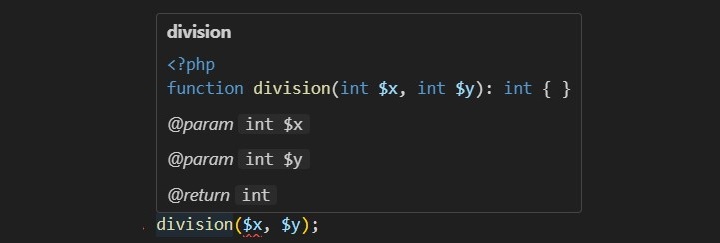
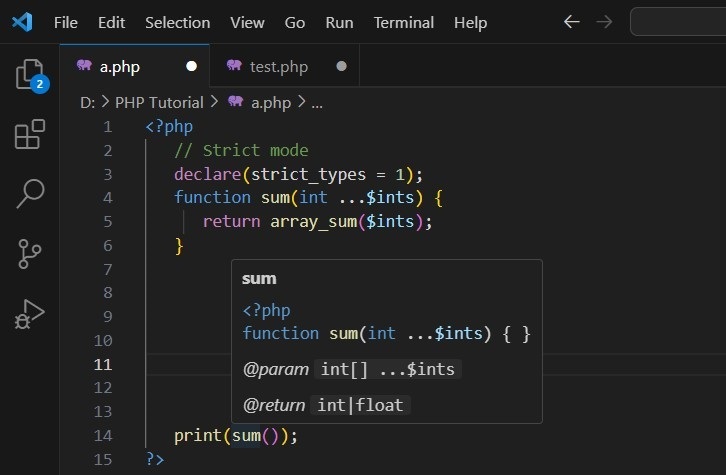
The type-hinting feature is mostly used by IDEs to prompt the user about the expected types of the parameters used in the function declaration. The following screenshot shows the VS Code editor popping up the function prototype as you type.
The built-in library of PHP has a wide range of functions that helps in programmatically handling and manipulating date and time information. Date and Time objects in PHP can be created by passing in a string presentation of date/time information, or from the current system’s time.
PHP provides the DateTime class that defines a number of methods. In this chapter, we will have a detailed view of the various Date and Time related methods available in PHP.
The date/time features in PHP implements the ISO 8601 calendar, which implements the current leap-day rules from before the Gregorian calendar was in place. The date and time information is internally stored as a 64-bit number.
Getting the Time Stamp with time()
PHP’s time() function gives you all the information that you need about the current date and time. It requires no arguments but returns an integer.
time():int
The integer returned by time() represents the number of seconds elapsed since midnight GMT on January 1, 1970. This moment is known as the UNIX epoch, and the number of seconds that have elapsed since then is referred to as a time stamp.
Open Compiler
<?php
   print time();
?>
It will produce the following output −
1699421347
We can convert a time stamp into a form that humans are comfortable with.
Converting a Time Stamp with getdate()
The function getdate() optionally accepts a time stamp and returns an associative array containing information about the date. If you omit the time stamp, it works with the current time stamp as returned by time().
The following table lists the elements contained in the array returned by getdate().
Sr.No
Key & Description
Example
1
secondsSeconds past the minutes (0-59)
20
2
minutesMinutes past the hour (0 – 59)
29
3
hoursHours of the day (0 – 23)
22
4
mdayDay of the month (1 – 31)
11
5
wdayDay of the week (0 – 6)
4
6
monMonth of the year (1 – 12)
7
7
yearYear (4 digits)
1997
8
ydayDay of year ( 0 – 365 )
19
9
weekdayDay of the week
Thursday
10
monthMonth of the year
January
11
0Timestamp
948370048
Now you have complete control over date and time. You can format this date and time in whatever format you want.
Explore our latest online courses and learn new skills at your own pace. Enroll and become a certified expert to boost your career.
Converting a Time Stamp with date()
The date() function returns a formatted string representing a date. You can exercise an enormous amount of control over the format that date() returns with a string argument that you must pass to it.
date(string$format,?int$timestamp=null):string
The date() optionally accepts a time stamp if omitted then current date and time will be used. Any other data you include in the format string passed to date() will be included in the return value.
The following table lists the codes that a format string can contain −
Sr.No
Format & Description
Example
1
a‘am’ or ‘pm’ lowercase
pm
2
A‘AM’ or ‘PM’ uppercase
PM
3
dDay of month, a number with leading zeroes
20
4
DDay of week (three letters)
Thu
5
FMonth name
January
6
hHour (12-hour format – leading zeroes)
12
7
HHour (24-hour format – leading zeroes)
22
8
gHour (12-hour format – no leading zeroes)
12
9
GHour (24-hour format – no leading zeroes)
22
10
iMinutes ( 0 – 59 )
23
11
jDay of the month (no leading zeroes
20
12
l (Lower ‘L’)Day of the week
Thursday
13
LLeap year (‘1’ for yes, ‘0’ for no)
1
14
mMonth of year (number – leading zeroes)
1
15
MMonth of year (three letters)
Jan
16
rThe RFC 2822 formatted date
Thu, 21 Dec 2000 16:01:07 +0200
17
nMonth of year (number – no leading zeroes)
2
18
sSeconds of hour
20
19
UTime stamp
948372444
20
yYear (two digits)
06
21
YYear (four digits)
2006
22
zDay of year (0 – 365)
206
23
ZOffset in seconds from GMT
+5
Example
Take a look at this following example −
Open Compiler
<?php
   print date("m/d/y G.i:s \n", time()) . PHP_EOL;
   print "Today is ";
   print date("j of F Y, \a\\t g.i a", time());
?>
It will produce the following output −
11/08/23 11.23:08

Today is 8 2023f November 2023, at 11.23 am
Hope you have good understanding on how to format date and time according to your requirement. For your reference a complete list of all the date and time functions is given in PHP Date & Time Functions.