Author: saqibkhan

  • Call by Value

    By default, PHP uses the “call by value” mechanism for passing arguments to a function. When a function is called, the values of actual arguments are copied to the formal arguments of the function’s definition.

    During the execution of the function body, if there is any change in the value of any of the formal arguments, it is not reflected in the actual arguments.

    • Actual Arguments − The arguments that are passed in a function call.
    • Formal Arguments − The arguments that are declared in a function definition.

    Example

    Let us consider the function used in the code below −

    Open Compiler

    <?php  
       function  change_name($nm) {
    
      echo "Initially the name is $nm \n";
      $nm = $nm."_new";
      echo "This function changes the name to $nm \n";
    } $name = "John"; echo "My name is $name \n"; change_name($name); echo "My name is still $name"; ?>

    It will produce the following output −

    My name is John
    Initially the name is John
    This function changes the name to John_new
    My name is still John
    

    In this example, the change_name() function appends _new to the string argument passed to it. However, the value of the variable that was passed to it remains unchanged after the function’s execution.

    Formal arguments, in fact, behave as local variables for the function. Such a variable is accessible only inside the scope in which it is initialized. For a function, its body marked by the curly brackets “{ }” is its scope. Any variable inside this scope is not available for the code outside it. Hence, manipulation of any local variable has no effect on the world outside.

    The “call by value” method is suitable for a function that uses the values passed to it. It performs certain computation and returns the result without having to change the value of parameters passed to it.

    Note − Any function that performs a formula-type computation is an example of call by value.

    Example

    Take a look at the following example −

    Open Compiler

    <?php
       function addFunction($num1, $num2) {
    
      $sum = $num1 + $num2;
      return $sum;
    } $x = 10; $y = 20; $num = addFunction($x, $y); echo "Sum of the two numbers is : $num"; ?>

    It will produce the following output −

    Sum of the two numbers is : 30  
    

    Explore our latest online courses and learn new skills at your own pace. Enroll and become a certified expert to boost your career.

    Example

    Here is another example of calling a function by passing the argument by value. The function increments the received number by 1, but that doesn’t affect the variable passed to it.

    Open Compiler

    <?php
       function increment($num) {
    
      echo "The initial value: $num \n";
      $num++;
      echo "This function increments the number by 1 to $num \n";
    } $x = 10; increment($x); echo "Number has not changed: $x"; ?>

    It will produce the following output −

    The initial value: 10
    This function increments the number by 1 to 11
    Number has not changed: 10
    

    PHP also supports passing the reference of variables to the function while calling. We shall discuss it in the next chapter.

  • Function Parameters

    A function in PHP may be defined to accept one or more parameters. Function parameters are a comma-separated list of expressions inside the parenthesis in front of the function name while defining a function. A parameter may be of any scalar type (number, string or Boolean), an array, an object, or even another function.

    functionfoo($arg_1,$arg_2,$arg_n){
       statements;return$retval;}

    The arguments act as the variables to be processed inside the function body. Hence, they follow the same naming conventions as any normal variable, i.e., they should start with “$” and can contain alphabets, digits and underscore.

    Note − There is no restriction on how many parameters can be defined.

    When a parameterized function needs to be called, you have to make sure that the same number of values as in the number of arguments in function’s definition, are passed to it.

    foo(val1, val2, val_n);

    A function defined with parameters can produce a result that changes dynamically depending on the passed values.

    Example

    The following code contains the definition of addition() function with two parameters, and displays the addition of the two. The run-time output depends on the two values passed to the function.

    Open Compiler

    <?php
       function addition($first, $second) {
    
      $result = $first+$second;
      echo "First number: $first \n";
      echo "Second number: $second \n"; 
      echo "Addition: $result";
    } addition(10, 20); $x=100; $y=200; addition($x, $y); ?>

    It will produce the following output −

    First number: 10 
    Second number: 20 
    Addition: 30 
    First number: 100 
    Second number: 200 
    Addition: 300
    

    Formal and Actual Arguments

    Sometimes the term argument is used for parameter. Actually, the two terms have a certain difference.

    • A parameter refers to the variable used in function’s definition, whereas an argument refers to the value passed to the function while calling.
    • An argument may be a literal, a variable or an expression
    • The parameters in a function definition are also often called as formal arguments, and what is passed is called actual arguments.
    • The names of formal arguments and actual arguments need not be same. The value of the actual argument is assigned to the corresponding formal argument, from left to right order.
    • The number of formal arguments defined in the function and the number of actual arguments passed should be same.

    Example

    PHP raises an ArgumentCountError when the number of actual arguments is less than formal arguments. However, the additional actual arguments are ignored if they are more than the formal arguments.

    Open Compiler

    <?php
       function addition($first, $second) {
    
      $result = $first+$second;
      echo "First number: $first \n";
      echo "Second number: $second \n";
      echo "Addition: $result \n";
    } # Actual arguments more than formal arguments addition(10, 20, 30); # Actual arguments fewer than formal arguments $x=10; $y=20; addition($x); ?>

    It will produce the following output −

    First number: 10 
    Second number: 20 
    Addition: 30 
    PHP Fatal error:  Uncaught ArgumentCountError: Too few arguments
    to function addition(), 1 passed in /home/cg/root/20048/main.php
    on line 16 and exactly 2 expected in /home/cg/root/20048/main.php:2
    

    Explore our latest online courses and learn new skills at your own pace. Enroll and become a certified expert to boost your career.

    Arguments Type Mismatch

    PHP is a dynamically typed language, hence it doesn’t enforce type checking when copying the value of an actual argument with a formal argument. However, if any statement inside the function body tries to perform an operation specific to a particular data type which doesn’t support it, PHP raises an exception.

    In the addition() function above, it is assumed that numeric arguments are passed. PHP doesn’t have any objection if string arguments are passed, but the statement performing the addition encounters exception because the “+” operation is not defined for string type.

    Example

    Take a look at the following example −

    Open Compiler

    <?php
       function addition($first, $second) {
    
      $result = $first+$second;
      echo "First number: $first \n";
      echo "Second number: $second \n";
      echo "Addition: $result";
    } # Actual arguments are strings $x="Hello"; $y="World"; addition($x, $y); ?>

    It will produce the following output −

    PHP Fatal error:  Uncaught TypeError: Unsupported operand types: string + string in hello.php:5
    

    However, PHP is a weakly typed language. It attempts to cast the variables into compatible type as far as possible. Hence, if one of the values passed is a string representation of a number and the second is a numeric variable, then PHP casts the string variable to numeric in order to perform the addition operation.

    Example

    Take a look at the following example −

    Open Compiler

    <?php
       function addition($first, $second) {
    
      $result = $first+$second;
      echo "First number: $first \n";
      echo "Second number: $second \n";
      echo "Addition: $result";
    } # Actual arguments are strings $x="10"; $y=20; addition($x, $y); ?>

    It will produce the following output −

    First number: 10 
    Second number: 20 
    Addition: 30
    
  • Functions

    Like most of the programming languages, a function in PHP is a block of organized, reusable code that is used to perform a single, related action. Functions provide better modularity for your application and a high degree of code reuse.

    PHP supports a structured programming approach by arranging the processing logic by defining blocks of independent reusable functions. The main advantage of this approach is that the code becomes easy to follow, develop and maintain.

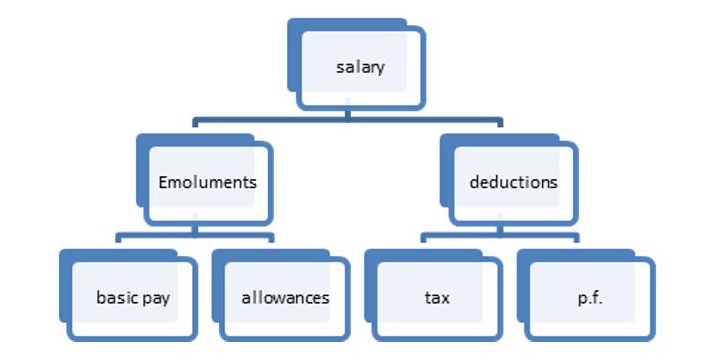
    The following figure shows how the process of salary computation is successively broken down to independent and reusable functions.

    PHP Functions

    Types of Functions

    You already have seen many functions like fopen() and fread() etc. They are built-in functions but PHP gives you option to create your own functions as well. There are two types of functions in PHP −

    • Built-in functions − PHP’s standard library contains a large number of built-in functions for string processing, file IO, mathematical computations and more.
    • User-defined functions − You can create user-defined functions too, specific to the requirements of the programming logic.

    A function may be invoked from any other function by passing required data (called parameters or arguments). The called function returns its result back to the calling environment.

    There are two parts which should be clear to you −

    • Creating a PHP Function
    • Calling a PHP Function

    In fact you hardly need to create your own PHP function because there are already more than 1000 built-in library functions created for different area and you just need to call them according to your requirement.

    User-defined Functions in PHP

    Its very easy to create your own PHP function. Let’s start with a simple example after which we will elaborate how it works. Suppose you want to create a PHP function which will simply write a simple message on your browser when you will call it.

    Example

    In this example, we create a function called writeMessage() and then call it to print a simple message −

    Open Compiler

    <?php
    
       /* Defining a PHP Function */
       function writeMessage() {
    
      echo "You are really a nice person, Have a nice time!";
    } /* Calling a PHP Function */ writeMessage(); ?>

    It will produce the following output −

    You are really a nice person, Have a nice time!
    

    Explore our latest online courses and learn new skills at your own pace. Enroll and become a certified expert to boost your career.

    Creating a Function in PHP

    Now let’s understand the process in detail. The first step is to write a function and then you can call it as many times as required. To create a new function, use the function keyword, followed by the name of the function you may want to use. In front of the name, put a parenthesis, which may or may not contain arguments. It is followed by a block of statements delimited by curly brackets. This function block contains the statements to be executed every time the function is called.

    The general syntax of defining a function is as follows −

    functionfoo($arg_1,$arg_2,$arg_n){
       statements;return$retval;}

    If the function is intended to return some result back to the calling environment, there should be a return statement as the last statement in the function block. It is not mandatory to have a return statement, as even without it, the program flow goes back to the caller, albeit without carrying any value with it.

    Any valid PHP code may appear inside a function, even other functions and class definitions. Name of the function must follow the same rules as used to form the name of a variable. It should start with a letter or underscore, followed by any number of letters, numbers, or underscores.

    Here is a simple function in PHP. Whenever called, it is expected to display the message “Hello World”.

    functionsayhello(){echo"Hello World";}

    Calling a Function in PHP

    Once a function is defined, it can be called any number of times, from anywhere in the PHP code. Note that a function will not be called automatically. To call the function, use its name in a statement; the name of the function followed by a semicolon.

    Open Compiler

    <?php
       # define a function
       function sayhello(){
    
      echo "Hello World";
    } # calling the function sayhello(); ?>

    It will produce the following output −

    Hello World
    

    Assuming that the above script “hello.php” is present in the document root folder of the PHP server, open the browser and enter the URL as http://localhost/hello.php. You should see the “Hello World” message in the browser window.

    In this example, the function is defined without any arguments or any return value. In the subsequent chapters, we shall learn about how to define and pass arguments, and how to make a function return some value. Also, some advanced features of PHP functions such as recursive functions, calling a function by value vs by reference, etc. will also be explained in detail.

  • Constant Arrays

    It was not possible to declare a constant array before PHP version 5.6. From PHP 5.6 onwards, you can use the “const” keyword to declare a constant array. From PHP 7 onwards, constant arrays can also be formed with define() function.

    A constant array is an array which cannot be modified after it has been formed. Unlike a normal array, its identifier doesn’t start with the “$” sign.

    The older syntax for declaring constant array is −

    constARR=array(val1, val2, val3);

    Example

    Open Compiler

    <?php
       const FRUITS = array(
    
      "Watermelon", 
      "Strawberries",
      "Pomegranate",
      "Blackberry",
    ); var_dump(FRUITS); ?>

    It will produce the following output −

    array(4) {
       [0]=>
       string(10) "Watermelon"
       [1]=>
       string(12) "Strawberries"
       [2]=>
       string(11) "Pomegranate"
       [3]=>
       string(10) "Blackberry"
    }
    

    You can also use the conventional square bracket syntax to declar a constant array in PHP −

    constFRUITS=["Watermelon","Strawberries","Pomegranate","Blackberry",];

    Example

    It is not possible to modify any element in a constant array. Hence, the following code throws a fatal error −

    Open Compiler

    <?php
       const FRUITS = [
    
      "Watermelon", 
      "Strawberries",
      "Pomegranate",
      "Blackberry",
    ]; FRUITS[1] = "Mango"; ?>

    It will produce the following output −

    PHP Fatal error:  Cannot use temporary expression in write context
    

    Explore our latest online courses and learn new skills at your own pace. Enroll and become a certified expert to boost your career.

    Constant Arrays PHP 7 Onwards

    The newer versions of PHP allow you to declare a constant array with define() function.

    Open Compiler

    <?php
       define ('FRUITS',  [
    
      "Watermelon", 
      "Strawberries",
      "Pomegranate",
      "Blackberry",
    ]); print_r(FRUITS); ?>

    It will produce the following output −

    Array
    (
       [0] => Watermelon
       [1] => Strawberries
       [2] => Pomegranate
       [3] => Blackberry
    )
    

    You can also use the array() function to declare the constant array here.

    define('FRUITS',array("Watermelon","Strawberries","Pomegranate","Blackberry",));

    Example

    It is also possible to declare an associative constant array. Here is an example −

    Open Compiler

    <?php
       define ('CAPITALS',  array(
    
      "Maharashtra" =&gt; "Mumbai",
      "Telangana" =&gt; "Hyderabad",
      "Gujarat" =&gt; "Gandhinagar",
      "Bihar" =&gt; "Patna"
    )); print_r(CAPITALS); ?>

    It will produce the following output −

    Array
    (
       [Maharashtra] => Mumbai
       [Telangana] => Hyderabad
       [Gujarat] => Gandhinagar
       [Bihar] => Patna
    )
    
  • Multidimensional Array

    A multidimensional array is an array of arrays. In a PHP array, each element can be another array. If the array consists of values or key-value pairs with values being of singular scalar types, it is a one-dimensional array. If each element in an array is an array of one or more scalar values, it is a two-dimensional array.

    A PHP array may be a two-dimensional associative array also, where each element of the outer array is key-value pair, the value being another associative array.

    # one dimensional indexed array$arr=[10,20,30,40];# one dimensional associative array$arr=["key1"=>"val1","key2"=>"val2","key3"=>"val3"];# two dimensional indexed array$arr=[[1,2,3,4],[10,20,30,40],[100,200,300,400]];# two dimensional associative array$arr=["row1"=>["key11"=>"val11","key12"=>"val12","key13"=>"val13"],"row2"=>["key21"=>"val21","key22"=>"val22","key23"=>"val23"],"row3"=>["key31"=>"val31","key32"=>"val32","key33"=>"val33"]];

    Iterating over a 2D Array

    Two nested loops will be needed to traverse all the elements in a 2D array. The foreach loop is more suitable for array traversal. A 2D array is like a tabular representation of data in rows and columns.

    Example

    The following example shows how you can reproduce a 2D array in a tabular form −

    Open Compiler

    <?php
       $tbl = [
    
      &#91;1,2,3,4],
      &#91;10, 20, 30, 40],
      &#91;100, 200, 300, 400]
    ]; echo ("\n"); foreach ($tbl as $row){
      foreach ($row as $elem){
         $val = sprintf("%5d", $elem);
         echo $val;
      }
      echo "\n";
    } ?>

    It will produce the following output −

      1    2    3    4
     10   20   30   40
    100  200  300  400
    

    Example

    We can also employ two nested foreach loops to traverse a 2D associative array. Unpack each row of the outer array in row-key and row-value variables and traverse each row elements with the inner foreach loop.

    Open Compiler

    <?php
       $tbl = [
    
      "row1" =&gt; &#91;"key11" =&gt; "val11", "key12" =&gt; "val12", "key13" =&gt; "val13"],
      "row2" =&gt; &#91;"key21" =&gt; "val21", "key22" =&gt; "val22", "key23" =&gt; "val23"],
      "row3" =&gt; &#91;"key31" =&gt; "val31", "key32" =&gt; "val32", "key33" =&gt; "val33"]
    ]; echo ("\n"); foreach ($tbl as $rk=>$rv){
      echo "$rk\n";
      foreach ($rv as $k=&gt;$v){
         echo "$k =&gt; $v  ";
      }
      echo "\n";
    } ?>

    It will produce the following output −

    row1
    key11 => val11  key12 => val12  key13 => val13
    row2
    key21 => val21  key22 => val22  key23 => val23
    row3
    key31 => val31  key32 => val32  key33 => val33
    

    Accessing the Elements in a 2D Array

    The $arr[$key] syntax of accessing and modifying an element in the array can be extended to a 2D array too. For a 2D indexed array, the jth element in the ith row can be fetched and assigned by using the expression “$arr[$i][$j]“.

    Example

    Open Compiler

    <?php
       $tbl = [[1,2,3,4], [10, 20, 30, 40], [100, 200, 300, 400]];    
    
       # prints number in index 2 of the row 2
       print ("Value at [2], [2] :" . $tbl[2][2]);
    ?>

    It will produce the following output −

    Value at [2], [2] :300
    

    Similarly, the value at ith row and jth column may be set to another value.

    $tbl[2][2]=250;

    Example

    If it is a 2D associative array, we need to use the row key and key-value variables of the desired column to access or modify its value.

    Open Compiler

    <?php
       $tbl = [
       "row1" => ["key11" => "val11", "key12" => "val12", "key13" => "val13"],
       "row2" => ["key21" => "val21", "key22" => "val22", "key23" => "val23"],
       "row3" => ["key31" => "val31", "key32" => "val32", "key33" => "val33"]
       ];
    
       print "value at row2 - key22 is " . $tbl["row2"]["key22"];
    ?>

    It will produce the following output −

    value at row2 - key22 is val22
    

    Explore our latest online courses and learn new skills at your own pace. Enroll and become a certified expert to boost your career.

    Multi-dimensional Array

    In the above example, we had an array in which the associated value of each key was another collection of key-value pairs, and we call it as a 2D array. The concept can be extended to any number of levels. For example, if each element in the inner array associates its key to another array, it becomes a three-dimensional array.

    Here is an example of a three-dimensional array −

    $arr3D=[[[1,0,9],[0,5,6],[1,0,3]],[[0,4,6],[0,0,1],[1,2,7]],];

    Example

    To traverse such a 3D array, we need three nested foreach loops, as shown below −

    Open Compiler

    <?php
       $arr3D = [ 
    
      &#91;&#91;1, 0, 9],&#91;0, 5, 6],&#91;1, 0, 3]],
      &#91;&#91;0, 4, 6],&#91;0, 0, 1],&#91;1, 2, 7]],
    ]; foreach ($arr3D as $arr) {
      foreach ($arr as $row) {
         foreach ($row as $element) {
            echo "$element ";
         }
         echo "\n";
      }
      echo "\n";
    } ?>

    It will produce the following output −

    1 0 9
    0 5 6
    1 0 3
    
    0 4 6
    0 0 1
    1 2 7
    

    However, it is entirely possible to declare an array extending upto any number of dimensions. For that we need to have a generalized solution to traverse an array of any dimensions.

    Recurve Traversal of Multidimensional Array

    The following code shows a recursive function that calls itself if the value of a certain key is another array. If we pass any array as an argument to this function, it will be traversed, showing all the k-v pairs in it.

    functionshowarray($arr){foreach($arras$k=>$v){if(is_array($v)){showarray($v);}else{echo"$k => $v  ";}}echo"\n";}

    Example

    Let us pass the above 3D array $arr3D to it and see the result −

    Open Compiler

    <?php
       $arr3D = [ 
    
      &#91;&#91;1, 0, 9],&#91;0, 5, 6],&#91;1, 0, 3]],
      &#91;&#91;0, 4, 6],&#91;0, 0, 1],&#91;1, 2, 7]],
    ]; function showarray($arr){
      foreach ($arr as $k=&gt;$v){
         if (is_array($v)){
            showarray($v);
         } else {
            echo "$k =&gt; $v  ";
         }
      }
      echo "\n";
    } showarray($arr3D); ?>

    It will produce the following output −

    0 => 1  1 => 0  2 => 9
    0 => 0  1 => 5  2 => 6
    0 => 1  1 => 0  2 => 3
    0 => 0  1 => 4  2 => 6
    0 => 0  1 => 0  2 => 1
    0 => 1  1 => 2  2 => 7
    

    This recursive function can be used with any type of array, whether indexed or associative, and of any dimension.

    Example

    Let us use a 2D associative array as argument to showarray() function −

    Open Compiler

    <?php
       $tbl = [
    
      "row1" =&gt; &#91;"key11" =&gt; "val11", "key12" =&gt; "val12", "key13" =&gt; "val13"],
      "row2" =&gt; &#91;"key21" =&gt; "val21", "key22" =&gt; "val22", "key23" =&gt; "val23"],
      "row3" =&gt; &#91;"key31" =&gt; "val31", "key32" =&gt; "val32", "key33" =&gt; "val33"]
    ]; function showarray($arr){
      foreach ($arr as $k=&gt;$v){
         if (is_array($v)){
            showarray($v);
         } else {
            echo "$k =&gt; $v  ";
         }
      }
      echo "\n";
    } showarray($tbl); ?>

    It will produce the following output −

    key11 => val11  key12 => val12  key13 => val13
    key21 => val21  key22 => val22  key23 => val23
    key31 => val31  key32 => val32  key33 => val33
    
  • Associative Array

    If each element in a PHP array is a key-value pair, such an array is called an associative array. In this type of array, each value is identified by its associated key and not an index.

    • Associative arrays are used to implement data structures such as dictionary, maps, trees, etc.
    • In PHP, the “=>” symbol is used to establish association between a key and its value.

    How to Declare an Associative Array in PHP?

    Both the approaches of declaring an array – the array() function and the square bracket notation – can be used.

    $arr1=array("Maharashtra"=>"Mumbai","Telangana"=>"Hyderabad","UP"=>"Lucknow","Tamilnadu"=>"Chennai");$arr2=["Maharashtra"=>"Mumbai","Telangana"=>"Hyderabad","UP"=>"Lucknow","Tamilnadu"=>"Chennai"];

    If we call the var_dump() function, both the above arrays will show the similar structure −

    array(4){["Maharashtra"]=>string(6)"Mumbai"["Telangana"]=>string(9)"Hyderabad
       ["UP"]=>
       string(7) "Lucknow"
       ["Tamilnadu"]=>
       string(7) "Chennai"
    }

    The key part of each element in an associative array can be any number (integer, float or Boolean), or a string. The value part can be of any type. However, the float key is cast to an integer. So, a Boolean true/false is used as “1” or “0” as the key.

    Example

    Take a look at the following example −

    Open Compiler

    <?php
       $arr1 = array(
    
      10=&gt;"hello",
      5.75=&gt;"world",
      -5=&gt;"foo",
      false=&gt;"bar"
    ); var_dump($arr1); ?>

    It will produce the following output −

    array(4) {
      [10]=>
      string(5) "hello"
      [5]=>
      string(5) "world"
      [-5]=>
      string(3) "foo"
      [0]=>
      string(3) "bar"
    }
    

    Note that the key 5.75 gets rounded to 5, and the key “true” is reflected as “0”. If the same key appears more than once in an array, the key-value pair that appears last will be retained, discarding the association of the key with earlier value.

    PHP internally treats even an indexed array as an associative array, where the index is actually the key of the value. It means the value at the 0th index has a key equal to “0”, and so on. A var_dump() on an indexed array also brings out this characteristics of a PHP array.

    Iterating a PHP Associative Array

    foreach loop is the easiest and ideal for iterating through an associative array, although any other type of loop can also be used with some maneuver.

    Example

    Let us look at the foreach loop implementation, with each key value pair unpacked in two variables.

    Open Compiler

    <?php
       $capitals = array(
    
      "Maharashtra"=&gt;"Mumbai", 
      "Telangana"=&gt;"Hyderabad", 
      "UP"=&gt;"Lucknow", 
      "Tamilnadu"=&gt;"Chennai"
    ); foreach ($capitals as $k=>$v) {
      echo "Capital of $k is $v \n";
    } ?>

    It will produce the following output −

    Capital of Maharashtra is Mumbai
    Capital of Telangana is Hyderabad
    Capital of UP is Lucknow
    Capital of Tamilnadu is Chennai
    

    There is another way of using the foreach loop in PHP, where each element is stored in a variable. We can then separate the key and value parts using array_search() and use them in the loop body.

    Open Compiler

    <?php
       $capitals = array(
    
      "Maharashtra"=&gt;"Mumbai", 
      "Telangana"=&gt;"Hyderabad", 
      "UP"=&gt;"Lucknow", 
      "Tamilnadu"=&gt;"Chennai"
    ); foreach ($capitals as $pair) {
      $cap = array_search($pair, $capitals);         
      echo "Capital of $cap is $capitals&#91;$cap] \n";
    } ?>

    It will produce the following output −

    Capital of Maharashtra is Mumbai 
    Capital of Telangana is Hyderabad 
    Capital of UP is Lucknow 
    Capital of Tamilnadu is Chennai
    

    To use for, while or do-while loop, we have to first get the array of all the keys (use array_keys()), find the size and use it as the test condition in the loop syntax.

    Example

    Here is how we can use a for loop to traverse an associative array −

    Open Compiler

    <?php
       $capitals = array(
    
      "Maharashtra"=&gt;"Mumbai", 
      "Telangana"=&gt;"Hyderabad", 
      "UP"=&gt;"Lucknow",
      "Tamilnadu"=&gt;"Chennai"
    ); $keys=array_keys($capitals); for ($i=0; $i<count($keys); $i++){
      $cap = $keys&#91;$i];
      echo "Capital of $cap is $capitals&#91;$cap] \n";
    } ?>

    It will produce the following output −

    Capital of Maharashtra is Mumbai 
    Capital of Telangana is Hyderabad 
    Capital of UP is Lucknow 
    Capital of Tamilnadu is Chennai
    

    Explore our latest online courses and learn new skills at your own pace. Enroll and become a certified expert to boost your career.

    Accessing the Value with its Key

    In an associative array, the key is the identifier of value instead of index. Hence, to fetch value associated with a certain key, use $arr[key] syntax. The same can be used to update the value of a certain key.

    Example

    In the following code, an associative array $arr1 is declared. Another array $arr2 is created such that it stores each pair from $arr1 with the value of each key being doubled.

    Open Compiler

    <?php
       $arr1 = array("a"=>10, "b"=>20, "c"=>30, "d"=>40);
       foreach ($arr1 as $k=>$v){
    
      $arr2&#91;$k] = $v*2;
    } print_r($arr2); ?>

    It will produce the following output −

    Array
    (
       [a] => 20
       [b] => 40
       [c] => 60
       [d] => 80
    )
    

    The print_r() function used here displays the data stored in the array in an easy to understand human readable form.

  • Indexed Array

    In PHP, the array elements may be a collection of key-value pairs or it may contain values only. If the array consists of values only, it is said to be an indexed array, as each element is identified by an incrementing index, starting with “0”.

    An indexed array in PHP may be created either by using the array() function or with the square bracket syntax.

    $arr1=array("a",10,9.99,true);$arr2=["a",10,9.99,true];

    Each element in the array has a positional index, the first element being at index “0”. The var_dump() function reveals the structured information of these arrays as −

    array(4){[0]=>string(1)"a"[1]=>int(10)[2]=>float(9.99)[3]=>bool(true)}

    We can use the index to traverse the array, fetch the value at a given index or modify the value of an element in place.

    Traversing an Indexed Array in PHP

    Any type of PHP loop can be employed to traverse an array. If we want to use a for or while loop, we have to find the number of elements in the array with count() function and use its value as the test condition for the counted for or while loop.

    Example

    The following code uses a for loop to list all the elements in an indexed array.

    Open Compiler

    <?php
       $numbers = array(10, 20, 30, 40, 50);
    
       for ($i=0; $i<count($numbers); $i++){
    
      echo "numbers&#91;$i] = $numbers&#91;$i] \n";
    } ?>

    It will produce the following output −

    numbers[0] = 10
    numbers[1] = 20
    numbers[2] = 30
    numbers[3] = 40
    numbers[4] = 50
    

    You can also use a while or do-while loop to traverse an indexed array. Here too, we need to find the array length with count() function.

    Example

    The following code traverses the given indexed array in reverse order −

    Open Compiler

    <?php
       $numbers = array(10, 20, 30, 40, 50);
       $i = count($numbers)-1;
       while ($i>=0){
    
      echo "numbers&#91;$i] = $numbers&#91;$i] \n";
      $i--;
    } ?>

    It will produce the following output −

    numbers[4] = 50
    numbers[3] = 40
    numbers[2] = 30
    numbers[1] = 20
    numbers[0] = 10
    

    Accessing the Array Elements Using Index

    You can access any value from an array using the array[index] syntax. The value at a specific index may be assigned with a new value. The array is thus modified in place.

    Example

    The following program fetches the values from an array $arr1 and places them in $arr2 in the reverse order. So the value at 0th position in $arr1 becomes the last value in $arr2.

    Open Compiler

    <?php
       $arr1 = array(10, 20, 30, 40, 50);
       $size = count($arr1);
    
       for ($i=0; $i<$size; $i++){
    
      $arr2&#91;$size-$i-1] = $arr1&#91;$i];
    } for ($i=0; $i<$size; $i++){
      echo "arr1&#91;$i] = $$arr1&#91;$i] arr2&#91;$i] = $$arr2&#91;$i] \n";
    } ?>

    It will produce the following output −

    arr1[0] = $10 arr2[0] = $50
    arr1[1] = $20 arr2[1] = $40
    arr1[2] = $30 arr2[2] = $30
    arr1[3] = $40 arr2[3] = $20
    arr1[4] = $50 arr2[4] = $10
    

    Explore our latest online courses and learn new skills at your own pace. Enroll and become a certified expert to boost your career.

    Traversing an Indexed Array Using “foreach” Loop

    You can also use the foreach loop to iterate through an indexed array. Take a look at the following example −

    Open Compiler

    <?php
       $arr1 = [10, 20, 30, 40, 50];
       foreach ($arr1 as $val){
    
      echo "$val \n";
    } ?>

    It will produce the following output −

    10 
    20 
    30 
    40 
    50
    

    Note that PHP internally treats the indexed array as an associative array, with the index being treated as the key. This fact can be verified by the var_dump() output of the array.

    Example

    We can unpack each element of an indexed array in the key and value variables with foreach syntax −

    Open Compiler

    <?php
       $arr1 = [10, 20, 30, 40, 50];
       foreach ($arr1 as $key => $val){
    
      echo "arr1&#91;$key] = $val \n";
    } ?>

    It will produce the following output −

    arr1[0] = 10
    arr1[1] = 20
    arr1[2] = 30
    arr1[3] = 40
    arr1[4] = 50
    

    In PHP, an array may be a mix of only values and key-value pairs. PHP assigns the index only to the values without keys.

    Example

    In this example, PHP assigns incrementing index to the numbers, skipping the key-value pair appearing in it.

    Open Compiler

    <?php
       $arr1 = [10, 20, 
    
         "vals" =&gt; &#91;"ten", "twenty"],
         30, 40, 50];
    var_dump($arr1); ?>

    It will produce the following output −

    array(6) {
      [0]=>
      int(10)
      [1]=>
      int(20)
      ["vals"]=>
      array(2) {
    
    &#91;0]=&gt;
    string(3) "ten"
    &#91;1]=&gt;
    string(6) "twenty"
    } [2]=> int(30) [3]=> int(40) [4]=> int(50) }
  • Arrays

    An array is a data structure that stores one or more data values having some relation among them, in a single variable. For example, if you want to store the marks of 10 students in a class, then instead of defining 10 different variables, it’s easy to define an array of 10 length.

    Arrays in PHP behave a little differently than the arrays in C, as PHP is a dynamically typed language as against C which is a statically type language.

    • An array in PHP is an ordered map that associates values to keys.
    • A PHP array can be used to implement different data structures such as a stack, queue, list (vector), hash table, dictionary, etc.
    • The value part of an array element can be other arrays. This fact can be used to implement tree data structure and multidimensional arrays.

    There are two ways to declare an array in PHP. One is to use the built-in array() function, and the other is to use a shorter syntax where the array elements are put inside square brackets.

    The array() Function

    The built-in array() function uses the parameters given to it and returns an object of array type. One or more comma-separated parameters are the elements in the array.

    array(mixed...$values):array

    Each value in the parenthesis may be either a singular value (it may be a number, string, any object or even another array), or a key-value pair. The association between the key and its value is denoted by the “=>” symbol.

    Examples

    $arr1=array(10,"asd",1.55,true);$arr2=array("one"=>1,"two"=>2,"three"=>3);$arr3=array(array(10,20,30),array("Ten","Twenty","Thirty"),array("physics"=>70,"chemistry"=>80,"maths"=>90));

    Using Square Brackets [ ]

    Instead of the array() function, the comma-separated array elements may also be put inside the square brackets to declare an array object. In this case too, the elements may be singular values or a string or another array.

    $arr1=[10,"asd",1.55,true];$arr2=["one"=>1,"two"=>2,"three"=>3];$arr3=[[10,20,30],["Ten","Twenty","Thirty"],["physics"=>70,"chemistry"=>80,"maths"=>90]];

    Explore our latest online courses and learn new skills at your own pace. Enroll and become a certified expert to boost your career.

    Types of Arrays in PHP

    There are three different kind of arrays and each array value is accessed using an ID which is called the array index.

    • Indexed Array − An array which is a collection of values only is called an indexed array. Each value is identified by a positional index staring from “0”. Values are stored and accessed in linear fashion.
    • Associative Array − If the array is a collection of key-value pairs, it is called as an associative array. The key component of the pair can be a number or a string, whereas the value part can be of any type. Associative arrays store the element values in association with key values rather than in a strict linear index order.
    • Multi Dimensional Array − If each value in either an indexed array or an associative array is an array itself, it is called a multi dimensional array. Values are accessed using multiple indices

    NOTE − Built-in array functions is given in function reference PHP Array Functions

    It may be noted that PHP internally considers any of the above types as an associative array itself. In case of an indexed array, where each value has index, the index itself is its key. The var_dump() function reveals this fact.

    Example

    In this example, arr1 is an indexed array. However, var_dump()which displays the structured information of any object, shows that each value is having its index as its key.

    Open Compiler

    <?php
       $arr1 = [10, "asd", 1.55, true];
       var_dump($arr1);
    ?>

    It will produce the following output −

    array(4) {
      [0]=>
      int(10)
      [1]=>
      string(3) "asd"
      [2]=>
      float(1.55)
      [3]=>
      bool(true)
    }
    

    Example

    The same principle applies to a multi-dimensional index array, where each value in an array is another array.

    Open Compiler

    <?php
       $arr1 = [
    
      &#91;10, 20, 30], 
      &#91;"Ten", "Twenty", "Thirty"],
      &#91;1.1, 2.2, 3.3]
    ]; var_dump($arr1); ?>

    It will produce the following output −

    array(3) {
      [0]=>
      array(3) {
    
    &#91;0]=&gt;
    int(10)
    &#91;1]=&gt;
    int(20)
    &#91;2]=&gt;
    int(30)
    } [1]=> array(3) {
    &#91;0]=&gt;
    string(3) "Ten"
    &#91;1]=&gt;
    string(6) "Twenty"
    &#91;2]=&gt;
    string(6) "Thirty"
    } [2]=> array(3) {
    &#91;0]=&gt;
    float(1.1)
    &#91;1]=&gt;
    float(2.2)
    &#91;2]=&gt;
    float(3.3)
    } }

    Accessing the Array Elements

    To access any element from a given array, you can use the array[key] syntax.

    Example

    For an indexed array, put the index inside the square bracket, as the index itself is anyway the key.

    Open Compiler

    <?php
       $arr1 = [10, 20, 30];
       $arr2 = array("one"=>1, "two"=>2, "three"=>3);
    
       var_dump($arr1[1]);
       var_dump($arr2["two"]);
    ?>

    It will produce the following output −

    int(20)
    int(2)
    

    We shall explore the types of PHP arrays in more details in the subsequent chapters.

  • Continue Statement

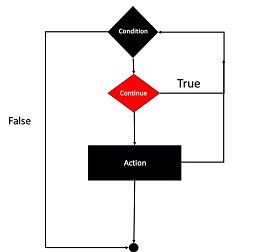
    Like the break statement, continue is another “loop control statement” in PHP. Unlike the break statement, the continue statement skips the current iteration and continues execution at the condition evaluation and then the beginning of the next iteration.

    The continue statement can be used inside any type of looping constructs, i.e., for, foreach, while or do-while loops. Like break, the continue keyword is also normally used conditionally.

    while(expr){if(condition){continue;}}

    The following flowchart explains how the continue statement works −

    Php Continue Statement

    Example

    Given below is a simple example showing the use of continue. The for loop is expected to complete ten iterations. However, the continue statement skips the iteration whenever the counter id is divisible by 2.

    Open Compiler

    <?php
       for ($x=1; $x<=10; $x++){
    
      if ($x%2==0){
         continue;
      }
      echo "x = $x \n";
    } ?>

    It will produce the following output −

    x = 1
    x = 3
    x = 5
    x = 7
    x = 9
    

    Example

    The continue statement accepts an optional numeric argument which tells it how many levels of enclosing loops it should skip to the end of. The default is 1.

    Open Compiler

    <?php
       for ($i=1; $i<=3; $i++){
    
      for ($j=1; $j&lt;=3; $j++){
         for ($k=1; $k&lt;=3; $k++){
            if ($k&gt;1){
               continue 2;
            }
            print "i: $i  j:$j  k: $k\n";
         }
      }
    } ?>

    It will produce the following output −

    i: 1  j:1  k: 1
    i: 1  j:2  k: 1
    i: 1  j:3  k: 1
    i: 2  j:1  k: 1
    i: 2  j:2  k: 1
    i: 2  j:3  k: 1
    i: 3  j:1  k: 1
    i: 3  j:2  k: 1
    i: 3  j:3  k: 1
    

    The continue statement in the inner for loop skips the iterations 2 and 3 and directly jumps to the middle loop. Hence, the output shows “k” as 1 for all the values of “i” and “k” variables.

  • Break Statement

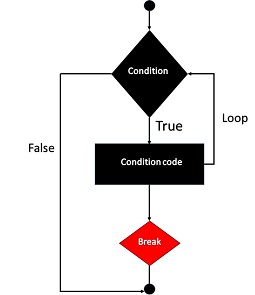
    The break statement along with the continue statement in PHP are known as “loop control statements”. Any type of loop (forwhile or do-while) in PHP is designed to run for a certain number of iterations, as per the test condition used. The break statement inside the looping block takes the program flow outside the block, abandoning the rest of iterations that may be remaining.

    The break statement is normally used conditionally. Otherwise, the loop will terminate without completing the first iteration itself.

    The syntax of break statement is as follows −

    while(expr){if(condition){break;}}

    The following flowchart explains how the break statement works −

    PHP Break Statement

    Example

    The following PHP code is a simple example of using break in a loop. The while loop is expected to perform ten iterations. However, a break statement inside the loop terminates it when the counter exceeds 3.

    Open Compiler

    <?php
       $i = 1;
    
       while ($i<=10){
    
      echo "Iteration No. $i \n";
      if ($i&gt;=3){
         break;
      }
      $i++;
    } ?>

    It will produce the following output −

    Iteration No. 1
    Iteration No. 2
    Iteration No. 3
    

    An optional numeric argument can be given in front of break keyword. It is especially useful in nested looping constructs. It tells how many nested enclosing structures are to be broken out of. The default value is 1, only the immediate enclosing structure is broken out of.

    Example

    The following example has three nested loops: a for loop inside which there is a while loop which in turn contains a do-while loop.

    The innermost loop executes the break. The number “2” in front of it takes the control out of the current scope into the for loop instead of the immediate while loop.

    Open Compiler

    <?php
       for ($x=1; $x<=3; $x++){
    
      $y=1;
      while ($y&lt;=3){
         $z=1;
         do {
            echo "x:$x y:$y z:$z \n";
            if ($z==2){
               break 2;
            }
            $z++;
         }
         while ($z&lt;=3);
         $z=1;
         $y++;
      }
    } ?>

    It will produce the following output −

    x:1 y:1 z:1
    x:1 y:1 z:2
    x:2 y:1 z:1
    x:2 y:1 z:2
    x:3 y:1 z:1
    x:3 y:1 z:2
    

    Note that each time the value of “z” becomes 2, the program breaks out of the “y” loop. Hence, the value of “y” is always 1.