Author: saqibkhan

  • Access Modifiers

    In PHP, the keywords public, private and protected are known as the access modifiers. These keywords control the extent of accessibility or visibility of the class properties and methods. One of these keywords is prefixed while declaring the member variables and defining member functions.

    Whether the PHP code has free access to a class member, or it is restricted from getting access, or it has a conditional access, is determined by these keywords −

    • Public − class members are accessible from anywhere, even from outside the scope of the class, but only with the object reference.
    • Private − class members can be accessed within the class itself. It prevents members from outside class access even with the reference of the class instance.
    • Protected − members can be accessed within the class and its child class only, nowhere else.

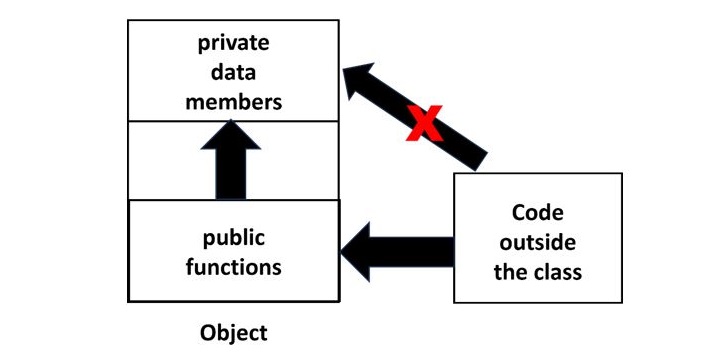
    The principle of data encapsulation is the cornerstone of the object-oriented programming methodology. It refers to the mechanism of keeping the data members or properties of an object away from the reach of the environment outside the class, allowing controlled access only through the methods or functions available in the class.

    To implement encapsulation, data members of a class are made private and the methods are made public.

    Access Modifiers 1

    Public Members

    In PHP, the class members (both member variables as well as member functions) are public by default.

    Example

    In the following program, the member variables title and price of the object are freely accessible outside the class because they are public by default, if not otherwise specified.

    Open Compiler

    <?php
       class Book {
    
      /* Member variables */
      var $price;
      var $title;
      /*Constructor*/
      function __construct(string $param1="PHP Basics", int $param2=380) {
         $this-&gt;title = $param1;
         $this-&gt;price = $param2;
      }
      function getPrice() {
         echo "Title: $this-&gt;price \n";
      }
      function getTitle() {
         echo "Price: $this-&gt;title \n";
      }
    } $b1 = new Book(); echo "Title : $b1->title Price: $b1->price"; ?>

    It will produce the following output −

    Title : PHP Basics Price: 380
    

    Private Members

    As mentioned above, the principle of encapsulation requires that the member variables should not be accessible directly. Only the methods should have the access to the data members. Hence, we need to make the member variables private and methods public.

    <?php
       class Book {
    
      /* Member variables */
      private $price;
      private $title;
      /*Constructor*/
      function __construct(string $param1="PHP Basics", int $param2=380) {
         $this-&gt;title = $param1;
         $this-&gt;price = $param2;
      }
      public function getPrice() {
         echo "Price: $this-&gt;price \n";
      }
      public function getTitle() {
         echo "Title: $this-&gt;title \n;";
      }
    } $b1 = new Book(); $b1->getTitle(); $b1->getPrice(); echo "Title : $b1->title Price: $b1->price"; ?>

    Output

    Now, the getTitle() and getPrice() functions are public, able to access the private member variables title and price. But, while trying to display the title and price directly, an error is encountered as they are not public.

    Title: PHP Basics
    Price: 380
    Fatal error: Uncaught Error: Cannot access private property 
    Book::$title in hello.php:31
    

    Explore our latest online courses and learn new skills at your own pace. Enroll and become a certified expert to boost your career.

    Protected Members

    The effect of specifying protected access to a class member is effective in case of class inheritance. We know that public members are accessible from anywhere outside the class, and private members are denied access from anywhere outside the class.

    The protected keyword grants access to an object of the same class and an object of its inherited class, denying it to any other environment.

    Let us set the title member in Book class example to protected, leaving price to private.

    classBook{/* Member variables */private$price;protected$title;# rest of the code kept as it is}$b1=newBook();$b1->getTitle();$b1->getPrice();

    PHP allows the both the member variables to be accessed, as the object belongs to the same class.

    Let us add a mybook class that inherits the Book class −

    classmybookextendsBook{# no additional members defined}

    whose object is still able to access the member variables, as the child class inherits public and protected members of the parent class.

    However, make mybook class as an independent class (not extending Book class) and define a getmytitle() function that tries to access protected title member variable of Book class.

    classmybook{publicfunctiongetmytitle($b){echo"Title: $b->title <br/>";}}$b1=newmybook();$b=newBook();$b1->getmytitle($b);

    As the getmytitle() function tries to print title of Book object, an error message showing Cannot access protected property Book::$title is raised.

    Example

    Try to run the following code −

    Open Compiler

    <?php
       class Book {
    
      private $price;
      protected $title;
      function __construct(string $param1="PHP Basics", int $param2=380) {
         $this-&gt;title = $param1;
         $this-&gt;price = $param2;
      }
      public function getPrice(){
         echo "Price: $this-&gt;price &lt;br/&gt;";
      }
      public function getTitle(){
         echo "Title: $this-&gt;title &lt;br/&gt;";
      }
    } class mybook {
      public function getmytitle($b) {
         echo "Title: $b-&gt;title &lt;br/&gt;";
      }
    } $b1 = new mybook(); $b = new Book(); $b1->getmytitle($b); ?>

    It will produce the following output −

    PHP Fatal error:  Uncaught Error: Cannot access protected property 
       Book::$title in /home/cg/root/97848/main.php:18
    

    Hence, it can be seen that the protected member is accessible by object of same class and inherited class only. For all other environment, protected members are not accessible.

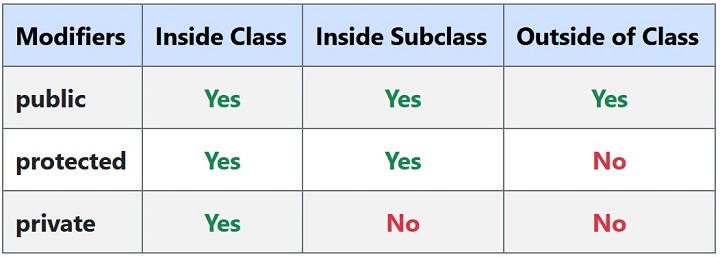
    The accessibility rules can be summarized by the following table −

    Access Modifiers 2
  • Constructor and Destructor

    As in most of the object-oriented languages, you can define a constructor function in a class in PHP also. When you declare an object with the new operator, its member variables are not assigned any value. The constructor function is used to initialize every new object at the time of declaration. PHP also supports having a destructor function that destroys the object from the memory as it no longer has any reference.

    The __construct() Function

    PHP provides a __construct() function that initializes an object.

    __construct(mixed...$values=""):void

    The constructor method inside a class is called automatically on each newly created object. Note that defining a constructor is not mandatory. However, if present, it is suitable for any initialization that the object may need before it is used.

    You can pass as many as arguments you like into the constructor function. The __construct() function doesn’t have any return value.

    Let us define a constructor in the Book class used in the previous chapter

    Open Compiler

    <?php
       class Book {
       
    
      /* Member variables */
      var $price;
      var $title;
      /*Constructor*/
      function __construct(){
         $this-&gt;title = "PHP Fundamentals";
         $this-&gt;price = 275;
      }
      /* Member functions */
      function getPrice() {
         echo "Price: $this-&gt;price \n";
      }
      function getTitle(){
         echo "Title: $this-&gt;title \n";
      }    
    } $b1 = new Book; $b1->getTitle(); $b1->getPrice(); ?>

    It will produce the following output −

    Title: PHP Fundamentals
    Price: 275
    

    Parameterized Constructor

    The member variables of $b1 have been initialized without having to call setTitle() and setPrice() methods, because the constructor was called as soon as the object was declared. However, this constructor will be called for each object, and hence each object has the same values of title and price properties.

    To initialize each object with different values, define the __construct() function with parameters.

    Change the definition of __construct() function to the following −

    function__construct($param1,$param2){$this->title=$param1;$this->price=$param2;}

    To initialize the object, pass values to the parameters inside a parenthesis in the declaration.

    $b1=newBook("PHP Fundamentals",375);

    Example

    Now, you can have each object with different values to the member variables.

    Open Compiler

    <?php
       class Book {
       
    
      /* Member variables */
      var $price;
      var $title;
      /*Constructor*/
      function __construct($param1, $param2) {
         $this-&gt;title = $param1;
         $this-&gt;price = $param2;
      }
      /* Member functions */
      function getPrice(){
         echo "Price: $this-&gt;price \n";
      }
      function getTitle(){
         echo "Title: $this-&gt;title \n";
      }
    } $b1 = new Book("PHP Fundamentals", 375); $b2 = new Book("PHP Programming", 450); $b1->getTitle(); $b1->getPrice(); $b2->getTitle(); $b2->getPrice(); ?>

    It will produce the following output −

    Title: PHP Fundamentals
    Price: 375
    Title: PHP Programming
    Price: 450
    

    Explore our latest online courses and learn new skills at your own pace. Enroll and become a certified expert to boost your career.

    Constructor Overloading

    Method overloading is an important concept in object-oriented programming, where a class may have more than one definitions of constructor, each having different number of arguments. However, PHP doesn’t support method overloading. This limitation may be overcome by using arguments with default values in the constructor function.

    Change the __construct() function to the following −

    function__construct($param1="PHP Basics",$param2=380){$this->title=$param1;$this->price=$param2;}

    Now, declare an object without passing parameters, and the other with parameters. One without parameters will be initialized with default arguments, the other with the values passed.

    $b1=newBook();$b2=newBook("PHP Programming",450);

    It will produce the following output −

    Title: PHP Basics
    Price: 380
    Title: PHP Programming
    Price: 450
    

    Type Declaration in Constructor

    Since PHP (version 7.0 onwards) allows scalar type declarations for function arguments, the __construct() function may be defined as −

    function__construct(string$param1="PHP Basics",int$param2=380){$this->title=$param1;$this->price=$param2;}

    In the earlier versions of PHP, using the name of class to define a constructor function was allowed, but this feature has been deprecated since PHP version 8.0.

    The __destruct() Function

    PHP also has a __destructor() function. It implements a destructor concept similar to that of other object-oriented languages, as in C++. The destructor method will be called as soon as there are no other references to a particular object.

    __destruct():void

    The __destruct() function doesn’t have any parameters, neither does it have any return value. The fact that the __destruct() function is automatically called when any object goes out of scope, can be verified by putting var_dump($this) inside the function.

    As mentioned above, $this carries the reference to the calling object, the dump shows that the member variables are set to NULL

    Add destructor function in the Book class as follows −

    function__destruct(){var_dump($this);echo"object destroyed";}

    As the program exits, the following output will be displayed −

    object(Book)#1 (2) {
       ["price"]=>
       NULL
       ["title"]=>
       NULL
    }
    object destroyed
    
  • Classes and Objects

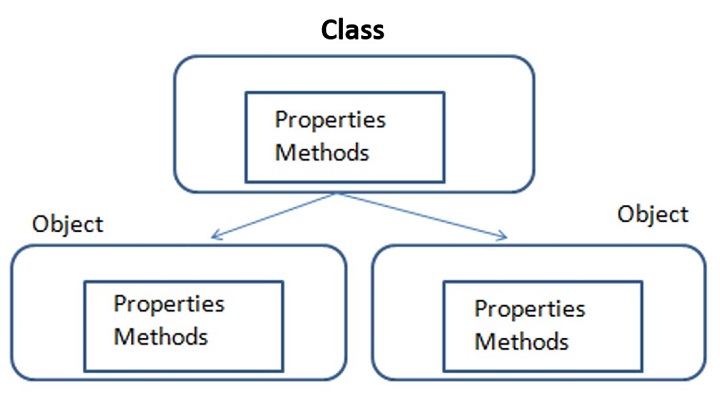
    The concept of classes and objects is central to PHP’s object-oriented programming methodology. A class is the template description of its objects. It includes the properties and functions that process the properties. An object is the instance of its class. It is characterized by the properties and functions defined in the class.

    Classes and Objects

    Defining a Class in PHP

    To define a class, PHP has a keyword “class“. Similarly, PHP provides the keyword “new” to declare an object of any given class.

    The general form for defining a new class in PHP is as follows −

    <?php
       class phpClass {
    
      var $var1;
      var $var2 = "constant string";
      function myfunc ($arg1, $arg2) {
         &#91;..]
      }
      &#91;..]
    } ?>

    The keyword class is followed by the name of the class that you want to define. Class name follows the same naming conventions as used for a PHP variable. It is followed by a pair of braces enclosing any number of variable declarations (properties) and function definitions.

    Variable declarations start with another reserved keyword var, which is followed by a conventional $variable name; they may also have an initial assignment to a constant value.

    Function definitions look much like standalone PHP functions but are local to the class and will be used to set and access object data. Functions inside a class are also called methods.

    Example

    Here is an example which defines a class of Book type −

    classBook{/* Member variables */var$price;var$title;/* Member functions */functionsetPrice($par){$this->price=$par;}functiongetPrice(){echo$this->price."<br/>";}functionsetTitle($par){$this->title=$par;}functiongetTitle(){echo$this->title." <br/>";}}

    The pseudo-variable $this is available when a method is called from within an object context. $this refers to the calling object.

    The Book class has two member variables (or properties) – $title and $price. The member variables (also sometimes called instance variables) usually have different values for each object; like each book has a title and price different from the other.

    The Book class has functions (functions defined inside the class are called methods) setTitle() and setPrice(). These functions are called with reference to an object and a parameter, used to set the value of title and price member variables respectively.

    The Book class also has getTitle() and getPrice() methods. When called, they return the title and price of the object whose reference is passed.

    Once a class is defined, you can declare one or more objects, using new operator.

    $b1=newBook;$b2=newBook;

    The new operator allocates the memory required for the member variables and methods of each object. Here we have created two objects and these objects are independent of each other and they will have their existence separately.

    Each object has access to its member variables and methods with the “->” operator. For example, the $title property of b1 object is “$b1->title” and to call setTitle() method, use the “$b1->setTitle()” statement.

    To set the title and price of b1 object,

    $b1->setTitle("PHP Programming");$b1->setPrice(450);

    Similarly, the following statements fetch the title and price of b1 book −

    echo$b1->getPrice();echo$b1->getTitle();

    Example

    Given below is the complete PHP script that defines Book class, declares two objects and calls the member functions.

    Open Compiler

    <?php
       class Book {
       
    
      /* Member variables */
      var $price;
      var $title;
      /* Member functions */
      function setPrice($par){
         $this-&gt;price = $par;
      }
      function getPrice(){
         echo $this-&gt;price ."\n";
      }
      function setTitle($par){
         $this-&gt;title = $par;
      }
      function getTitle(){
         echo $this-&gt;title ."\n";
      }
    } $b1 = new Book; $b2 =new Book; $b1->setTitle("PHP Programming"); $b1->setPrice(450); $b2->setTitle("PHP Fundamentals"); $b2->setPrice(275); $b1->getTitle(); $b1->getPrice(); $b2->getTitle(); $b2->getPrice(); ?>

    It will produce the following output −

    PHP Programming
    450
    PHP Fundamentals
    275
    
  • Programming in PHP

    We can imagine our universe made of different objects like sun, earth, moon etc. Similarly we can imagine our car made of different objects like wheel, steering, gear etc. Same way there is object oriented programming concepts which assume everything as an object and implement a software using different objects.

    Object Oriented Concepts

    Before we go in detail, lets define important terms related to Object Oriented Programming.

    • Class − This is a programmer-defined data type, which includes local functions as well as local data. You can think of a class as a template for making many instances of the same kind (or class) of object.
    • Object − An individual instance of the data structure defined by a class. You define a class once and then make many objects that belong to it. Objects are also known as instance.
    • Member Variable − These are the variables defined inside a class. This data will be invisible to the outside of the class and can be accessed via member functions. These variables are called attribute of the object once an object is created.
    • Member function − These are the function defined inside a class and are used to access object data.
    • Inheritance − When a class is defined by inheriting existing function of a parent class then it is called inheritance. Here child class will inherit all or few member functions and variables of a parent class.
    • Parent class − A class that is inherited from by another class. This is also called a base class or super class.
    • Child Class − A class that inherits from another class. This is also called a subclass or derived class.
    • Polymorphism − This is an object oriented concept where same function can be used for different purposes. For example function name will remain same but it take different number of arguments and can do different task.
    • Overloading − a type of polymorphism in which some or all of operators have different implementations depending on the types of their arguments. Similarly functions can also be overloaded with different implementation.
    • Data Abstraction − Any representation of data in which the implementation details are hidden (abstracted).
    • Encapsulation − refers to a concept where we encapsulate all the data and member functions together to form an object.
    • Constructor − refers to a special type of function which will be called automatically whenever there is an object formation from a class.
    • Destructor − refers to a special type of function which will be called automatically whenever an object is deleted or goes out of scope.

    Defining PHP Classes

    The general form for defining a new class in PHP is as follows −

    <?php
       class phpClass {
    
      var $var1;
      var $var2 = "constant string";
      
      function myfunc ($arg1, $arg2) {
         &#91;..]
      }
      &#91;..]
    } ?>

    Here is the description of each line −

    • The special form class, followed by the name of the class that you want to define.
    • A set of braces enclosing any number of variable declarations and function definitions.
    • Variable declarations start with the special form var, which is followed by a conventional $ variable name; they may also have an initial assignment to a constant value.
    • Function definitions look much like standalone PHP functions but are local to the class and will be used to set and access object data.

    Example

    Here is an example which defines a class of Books type −

    <?php
       class Books {
    
      /* Member variables */
      var $price;
      var $title;
      
      /* Member functions */
      function setPrice($par){
         $this-&gt;price = $par;
      }
      
      function getPrice(){
         echo $this-&gt;price ."&lt;br/&gt;";
      }
      
      function setTitle($par){
         $this-&gt;title = $par;
      }
      
      function getTitle(){
         echo $this-&gt;title ." &lt;br/&gt;";
      }
    } ?>

    The variable $this is a special variable and it refers to the same object ie. itself.

    Explore our latest online courses and learn new skills at your own pace. Enroll and become a certified expert to boost your career.

    Creating Objects in PHP

    Once you defined your class, then you can create as many objects as you like of that class type. Following is an example of how to create object using new operator.

    $physics=newBooks;$maths=newBooks;$chemistry=newBooks;

    Here we have created three objects and these objects are independent of each other and they will have their existence separately. Next we will see how to access member function and process member variables.

    Calling Member Functions

    After creating your objects, you will be able to call member functions related to that object. One member function will be able to process member variable of related object only.

    Following example shows how to set title and prices for the three books by calling member functions.

    $physics->setTitle("Physics for High School");$chemistry->setTitle("Advanced Chemistry");$maths->setTitle("Algebra");$physics->setPrice(10);$chemistry->setPrice(15);$maths->setPrice(7);

    Now you call another member functions to get the values set by in above example −

    $physics->getTitle();$chemistry->getTitle();$maths->getTitle();$physics->getPrice();$chemistry->getPrice();$maths->getPrice();

    This will produce the following result −

    Physics for High School
    Advanced Chemistry
    Algebra
    10
    15
    7
    

    Constructor Functions

    Constructor Functions are special type of functions which are called automatically whenever an object is created. So we take full advantage of this behaviour, by initializing many things through constructor functions.

    PHP provides a special function called __construct() to define a constructor. You can pass as many as arguments you like into the constructor function.

    Following example will create one constructor for Books class and it will initialize price and title for the book at the time of object creation.

    function__construct($par1,$par2){$this->title=$par1;$this->price=$par2;}

    Now we don’t need to call set function separately to set price and title. We can initialize these two member variables at the time of object creation only. Check following example below −

    $physics=newBooks("Physics for High School",10);$maths=newBooks("Advanced Chemistry",15);$chemistry=newBooks("Algebra",7);/* Get those set values */$physics->getTitle();$chemistry->getTitle();$maths->getTitle();$physics->getPrice();$chemistry->getPrice();$maths->getPrice();

    This will produce the following result −

    Physics for High School
    Advanced Chemistry
    Algebra
    10
    15
    7
    

    Destructor

    Like a constructor function you can define a destructor function using function __destruct(). You can release all the resources with-in a destructor.

    Inheritance

    PHP class definitions can optionally inherit from a parent class definition by using the extends clause. The syntax is as follows −

    classChildextendsParent{<definition body>}

    The effect of inheritance is that the child class (or subclass or derived class) has the following characteristics −

    • Automatically has all the member variable declarations of the parent class.
    • Automatically has all the same member functions as the parent, which (by default) will work the same way as those functions do in the parent.

    Following example inherit Books class and adds more functionality based on the requirement.

    classNovelextendsBooks{var$publisher;functionsetPublisher($par){$this->publisher=$par;}functiongetPublisher(){echo$this->publisher."<br />";}}

    Now apart from inherited functions, class Novel keeps two additional member functions.

    Function Overriding

    Function definitions in child classes override definitions with the same name in parent classes. In a child class, we can modify the definition of a function inherited from parent class.

    In the following example getPrice and getTitle functions are overridden to return some values.

    functiongetPrice(){echo$this->price."<br/>";return$this->price;}functiongetTitle(){echo$this->title."<br/>";return$this->title;}

    Public Members

    Unless you specify otherwise, properties and methods of a class are public. That is to say, they may be accessed in three possible situations −

    • From outside the class in which it is declared
    • From within the class in which it is declared
    • From within another class that implements the class in which it is declared

    Till now we have seen all members as public members. If you wish to limit the accessibility of the members of a class then you define class members as private or protected.

    Private members

    By designating a member private, you limit its accessibility to the class in which it is declared. The private member cannot be referred to from classes that inherit the class in which it is declared and cannot be accessed from outside the class.

    A class member can be made private by using private keyword infront of the member.

    classMyClass{private$car="skoda";$driver="SRK";function__construct($par){// Statements here run every time// an instance of the class// is created.}functionmyPublicFunction(){return("I'm visible!");}privatefunctionmyPrivateFunction(){return("I'm  not visible outside!");}}

    When MyClass class is inherited by another class using extends, myPublicFunction() will be visible, as will $driver. The extending class will not have any awareness of or access to myPrivateFunction and $car, because they are declared private.

    Protected members

    A protected property or method is accessible in the class in which it is declared, as well as in classes that extend that class. Protected members are not available outside of those two kinds of classes. A class member can be made protected by using protected keyword in front of the member.

    Here is different version of MyClass −

    classMyClass{protected$car="skoda";$driver="SRK";function__construct($par){// Statements here run every time// an instance of the class// is created.}functionmyPublicFunction(){return("I'm visible!");}protectedfunctionmyPrivateFunction(){return("I'm  visible in child class!");}}

    Interfaces

    Interfaces are defined to provide a common function names to the implementers. Different implementors can implement those interfaces according to their requirements. You can say, interfaces are skeletons which are implemented by developers.

    As of PHP5, it is possible to define an interface, like this −

    interfaceMail{publicfunctionsendMail();}

    Then, if another class implemented that interface, like this −

    classReportimplementsMail{// sendMail() Definition goes here}

    Constants

    A constant is somewhat like a variable, in that it holds a value, but is really more like a function because a constant is immutable. Once you declare a constant, it does not change.

    Declaring one constant is easy, as is done in this version of MyClass −

    classMyClass{constrequiredMargin=1.7;function__construct($incomingValue){// Statements here run every time// an instance of the class// is created.}}

    In this class, requiredMargin is a constant. It is declared with the keyword const, and under no circumstances can it be changed to anything other than 1.7. Note that the constant’s name does not have a leading $, as variable names do.

    Abstract Classes

    An abstract class is one that cannot be instantiated, only inherited. You declare an abstract class with the keyword abstract, like this −

    When inheriting from an abstract class, all methods marked abstract in the parent’s class declaration must be defined by the child; additionally, these methods must be defined with the same visibility.

    abstractclassMyAbstractClass{abstractfunctionmyAbstractFunction(){}}

    Note that function definitions inside an abstract class must also be preceded by the keyword abstract. It is not legal to have abstract function definitions inside a non-abstract class.

    Static Keyword

    Declaring class members or methods as static makes them accessible without needing an instantiation of the class. A member declared as static can not be accessed with an instantiated class object (though a static method can).

    Try out following example −

    <?php
       class Foo {
    
      public static $my_static = 'foo';
      
      public function staticValue() {
         return self::$my_static;
      }
    } print Foo::$my_static . "\n"; $foo = new Foo(); print $foo->staticValue() . "\n"; ?>

    Final Keyword

    PHP 5 introduces the final keyword, which prevents child classes from overriding a method by prefixing the definition with final. If the class itself is being defined final then it cannot be extended.

    Following example results in Fatal error: Cannot override final method BaseClass::moreTesting()

    <?php
    
       class BaseClass {
    
      public function test() {
         echo "BaseClass::test() called&lt;br&gt;";
      }
      
      final public function moreTesting() {
         echo "BaseClass::moreTesting() called&lt;br&gt;";
      }
    } class ChildClass extends BaseClass {
      public function moreTesting() {
         echo "ChildClass::moreTesting() called&lt;br&gt;";
      }
    } ?>

    Calling parent constructors

    Instead of writing an entirely new constructor for the subclass, let’s write it by calling the parent’s constructor explicitly and then doing whatever is necessary in addition for instantiation of the subclass. Here’s a simple example −

    className{var$_firstName;var$_lastName;functionName($first_name,$last_name){$this->_firstName=$first_name;$this->_lastName=$last_name;}functiontoString(){return($this->_lastName.", ".$this->_firstName);}}classNameSub1extendsName{var$_middleInitial;functionNameSub1($first_name,$middle_initial,$last_name){Name::Name($first_name,$last_name);$this->_middleInitial=$middle_initial;}functiontoString(){return(Name::toString()." ".$this->_middleInitial);}}

    In this example, we have a parent class (Name), which has a two-argument constructor, and a subclass (NameSub1), which has a three-argument constructor. The constructor of NameSub1 functions by calling its parent constructor explicitly using the :: syntax (passing two of its arguments along) and then setting an additional field. Similarly, NameSub1 defines its non constructor toString() function in terms of the parent function that it overrides.

    NOTE − A constructor can be defined with the same name as the name of a class. It is defined in above example.
  • Listing Files

    Windows command DIR and Linux command ls both display the list of files in the current directory. These commands can be operated with different switches to apply conditions on the list of files displayed. PHP provides a couple of options for programmatically listing files in a given directory.

    The readdir() Function

    The opendir() function in PHP is similar to fopen() function. It returns handles to the directory so that the contents of the directory can be read from in a serialized manner.

    opendir(string$directory,?resource$context=null):resource|false

    This function opens up a directory handle to be used in the subsequent closedir(), readdir(), and rewinddir() calls.

    The readdir() function reads the next available entry from the stream handle returned by opendir() function.

    readdir(?resource$dir_handle=null):string|false

    Here, dir_handle is the directory handle previously opened with opendir().not specified, the last link opened by opendir() is assumed.

    The closedir() function is similar to fclose() function. It closes the directory handle.

    closedir(?resource$dir_handle=null):void

    The function closes the directory stream indicated by dir_handle. The stream must have previously been opened by opendir().

    Example

    The following PHP code reads one file at a time from the currently logged directory.

    <?php
       $dir = getcwd();
       
       // Open a known directory, and proceed to read its contents
       if (is_dir($dir)) {
    
      if ($dh = opendir($dir)) {
         while (($file = readdir($dh)) !== false) {
            echo "filename:" . $file . "\n";
         }
         closedir($dh);
      }
    } ?>

    The scandir() Function

    The scandir() function retrieves the files ans subdirectories inside a given directory.

    scandir(string$directory,int$sorting_order=SCANDIR_SORT_ASCENDING,?resource$context=null):array|false

    The “sorting_order” by default is alphabetical in ascending order. If this optional parameter is set to SCANDIR_SORT_DESCENDING, then the sort order becomes alphabetical in descending order. If it is set to SCANDIR_SORT_NONE, then the result becomes unsorted.

    Example

    With the following PHP code, the scandir() function returns an array of files in the given directory.

    <?php
       $dir = "c:/xampp/php/mydir/";
    
       $files = scandir($dir);
       var_dump($files);
    ?>

    It will produce the following output −

    array(4) {
       [0]=>
       string(1) "."
       [1]=>
       string(2) ".."
       [2]=>
       string(5) "a.txt"
       [3]=>
       string(5) "b.txt"
    }
    

    You can use a foreach loop to traverse the array returned by the scandir() function.

    <?php
       $dir = "c:/xampp/php/mydir/";
    
       $files = scandir($dir);
       foreach ($files as $file)
       echo $file . PHP_EOL;
    ?>

    It will produce the following output −

    .
    ..
    a.txt
    b.txt
    
  • Create Directory

    Computer files are stored in the local storage device (called drive) in a hierarchical order, where a directory contains one or more files as well as subdirectories. Respective DOS commands defined in operating systems Windows, Linux etc. are used to create and manage directories.

    PHP provides directory management functions to create a directory, change the current directory and remove a certain directory.

    This chapter discusses the usage of the following directory functions in PHP −

    The mkdir() Function

    The mkdir() function creates a new directory whose path is given as one of the parameters to the function

    mkdir(string$directory,int$permissions=0777,bool$recursive=false,?resource$context=null):bool

    Parameters

    • $directory − The first parameter $directory is mandatory. It is a string with either absolute or relative path of the new directory to be created.
    • $permissions − The second parameter $permissions is an octal number with four octal digits. The first digit is always zero, second specifies permissions for the owner, third for the owner’s user group and fourth for everybody else.

    Each digit is the sum of values for each type of permission −

    • 1 = execute permission
    • 2 = write permission
    • 4 = read permission

    The default value of $permissions parameters is 0777, which means the directory is created with execute, write and read permissions enabled.

    Note that the $permissions parameter is ignored when working on Windows OS.

    • $recursive − If true, then any parent directories to the directory specified will also be created, with the same permissions.
    • $context − This optional parameter is the stream resource.

    The mkdir() function returns either true or false, indicating if the function has been successfully executed or not.

    Examples

    Here are some examples of mkdir() function.

    The following call to mkdir() creates a subdirectory inside the current working directory. The dot indicates that the path is relative.

    $dir="./mydir/";mkdir($dir);

    We can give the string parameter that contains the absolute path of the directory to be created.

    $dir="c:/newdir/";mkdir($dir);

    The following call to mkdir() contains nested directory structure inside the current directory, as the $recursive parameter is set to true.

    $dirs="./dir1/dir2/dir3/";mkdir($dirs,0777,true);

    The Windows explorer will show the nested directory structure as follows −

    Create Directory

    The chdir() Function

    The chdir() function in PHP corresponds to the chdir or cd command in Linux/Windows. It causes the current directory to be changed as required.

    chdir(string$directory):bool

    The string parameter to this function is either an absolute or relative path of a directory to which the current directory needs to be changed to. It returns true or false.

    Explore our latest online courses and learn new skills at your own pace. Enroll and become a certified expert to boost your career.

    The getcwd() Function

    The getcwd() function works similar to pwd command in Ubuntu Linux, and returns the path to the current working directory.

    Example

    With the following code snippet, PHP displays the current working directory before and after changing the current working directory. A couple of files are created inside the new current directory. With the scandir() function, the files are listed.

    <?php
       echo "current directory: ". getcwd() . PHP_EOL;
       $dir = "./mydir";
       chdir($dir);
       echo "current directory changed to: ". getcwd() .PHP_EOL;
    
       $fp = fopen("a.txt", "w");
       fwrite($fp, "Hello World");
       fclose($fp);
    
       copy("a.txt", "b.txt");
       $dir = getcwd();
       foreach(scandir($dir) as $file)
       echo $file . PHP_EOL;
    ?>

    It will produce the following output −

    current directory: C:\xampp\php
    current directory changed to: C:\xampp\php\mydir
    .
    ..
    a.txt
    b.txt
    

    The rmdir() Function

    The rmdir() function removes a certain directory whose path is given as parameter. The directory to be removed must be empty.

    $dir="c:/newdir/";rmdir($dir)ordie("The directory is not present or not empty");
  • File Permissions

    The concept of permissions is at the core of Unix/Linux file system. The permissions determine who can access a file and how one can access a file. File permissions in Linux are manipulated by the chmod command, which can be run inside the Linux terminal. PHP provides the chmod() function with which you can handle file permissions programmatically.

    PHP’s chmod() function is effective only when you are working on a Linux OS. It doesn’t work on Windows, as Windows OS has a different mechanism of controlling file permissions.

    To view the permissions enabled on a file, obtain the list of files using the “ls -l” command (long listing)

    mvl@GNVBGL3:~$ ls -l
    
    -rwxr-xr-x 1 mvl mvl 16376 May  521:52 a.out
    -rw-r--r--1 mvl mvl    83 May  521:52 hello.cpp
    -rwxr-xr-x 1 mvl mvl    43 Oct 1114:50 hello.php
    -rwxr-xr-x 1 mvl mvl    43 May  810:01 hello.py
    drwxr-xr-x 5 mvl mvl  4096 Apr 2021:52 myenv
    

    The first column contains permission flags of each file. Third and fourth columns indicate the owner and group of each file, followed by size, date and time, and the file name.

    The permissions string has ten characters, their meaning is described as follows −

    PositionMeaning
    1“d” if a directory, “-” if a normal file
    2, 3, 4read, write, execute permission for user (owner) of file
    5, 6, 7read, write, execute permission for group
    8, 9, 10read, write, execute permission for other (world)

    The characters in the permission string have following meaning −

    ValueMeaning
    Flag is not set.
    rFile is readable.
    wFile is writable. For directories, files may be created or removed.
    xFile is executable. For directories, files may be listed.

    If you consider the first entry in the above list −

    -rwxr-xr-x 1 mvl mvl 16376 May  521:52 a.out
    

    The “a.out” file is owned by the user “mvl” and group “mvl”. It is a normal file with “read/write/execute” permissions for the owner, and “read/ execute” permissions for the group as well as others.

    The binary and octal representation of permission flags can be understood with the following table −

    Octal DigitBinary Representation (rwx)Permission
    0000none
    1001execute only
    2010write only
    3011write and execute
    4100read only
    5101read and execute
    6110read and write
    7111read, write, and execute (full permissions)

    The chmod() Function

    The chmod() function can change permissions of a specified file. It returns true on success, otherwise false on failure.

    chmod(string$filename,int$permissions):bool

    The chmod() function attempts to change the mode of the specified file ($filename) to that given in permissions.

    The second parameter $permissions is an octal number with four octal digits. The first digit is always zero, second specifies permissions for the owner, third for the owner’s user group and fourth for everybody else. Each digit is the sum of values for each type of permission.

    1Execute Permission
    2Write Permission
    4Read Permission

    The default value of $permissions parameters is 0777, which means the directory is created with execute, write and read permissions enabled.

    Example

    Take a look at the following example −

    <?php
    
       // Read and write for owner, nothing for everybody else
       chmod("/PhpProject/sample.txt", 0600);
    
       // Read and write for owner, read for everybody else
       chmod("/PhpProject/sample.txt", 0644);
    
       // Everything for owner, read and execute for everybody else
       chmod("/PhpProject/sample.txt", 0755);
    
       // Everything for owner, read for owner's group
       chmod("/PhpProject/sample.txt", 0740);
    ?>

    The chown() Function

    The chown() function attempts to change the owner of the file filename to a new user. Note that only the superuser may change the owner of a file.

    chown(string$filename,string|int$user):bool

    Example

    Take a look at the following example −

    <?php
    
       // File name and username to use
       $file_name= "index.php";
       $path = "/PhpProject/backup: " . $file_name ;
       $user_name = "root";
    
       // Set the user
       chown($path, $user_name);
    
       // Check the result
       $stat = stat($path);
       print_r(posix_getpwuid(fileowner($path)));
    ?>

    Explore our latest online courses and learn new skills at your own pace. Enroll and become a certified expert to boost your career.

    The chgrp() Function

    The chgrp() function attempts to change the group of the file filename to group.

    chgrp(string$filename,string|int$group):bool

    Only a superuser may change the group of a file arbitrarily; other users may change the group of a file to any group of which that user is a member.

    Example

    Take a look at the following example −

    <?php
       $filename = "/PhpProject/sample.txt";
       $format = "%s's Group ID @ %s: %d\n";
       printf($format, $filename, date('r'), filegroup($filename));
       chgrp($filename, "admin");
       clearstatcache();  	// do not cache filegroup() results
       printf($format, $filename, date('r'), filegroup($filename));
    ?>

    It will produce the following output −

    /PhpProject/sample.txt's Group ID @ Fri, 13 Oct 2023 07:42:21 +0200: 0
    /PhpProject/sample.txt's Group ID @ Fri, 13 Oct 2023 07:42:21 +0200: 0
    
  • Handle CSV File

    Popular spreadsheet programs use the CSV file format (which stands for Comma Separated Values) to export worksheet data in plain text. Each line in the file represents one row of the worksheet, with values in each column separated by commas.

    PHP’s filesystem function library provides two functions – fgetcsv() and fputcsv() – respectively to read data from a CSV file into an array and put the array elements in a CSV file.

    The fgetcsv() Function

    The getcsv() function reads the line from the file pointer, and parses it into CSV fields.

    fgetcsv(resource$stream,?int$length=null,string$separator=",",string$enclosure="\"",string$escape="\\"):array|false

    The $stream parameter is a handle to the file resource, opened in read mode. The default separator symbol to parse the fields is comma, you can specify any other symbol if required.

    The fgetcsv() function returns an indexed array containing the fields. If the function encounters any error, it returns false.

    To demonstrate the use of fgetcsv() function, store the following text as “hello.txt” in the current working directory.

    Name, Email, Post, Salary
    Ravishankar, [email protected], Manager,40000
    Kavita, [email protected], Assistant,25000
    Nandkumar, [email protected], Programmer,30000

    Example

    The following PHP code reads the CSV data from this file, and returns an array. The fields in the array are then rendered in a HTML table −

    <?php
       $filename = 'hello.csv';
       $data = [];
    
       // open the file
       $f = fopen($filename, 'r');
    
       if ($f === false) {
    
      die('Cannot open the file ' . $filename);
    } // read each line in CSV file at a time while (($row = fgetcsv($f)) !== false) {
      $data&#91;] = $row;
    } // close the file fclose($f); echo "<table border=1>"; foreach ($data as $row) {
      echo "&lt;tr&gt;";
      foreach($row as $val) {
         echo "&lt;td&gt;$val&lt;/td&gt;"; 
      }
      echo "&lt;/tr&gt;";
    } echo "</table>"; ?>

    It will produce the following output −

    NameEmailPostSalary
    Ravishankar[email protected]Manager40000
    Kavita[email protected]Assistant25000
    Nandkumar[email protected]Programmer30000

    The fputcsv() Function

    Te fputcsv() function puts an indexed array with its elements separated by commas, at the current file pointer position of a CSV file.

    fputcsv(resource$stream,array$fields,string$separator=",",string$enclosure="\"",string$escape="\\",string$eol="\n"):int|false

    The target file must be opened in write mode. The second mandatory parameter is an array consisting of comma separated fields. As in case of fgetcsv() function, the default separator is comma.

    Example

    In the following code, a two dimensional array of comma separated values is written into a CSV file.

    <?php
       $data = [
    
      &#91;"Name", "Email", "Post", "Salary"],
      &#91;"Ravishankar", "[email protected]", "Manager", "40000"],
      &#91;"Kavita", "[email protected]", "Assistant", "25000"],
      &#91;"Nandkumar", "[email protected]", "Programmer", "30000"],
    ]; $filename = 'employee.csv'; // open csv file for writing $f = fopen($filename, 'w'); if ($f === false) {
      die('Error opening the file ' . $filename);
    } // write each row at a time to a file foreach ($data as $row) {
      fputcsv($f, $row);
    } // close the file fclose($f); ?>

    The “employee.csv” file should be created in the current working directory, after the above program is executed.

  • Delete File

    PHP doesn’t have either a delete keyword or a delete() function. Instead, it provides the unlink() function, which when called, deletes a file from the filesystem. It is similar to Unix/C unlink function.

    If the delete operation could not be completed, PHP returns false and shows an E_WARNING message.

    unlink(string$filename,?resource$context=null):bool

    The mandatory string parameter to unlink() function is a string that refers to the file to be deleted.

    Example

    The following code demonstrates a simple use of the unlink() function −

    <?php
       $file = "my_file.txt";
    
       if (unlink($file)) {
    
      echo "The file was deleted successfully.";
    } else {
      echo "The file could not be deleted.";
    } ?>

    Deleting the Symlink to a File

    The unlink() function can also delete a symlink to a file. However, deleting a symlink doesn’t delete the original file. A symlink is a shortcut to an existing file.

    In Windows, open a command prompt with administrator privilege and use the mlink command with /h switch to create a symlink to a file. (/j switch is used for symlink to a folder)

    mklink /h hellolink.lnk hello.txt
    Hardlink created for hellolink.lnk <<===>> hello.txt
    

    In Ubuntu Linux, to create a symbolic link to a file, you would use the following command −

    ln -s /path/to/original_file /path/to/symlink
    

    To create a symbolic link to a directory, you would use the following command −

    ln -s /path/to/original_directory /path/to/symlink
    

    In PHP, there is also a symlink() function for the purpose.

    symlink(string$target,string$link):bool

    Example

    Create a symlink with the following code −

    <?php
       $target = 'hello.txt';
       $link = 'hellolink.lnk';
       symlink($target, $link);
    
       echo readlink($link);
    ?>

    Now delete the symlink created above −

    unlink("hellolink.lnk");
    

    If you check the current working directory, the symlink will be deleted, leaving the original file intact.

    Explore our latest online courses and learn new skills at your own pace. Enroll and become a certified expert to boost your career.

    How to Rename a File in PHP

    You can change the name of an existing file with the help of respective command from the console of an operating system. For example, the “mv command in Linux terminal or the “rename command” in Windows command prompt helps you to change the name of a file.

    However, to rename a file programmatically, PHP’s built-in library includes a rename() function.

    Here is the syntax of the rename() function −

    rename(string$from,string$to,?resource$context=null):bool

    Both $from and $to strings are the names of files, existing and new respectively. The rename() function attempts to rename $from to $to, moving it between directories if necessary.

    If you are renaming a file and $to already exists, then it will be overwritten. If you are renaming a directory and $to exists, then this function will emit a warning.

    To change the name of “hello.txt” to “test.txt” −

    <?php
       rename("hello.txt", "test.txt");
    ?>

    You can also employ a little indirect approach for renaming a file. Make a copy of an existing file and delete the original one. This also renames “hello.txt” to “test.txt” −

    copy("hello.txt", "test.txt");
    unlink("hello.txt");
    
  • Append File

    In PHP, the fopen() function returns the file pointer of a file used in different opening modes such as “w” for write mode, “r” read mode and “r+” or “r+” mode for simultaneous read/write operation, and “a” mode that stands for append mode.

    When a file is opened with “w” mode parameter, it always opens a new file. It means that if the file already exists, its content will be lost. The subsequent fwrite() function will put the data at the starting position of the file.

    Assuming that a file “new.txt” is present with the following contents −

    Hello World
    TutorialsPoint
    PHP Tutorial
    

    The following statement −

    $fp=fopen("new.txt","w");

    Erases all the existing data before new contents are written.

    Read/Write Mode

    Obviously, it is not possible to add new data if the file is opened with “r” mode. However, “r+” or “w+” mod opens the file in “r/w” mode, but still a fwrite() statement immediately after opening a file will overwrite the contents.

    Example

    Take a look at the following code −

    <?php
       $fp = fopen("new.txt", "r+");
       fwrite($fp, "PHP-MySQL Tutorial\n");
       fclose($fp);
    ?>

    With this code, the contents of the “new.txt” file will now become −

    PHP-MySQL Tutorial
    lsPoint
    PHP Tutorial
    

    To ensure that the new content is added at the end of the existing file, we need to manually put the file pointer to the end, before write operation. (The initial file pointer position is at the 0th byte)

    The fseek() Function

    PHP’s fseek() function makes it possible to place the file pointer anywhere you want −

    fseek(resource$stream,int$offset,int$whence=SEEK_SET):int

    The $whence parameter is from where the offset is counted. Its values are −

    • SEEK_SET − Set position equal to offset bytes.
    • SEEK_CUR − Set position to current location plus offset.
    • SEEK_END − Set position to end-of-file plus offset.

    Example

    So, we need to move the pointer to the end with the fseek() function as in the following code which adds the new content to the end.

    <?php
       $fp = fopen("new.txt", "r+");
       fseek($fp, 0, SEEK_END);
       fwrite($fp, "\nPHP-MySQL Tutorial\n");
       fclose($fp);
    ?>

    Now check the contents of “new.txt”. It will have the following text −

    Hello World
    TutorialsPoint
    PHP Tutorial
    PHP-MySQL Tutorial
    

    Explore our latest online courses and learn new skills at your own pace. Enroll and become a certified expert to boost your career.

    Append Mode

    Instead of manually moving the pointer to the end, the “a” parameter in fopen() function opens the file in append mode. Each fwrite() statement adds the content at the end of the existing contents, by automatically moving the pointer to SEEK_END position.

    <?php
       $fp = fopen("new.txt", "a");
       fwrite($fp, "\nPHP-MySQL Tutorial\n");
       fclose($fp);
    ?>

    One of the allowed modes for fopen() function is “r+” mode, with which the file performs read/append operation. To read data from any position, you can place the pointer to the desired byte by fseek(). But, every fwrite() operation writes new content at the end only.

    Example

    In the program below, the file is opened in “a+” mode. To read the first line, we shift the file position to 0the position from beginning. However, the fwrite() statement still adds new content to the end and doesn’t overwrite the following line as it would have if the opening mode “r+” mode.

    <?php
       $fp = fopen("new.txt", "a+");
       fseek($fp, 0, SEEK_SET);
       $data = fread($fp, 12);
       echo $data;
       fwrite($fp, "PHP-File Handling");
       fclose ($fp);
    ?>

    Thus, we can append data to an existing file if it is opened in “r+/w+” mode or “a/a+” mode