Author: saqibkhan

  • Symbol

    Symbols in Dart are opaque, dynamic string name used in reflecting out metadata from a library. Simply put, symbols are a way to store the relationship between a human readable string and a string that is optimized to be used by computers.

    Reflection is a mechanism to get metadata of a type at runtime like the number of methods in a class, the number of constructors it has or the number of parameters in a function. You can even invoke a method of the type which is loaded at runtime.

    In Dart reflection specific classes are available in the dart:mirrors package. This library works in both web applications and command line applications.

    Syntax

    Symbol obj = new Symbol('name');  
    // expects a name of class or function or library to reflect 
    

    The name must be a valid public Dart member name, public constructor name, or library name.

    Example

    Consider the following example. The code declares a class Foo in a library foo_lib. The class defines the methods m1, m2, and m3.

    Explore our latest online courses and learn new skills at your own pace. Enroll and become a certified expert to boost your career.

    Foo.dart

    library foo_lib;   
    // libarary name can be a symbol   
    
    class Foo {         
       // class name can be a symbol  
       m1() {        
    
      // method name can be a symbol 
      print("Inside m1"); 
    } m2() {
      print("Inside m2"); 
    } m3() {
      print("Inside m3"); 
    } }

    The following code loads Foo.dart library and searches for Foo class, with help of Symbol type. Since we are reflecting the metadata from the above library the code imports dart:mirrors library.

    FooSymbol.dart

    import 'dart:core'; 
    import 'dart:mirrors'; 
    import 'Foo.dart';  
    
    main() { 
       Symbol lib = new Symbol("foo_lib");   
       //library name stored as Symbol 
       
       Symbol clsToSearch = new Symbol("Foo");  
       // class name stored as Symbol  
       
       if(checkIf_classAvailableInlibrary(lib, clsToSearch))  
       // searches Foo class in foo_lib library 
    
      print("class found.."); 
    } bool checkIf_classAvailableInlibrary(Symbol libraryName, Symbol className) { MirrorSystem mirrorSystem = currentMirrorSystem(); LibraryMirror libMirror = mirrorSystem.findLibrary(libraryName);
      
    if (libMirror != null) {
      print("Found Library"); 
      print("checkng...class details.."); 
      print("No of classes found is : ${libMirror.declarations.length}"); 
      libMirror.declarations.forEach((s, d) => print(s));  
         
      if (libMirror.declarations.containsKey(className)) return true; 
      return false; 
    } }

    Note that the line libMirror.declarations.forEach((s, d) => print(s)); will iterate across every declaration in the library at runtime and prints the declarations as type of Symbol.

    This code should produce the following output −

    Found Library 
    checkng...class details.. 
    No of classes found is : 1 
    Symbol("Foo") // class name displayed as symbol  
    class found. 
    

    Example: Display the number of instance methods of a class

    Let us now consider displaying the number of instance methods in a class. The predefined class ClassMirror helps us to achieve the same.

    import 'dart:core'; 
    import 'dart:mirrors'; 
    import 'Foo.dart';  
    
    main() { 
       Symbol lib = new Symbol("foo_lib"); 
       Symbol clsToSearch = new Symbol("Foo");  
       reflect_InstanceMethods(lib, clsToSearch); 
    }  
    void reflect_InstanceMethods(Symbol libraryName, Symbol className) { 
       MirrorSystem mirrorSystem = currentMirrorSystem(); 
       LibraryMirror libMirror = mirrorSystem.findLibrary(libraryName); 
       
       if (libMirror != null) { 
    
      print("Found Library"); 
      print("checkng...class details.."); 
      print("No of classes found is : ${libMirror.declarations.length}"); 
      libMirror.declarations.forEach((s, d) => print(s));  
      
      if (libMirror.declarations.containsKey(className)) print("found class");
      ClassMirror classMirror = libMirror.declarations[className]; 
      
      print("No of instance methods found is ${classMirror.instanceMembers.length}");
      classMirror.instanceMembers.forEach((s, v) => print(s)); 
    } }

    This code should produce the following output −

    Found Library 
    checkng...class details.. 
    No of classes found is : 1 
    Symbol("Foo") 
    found class 
    No of instance methods found is 8 
    Symbol("==") 
    Symbol("hashCode") 
    Symbol("toString") 
    Symbol("noSuchMethod") 
    Symbol("runtimeType") 
    Symbol("m1") 
    Symbol("m2") 
    Symbol("m3")
    

    Convert Symbol to String

    You can convert the name of a type like class or library stored in a symbol back to string using MirrorSystem class. The following code shows how you can convert a symbol to a string.

    import 'dart:mirrors'; 
    void main(){ 
       Symbol lib = new Symbol("foo_lib"); 
       String name_of_lib = MirrorSystem.getName(lib); 
       
       print(lib); 
       print(name_of_lib); 
    }

    It should produce the following output −

    Symbol("foo_lib")   
    
    foo_lib     

    
  • Map

    The Map object is a simple key/value pair. Keys and values in a map may be of any type. A Map is a dynamic collection. In other words, Maps can grow and shrink at runtime.

    Maps can be declared in two ways −

    • Using Map Literals
    • Using a Map constructor

    Declaring a Map using Map Literals

    To declare a map using map literals, you need to enclose the key-value pairs within a pair of curly brackets “{ }”.

    Here is its syntax −

    var identifier = { key1:value1, key2:value2 [,…..,key_n:value_n] }
    

    Declaring a Map using a Map Constructor

    To declare a Map using a Map constructor, we have two steps. First, declare the map and second, initialize the map.

    The syntax to declare a map is as follows −

    var identifier = new Map()
    

    Now, use the following syntax to initialize the map −

    map_name[key] = value
    

    Example: Map Literal

    void main() { 
       var details = {'Usrname':'tom','Password':'pass@123'}; 
       print(details); 
    }

    It will produce the following output −

    {Usrname: tom, Password: pass@123}
    

    Example: Adding Values to Map Literals at Runtime

    void main() { 
       var details = {'Usrname':'tom','Password':'pass@123'}; 
       details['Uid'] = 'U1oo1'; 
       print(details); 
    } 

    It will produce the following output −

    {Usrname: tom, Password: pass@123, Uid: U1oo1}
    

    Example: Map Constructor

    void main() { 
       var details = new Map(); 
       details['Usrname'] = 'admin'; 
       details['Password'] = 'admin@123'; 
       print(details); 
    } 

    It will produce the following output −

    {Usrname: admin, Password: admin@123}
    

    Note − A map value can be any object including NULL.

    Explore our latest online courses and learn new skills at your own pace. Enroll and become a certified expert to boost your career.

    Map – Properties

    The Map class in the dart:core package defines the following properties −

    Sr.NoProperty & Description
    1KeysReturns an iterable object representing keys
    2ValuesReturns an iterable object representing values
    3LengthReturns the size of the Map
    4isEmptyReturns true if the Map is an empty Map
    5isNotEmptyReturns true if the Map is an empty Map

    Map – Functions

    Following are the commonly used functions for manipulating Maps in Dart.

    Sr.NoFunction Name & Description
    1addAll()Adds all key-value pairs of other to this map.
    2clear()Removes all pairs from the map.
    3remove()Removes key and its associated value, if present, from the map.
    4forEach()Applies f to each key-value pair of the map.
  • Lists

    A very commonly used collection in programming is an array. Dart represents arrays in the form of List objects. A List is simply an ordered group of objects. The dart:core library provides the List class that enables creation and manipulation of lists.

    The logical representation of a list in Dart is given below −

    Logical Representation of a List
    • test_list − is the identifier that references the collection.
    • The list contains in it the values 12, 13, and 14. The memory blocks holding these values are known as elements.
    • Each element in the List is identified by a unique number called the index. The index starts from zero and extends up to n-1 where n is the total number of elements in the List. The index is also referred to as the subscript.

    Lists can be classified as −

    • Fixed Length List
    • Growable List

    Let us now discuss these two types of lists in detail.

    Fixed Length List

    A fixed length list’s length cannot change at runtime. The syntax for creating a fixed length list is as given below −

    Step 1 − Declaring a list

    The syntax for declaring a fixed length list is given below −

    var list_name = new List(initial_size)
    

    The above syntax creates a list of the specified size. The list cannot grow or shrink at runtime. Any attempt to resize the list will result in an exception.

    Step 2 − Initializing a list

    The syntax for initializing a list is as given below −

    lst_name[index] = value;
    

    Example

    void main() { 
       var lst = new List(3); 
       lst[0] = 12; 
       lst[1] = 13; 
       lst[2] = 11; 
       print(lst); 
    }

    It will produce the following output −

    [12, 13, 11]
    

    Growable List

    A growable list’s length can change at run-time. The syntax for declaring and initializing a growable list is as given below −

    Step 1 − Declaring a List

    var list_name = [val1,val2,val3]   
    --- creates a list containing the specified values  
    OR  
    var list_name = new List() 
    --- creates a list of size zero 
    

    Step 2 − Initializing a List

    The index / subscript is used to reference the element that should be populated with a value. The syntax for initializing a list is as given below −

    list_name[index] = value;
    

    Example

    The following example shows how to create a list of 3 elements.Live Demo

    void main() { 
       var num_list = [1,2,3]; 
       print(num_list); 
    }

    It will produce the following output −

    [1, 2, 3]
    

    Example

    The following example creates a zero-length list using the empty List() constructor. The add() function in the List class is used to dynamically add elements to the list.

    void main() { 
       var lst = new List(); 
       lst.add(12); 
       lst.add(13); 
       print(lst); 
    } 

    It will produce the following output −

    [12, 13] 
    

    Explore our latest online courses and learn new skills at your own pace. Enroll and become a certified expert to boost your career.

    List Properties

    The following table lists some commonly used properties of the List class in the dart:core library.

    Sr.NoMethods & Description
    1firstReturns the first element in the list.
    2isEmptyReturns true if the collection has no elements.
    3isNotEmptyReturns true if the collection has at least one element.
    4lengthReturns the size of the list.
    5lastReturns the last element in the list.
    6reversedReturns an iterable object containing the lists values in the reverse order.
    7SingleChecks if the list has only one element and returns it.
  • Boolean

    Dart provides an inbuilt support for the Boolean data type. The Boolean data type in DART supports only two values – true and false. The keyword bool is used to represent a Boolean literal in DART.

    The syntax for declaring a Boolean variable in DART is as given below −

    bool var_name = true;  
    OR  
    bool var_name = false 
    

    Example

    void main() { 
       bool test; 
       test = 12 > 5; 
       print(test); 
    }

    It will produce the following output −

    true 
    

    Example

    Unlike JavaScript, the Boolean data type recognizes only the literal true as true. Any other value is considered as false. Consider the following example −

    var str = 'abc'; 
    if(str) { 
       print('String is not empty'); 
    } else { 
       print('Empty String'); 
    } 

    The above snippet, if run in JavaScript, will print the message ‘String is not empty’ as the if construct will return true if the string is not empty.

    However, in Dart, str is converted to false as str != true. Hence the snippet will print the message ‘Empty String’ (when run in unchecked mode).

    Explore our latest online courses and learn new skills at your own pace. Enroll and become a certified expert to boost your career.

    Example

    The above snippet if run in checked mode will throw an exception. The same is illustrated below −

    void main() { 
       var str = 'abc'; 
       if(str) { 
    
      print('String is not empty'); 
    } else {
      print('Empty String'); 
    } }

    It will produce the following output, in Checked Mode −

    Unhandled exception: 
    type 'String' is not a subtype of type 'bool' of 'boolean expression' where 
       String is from dart:core 
       bool is from dart:core  
    #0 main (file:///D:/Demos/Boolean.dart:5:6) 
    #1 _startIsolate.<anonymous closure> (dart:isolate-patch/isolate_patch.dart:261) 
    #2 _RawReceivePortImpl._handleMessage (dart:isolate-patch/isolate_patch.dart:148)
    

    It will produce the following output, in Unchecked Mode −

    Empty String
    

    Note − The WebStorm IDE runs in checked mode, by default.

  • String

    The String data type represents a sequence of characters. A Dart string is a sequence of UTF 16 code units.

    String values in Dart can be represented using either single or double or triple quotes. Single line strings are represented using single or double quotes. Triple quotes are used to represent multi-line strings.

    The syntax of representing string values in Dart is as given below −

    Syntax

    String  variable_name = 'value'  
    
    OR  
    
    String  variable_name = ''value''  
    
    OR  
    
    String  variable_name = '''line1 
    line2'''  
    
    OR  
    
    String  variable_name= ''''''line1 
    line2''''''
    

    The following example illustrates the use of String data type in Dart.

    void main() { 
       String str1 = 'this is a single line string'; 
       String str2 = "this is a single line string"; 
       String str3 = '''this is a multiline line string'''; 
       String str4 = """this is a multiline line string"""; 
       
       print(str1);
       print(str2); 
       print(str3); 
       print(str4); 
    }

    It will produce the following Output −

    this is a single line string 
    this is a single line string 
    this is a multiline line string 
    this is a multiline line string 
    

    Strings are immutable. However, strings can be subjected to various operations and the resultant string can be a stored as a new value.

    String Interpolation

    The process of creating a new string by appending a value to a static string is termed as concatenation or interpolation. In other words, it is the process of adding a string to another string.

    The operator plus (+) is a commonly used mechanism to concatenate / interpolate strings.

    Example 1

    void main() { 
       String str1 = "hello"; 
       String str2 = "world"; 
       String res = str1+str2; 
       
       print("The concatenated string : ${res}"); 
    }

    It will produce the following output −

    The concatenated string : Helloworld
    

    Example 2

    You can use “${}” can be used to interpolate the value of a Dart expression within strings. The following example illustrates the same.

    void main() { 
       int n=1+1; 
       
       String str1 = "The sum of 1 and 1 is ${n}"; 
       print(str1); 
       
       String str2 = "The sum of 2 and 2 is ${2+2}"; 
       print(str2); 
    }

    It will produce the following output −

    The sum of 1 and 1 is 2 
    The sum of 2 and 2 is 4
    

    Explore our latest online courses and learn new skills at your own pace. Enroll and become a certified expert to boost your career.

    String Properties

    The properties listed in the following table are all read-only.

    Sr.NoProperty & Description
    1codeUnitsReturns an unmodifiable list of the UTF-16 code units of this string.
    2isEmptyReturns true if this string is empty.
    3LengthReturns the length of the string including space, tab and newline characters.

    Methods to Manipulate Strings

    The String class in the dart: core library also provides methods to manipulate strings. Some of these methods are given below −

    Sr.NoMethods & Description
    1toLowerCase()Converts all characters in this string to lower case.
    2toUpperCase()Converts all characters in this string to upper case.
    3trim()Returns the string without any leading and trailing whitespace.
    4compareTo()Compares this object to another.
    5replaceAll()Replaces all substrings that match the specified pattern with a given value.
    6split()Splits the string at matches of the specified delimiter and returns a list of substrings.
    7substring()Returns the substring of this string that extends from startIndex, inclusive, to endIndex, exclusive.
    8toString()Returns a string representation of this object.
    9codeUnitAt()Returns the 16-bit UTF-16 code unit at the given index.
  • Numbers

    Dart numbers can be classified as −

    • int − Integer of arbitrary size. The int data type is used to represent whole numbers.
    • double − 64-bit (double-precision) floating-point numbers, as specified by the IEEE 754 standard. The double data type is used to represent fractional numbers

    The num type is inherited by the int and double types. The dart core library allows numerous operations on numeric values.

    The syntax for declaring a number is as given below −

    int var_name;      // declares an integer variable 
    double var_name;   // declares a double variable 
    

    Example

    void main() {
       // declare an integer
       int num1 = 10;             
    
     
    // declare a double value double num2 = 10.50; // print the values print(num1); print(num2); }

    It will produce the following output −

    10 
    10.5 
    

    Note − The Dart VM will throw an exception if fractional values are assigned to integer variables.

    Parsing

    The parse() static function allows parsing a string containing numeric literal into a number. The following illustration demonstrates the same −

    void main() { 
       print(num.parse('12')); 
       print(num.parse('10.91')); 
    }

    The above code will result in the following output −

    12 
    10.91
    

    The parse function throws a FormatException if it is passed any value other than numerals. The following code shows how to pass an alpha-numeric value to the parse() function.

    Example

    void main() { 
       print(num.parse('12A')); 
       print(num.parse('AAAA')); 
    }

    The above code will result in the following output −

    Unhandled exception: 
    FormatException: 12A 
    #0 num.parse (dart:core/num.dart:446) 
    #1 main (file:///D:/Demos/numbers.dart:4:13) 
    #2 _startIsolate.<anonymous closure> (dart:isolatepatch/isolate_patch.dart:261) 
    #3 _RawReceivePortImpl._handleMessage (dart:isolatepatch/isolate_patch.dart:148)
    

    Number Properties

    The following table lists the properties supported by Dart numbers.

    Sr.NoProperty & Description
    1hashcodeReturns a hash code for a numerical value.
    2isFiniteTrue if the number is finite; otherwise, false.
    3isInfiniteTrue if the number is positive infinity or negative infinity; otherwise, false.
    4isNanTrue if the number is the double Not-a-Number value; otherwise, false.
    5isNegativeTrue if the number is negative; otherwise, false.
    6signReturns minus one, zero or plus one depending on the sign and numerical value of the number.
    7isEvenReturns true if the number is an even number.
    8isOddReturns true if the number is an odd number.

    Explore our latest online courses and learn new skills at your own pace. Enroll and become a certified expert to boost your career.

    Number Methods

    Given below are a list of commonly used methods supported by numbers −

    Sr.NoMethod & Description
    1absReturns the absolute value of the number.
    2ceilReturns the least integer no smaller than the number.
    3compareToCompares this to other number.
    4FloorReturns the greatest integer not greater than the current number.
    5remainderReturns the truncated remainder after dividing the two numbers.
    6RoundReturns the integer closest to the current numbers.
    7toDoubleReturns the double equivalent of the number.
    8toIntReturns the integer equivalent of the number.
    9toStringReturns the string equivalent representation of the number.
    10truncateReturns an integer after discarding any fractional digits.
  • Decision Making

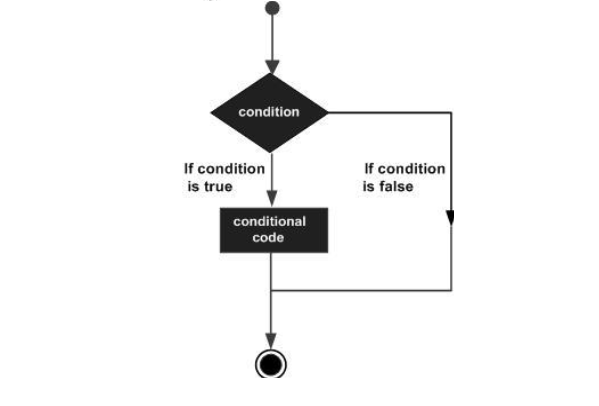
    A conditional/decision-making construct evaluates a condition before the instructions are executed.

    Decision Making

    Conditional constructs in Dart are classified in the following table.

    Sr.NoStatement & Description
    1if statementAn if statement consists of a Boolean expression followed by one or more statements.
    2If…Else StatementAn if can be followed by an optional else block. The else block will execute if the Boolean expression tested by the if block evaluates to false.
    3else…if LadderThe else…if ladder is useful to test multiple conditions. Following is the syntax of the same.
    4switch…case StatementThe switch statement evaluates an expression, matches the expression’s value to a case clause and executes the statements associated with that case.
  • Loops

    At times, certain instructions require repeated execution. Loops are an ideal way to do the same. A loop represents a set of instructions that must be repeated. In a loop’s context, a repetition is termed as an iteration.

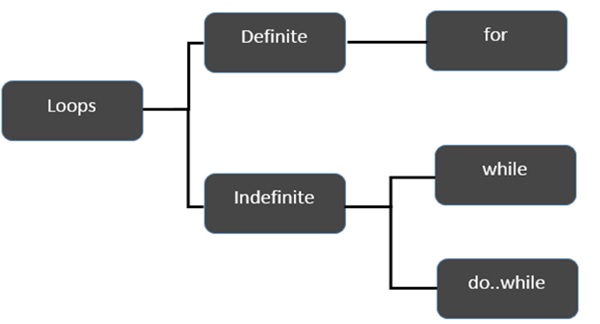
    The following figure illustrates the classification of loops −

    Classification Of Loops

    Let’s start the discussion with Definite Loops. A loop whose number of iterations are definite/fixed is termed as a definite loop.

    Sr.NoLoop & Description
    1for loopThe for loop is an implementation of a definite loop. The for loop executes the code block for a specified number of times. It can be used to iterate over a fixed set of values, such as an array
    2for…in LoopThe for…in loop is used to loop through an object’s properties.

    Moving on, let’s now discuss the indefinite loops. An indefinite loop is used when the number of iterations in a loop is indeterminate or unknown. Indefinite loops can be implemented using −

    Sr.NoLoop & Description
    1while LoopThe while loop executes the instructions each time the condition specified evaluates to true. In other words, the loop evaluates the condition before the block of code is executed.
    2do…while LoopThe do…while loop is similar to the while loop except that the do…while loop doesn’t evaluate the condition for the first time the loop executes.

    Let us now move on and discuss the Loop Control Statements of Dart.

    Sr.NoControl Statement & Description
    1break StatementThe break statement is used to take the control out of a construct. Using break in a loop causes the program to exit the loop. Following is an example of the break statement.
    2continue StatementThe continue statement skips the subsequent statements in the current iteration and takes the control back to the beginning of the loop.

    Using Labels to Control the Flow

    label is simply an identifier followed by a colon (:) that is applied to a statement or a block of code. A label can be used with break and continue to control the flow more precisely.

    Line breaks are not allowed between the ‘continue’ or ‘break’ statement and its label name. Also, there should not be any other statement in between a label name and an associated loop.

    Example: Label with Break

    void main() { 
       outerloop: // This is the label name 
       
       for (var i = 0; i < 5; i++) { 
    
      print("Innerloop: ${i}"); 
      innerloop: 
      
      for (var j = 0; j &lt; 5; j++) { 
         if (j &gt; 3 ) break ; 
         
         // Quit the innermost loop 
         if (i == 2) break innerloop; 
         
         // Do the same thing 
         if (i == 4) break outerloop; 
         
         // Quit the outer loop 
         print("Innerloop: ${j}"); 
      } 
    } }

    The following output is displayed on successful execution of the above code.

    Innerloop: 0
    Innerloop: 0
    Innerloop: 1
    Innerloop: 2
    Innerloop: 3
    Innerloop: 1
    Innerloop: 0
    Innerloop: 1
    Innerloop: 2
    Innerloop: 3
    Innerloop: 2
    Innerloop: 3
    Innerloop: 0
    Innerloop: 1
    Innerloop: 2
    Innerloop: 3
    Innerloop: 4
    

    Example: Label with continue

    void main() { 
       outerloop: // This is the label name 
       
       for (var i = 0; i < 3; i++) { 
    
      print("Outerloop:${i}"); 
      
      for (var j = 0; j &lt; 5; j++) { 
         if (j == 3){ 
            continue outerloop; 
         } 
         print("Innerloop:${j}"); 
      } 
    } }

    The following output is displayed on successful execution of the above code.

    Outerloop: 0 
    Innerloop: 0 
    Innerloop: 1 
    Innerloop: 2 
    
    Outerloop: 1 
    Innerloop: 0 
    Innerloop: 1 
    Innerloop: 2 
    
    Outerloop: 2 
    Innerloop: 0 
    Innerloop: 1 
    Innerloop: 2 
    
  • Operators

    An expression is a special kind of statement that evaluates to a value. Every expression is composed of −

    • Operands − Represents the data
    • Operator − Defines how the operands will be processed to produce a value.

    Consider the following expression – “2 + 3”. In this expression, 2 and 3 are operands and the symbol “+” (plus) is the operator.

    In this chapter, we will discuss the operators that are available in Dart.

    • Arithmetic Operators
    • Equality and Relational Operators
    • Type test Operators
    • Bitwise Operators
    • Assignment Operators
    • Logical Operators

    Arithmetic Operators

    The following table shows the arithmetic operators supported by Dart.

    Sr.NoOperators & Meaning
    1+Add
    2Subtract
    3-exprUnary minus, also known as negation (reverse the sign of the expression)
    4*Multiply
    5/Divide
    6~/Divide, returning an integer result
    7%Get the remainder of an integer division (modulo)
    8++Increment
    9Decrement

    Equality and Relational Operators

    Relational Operators tests or defines the kind of relationship between two entities. Relational operators return a Boolean value i.e. true/ false.

    Assume the value of A is 10 and B is 20.

    OperatorDescriptionExample
    >Greater than(A > B) is False
    <Lesser than(A < B) is True
    >=Greater than or equal to(A >= B) is False
    <=Lesser than or equal to(A <= B) is True
    ==Equality(A==B) is False
    !=Not equal(A!=B) is True

    Explore our latest online courses and learn new skills at your own pace. Enroll and become a certified expert to boost your career.

    Type test Operators

    These operators are handy for checking types at runtime.

    OperatorMeaning
    isTrue if the object has the specified type
    is!False if the object has the specified type

    Bitwise Operators

    The following table lists the bitwise operators available in Dart and their role −

    OperatorDescriptionExample
    Bitwise ANDa & bReturns a one in each bit position for which the corresponding bits of both operands are ones.
    Bitwise ORa | bReturns a one in each bit position for which the corresponding bits of either or both operands are ones.
    Bitwise XORa ^ bReturns a one in each bit position for which the corresponding bits of either but not both operands are ones.
    Bitwise NOT~ aInverts the bits of its operand.
    Left shifta ≪ bShifts a in binary representation b (< 32) bits to the left, shifting in zeroes from the right.
    Signpropagating right shifta ≫ bShifts a in binary representation b (< 32) bits to the right, discarding bits shifted off.

    Assignment Operators

    The following table lists the assignment operators available in Dart.

    Sr.NoOperator & Description
    1=(Simple Assignment )Assigns values from the right side operand to the left side operandEx:C = A + B will assign the value of A + B into C
    2??=Assign the value only if the variable is null
    3+=(Add and Assignment)It adds the right operand to the left operand and assigns the result to the left operand.Ex: C += A is equivalent to C = C + A
    4─=(Subtract and Assignment)It subtracts the right operand from the left operand and assigns the result to the left operand.Ex: C -= A is equivalent to C = C – A
    5*=(Multiply and Assignment)It multiplies the right operand with the left operand and assigns the result to the left operand.Ex: C *= A is equivalent to C = C * A
    6/=(Divide and Assignment)It divides the left operand with the right operand and assigns the result to the left operand.

    Note − Same logic applies to Bitwise operators, so they will become ≪=, ≫=, ≫=, ≫=, |= and ^=.

    Logical Operators

    Logical operators are used to combine two or more conditions. Logical operators return a Boolean value. Assume the value of variable A is 10 and B is 20.

    OperatorDescriptionExample
    &&And − The operator returns true only if all the expressions specified return true(A > 10 && B > 10) is False.
    ||OR − The operator returns true if at least one of the expressions specified return true(A > 10 || B > 10) is True.
    !NOT − The operator returns the inverse of the expression’s result. For E.g.: !(7>5) returns false!(A > 10) is True.

    Conditional Expressions

    Dart has two operators that let you evaluate expressions that might otherwise require ifelse statements −

    condition ? expr1 : expr2

    If condition is true, then the expression evaluates expr1 (and returns its value); otherwise, it evaluates and returns the value of expr2.

    expr1 ?? expr2

    If expr1 is non-null, returns its value; otherwise, evaluates and returns the value of expr2

    Example

    The following example shows how you can use conditional expression in Dart −

    void main() { 
       var a = 10; 
       var res = a > 12 ? "value greater than 10":"value lesser than or equal to 10"; 
       print(res); 
    } 

    It will produce the following output −

    value lesser than or equal to 10
    

    Example

    Let’s take another example −

    void main() { 
       var a = null; 
       var b = 12; 
       var res = a ?? b; 
       print(res); 
    }

    It will produce the following output −

    12
    
  • Variables

    A variable is “a named space in the memory” that stores values. In other words, it acts a container for values in a program. Variable names are called identifiers. Following are the naming rules for an identifier −

    • Identifiers cannot be keywords.
    • Identifiers can contain alphabets and numbers.
    • Identifiers cannot contain spaces and special characters, except the underscore (_) and the dollar ($) sign.
    • Variable names cannot begin with a number.

    Type Syntax

    A variable must be declared before it is used. Dart uses the var keyword to achieve the same. The syntax for declaring a variable is as given below −

    var name = 'Smith';
    

    All variables in dart store a reference to the value rather than containing the value. The variable called name contains a reference to a String object with a value of “Smith”.

    Type Syntax

    Dart supports type-checking by prefixing the variable name with the data type. Type-checking ensures that a variable holds only data specific to a data type. The syntax for the same is given below −

    String name = 'Smith'; 
    int num = 10;
    

    Consider the following example −

    void main() { 
       String name = 1; 
    }

    The above snippet will result in a warning since the value assigned to the variable doesn’t match the variable’s data type.

    Output

    Warning: A value of type 'String' cannot be assigned to a variable of type 'int' 
    

    All uninitialized variables have an initial value of null. This is because Dart considers all values as objects. The following example illustrates the same −

    void main() { 
       int num; 
       print(num); 
    }

    Output

    Null 
    

    The dynamic keyword

    Variables declared without a static type are implicitly declared as dynamic. Variables can be also declared using the dynamic keyword in place of the var keyword.

    The following example illustrates the same.

    void main() { 
       dynamic x = "tom"; 
       print(x);  
    }

    Output

    tom
    

    Final and Const

    The final and const keyword are used to declare constants. Dart prevents modifying the values of a variable declared using the final or const keyword. These keywords can be used in conjunction with the variable’s data type or instead of the var keyword.

    The const keyword is used to represent a compile-time constant. Variables declared using the const keyword are implicitly final.

    Syntax: final Keyword

    final variable_name
    

    OR

    final data_type  variable_name
    

    Syntax: const Keyword

    const variable_name
    

    OR

    const data_type variable_name
    

    Example – final Keyword

    void main() { 
       final val1 = 12; 
       print(val1); 
    }

    Output

    12
    

    Example – const Keyword

    void main() { 
       const pi = 3.14; 
       const area = pi*12*12; 
       print("The output is ${area}"); 
    }

    The above example declares two constants, pi and area, using the const keyword. The area variable’s value is a compile-time constant.

    Output

    The output is 452.15999999999997
    

    Note − Only const variables can be used to compute a compile time constant. Compile-time constants are constants whose values will be determined at compile time

    Example

    Dart throws an exception if an attempt is made to modify variables declared with the final or const keyword. The example given below illustrates the same −

    void main() { 
       final v1 = 12; 
       const v2 = 13; 
       v2 = 12; 
    }

    The code given above will throw the following error as output −

    Unhandled exception: 
    cannot assign to final variable 'v2='.  
    NoSuchMethodError: cannot assign to final variable 'v2=' 
    #0  NoSuchMethodError._throwNew (dart:core-patch/errors_patch.dart:178) 
    #1      main (file: Test.dart:5:3) 
    #2    _startIsolate.<anonymous closure> (dart:isolate-patch/isolate_patch.dart:261) 
    #3    _RawReceivePortImpl._handleMessage (dart:isolate-patch/isolate_patch.dart:148)