Author: saqibkhan

  • Exceptions

    An exception (or exceptional event) is a problem that arises during the execution of a program. When an Exception occurs the normal flow of the program is disrupted and the program/Application terminates abnormally.

    Built-in Dart exceptions include −

    Sr.NoExceptions & Description
    1DeferredLoadExceptionThrown when a deferred library fails to load.
    2FormatExceptionException thrown when a string or some other data does not have an expected format and cannot be parsed or processed.
    3IntegerDivisionByZeroExceptionThrown when a number is divided by zero.
    4IOExceptionBase class for all Inupt-Output related exceptions.
    5IsolateSpawnExceptionThrown when an isolate cannot be created.
    6TimeoutThrown when a scheduled timeout happens while waiting for an async result.

    Every exception in Dart is a subtype of the pre-defined class Exception. Exceptions must be handled to prevent the application from terminating abruptly.

    The try / on / catch Blocks

    The try block embeds code that might possibly result in an exception. The on block is used when the exception type needs to be specified. The catch block is used when the handler needs the exception object.

    The try block must be followed by either exactly one on / catch block or one finally block (or one of both). When an exception occurs in the try block, the control is transferred to the catch.

    The syntax for handling an exception is as given below −

    try { 
       // code that might throw an exception 
    }  
    on Exception1 { 
       // code for handling exception 
    }  
    catch Exception2 { 
       // code for handling exception 
    } 
    

    Following are some points to remember −

    • A code snippet can have more than one on / catch blocks to handle multiple exceptions.
    • The on block and the catch block are mutually inclusive, i.e. a try block can be associated with both- the on block and the catch block.

    The following code illustrates exception handling in Dart −

    Example: Using the ON Block

    The following program divides two numbers represented by the variables x and y respectively. The code throws an exception since it attempts division by zero. The on block contains the code to handle this exception.

    main() { 
       int x = 12; 
       int y = 0; 
       int res;  
       
       try {
    
      res = x ~/ y; 
    } on IntegerDivisionByZeroException {
      print('Cannot divide by zero'); 
    } }

    It should produce the following output −

    Cannot divide by zero
    

    Example: Using the catch Block

    In the following example, we have used the same code as above. The only difference is that the catch block (instead of the ON block) here contains the code to handle the exception. The parameter of catch contains the exception object thrown at runtime.

    main() { 
       int x = 12; 
       int y = 0; 
       int res;  
       
       try {  
    
      res = x ~/ y; 
    } catch(e) {
      print(e); 
    } }

    It should produce the following output −

    IntegerDivisionByZeroException
    

    Example: on…catch

    The following example shows how to use the on…catch block.

    main() { 
       int x = 12; 
       int y = 0; 
       int res;  
       
       try { 
    
      res = x ~/ y; 
    } on IntegerDivisionByZeroException catch(e) {
      print(e); 
    } }

    It should produce the following output −

    IntegerDivisionByZeroException
    

    The Finally Block

    The finally block includes code that should be executed irrespective of an exception’s occurrence. The optional finally block executes unconditionally after try/on/catch.

    The syntax for using the finally block is as follows −

    try { 
       // code that might throw an exception 
    }  
    on Exception1 { 
       // exception handling code 
    }  
    catch Exception2 { 
       //  exception handling 
    }  
    finally { 
       // code that should always execute; irrespective of the exception 
    }
    

    The following example illustrates the use of finally block.

    main() { 
       int x = 12; 
       int y = 0; 
       int res;  
       
       try { 
    
      res = x ~/ y; 
    } on IntegerDivisionByZeroException {
      print('Cannot divide by zero'); 
    } finally {
      print('Finally block executed'); 
    } }

    It should produce the following output −

    Cannot divide by zero 
    Finally block executed
    

    Explore our latest online courses and learn new skills at your own pace. Enroll and become a certified expert to boost your career.

    Throwing an Exception

    The throw keyword is used to explicitly raise an exception. A raised exception should be handled to prevent the program from exiting abruptly.

    The syntax for raising an exception explicitly is −

    throw new Exception_name()
    

    Example

    The following example shows how to use the throw keyword to throw an exception −

    main() { 
       try { 
    
      test_age(-2); 
    } catch(e) {
      print('Age cannot be negative'); 
    } } void test_age(int age) { if(age<0) {
      throw new FormatException(); 
    } }

    It should produce the following output −

    Age cannot be negative
    

    Custom Exceptions

    As specified above, every exception type in Dart is a subtype of the built-in class Exception. Dart enables creating custom exceptions by extending the existing ones. The syntax for defining a custom exception is as given below −

    Syntax: Defining the Exception

    class Custom_exception_Name implements Exception { 
       // can contain constructors, variables and methods 
    } 
    

    Custom Exceptions should be raised explicitly and the same should be handled in the code.

    Example

    The following example shows how to define and handle a custom exception.

    class AmtException implements Exception { 
       String errMsg() => 'Amount should be greater than zero'; 
    }  
    void main() { 
       try { 
    
      withdraw_amt(-1); 
    } catch(e) {
      print(e.errMsg()); 
    } finally {
      print('Ending requested operation.....'); 
    } } void withdraw_amt(int amt) { if (amt <= 0) {
      throw new AmtException(); 
    } }

    In the above code, we are defining a custom exception, AmtException. The code raises the exception if the amount passed is not within the excepted range. The main function encloses the function invocation in the try…catch block.

    The code should produce the following output −

    Amount should be greater than zero 
    Ending requested operation.... 
    
  • Packages

    A package is a mechanism to encapsulate a group of programming units. Applications might at times need integration of some third-party libraries or plugins. Every language has a mechanism for managing external packages like Maven or Gradle for Java, Nuget for .NET, npm for Node.js, etc. The package manager for Dart is pub.

    Pub helps to install packages in the repository. The repository of packages hosted can be found at https://pub.dartlang.org/.

    The package metadata is defined in a file, pubsec.yaml. YAML is the acronym for Yet Another Markup Language. The pub tool can be used to download all various libraries that an application requires.

    Every Dart application has a pubspec.yaml file which contains the application dependencies to other libraries and metadata of applications like application name, author, version, and description.

    The contents of a pubspec.yaml file should look something like this −

    name: 'vector_victor' 
    version: 0.0.1 
    description: An absolute bare-bones web app. 
    ... 
    dependencies: browser: '>=0.10.0 <0.11.0' 
    

    The important pub commands are as follows −

    Sr.NoCommand & Description
    1‘pub get’Helps to get all packages your application is depending on.
    2‘pub upgrade’Upgrades all your dependencies to a newer version.
    3‘pub build’This s used for building your web application and it will create a build folder , with all related scripts in it.
    4‘pub help’This will give you help for all different pub commands.

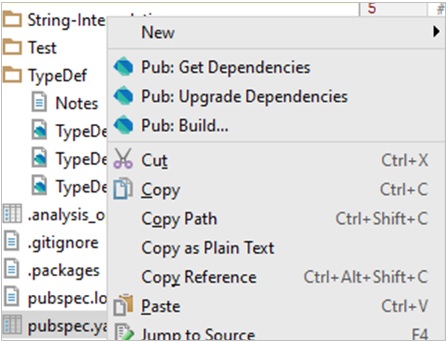
    If you are using an IDE like WebStorm, then you can right-click on the pubspec.yaml to get all the commands directly −

    Pubspec.yaml

    Installing a Package

    Consider an example where an application needs to parse xml. Dart XML is a lightweight library that is open source and stable for parsing, traversing, querying and building XML documents.

    The steps for achieving the said task is as follows −

    Step 1 − Add the following to the pubsec.yaml file.

    name: TestApp 
    version: 0.0.1 
    description: A simple console application. 
    #dependencies: 
    #  foo_bar: '>=1.0.0 <2.0.0' 
    dependencies: https://mail.google.com/mail/u/0/images/cleardot.gif
    xml: 

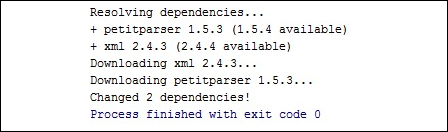
    Right-click on the pubsec.yaml and get dependencies. This will internally fire the pub get command as shown below.

    Pub Get Command

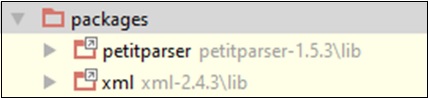
    The downloaded packages and its dependent packages can be verified under the packages folder.

    Packages

    Since installation is completed now, we need to refer the dart xml in the project. The syntax is as follows −

    import 'package:xml/xml.dart' as xml;
    

    Read XML String

    To read XML string and verify the input, Dart XML uses a parse() method. The syntax is as follows −

    xml.parse(String input):
    

    Example : Parsing XML String Input

    The following example shows how to parse XML string input −

    import 'package:xml/xml.dart' as xml; 
    void main(){ 
       print("xml"); 
       var bookshelfXml = '''<?xml version = "1.0"?> 
       <bookshelf> 
    
      &lt;book&gt; 
         &lt;title lang = "english"&gt;Growing a Language&lt;/title&gt; 
         &lt;price&gt;29.99&lt;/price&gt; 
      &lt;/book&gt; 
      
      &lt;book&gt; 
         &lt;title lang = "english"&gt;Learning XML&lt;/title&gt; 
         &lt;price&gt;39.95&lt;/price&gt; 
      &lt;/book&gt; 
      &lt;price&gt;132.00&lt;/price&gt; 
    </bookshelf>'''; var document = xml.parse(bookshelfXml); print(document.toString()); }

    It should produce the following output −

    xml 
    <?xml version = "1.0"?><bookshelf> 
       <book> 
    
      &lt;title lang = "english"&gt;Growing a Language&lt;/title&gt; 
      &lt;price&gt;29.99&lt;/price&gt; 
    </book> <book>
      &lt;title lang = "english"&gt;Learning XML&lt;/title&gt; 
      &lt;price&gt;39.95&lt;/price&gt; 
    </book> <price>132.00</price> </bookshelf>
  • Generics

    Dart is an optionally typed language. Collections in Dart are heterogeneous by default. In other words, a single Dart collection can host values of various types. However, a Dart collection can be made to hold homogenous values. The concept of Generics can be used to achieve the same.

    The use of Generics enforces a restriction on the data type of the values that can be contained by the collection. Such collections are termed as type-safe collections. Type safety is a programming feature which ensures that a memory block can only contain data of a specific data type.

    All Dart collections support type-safety implementation via generics. A pair of angular brackets containing the data type is used to declare a type-safe collection. The syntax for declaring a type-safe collection is as given below.

    Syntax

    Collection_name <data_type> identifier= new Collection_name<data_type> 
    

    The type-safe implementations of List, Map, Set and Queue is given below. This feature is also supported by all implementations of the above-mentioned collection types.

    Example: Generic List

    void main() { 
       List <String> logTypes = new List <String>(); 
       logTypes.add("WARNING"); 
       logTypes.add("ERROR"); 
       logTypes.add("INFO");  
       
       // iterating across list 
       for (String type in logTypes) { 
    
      print(type); 
    } }

    It should produce the following output −

    WARNING 
    ERROR 
    INFO
    

    An attempt to insert a value other than the specified type will result in a compilation error. The following example illustrates this.

    Example

    void main() { 
       List <String> logTypes = new List <String>(); 
       logTypes.add(1); 
       logTypes.add("ERROR"); 
       logTypes.add("INFO"); 
      
       //iterating across list 
       for (String type in logTypes) { 
    
      print(type); 
    } }

    It should produce the following output −

    1                                                                                     
    ERROR                                                                             
    INFO
    

    Example: Generic Set

    void main() { 
       Set <int>numberSet = new  Set<int>(); 
       numberSet.add(100); 
       numberSet.add(20); 
       numberSet.add(5); 
       numberSet.add(60);
       numberSet.add(70); 
       
       // numberSet.add("Tom"); 
       compilation error; 
       print("Default implementation  :${numberSet.runtimeType}");  
       
       for(var no in numberSet) { 
    
      print(no); 
    } }

    It should produce the following output −

    Default implementation :_CompactLinkedHashSet<int> 
    100 
    20 
    5 
    60 
    70
    

    Example: Generic Queue

    import 'dart:collection'; 
    void main() { 
       Queue<int> queue = new Queue<int>(); 
       print("Default implementation ${queue.runtimeType}");  
       queue.addLast(10); 
       queue.addLast(20); 
       queue.addLast(30); 
       queue.addLast(40); 
       queue.removeFirst();  
       
       for(int no in queue){ 
    
      print(no); 
    } }

    It should produce the following output −

    Default implementation ListQueue<int> 
    20 
    30 
    40
    

    Generic Map

    A type-safe map declaration specifies the data types of −

    • The key
    • The value

    Syntax

    Map <Key_type, value_type>
    

    Example

    void main() { 
       Map <String,String>m={'name':'Tom','Id':'E1001'}; 
       print('Map :${m}'); 
    } 

    It should produce the following output −

    Map :{name: Tom, Id: E1001}
    
  • Collection

    Dart, unlike other programming languages, doesn’t support arrays. Dart collections can be used to replicate data structures like an array. The dart:core library and other classes enable Collection support in Dart scripts.

    Dart collections can be basically classified as −

    Sr.NoDart collection & Description
    1ListA List is simply an ordered group of objects. The dart:core library provides the List class that enables creation and manipulation of lists.Fixed Length List − The list’s length cannot change at run-time.Growable List − The list’s length can change at run-time.
    2SetSet represents a collection of objects in which each object can occur only once. The dart:core library provides the Set class to implement the same.
    3MapsThe Map object is a simple key/value pair. Keys and values in a map may be of any type. A Map is a dynamic collection. In other words, Maps can grow and shrink at runtime. The Map class in the dart:core library provides support for the same.
    4QueueA Queue is a collection that can be manipulated at both ends. Queues are useful when you want to build a first-in, first-out collection. Simply put, a queue inserts data from one end and deletes from another end. The values are removed / read in the order of their insertion.

    Iterating Collections

    The Iterator class from the dart:core library enables easy collection traversal. Every collection has an iterator property. This property returns an iterator that points to the objects in the collection.

    Example

    The following example illustrates traversing a collection using an iterator object.

    import 'dart:collection'; 
    void main() { 
       Queue numQ = new Queue(); 
       numQ.addAll([100,200,300]);  
       Iterator i= numQ.iterator; 
       
       while(i.moveNext()) { 
    
      print(i.current); 
    } }

    The moveNext() function returns a Boolean value indicating whether there is a subsequent entry. The current property of the iterator object returns the value of the object that the iterator currently points to.

    This program should produce the following output −

    100 
    200 
    300
    
  • Object

    Object-Oriented Programming defines an object as “any entity that has a defined boundary.” An object has the following −

    • State − Describes the object. The fields of a class represent the object’s state.
    • Behavior − Describes what an object can do.
    • Identity − A unique value that distinguishes an object from a set of similar other objects. Two or more objects can share the state and behavior but not the identity.

    The period operator (.) is used in conjunction with the object to access a class’ data members.

    Example

    Dart represents data in the form of objects. Every class in Dart extends the Object class. Given below is a simple example of creating and using an object.

    class Student { 
       void test_method() { 
    
      print("This is a  test method"); 
    } void test_method1() {
      print("This is a  test method1"); 
    } } void main() { Student s1 = new Student(); s1.test_method(); s1.test_method1(); }

    It should produce the following output −

    This is a test method 
    This is a test method1
    

    The Cascade operator (..)

    The above example invokes the methods in the class. However, every time a function is called, a reference to the object is required. The cascade operator can be used as a shorthand in cases where there is a sequence of invocations.

    The cascade ( .. ) operator can be used to issue a sequence of calls via an object. The above example can be rewritten in the following manner.

    class Student { 
       void test_method() { 
    
      print("This is a  test method"); 
    } void test_method1() {
      print("This is a  test method1"); 
    } } void main() { new Student() ..test_method() ..test_method1(); }

    It should produce the following output −

    This is a test method 
    This is a test method1
    

    The toString() method

    This function returns a string representation of an object. Take a look at the following example to understand how to use the toString method.

    void main() { 
       int n = 12; 
       print(n.toString()); 
    } 

    It should produce the following output −

    12
    
  • Classes

    Dart is an object-oriented language. It supports object-oriented programming features like classes, interfaces, etc. A class in terms of OOP is a blueprint for creating objects. A class encapsulates data for the object. Dart gives built-in support for this concept called class.

    Declaring a Class

    Use the class keyword to declare a class in Dart. A class definition starts with the keyword class followed by the class name; and the class body enclosed by a pair of curly braces. The syntax for the same is given below −

    Syntax

    class class_name {  
       <fields> 
       <getters/setters> 
       <constructors> 
       <functions> 
    }
    

    The class keyword is followed by the class name. The rules for identifiers must be considered while naming a class.

    A class definition can include the following −

    • Fields − A field is any variable declared in a class. Fields represent data pertaining to objects.
    • Setters and Getters − Allows the program to initialize and retrieve the values of the fields of a class. A default getter/ setter is associated with every class. However, the default ones can be overridden by explicitly defining a setter/ getter.
    • Constructors − responsible for allocating memory for the objects of the class.
    • Functions − Functions represent actions an object can take. They are also at times referred to as methods.

    These components put together are termed as the data members of the class.

    Example: Declaring a class

    class Car {  
       // field 
       String engine = "E1001";  
       
       // function 
       void disp() { 
    
      print(engine); 
    } }

    The example declares a class Car. The class has a field named engine. The disp() is a simple function that prints the value of the field engine.

    Creating Instance of the class

    To create an instance of the class, use the new keyword followed by the class name. The syntax for the same is given below −

    Syntax

    var object_name = new class_name([ arguments ])
    
    • The new keyword is responsible for instantiation.
    • The right-hand side of the expression invokes the constructor. The constructor should be passed values if it is parameterized.

    Example: Instantiating a class

    var obj = new Car("Engine 1")

    Explore our latest online courses and learn new skills at your own pace. Enroll and become a certified expert to boost your career.

    Accessing Attributes and Functions

    A class’s attributes and functions can be accessed through the object. Use the ‘.’ dot notation (called as the period) to access the data members of a class.

    //accessing an attribute 
    obj.field_name  
    
    //accessing a function 
    obj.function_name()

    Example

    Take a look at the following example to understand how to access attributes and functions in Dart −

    void main() { 
       Car c= new Car(); 
       c.disp(); 
    }  
    class Car {  
       // field 
       String engine = "E1001";  
       
       // function 
       void disp() { 
    
      print(engine); 
    } }

    The output of the above code is as follows −

    E1001
    

    Dart Constructors

    A constructor is a special function of the class that is responsible for initializing the variables of the class. Dart defines a constructor with the same name as that of the class. A constructor is a function and hence can be parameterized. However, unlike a function, constructors cannot have a return type. If you don’t declare a constructor, a default no-argument constructor is provided for you.

    Syntax

    Class_name(parameter_list) { 
       //constructor body 
    }
    

    Example

    The following example shows how to use constructors in Dart −

    void main() { 
       Car c = new Car('E1001'); 
    } 
    class Car { 
       Car(String engine) { 
    
      print(engine); 
    } }

    It should produce the following output −

    E1001 
    

    Named Constructors

    Dart provides named constructors to enable a class define multiple constructors. The syntax of named constructors is as given below −

    Syntax : Defining the constructor

    Class_name.constructor_name(param_list)
    

    Example

    The following example shows how you can use named constructors in Dart −

    void main() {           
       Car c1 = new Car.namedConst('E1001');                                       
       Car c2 = new Car(); 
    }           
    class Car {                   
       Car() {                           
    
      print("Non-parameterized constructor invoked");
    } Car.namedConst(String engine) {
      print("The engine is : ${engine}");    
    } }

    It should produce the following output −

    The engine is : E1001 
    Non-parameterized constructor invoked
    

    The this Keyword

    The this keyword refers to the current instance of the class. Here, the parameter name and the name of the class’s field are the same. Hence to avoid ambiguity, the class’s field is prefixed with the this keyword. The following example explains the same −

    Example

    The following example explains how to use the this keyword in Dart −

    void main() { 
       Car c1 = new Car('E1001'); 
    }  
    class Car { 
       String engine; 
       Car(String engine) { 
    
      this.engine = engine; 
      print("The engine is : ${engine}"); 
    } }

    It should produce the following output −

    The engine is : E1001
    

    Dart Class ─ Getters and Setters

    Getters and Setters, also called as accessors and mutators, allow the program to initialize and retrieve the values of class fields respectively. Getters or accessors are defined using the get keyword. Setters or mutators are defined using the set keyword.

    A default getter/setter is associated with every class. However, the default ones can be overridden by explicitly defining a setter/ getter. A getter has no parameters and returns a value, and the setter has one parameter and does not return a value.

    Syntax: Defining a getter

    Return_type  get identifier 
    { 
    } 
    

    Syntax: Defining a setter

    set identifier 
    { 
    }
    

    Example

    The following example shows how you can use getters and setters in a Dart class −

    class Student { 
       String name; 
       int age; 
    
    String get stud_name {
      return name; 
    }
    void set stud_name(String name) {
      this.name = name; 
    } void set stud_age(int age) {
      if(age&lt;= 0) { 
        print("Age should be greater than 5"); 
      }  else { 
         this.age = age; 
      } 
    } int get stud_age {
      return age;     
    } } void main() { Student s1 = new Student(); s1.stud_name = 'MARK'; s1.stud_age = 0; print(s1.stud_name); print(s1.stud_age); }

    This program code should produce the following output −

    Age should be greater than 5 
    MARK 
    Null 
    

    Class Inheritance

    Dart supports the concept of Inheritance which is the ability of a program to create new classes from an existing class. The class that is extended to create newer classes is called the parent class/super class. The newly created classes are called the child/sub classes.

    A class inherits from another class using the ‘extends’ keyword. Child classes inherit all properties and methods except constructors from the parent class.

    Syntax

    class child_class_name extends parent_class_name 
    

    Note − Dart doesn’t support multiple inheritance.

    Example: Class Inheritance

    In the following example, we are declaring a class Shape. The class is extended by the Circle class. Since there is an inheritance relationship between the classes, the child class, i.e., the class Car gets an implicit access to its parent class data member.

    void main() { 
       var obj = new Circle(); 
       obj.cal_area(); 
    }  
    class Shape { 
       void cal_area() { 
    
      print("calling calc area defined in the Shape class"); 
    } } class Circle extends Shape {}

    It should produce the following output −

    calling calc area defined in the Shape class
    

    Types of Inheritance

    Inheritance can be of the following three types −

    • Single − Every class can at the most extend from one parent class.
    • Multiple − A class can inherit from multiple classes. Dart doesn’t support multiple inheritance.
    • Multi-level − A class can inherit from another child class.

    Example

    The following example shows how multi-level inheritance works −

    void main() { 
       var obj = new Leaf(); 
       obj.str = "hello"; 
       print(obj.str); 
    }  
    class Root { 
       String str; 
    }  
    class Child extends Root {}  
    class Leaf extends Child {}  
    //indirectly inherits from Root by virtue of inheritance

    The class Leaf derives the attributes from Root and Child classes by virtue of multi-level inheritance. Its output is as follows −

    hello
    

    Dart – Class Inheritance and Method Overriding

    Method Overriding is a mechanism by which the child class redefines a method in its parent class. The following example illustrates the same −

    Example

    void main() { 
       Child c = new Child(); 
       c.m1(12); 
    } 
    class Parent { 
       void m1(int a){ print("value of a ${a}");} 
    }  
    class Child extends Parent { 
       @override 
       void m1(int b) { 
    
      print("value of b ${b}"); 
    } }

    It should produce the following output −

    value of b 12
    

    The number and type of the function parameters must match while overriding the method. In case of a mismatch in the number of parameters or their data type, the Dart compiler throws an error. The following illustration explains the same −

    import 'dart:io'; 
    void main() { 
       Child c = new Child(); 
       c.m1(12); 
    } 
    class Parent { 
       void m1(int a){ print("value of a ${a}");} 
    } 
    class Child extends Parent { 
       @override 
       void m1(String b) { 
    
      print("value of b ${b}");
    } }

    It should produce the following output −

    value of b 12
    

    The static Keyword

    The static keyword can be applied to the data members of a class, i.e., fields and methods. A static variable retains its values till the program finishes execution. Static members are referenced by the class name.

    Example

    class StaticMem { 
       static int num;  
       static disp() { 
    
      print("The value of num is ${StaticMem.num}")  ; 
    } } void main() { StaticMem.num = 12; // initialize the static variable } StaticMem.disp(); // invoke the static method }

    It should produce the following output −

    The value of num is 12
    

    The super Keyword

    The super keyword is used to refer to the immediate parent of a class. The keyword can be used to refer to the super class version of a variable, property, or method. The following example illustrates the same −

    Example

    void main() { 
       Child c = new Child(); 
       c.m1(12); 
    } 
    class Parent { 
       String msg = "message variable from the parent class"; 
       void m1(int a){ print("value of a ${a}");} 
    } 
    class Child extends Parent { 
       @override 
       void m1(int b) { 
    
      print("value of b ${b}"); 
      super.m1(13); 
      print("${super.msg}")   ; 
    } }

    It should produce the following output −

    value of b 12 
    value of a 13 
    message variable from the parent class
    
  • Interfaces

    An interface defines the syntax that any entity must adhere to. Interfaces define a set of methods available on an object. Dart does not have a syntax for declaring interfaces. Class declarations are themselves interfaces in Dart.

    Classes should use the implements keyword to be able to use an interface. It is mandatory for the implementing class to provide a concrete implementation of all the functions of the implemented interface. In other words, a class must redefine every function in the interface it wishes to implement.

    Syntax: Implementing an Interface

    class identifier implements interface_name
    

    Example

    In the following program, we are declaring a class Printer. The ConsolePrinter class implements the implicit interface declaration for the Printer class. The main function creates an object of the ConsolePrinter class using the new keyword. This object is used to invoke the function print_data defined in the ConsolePrinter class.

    void main() { 
       ConsolePrinter cp= new ConsolePrinter(); 
       cp.print_data(); 
    }  
    class Printer { 
       void print_data() { 
    
      print("__________Printing Data__________"); 
    } } class ConsolePrinter implements Printer { void print_data() {
      print("__________Printing to Console__________"); 
    } }

    It should produce the following output −

    __________Printing to Console__________
    

    Implementing Multiple Interfaces

    A class can implement multiple interfaces. The interfaces are separated by a comma. The syntax for the same is given below −

    class identifier implements interface-1,interface_2,interface_4…….
    

    The following example shows how you can implement multiple interfaces in Dart −

    void main() { 
       Calculator c = new Calculator(); 
       print("The gross total : ${c.ret_tot()}"); 
       print("Discount :${c.ret_dis()}"); 
    }  
    class Calculate_Total { 
       int ret_tot() {} 
    }  
    class Calculate_Discount { 
       int ret_dis() {} 
    }
    class Calculator  implements Calculate_Total,Calculate_Discount { 
       int ret_tot() { 
    
      return 1000; 
    } int ret_dis() {
      return 50; 
    } }

    It should produce the following output −

    The gross total: 1000 
    Discount:50 
    
  • Functions

    Functions are the building blocks of readable, maintainable, and reusable code. A function is a set of statements to perform a specific task. Functions organize the program into logical blocks of code. Once defined, functions may be called to access code. This makes the code reusable. Moreover, functions make it easy to read and maintain the program’s code.

    A function declaration tells the compiler about a function’s name, return type, and parameters. A function definition provides the actual body of the function.

    Sr.NoFunctions & Description
    1Defining a FunctionA function definition specifies what and how a specific task would be done.
    2Calling a FunctionA function must be called so as to execute it.
    3Returning FunctionsFunctions may also return value along with control, back to the caller.
    4Parameterized FunctionParameters are a mechanism to pass values to functions.

    Optional Parameters

    Optional parameters can be used when arguments need not be compulsorily passed for a function’s execution. A parameter can be marked optional by appending a question mark to its name. The optional parameter should be set as the last argument in a function.

    We have three types of optional parameters in Dart −

    Sr.NoParameter & Description
    1Optional Positional ParameterTo specify optional positional parameters, use square [] brackets.
    2Optional named parameterUnlike positional parameters, the parameter’s name must be specified while the value is being passed. Curly brace {} can be used to specify optional named parameters.
    3Optional Parameters with Default ValuesFunction parameters can also be assigned values by default. However, such parameters can also be explicitly passed values.

    Recursive Dart Functions

    Recursion is a technique for iterating over an operation by having a function call to itself repeatedly until it arrives at a result. Recursion is best applied when you need to call the same function repeatedly with different parameters from within a loop.

    Example

    void main() { 
       print(factorial(6));
    }  
    factorial(number) { 
       if (number <= 0) {         
    
      // termination case 
      return 1; 
    } else {
      return (number * factorial(number - 1));    
      // function invokes itself 
    } }

    It should produce the following output −

    720
    

    Explore our latest online courses and learn new skills at your own pace. Enroll and become a certified expert to boost your career.

    Lambda Functions

    Lambda functions are a concise mechanism to represent functions. These functions are also called as Arrow functions.

    Syntax

    [return_type]function_name(parameters)=>expression;
    

    Example

    void main() { 
       printMsg(); 
       print(test()); 
    }  
    printMsg()=>
    print("hello"); 
    
    int test()=>123;                       
    // returning function

    It should produce the following output −

    hello 123 
    
  • Enumeration

    An enumeration is used for defining named constant values. An enumerated type is declared using the enum keyword.

    Syntax

    enum enum_name {  
       enumeration list 
    }
    

    Where,

    • The enum_name specifies the enumeration type name
    • The enumeration list is a comma-separated list of identifiers

    Each of the symbols in the enumeration list stands for an integer value, one greater than the symbol that precedes it. By default, the value of the first enumeration symbol is 0.

    For example

    enum Status { 
       none, 
       running, 
       stopped, 
       paused 
    }

    Example

    enum Status { 
       none, 
       running, 
       stopped, 
       paused 
    }  
    void main() { 
       print(Status.values); 
       Status.values.forEach((v) => print('value: $v, index: ${v.index}'));
       print('running: ${Status.running}, ${Status.running.index}'); 
       print('running index: ${Status.values[1]}'); 
    }

    It will produce the following output −

    [Status.none, Status.running, Status.stopped, Status.paused] 
    value: Status.none, index: 0 
    value: Status.running, index: 1 
    value: Status.stopped, index: 2 
    value: Status.paused, index: 3 
    running: Status.running, 1 
    running index: Status.running 
    
  • Runes

    Strings are a sequence of characters. Dart represents strings as a sequence of Unicode UTF-16 code units. Unicode is a format that defines a unique numeric value for each letter, digit, and symbol.

    Since a Dart string is a sequence of UTF-16 code units, 32-bit Unicode values within a string are represented using a special syntax. A rune is an integer representing a Unicode code point.

    The String class in the dart:core library provides mechanisms to access runes. String code units / runes can be accessed in three ways −

    • Using String.codeUnitAt() function
    • Using String.codeUnits property
    • Using String.runes property

    String.codeUnitAt() Function

    Code units in a string can be accessed through their indexes. Returns the 16-bit UTF-16 code unit at the given index.

    Syntax

    String.codeUnitAt(int index);
    

    Example

    import 'dart:core'; 
    void main(){ 
       f1(); 
    } 
    f1() { 
       String x = 'Runes'; 
       print(x.codeUnitAt(0)); 
    }

    It will produce the following output −

    82
    

    String.codeUnits Property

    This property returns an unmodifiable list of the UTF-16 code units of the specified string.

    Syntax

    String. codeUnits;
    

    Example

    import 'dart:core';  
    void main(){ 
       f1(); 
    }  
    f1() { 
       String x = 'Runes'; 
       print(x.codeUnits); 
    } 

    It will produce the following output −

    [82, 117, 110, 101, 115]
    

    Explore our latest online courses and learn new skills at your own pace. Enroll and become a certified expert to boost your career.

    String.runes Property

    This property returns an iterable of Unicode code-points of this string.Runes extends iterable.

    Syntax

    String.runes
    

    Example

    void main(){ 
       "A string".runes.forEach((int rune) { 
    
      var character=new String.fromCharCode(rune); 
      print(character); 
    }); }

    It will produce the following output −

    A 
    s 
    t 
    r 
    i 
    n 
    g
    

    Unicode code points are usually expressed as \uXXXX, where XXXX is a 4-digit hexadecimal value. To specify more or less than 4 hex digits, place the value in curly brackets. One can use the constructor of the Runes class in the dart:core library for the same.

    Example

    main() { 
       Runes input = new Runes(' \u{1f605} '); 
       print(new String.fromCharCodes(input)); 
    }  

    It will produce the following output −

    Runes