Author: saqibkhan

  • String

    Dart String is a sequence of the character or UTF-16 code units. It is used to store the text value. The string can be created using single quotes or double-quotes. The multiline string can be created using the triple-quotes. Strings are immutable; it means you cannot modify it after creation.

    In Dart, The String keyword can be used to declare the string. The syntax of the string declaration is given below.

    Syntax:

    String msg = 'Welcome to JavaTpoint';  
    
    or  
    
    String msg1 = "This is double-quoted string example.";  
    
    or  
    
    String msg2 = ' ' ' line1  
    
    line2  
    
    line3'''

    Printing String

    The print() function is used to print the string on the screen. The string can be formatted message, any expression, and any other object. Dart provides ${expression}, which is used to put the value inside a string. Let’ have at look at the following example.

    Example –

    void main() {   
    
       String str1 = 'this is an example of a single-line string';   
    
       String str2 = "this is an example of a double-quotes multiline line string";   
    
       String str3 = """this is a multiline line   
    
    string using the triple-quotes""";   


       var  a = 10;  
    
       var b = 20;  


       print(str1);  
    
       print(str2);   
    
       print(str3);   


     // We can add expression using the ${expression}.  
    
       print("The sum is  = ${a+b}");  
    
    } 

      Output:

      this is an example of a single-line string
      this is an example of a double-quotes multiline line string
      this is a multiline line
      string using the triple-quotes
      The sum is = 30
      

      String Concatenation

      The + or += operator is used to merge the two string. The example is given below.

      void main() {   
      
         String str1 = 'Welcome To ';   
      
         String str2 = "JavaTpoint";   
      
         String str3 = str1+str2;  


         print(str3);   
      
      }

      Output:

      Welcome To JavaTpoint
      

      String Interpolation

      The string interpolation is a technique to manipulate the string and create the new string by adding another value. It can be used to evaluate the string including placeholders, variables, and interpolated expression. The ${expression} is used for string interpolation. The expressions are replaced with their corresponding values. Let’s understand by the following example.

      void main() {   
      
         String str1 = 'Hello ';   
      
         String str2 = "World!";   
      
         String str3 = str1+str2;  


       print(str3);   


         var x = 26;  
      
         var y = 10;  


         print("The result is  = ${x%y}");  


         var name = "Peter";  
      
         var roll_nu = 101;  


         print("My name is ${name}, my roll number is ${roll_nu}");  
      
      } 

        Output:

        Hello World!
        The result is = 6
        My name is Peter, my roll number is 101
        

        Explanation –

        In the above code, we have declared two strings variable, created a new string after concatenation, and printed the result.

        We have created two variables that hold integer value then performed the mod operation and we printed the result using the string interpolation.

        We can use the string interpolation as a placeholder, as we have shown in the above example.

        String Properties

        The Dart provides the following string properties.

        PropertyDescription
        codeUnitsIt returns an unmodified list of the UTF-16 code units of this string.
        isEmptyIf the string is empty, it returns true.
        LengthIt returns the length of the string including whitespace.

        String Methods

        The Dart provides an extensive range of methods. The list of a few essential methods is given below.

        MethodsDescriptions
        toLowerCase()It converts all characters of the given string in lowercase.
        toUpperCase()It converts all characters of the given string in uppercase.
        trim()It eliminates all whitespace from the given string.
        compareTo()It compares one string from another.
        replaceAll()It replaces all substring that matches the specified pattern with a given string.
        split()It splits the string at matches of the specified delimiter and returns the list of the substring.
        substring()It returns the substring from start index, inclusive to end index.
        toString()It returns the string representation of the given object.
        codeUnitAt()It returns the 16-bits code unit at the given index.
      1. Number

        The Number is the data type that is used to hold the numeric value. In Dart, It can be two types –

        • Integer
        • Double
        Dart Number

        Dart integer – Integer numbers are the whole numbers means that can be written without a fractional component. For example – 20, 30, -3215, 0, etc. An integer number can be signed or unsigned. The representation of the integer value is in between -263 to 263 non-decimal numbers. The int keyword is used to declare integer value in Dart.

        int id = 501;   

        Dart Double – The Double number are the numbers that can be written with floating-point numbers or number with larger decimal points. The double keyword is used to declare Double value in Dart.

        double root = 1.41234;  
        
        or  
        
        double rupees  = 100000;

        Rules for the integer value

        • An integer value must be a digit.
        • The decimal points should not include in an integer number.
        • Unsigned numbers are always a positive number. Numbers can be either negative or positive.
        • The size of the integer value depends upon the platform, but integer value should no longer than 64 bit.

        Let’s have a look at following example –

        Example –

        void main(){    
        
         int r = 5;  
        
         double pi = 3.14;  
        
         double res = 4*pi*r*r;    
        
         print("The area of sphere = ${(res)}");  
        
        }  

          Output:

          The area of sphere 314
          

          Dart parse() function

          The parse() function converts the numeric string to the number. Consider the following example –

          Example –

          void main(){  
          
          var a = num.parse("20.56");  
          
          var b = num.parse("15.63");  


          var c = a+b;   
          
          print("The sum is = ${c}");  
          
          }

          Output:

          The sum is = 36.19
          

          Explanation –

          In the above example, we converted the numeric strings into the numbers by using parse() method then stored in the variables. After the successful conversion, we performed add operation and printed the output to the screen.

          Number Properties

          PropertiesDescription
          hashcodeIt returns the hash code of the given number.
          isFiniteIf the given number is finite, then it returns true.
          isInfiniteIf the number infinite it returns true.
          isNanIf the number is non-negative then it returns true.
          isNegativeIf the number is negative then it returns true.
          signIt returns -1, 0, or 1 depending upon the sign of the given number.
          isEvenIf the given number is an even then it returns true.
          isOddIf the given number is odd then it returns true.

          Number Methods

          The commonly used methods of number are given below.

          MethodDescription
          abs()It gives the absolute value of the given number.
          ceil()It gives the ceiling value of the given number.
          floor()It gives the floor value of the given number.
          compareTo()It compares the value with other number.
          remainder()It gives the truncated remainder after dividing the two numbers.
          round()It returns the round of the number.
          toDouble()It gives the double equivalent representation of the number.
          toInt()Returns the integer equivalent representation of the number.
          toString()Returns the String equivalent representation of the number
          truncate()Returns the integer after discarding fraction digits.
        1. Constants

          Dart Constant is defined as an immutable object, which means it can’t be changed or modified during the execution of the program. Once we initialize the value to the constant variable, it cannot be reassigned later.

          Defining/Initializing Constant in Dart

          The Dart constant can be defined in the following two ways.

          • Using the final keyword
          • Using the const keyword

          It is beneficial when we want to keep the value unchanged in the whole program. The keywords final and const are used to create a constant variable. Both keywords final and const are used as a conjunction with the data-type. Dart will throw an exception if we try to modify the constant variable.

          A const keyword represents the compile-time constant, and the final variable can be set only once.

          Define Constant Using final Keyword

          We can define the constant by using the final keyword. The syntax is given below.

          Syntax:

          final const_name;  
          
          or   
          
          final data_type const_name  

            Let’s understand the following example.

            Example –

            void main () {  
            
              final a = 10;  
            
              final b = 20;  


             print(a);  
            
             print(b);  
            
            } 

              Output:

              10
              20
              

              Define Constants Using const Keyword

              We can define constant using the const keyword. The syntax is given below.

              Syntax –

              const const_name  
              
              Or  
              
              const data_type const_name  

                Let’s understand the following example.

                void main() {  
                
                   const name= "Peter";  
                
                   print(name);  
                
                } 

                  Output:

                  Peter
                  
                1. HTML DOM

                  Every webpage resides inside a browser window which can be considered as an object.

                  Document object represents the HTML document that is displayed in that window. The Document object has various properties that refer to other objects which allow access to and modification of document content.

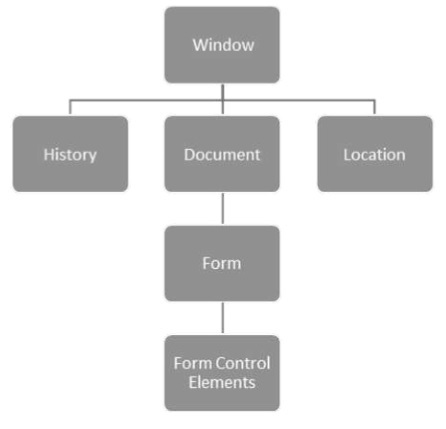
                  The way a document content is accessed and modified is called the Document Object Model, or DOM. The Objects are organized in a hierarchy. This hierarchical structure applies to the organization of objects in a Web document.

                  • Window − Top of the hierarchy. It is the outmost element of the object hierarchy.
                  • Document − Each HTML document that gets loaded into a window becomes a document object. The document contains the contents of the page.
                  • Elements − represent the content on a web page. Examples include the text boxes, page title etc.
                  • Nodes − are often elements, but they can also be attributes, text, comments, and other DOM types.

                  Here is a simple hierarchy of a few important DOM objects −

                  HTML DOM

                  Dart provides the dart:html library to manipulate objects and elements in the DOM. Console-based applications cannot use the dart:html library. To use the HTML library in the web applications, import dart:html −

                  import 'dart:html';
                  

                  Moving on, we will discuss some DOM Operations in the next section.

                  Finding DOM Elements

                  The dart:html library provides the querySelector function to search for elements in the DOM.

                  Element querySelector(String selectors);
                  

                  The querySelector() function returns the first element that matches the specified group of selectors. “selectors should be string using CSS selector syntax as given below

                  var element1 = document.querySelector('.className'); 
                  var element2 = document.querySelector('#id'); 
                  

                  Example: Manipulating DOM

                  Follow the steps given below, in the Webstorm IDE −

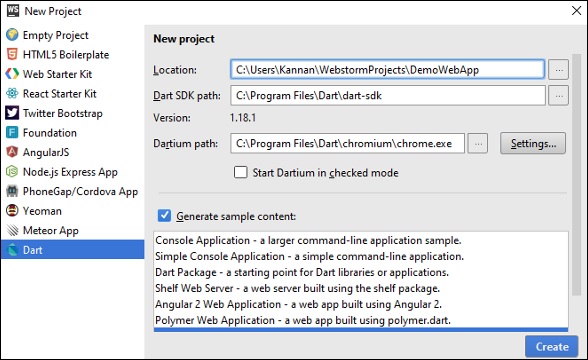
                  Step 1 − File NewProject → In the location, provide the project name as DemoWebApp.

                  Demowebapp

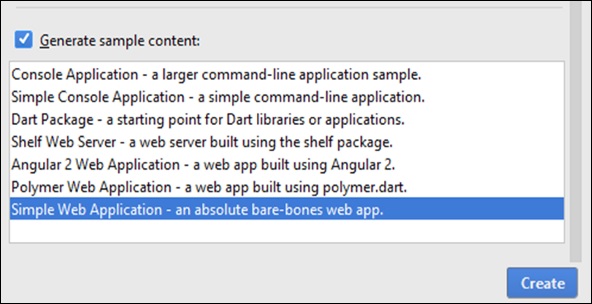
                  Step 1 − In the section “Generate sample content”, select SimpleWebApplication.

                  Create

                  It will create a sample project, DemoWebApp. There is a pubspec.yaml file containing the dependencies which need to be downloaded.

                  name: 'DemoWebApp' 
                  version: 0.0.1 
                  description: An absolute bare-bones web app. 
                  
                  #author: Your Name <[email protected]> 
                  #homepage: https://www.example.com  
                  environment:   
                     sdk: '>=1.0.0 <2.0.0'  
                  dependencies:   
                     browser: '>=0.10.0 <0.11.0'   dart_to_js_script_rewriter: '^1.0.1'  
                  transformers: 
                  - dart_to_js_script_rewriter 

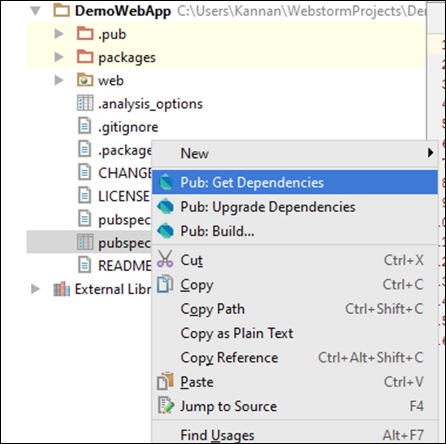
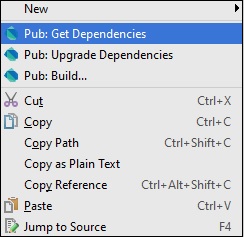
                  If you are connected to Web, then these will be downloaded automatically, else you can right-click on the pubspec.yaml and get dependencies.

                  Pub Get Dependencies

                  In the web folder, you will find three files: Index.html, main.dart, and style.css

                  Index.html

                  <!DOCTYPE html>   
                  <html> 
                     <head>     
                  
                    &lt;meta charset = "utf-8"&gt;     
                    &lt;meta http-equiv = "X-UA-Compatible" content = "IE = edge"&gt;     
                    &lt;meta name = "viewport" content = "width = device-width, initial-scale = 1.0"&gt;
                    &lt;meta name = "scaffolded-by" content = "https://github.com/google/stagehand"&gt;
                    &lt;title&gt;DemoWebApp&lt;/title&gt;     
                    &lt;link rel = "stylesheet" href = "styles.css"&gt;     
                    &lt;script defer src = "main.dart" type = "application/dart"&gt;&lt;/script&gt;
                    &lt;script defer src = "packages/browser/dart.js"&gt;&lt;/script&gt; 
                  </head> <body>
                    &lt;h1&gt;
                       &lt;div id = "output"&gt;&lt;/div&gt; 
                    &lt;/h1&gt;  
                  </body> </html>

                  Main.dart

                  import 'dart:html';  
                  void main() {   
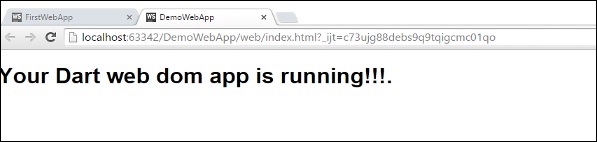
                     querySelector('#output').text = 'Your Dart web dom app is running!!!.'; 
                  } 

                  Run the index.html file; you will see the following output on your screen.

                  Demo Web App

                  Event Handling

                  The dart:html library provides the onClick event for DOM Elements. The syntax shows how an element could handle a stream of click events.

                  querySelector('#Id').onClick.listen(eventHanlderFunction); 
                  

                  The querySelector() function returns the element from the given DOM and onClick.listen() will take an eventHandler method which will be invoked when a click event is raised. The syntax of eventHandler is given below −

                  void eventHanlderFunction (MouseEvent event){ } 
                  

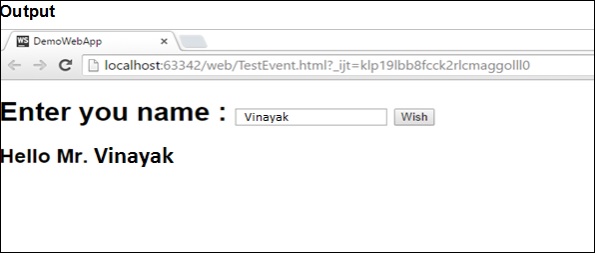
                  Let us now take an example to understand the concept of Event Handling in Dart.

                  TestEvent.html

                  <!DOCTYPE html> 
                  <html> 
                     <head> 
                  
                    &lt;meta charset = "utf-8"&gt; 
                    &lt;meta http-equiv = "X-UA-Compatible" content = "IE = edge"&gt; 
                    &lt;meta name = "viewport" content = "width = device-width, initial-scale = 1.0"&gt; 
                    &lt;meta name = "scaffolded-by" content ="https://github.com/google/stagehand"&gt; 
                    &lt;title&gt;DemoWebApp&lt;/title&gt; 
                    &lt;link rel = "stylesheet" href = "styles.css"&gt; 
                    &lt;script defer src = "TestEvent.dart" type="application/dart"&gt;&lt;/script&gt; 
                    &lt;script defer src = "packages/browser/dart.js"&gt;&lt;/script&gt; 
                  </head> <body>
                    &lt;div id = "output"&gt;&lt;/div&gt; 
                    &lt;h1&gt; 
                       &lt;div&gt; 
                          Enter you name : &lt;input type = "text" id = "txtName"&gt; 
                          &lt;input type = "button" id = "btnWish" value="Wish"&gt; 
                       &lt;/div&gt; 
                    &lt;/h1&gt; 
                    &lt;h2 id = "display"&gt;&lt;/h2&gt; 
                  </body> </html>

                  TestEvent.dart

                  import 'dart:html'; 
                  void main() { 
                     querySelector('#btnWish').onClick.listen(wishHandler); 
                  }  
                  void wishHandler(MouseEvent event){ 
                     String name = (querySelector('#txtName')  as InputElement).value; 
                     querySelector('#display').text = 'Hello Mr.'+ name; 
                  }

                  Output

                  Output
                2. Unit Testing

                  Unit Testing involves testing every individual unit of an application. It helps the developer to test small functionalities without running the entire complex application.

                  The Dart external library named “test” provides a standard way of writing and running unit tests.

                  Dart unit testing involves the following steps −

                  Step 1: Installing the “test” package

                  To installing third-party packages in the current project, you will require the pubspec.yaml file. To install test packages, first make the following entry in the pubspec.yaml file −

                  dependencies: 
                  test:
                  

                  After making the entry, right-click the pubspec.yaml file and get dependencies. It will install the “test” package. Given below is a screenshot for the same in the WebStorm Editor.

                  Unit Testing

                  Packages can be installed from the command line too. Type the following in the terminal −

                  pub get
                  

                  Step 2: Importing the “test” package

                  import "package:test/test.dart";
                  

                  Step 3 Writing Tests

                  Tests are specified using the top-level function test(), while test assertions are made using the expect() function. For using these methods, they should be installed as a pub dependency.

                  Syntax

                  test("Description of the test ", () {  
                     expect(actualValue , matchingValue) 
                  });
                  

                  The group() function can be used to group tests. Each group’s description is added to the beginning of its test’s descriptions.

                  Syntax

                  group("some_Group_Name", () { 
                     test("test_name_1", () { 
                  
                    expect(actual, equals(exptected)); 
                  }); test("test_name_2", () {
                    expect(actual, equals(expected)); 
                  }); })

                  Example 1: A Passing Test

                  The following example defines a method Add(). This method takes two integer values and returns an integer representing the sum. To test this add() method −

                  Step 1 − Import the test package as given below.

                  Step 2 − Define the test using the test() function. Here, the test() function uses the expect() function to enforce an assertion.

                  import 'package:test/test.dart';      
                  // Import the test package 
                  
                  int Add(int x,int y)                  
                  // Function to be tested { 
                     return x+y; 
                  }  
                  void main() { 
                     // Define the test 
                     test("test to check add method",(){  
                  
                    // Arrange 
                    var expected = 30; 
                    
                    // Act 
                    var actual = Add(10,20); 
                    
                    // Asset 
                    expect(actual,expected); 
                  }); }

                  It should produce the following output −

                  00:00 +0: test to check add method 
                  00:00 +1: All tests passed! 
                  

                  Example 2: A Failing Test

                  The subtract() method defined below has a logical mistake. The following test verifies the same.

                  import 'package:test/test.dart'; 
                  int Add(int x,int y){ 
                     return x+y; 
                  }
                  int Sub(int x,int y){ 
                     return x-y-1; 
                  }  
                  void main(){ 
                     test('test to check sub',(){ 
                  
                    var expected = 10;   
                    // Arrange 
                    
                    var actual = Sub(30,20);  
                    // Act 
                    
                    expect(actual,expected);  
                    // Assert 
                  }); test("test to check add method",(){
                    var expected = 30;   
                    // Arrange 
                    
                    var actual = Add(10,20);  
                    // Act 
                    
                    expect(actual,expected);  
                    // Asset 
                  }); }

                  Output − The test case for the function add() passes but the test for subtract() fails as shown below.

                  00:00 +0: test to check sub 
                  00:00 +0 -1: test to check sub 
                  Expected: <10> 
                  Actual: <9> 
                  package:test  expect 
                  bin\Test123.dart 18:5  main.<fn> 
                     
                  00:00 +0 -1: test to check add method 
                  00:00 +1 -1: Some tests failed.  
                  Unhandled exception: 
                  Dummy exception to set exit code. 
                  #0  _rootHandleUncaughtError.<anonymous closure> (dart:async/zone.dart:938) 
                  #1  _microtaskLoop (dart:async/schedule_microtask.dart:41)
                  #2  _startMicrotaskLoop (dart:async/schedule_microtask.dart:50) 
                  #3  _Timer._runTimers (dart:isolate-patch/timer_impl.dart:394) 
                  #4  _Timer._handleMessage (dart:isolate-patch/timer_impl.dart:414) 
                  #5  _RawReceivePortImpl._handleMessage (dart:isolate-patch/isolate_patch.dart:148) 
                  

                  Grouping Test Cases

                  You can group the test cases so that it adds more meaning to you test code. If you have many test cases this helps to write much cleaner code.

                  In the given code, we are writing a test case for the split() function and the trim function. Hence, we logically group these test cases and call it String.

                  Example

                  import "package:test/test.dart"; 
                  void main() { 
                     group("String", () { 
                  
                    test("test on split() method of string class", () { 
                       var string = "foo,bar,baz"; 
                       expect(string.split(","), equals(&#91;"foo", "bar", "baz"])); 
                    }); 
                    test("test on trim() method of string class", () { 
                       var string = "  foo "; 
                       expect(string.trim(), equals("foo")); 
                    }); 
                  }); }

                  Output − The output will append the group name for each test case as given below −

                  00:00 +0: String test on split() method of string class 
                  00:00 +1: String test on trim() method of string class 
                  00:00 +2: All tests passed
                  
                3. Concurrency

                  Concurrency is the execution of several instruction sequences at the same time. It involves performing more than one task simultaneously.

                  Dart uses Isolates as a tool for doing works in parallel. The dart:isolate package is Dart’s solution to taking single-threaded Dart code and allowing the application to make greater use of the hard-ware available.

                  Isolates, as the name suggests, are isolated units of running code. The only way to send data between them is by passing messages, like the way you pass messages between the client and the server. An isolate helps the program to take advantage of multicore microprocessors out of the box.

                  Example

                  Let’s take an example to understand this concept better.

                  import 'dart:isolate';  
                  void foo(var message){ 
                     print('execution from foo ... the message is :${message}'); 
                  }  
                  void main(){ 
                     Isolate.spawn(foo,'Hello!!'); 
                     Isolate.spawn(foo,'Greetings!!'); 
                     Isolate.spawn(foo,'Welcome!!'); 
                     
                     print('execution from main1'); 
                     print('execution from main2'); 
                     print('execution from main3'); 
                  }

                  Here, the spawn method of the Isolate class facilitates running a function, foo, in parallel with the rest of our code. The spawn function takes two parameters −

                  • the function to be spawned, and
                  • an object that will be passed to the spawned function.

                  In case there is no object to pass to the spawned function, it can be passed a NULL value.

                  The two functions (foo and main) might not necessarily run in the same order each time. There is no guarantee as to when foo will be executing and when main() will be executing. The output will be different each time you run.

                  Output 1

                  execution from main1 
                  execution from main2 
                  execution from main3 
                  execution from foo ... the message is :Hello!! 
                  

                  Output 2

                  execution from main1 
                  execution from main2 
                  execution from main3 
                  execution from foo ... the message is :Welcome!! 
                  execution from foo ... the message is :Hello!! 
                  execution from foo ... the message is :Greetings!! 
                  

                  From the outputs, we can conclude that the Dart code can spawn a new isolate from running code like the way Java or C# code can start a new thread.

                  Isolates differ from threads in that an isolate has its own memory. There’s no way to share a variable between isolates—the only way to communicate between isolates is via message passing.

                  Note − The above output will be different for different hardware and operating system configurations.

                  Isolate v/s Future

                  Doing complex computational work asynchronously is important to ensure responsiveness of applications. Dart Future is a mechanism for retrieving the value of an asynchronous task after it has completed, while Dart Isolates are a tool for abstracting parallelism and implementing it on a practical high-level basis.

                4. Async

                  An asynchronous operation executes in a thread, separate from the main application thread. When an application calls a method to perform an operation asynchronously, the application can continue executing while the asynchronous method performs its task.

                  Example

                  Let’s take an example to understand this concept. Here, the program accepts user input using the IO library.

                  import 'dart:io'; 
                  void main() { 
                     print("Enter your name :");            
                     
                     // prompt for user input 
                     String name = stdin.readLineSync();  
                     
                     // this is a synchronous method that reads user input 
                     print("Hello Mr. ${name}"); 
                     print("End of main"); 
                  } 

                  The readLineSync() is a synchronous method. This means that the execution of all instructions that follow the readLineSync() function call will be blocked till the readLineSync() method finishes execution.

                  The stdin.readLineSync waits for input. It stops in its tracks and does not execute any further until it receives the user’s input.

                  The above example will result in the following output −

                  Enter your name :     
                  Tom                   
                  
                  // reads user input  
                  Hello Mr. Tom 
                  End of main
                  

                  In computing, we say something is synchronous when it waits for an event to happen before continuing. A disadvantage in this approach is that if a part of the code takes too long to execute, the subsequent blocks, though unrelated, will be blocked from executing. Consider a webserver that must respond to multiple requests for a resource.

                  A synchronous execution model will block every other user’s request till it finishes processing the current request. In such a case, like that of a web server, every request must be independent of the others. This means, the webserver should not wait for the current request to finish executing before it responds to request from other users.

                  Simply put, it should accept requests from new users before necessarily completing the requests of previous users. This is termed as asynchronous. Asynchronous programming basically means no waiting or non-blocking programming model. The dart:async package facilitates implementing asynchronous programming blocks in a Dart script.

                  Example

                  The following example better illustrates the functioning of an asynchronous block.

                  Step 1 − Create a contact.txt file as given below and save it in the data folder in the current project.

                  1, Tom 
                  2, John 
                  3, Tim 
                  4, Jane 
                  

                  Step 2 − Write a program which will read the file without blocking other parts of the application.

                  import "dart:async"; 
                  import "dart:io";  
                  
                  void main(){ 
                     File file = new File( Directory.current.path+"\\data\\contact.txt"); 
                     Future<String> f = file.readAsString();  
                    
                     // returns a futrue, this is Async method 
                     f.then((data)=>print(data));  
                     
                     // once file is read , call back method is invoked  
                     print("End of main");  
                     // this get printed first, showing fileReading is non blocking or async 
                  }

                  The output of this program will be as follows −

                  End of main 
                  1, Tom 
                  2, John 
                  3, Tim 
                  4, Jan
                  

                  The “end of main” executes first while the script continues reading the file. The Future class, part of dart:async, is used for getting the result of a computation after an asynchronous task has completed. This Future value is then used to do something after the computation finishes.

                  Once the read operation is completed, the execution control is transferred within “then()”. This is because the reading operation can take more time and so it doesn’t want to block other part of program.

                  Dart Future

                  The Dart community defines a Future as “a means for getting a value sometime in the future.” Simply put, Future objects are a mechanism to represent values returned by an expression whose execution will complete at a later point in time. Several of Dart’s built-in classes return a Future when an asynchronous method is called.

                  Dart is a single-threaded programming language. If any code blocks the thread of execution (for example, by waiting for a time-consuming operation or blocking on I/O), the program effectively freezes.

                  Asynchronous operations let your program run without getting blocked. Dart uses Future objects to represent asynchronous operations.

                5. Libraries

                  A library in a programming language represents a collection of routines (set of programming instructions). Dart has a set of built-in libraries that are useful to store routines that are frequently used. A Dart library comprises of a set of classes, constants, functions, typedefs, properties, and exceptions.

                  Importing a library

                  Importing makes the components in a library available to the caller code. The import keyword is used to achieve the same. A dart file can have multiple import statements.

                  Built in Dart library URIs use the dart: scheme to refer to a library. Other libraries can use a file system path or the package: scheme to specify its URI. Libraries provided by a package manager such as the pub tool uses the package: scheme.

                  The syntax for importing a library in Dart is given below −

                  import 'URI'
                  

                  Consider the following code snippet −

                  import 'dart:io' 
                  import 'package:lib1/libfile.dart' 
                  

                  If you want to use only part of a library, you can selectively import the library. The syntax for the same is given below −

                  import 'package: lib1/lib1.dart' show foo, bar;  
                  // Import only foo and bar. 
                  
                  import 'package: mylib/mylib.dart' hide foo;  
                  // Import all names except foo
                  

                  Some commonly used libraries are given below −

                  Sr.NoLibrary & Description
                  1dart:ioFile, socket, HTTP, and other I/O support for server applications. This library does not work in browser-based applications. This library is imported by default.
                  2dart:coreBuilt-in types, collections, and other core functionality for every Dart program. This library is automatically imported.
                  3dart: mathMathematical constants and functions, plus a random number generator.
                  4dart: convertEncoders and decoders for converting between different data representations, including JSON and UTF-8.
                  5dart: typed_dataLists that efficiently handle fixed sized data (for example, unsigned 8 byte integers).

                  Example : Importing and using a Library

                  The following example imports the built-in library dart: math. The snippet calls the sqrt() function from the math library. This function returns the square root of a number passed to it.

                  import 'dart:math'; 
                  void main() { 
                     print("Square root of 36 is: ${sqrt(36)}"); 
                  }

                  Output

                  Square root of 36 is: 6.0
                  

                  Encapsulation in Libraries

                  Dart scripts can prefix identifiers with an underscore ( _ ) to mark its components private. Simply put, Dart libraries can restrict access to its content by external scripts. This is termed as encapsulation. The syntax for the same is given below −

                  Syntax

                  _identifier
                  

                  Example

                  At first, define a library with a private function.

                  library loggerlib;                            
                  void _log(msg) {
                     print("Log method called in loggerlib msg:$msg");      
                  } 

                  Next, import the library

                  import 'test.dart' as web; 
                  void main() { 
                     web._log("hello from webloggerlib"); 
                  } 

                  The above code will result in an error.

                  Unhandled exception: 
                  No top-level method 'web._log' declared.  
                  NoSuchMethodError: method not found: 'web._log' 
                  Receiver: top-level 
                  Arguments: [...] 
                  #0 NoSuchMethodError._throwNew (dart:core-patch/errors_patch.dart:184) 
                  #1 main (file:///C:/Users/Administrator/WebstormProjects/untitled/Assertion.dart:6:3) 
                  #2 _startIsolate.<anonymous closure> (dart:isolate-patch/isolate_patch.dart:261) 
                  #3 _RawReceivePortImpl._handleMessage (dart:isolate-patch/isolate_patch.dart:148)
                  

                  Explore our latest online courses and learn new skills at your own pace. Enroll and become a certified expert to boost your career.

                  Creating Custom Libraries

                  Dart also allows you to use your own code as a library. Creating a custom library involves the following steps −

                  Step 1: Declaring a Library

                  To explicitly declare a library, use the library statement. The syntax for declaring a library is as given below −

                  library library_name  
                  // library contents go here 
                  

                  Step 2: Associating a Library

                  You can associate a library in two ways −

                  • Within the same directory
                  import 'library_name'
                  
                  • From a different directory
                  import 'dir/library_name'
                  

                  Example: Custom Library

                  First, let us define a custom library, calculator.dart.

                  library calculator_lib;  
                  import 'dart:math'; 
                  
                  //import statement after the libaray statement  
                  int add(int firstNumber,int secondNumber){ 
                     print("inside add method of Calculator Library ") ; 
                     return firstNumber+secondNumber; 
                  }  
                  int modulus(int firstNumber,int secondNumber){ 
                     print("inside modulus method of Calculator Library ") ; 
                     return firstNumber%secondNumber; 
                  }  
                  int random(int no){ 
                     return new Random().nextInt(no); 
                  }

                  Next, we will import the library −

                  import 'calculator.dart';  
                  void main() {
                     var num1 = 10; 
                     var num2 = 20; 
                     var sum = add(num1,num2); 
                     var mod = modulus(num1,num2); 
                     var r = random(10);  
                     
                     print("$num1 + $num2 = $sum"); 
                     print("$num1 % $num2= $mod"); 
                     print("random no $r"); 
                  } 

                  The program should produce the following output −

                  inside add method of Calculator Library  
                  inside modulus method of Calculator Library  
                  10 + 20 = 30 
                  10 % 20= 10 
                  random no 0 
                  

                  Library Prefix

                  If you import two libraries with conflicting identifiers, then you can specify a prefix for one or both libraries. Use the ‘as’ keyword for specifying the prefix. The syntax for the same is given below −

                  Syntax

                  import 'library_uri' as prefix
                  

                  Example

                  First, let us define a library: loggerlib.dart.

                  library loggerlib;  
                  void log(msg){ 
                     print("Log method called in loggerlib msg:$msg");
                  }   

                  Next, we will define another library: webloggerlib.dart.

                  library webloggerlib; 
                  void log(msg){ 
                     print("Log method called in webloggerlib msg:$msg"); 
                  } 

                  Finally, we will import the library with a prefix.

                  import 'loggerlib.dart'; 
                  import 'webloggerlib.dart' as web;  
                  
                  // prefix avoids function name clashes 
                  void main(){ 
                     log("hello from loggerlib"); 
                     web.log("hello from webloggerlib"); 
                  } 

                  It will produce the following output −

                  Log method called in loggerlib msg:hello from loggerlib 
                  Log method called in webloggerlib msg:hello from webloggerlib 
                  
                6. Typedef

                  typedef, or a function-type alias, helps to define pointers to executable code within memory. Simply put, a typedef can be used as a pointer that references a function.

                  Given below are the steps to implement typedefs in a Dart program.

                  Step 1: Defining a typedef

                  typedef can be used to specify a function signature that we want specific functions to match. A function signature is defined by a function’s parameters (including their types). The return type is not a part of the function signature. Its syntax is as follows.

                  typedef function_name(parameters)
                  

                  Step 2: Assigning a Function to a typedef Variable

                  A variable of typedef can point to any function having the same signature as typedef. You can use the following signature to assign a function to a typedef variable.

                  type_def  var_name = function_name
                  

                  Step 3: Invoking a Function

                  The typedef variable can be used to invoke functions. Here is how you can invoke a function −

                  var_name(parameters) 
                  

                  Example

                  Let’s now take an example to understand more on typedef in Dart.

                  At first, let us define a typedef. Here we are defining a function signature. The function will take two input parameters of the type integer. Return type is not a part of the function signature.

                  typedef ManyOperation(int firstNo , int secondNo); //function signature
                  

                  Next, let us define the functions. Define some functions with the same function signature as that of the ManyOperation typedef.

                  Add(int firstNo,int second){ 
                     print("Add result is ${firstNo+second}"); 
                  }  
                  Subtract(int firstNo,int second){ 
                     print("Subtract result is ${firstNo-second}"); 
                  }  
                  Divide(int firstNo,int second){ 
                     print("Add result is ${firstNo/second}"); 
                  }

                  Finally, we will invoke the function via typedef. Declare a variable of the ManyOperations type. Assign the function name to the declared variable.

                  ManyOperation oper ;  
                  
                  //can point to any method of same signature 
                  oper = Add; 
                  oper(10,20); 
                  oper = Subtract; 
                  oper(30,20); 
                  oper = Divide; 
                  oper(50,5); 

                  The oper variable can point to any method which takes two integer parameters. The Add function’s reference is assigned to the variable. Typedefs can switch function references at runtime

                  Let us now put all the parts together and see the complete program.

                  typedef ManyOperation(int firstNo , int secondNo); 
                  //function signature  
                  
                  Add(int firstNo,int second){ 
                     print("Add result is ${firstNo+second}"); 
                  } 
                  Subtract(int firstNo,int second){ 
                     print("Subtract result is ${firstNo-second}"); 
                  }
                  Divide(int firstNo,int second){ 
                     print("Divide result is ${firstNo/second}"); 
                  }  
                  Calculator(int a, int b, ManyOperation oper){ 
                     print("Inside calculator"); 
                     oper(a,b); 
                  }  
                  void main(){ 
                     ManyOperation oper = Add; 
                     oper(10,20); 
                     oper = Subtract; 
                     oper(30,20); 
                     oper = Divide; 
                     oper(50,5); 
                  } 

                  The program should produce the following output −

                  Add result is 30 
                  Subtract result is 10 
                  Divide result is 10.0 
                  

                  Note − The above code will result in an error if the typedef variable tries to point to a function with a different function signature.

                  Example

                  Typedefs can also be passed as a parameter to a function. Consider the following example −

                  typedef ManyOperation(int firstNo , int secondNo);   //function signature 
                  Add(int firstNo,int second){ 
                     print("Add result is ${firstNo+second}"); 
                  }  
                  Subtract(int firstNo,int second){
                     print("Subtract result is ${firstNo-second}"); 
                  }  
                  Divide(int firstNo,int second){ 
                     print("Divide result is ${firstNo/second}"); 
                  }  
                  Calculator(int a,int b ,ManyOperation oper){ 
                     print("Inside calculator"); 
                     oper(a,b); 
                  }  
                  main(){ 
                     Calculator(5,5,Add); 
                     Calculator(5,5,Subtract); 
                     Calculator(5,5,Divide); 
                  } 

                  It will produce the following output −

                  Inside calculator 
                  Add result is 10 
                  Inside calculator 
                  Subtract result is 0 
                  Inside calculator 
                  Divide result is 1.0
                  
                7. Debugging

                  Every now and then, developers commit mistakes while coding. A mistake in a program is referred to as a bug. The process of finding and fixing bugs is called debugging and is a normal part of the development process. This section covers tools and techniques that can help you with debugging tasks.

                  The WebStorm editor enables breakpoints and step-by-step debugging. The program will break at the point where the breakpoint is attached. This functionality is like what you might expect from Java or C# application development. You can watch variables, browse the stack, step over and step into method and function calls, all from the WebStorm Editor.

                  Adding a Breakpoint

                  Consider the following code snippet. (TestString.dart)

                  void main() { 
                     int a = 10, b = 20, c = 5; 
                     c = c * c * c; 
                     
                     print("$a + $b = ${a+b}"); 
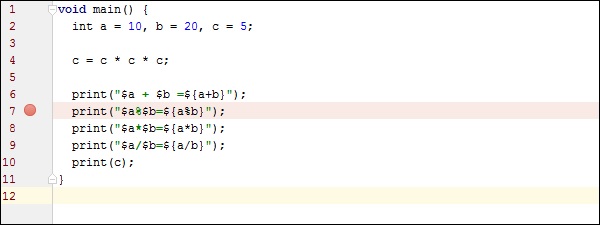
                     print("$a%$b = ${a%b}");  // Add a break point here 
                     print("$a*$b = ${a*b}"); 
                     print("$a/$b = ${a/b}"); 
                     print(c); 
                  }

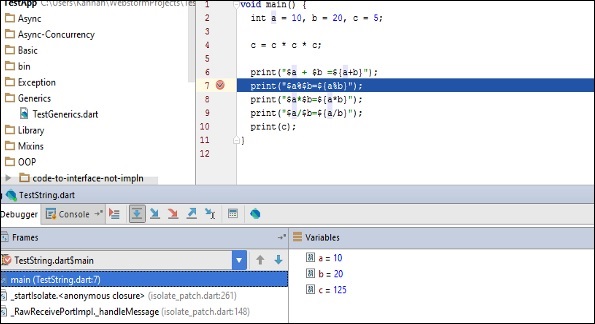
                  To add a breakpoint, click on the left margin to. In the figure given below, line number 7 has a break point.

                  Add a Breakpoint

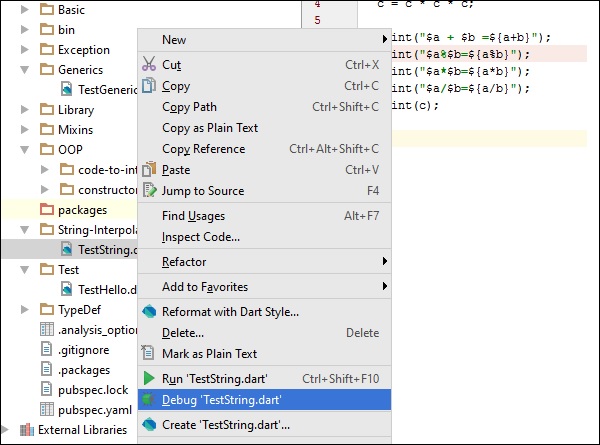
                  Run the program in debug mode. In the project explorer right click on the dart program in our case TestString.dart.

                  Debug TestString

                  Once the program runs in debug mode, you will get the Debugger window as shown in the following screenshot. The variables tab shows the values of variables in the current context. You can add watchers for specific variables and listen to that values changes using watches window.

                  Add Watchers

                  Step Into (F7) arrow icon on debug menu helps to Executes code one statement at a time. If main methods call a subroutine, then this will go into the subroutine code also.

                  Step over (F8): It is similar to Step Into. The difference in use occurs when the current statement contains a call to a subroutine. If the main method calls a subroutine, step over will not drill into the subroutine. it will skip the subroutine.

                  Step Out (Shift+F8): Executes the remaining lines of a function in which the current execution point lies. The next statement displayed is the statement following the subroutine call.

                  After running in debug mode, the program gives the following output −

                  10 + 20 = 30 
                  10 % 20 = 10 
                  10 * 20 = 200 
                  10 / 20 = 0.5 
                  125