Author: saqibkhan

  • Nonlinear Least Square

    When modeling real world data for regression analysis, we observe that it is rarely the case that the equation of the model is a linear equation giving a linear graph. Most of the time, the equation of the model of real world data involves mathematical functions of higher degree like an exponent of 3 or a sin function. In such a scenario, the plot of the model gives a curve rather than a line. The goal of both linear and non-linear regression is to adjust the values of the model’s parameters to find the line or curve that comes closest to your data. On finding these values we will be able to estimate the response variable with good accuracy.

    In Least Square regression, we establish a regression model in which the sum of the squares of the vertical distances of different points from the regression curve is minimized. We generally start with a defined model and assume some values for the coefficients. We then apply the nls() function of R to get the more accurate values along with the confidence intervals.

    Syntax

    The basic syntax for creating a nonlinear least square test in R is −

    nls(formula, data, start)
    

    Following is the description of the parameters used −

    • formula is a nonlinear model formula including variables and parameters.
    • data is a data frame used to evaluate the variables in the formula.
    • start is a named list or named numeric vector of starting estimates.

    Example

    We will consider a nonlinear model with assumption of initial values of its coefficients. Next we will see what is the confidence intervals of these assumed values so that we can judge how well these values fir into the model.

    So let’s consider the below equation for this purpose −

    a = b1*x^2+b2
    

    Let’s assume the initial coefficients to be 1 and 3 and fit these values into nls() function.

    xvalues <- c(1.6,2.1,2,2.23,3.71,3.25,3.4,3.86,1.19,2.21)
    yvalues <- c(5.19,7.43,6.94,8.11,18.75,14.88,16.06,19.12,3.21,7.58)
    
    # Give the chart file a name.
    png(file = "nls.png")
    
    
    # Plot these values.
    plot(xvalues,yvalues)
    
    
    # Take the assumed values and fit into the model.
    model <- nls(yvalues ~ b1*xvalues^2+b2,start = list(b1 = 1,b2 = 3))
    
    # Plot the chart with new data by fitting it to a prediction from 100 data points.
    new.data <- data.frame(xvalues = seq(min(xvalues),max(xvalues),len = 100))
    lines(new.data$xvalues,predict(model,newdata = new.data))
    
    # Save the file.
    dev.off()
    
    # Get the sum of the squared residuals.
    print(sum(resid(model)^2))
    
    # Get the confidence intervals on the chosen values of the coefficients.
    print(confint(model))

    When we execute the above code, it produces the following result −

    [1] 1.081935
    Waiting for profiling to be done...
    
       2.5%    97.5%
    b1 1.137708 1.253135 b2 1.497364 2.496484
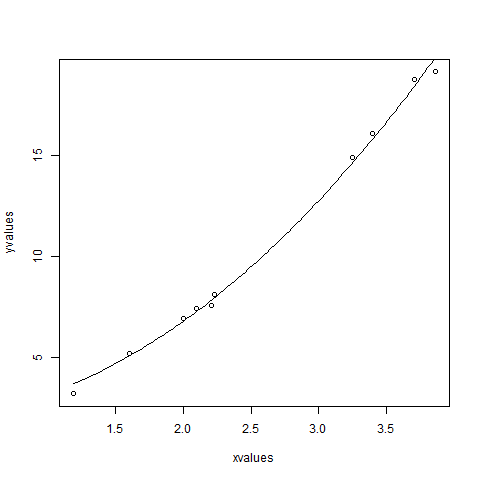
    Non Linear least square R

    We can conclude that the value of b1 is more close to 1 while the value of b2 is more close to 2 and not 3.
  • Advancements in Visualization and Data Handling

    • ggplot2 (2005): Created by Hadley Wickham, ggplot2 revolutionized data visualization in R. It introduced a powerful and flexible grammar of graphics, enabling users to create complex visualizations easily.
    • Tidyverse (2016): Hadley Wickham also led the development of the Tidyverse, a collection of R packages designed for data science. It emphasizes a cohesive philosophy and consistent syntax, making data manipulation and visualization more intuitive.
  • Popularization and Community Engagement

    • Conferences and Workshops: The R community organized its first major conference, useR!, in 2004, which has become an annual event. These gatherings fostered collaboration and knowledge sharing.
    • Educational Resources: Many universities began incorporating R into their curricula, further boosting its popularity. Numerous online resources, tutorials, and books emerged, making R more accessible.
  • Milestones in the 2000s

    • R Foundation (2002): The R Foundation for Statistical Computing was established to support the development of R. This marked a formalization of the R community and its governance.
    • CRAN Expansion: By the mid-2000s, CRAN had grown significantly, hosting thousands of packages contributed by users around the world. This library became a cornerstone for R’s functionality.
  • Early Development and Features

    • S Language Influence: R’s syntax and structure were heavily influenced by the S language, which was designed for statistical computing. This heritage is evident in R’s data structures, such as vectors, lists, and data frames, making it intuitive for statisticians.
    • Functional Programming: R supports functional programming paradigms, allowing users to write concise and expressive code. This feature has attracted programmers from different backgrounds.
  • Popularity Surge (2010-present)

    • Data Science Boom: With the rise of data science, R became increasingly popular for data analysis, visualization, and statistical modeling.
    • Community: A vibrant community of users and contributors developed, enhancing R’s functionality and resources through packages like ggplot2, dplyr, and tidyverse.
    • Integration: R has seen improved integration with other programming languages and tools, such as Python and SQL, further broadening its application.
  • Time Series Analysis

    Time series is a series of data points in which each data point is associated with a timestamp. A simple example is the price of a stock in the stock market at different points of time on a given day. Another example is the amount of rainfall in a region at different months of the year. R language uses many functions to create, manipulate and plot the time series data. The data for the time series is stored in an R object called time-series object. It is also a R data object like a vector or data frame.

    The time series object is created by using the ts() function.

    Syntax

    The basic syntax for ts() function in time series analysis is −

    timeseries.object.name <-  ts(data, start, end, frequency)
    

    Following is the description of the parameters used −

    • data is a vector or matrix containing the values used in the time series.
    • start specifies the start time for the first observation in time series.
    • end specifies the end time for the last observation in time series.
    • frequency specifies the number of observations per unit time.

    Except the parameter “data” all other parameters are optional.

    Example

    Consider the annual rainfall details at a place starting from January 2012. We create an R time series object for a period of 12 months and plot it.

    Live Demo

    # Get the data points in form of a R vector.
    rainfall <- c(799,1174.8,865.1,1334.6,635.4,918.5,685.5,998.6,784.2,985,882.8,1071)
    
    # Convert it to a time series object.
    rainfall.timeseries <- ts(rainfall,start = c(2012,1),frequency = 12)
    
    # Print the timeseries data.
    print(rainfall.timeseries)
    
    # Give the chart file a name.
    png(file = "rainfall.png")
    
    # Plot a graph of the time series.
    plot(rainfall.timeseries)
    
    # Save the file.
    dev.off()

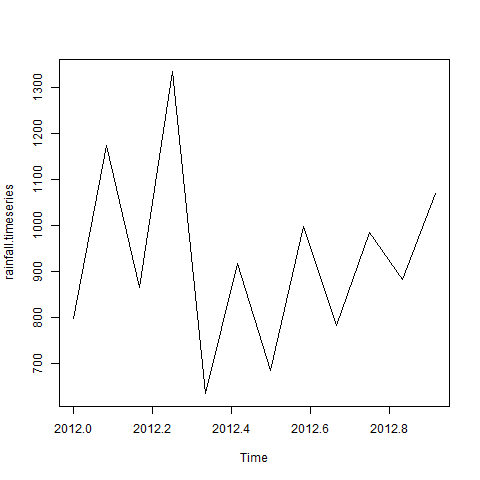
    When we execute the above code, it produces the following result and chart −

    Jan    Feb    Mar    Apr    May     Jun    Jul    Aug    Sep
    2012  799.0  1174.8  865.1  1334.6  635.4  918.5  685.5  998.6  784.2
    
        Oct    Nov    Dec
    2012 985.0 882.8 1071.0

    The Time series chart −

    Time Series using R

    Different Time Intervals

    The value of the frequency parameter in the ts() function decides the time intervals at which the data points are measured. A value of 12 indicates that the time series is for 12 months. Other values and its meaning is as below −

    • frequency = 12 pegs the data points for every month of a year.
    • frequency = 4 pegs the data points for every quarter of a year.
    • frequency = 6 pegs the data points for every 10 minutes of an hour.
    • frequency = 24*6 pegs the data points for every 10 minutes of a day.

    Multiple Time Series

    We can plot multiple time series in one chart by combining both the series into a matrix.

    # Get the data points in form of a R vector.
    rainfall1 <- c(799,1174.8,865.1,1334.6,635.4,918.5,685.5,998.6,784.2,985,882.8,1071)
    rainfall2 <- 
    
           c(655,1306.9,1323.4,1172.2,562.2,824,822.4,1265.5,799.6,1105.6,1106.7,1337.8)
    # Convert them to a matrix. combined.rainfall <- matrix(c(rainfall1,rainfall2),nrow = 12) # Convert it to a time series object. rainfall.timeseries <- ts(combined.rainfall,start = c(2012,1),frequency = 12) # Print the timeseries data. print(rainfall.timeseries) # Give the chart file a name. png(file = "rainfall_combined.png") # Plot a graph of the time series. plot(rainfall.timeseries, main = "Multiple Time Series") # Save the file. dev.off()

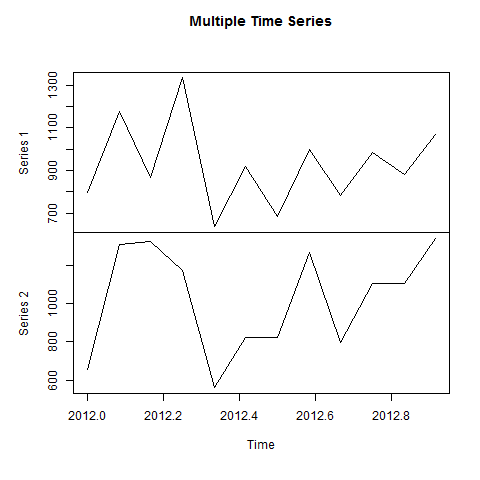
    When we execute the above code, it produces the following result and chart −

               Series 1  Series 2
    Jan 2012    799.0    655.0
    Feb 2012   1174.8   1306.9
    Mar 2012    865.1   1323.4
    Apr 2012   1334.6   1172.2
    May 2012    635.4    562.2
    Jun 2012    918.5    824.0
    Jul 2012    685.5    822.4
    Aug 2012    998.6   1265.5
    Sep 2012    784.2    799.6
    Oct 2012    985.0   1105.6
    Nov 2012    882.8   1106.7
    Dec 2012   1071.0   1337.8
    

    The Multiple Time series chart −

    Combined Time series is using R
  • Growth (2000-2010)

    • CRAN: The Comprehensive R Archive Network (CRAN) was established, providing a central repository for R packages, which expanded the language’s capabilities significantly.
    • Packages: The availability of numerous packages helped R gain traction among statisticians and data scientists.
  • Development (1995-2000)

    • First Release: The first version of R was released in 1995. It was initially intended as a programming language for statistical computing and data analysis.
    • Open Source: R was developed as an open-source project, allowing users to modify and extend the software.
  • Origins (1992)

    • Creation: R was created by Ross Ihaka and Robert Gentleman at the University of Auckland, New Zealand. It was inspired by the S programming language, which was developed at Bell Laboratories in the 1970s and 1980s.