Author: saqibkhan

  • Arithmetic Operators

    Python Arithmetic Operators

    Python arithmetic operators are used to perform mathematical operations such as addition, subtraction, multiplication, division, and more on numbers. Arithmetic operators are binary operators in the sense they operate on two operands. Python fully supports mixed arithmetic. That is, the two operands can be of two different number types. In such a situation.

    Types of Arithmetic Operators

    Following is the table which lists down all the arithmetic operators available in Python:

    OperatorNameExample
    +Additiona + b = 30
    Subtractiona b = -10
    *Multiplicationa * b = 200
    /Divisionb / a = 2
    %Modulusb % a = 0
    **Exponenta**b =10**20
    //Floor Division9//2 = 4

    Let us study these operators with examples.

    Addition Operator

    The addition operator represents by + symbol. It is a basic arithmetic operator. It adds the two numeric operands on the either side and returns the addition result.

    Example to add two integer numbers

    In the following example, the two integer variables are the operands for the “+” operator.

    a=10
    b=20print("Addition of two integers")print("a =",a,"b =",b,"addition =",a+b)

    It will produce the following output −

    Addition of two integers
    a = 10 b = 20 addition = 30
    

    Example to add integer and float numbers

    Addition of integer and float results in a float.

    a=10
    b=20.5print("Addition of integer and float")print("a =",a,"b =",b,"addition =",a+b)

    It will produce the following output −

    Addition of integer and float
    a = 10 b = 20.5 addition = 30.5
    

    Example to add two complex numbers

    The result of adding float to complex is a complex number.

    a=10+5j
    b=20.5print("Addition of complex and float")print("a=",a,"b=",b,"addition=",a+b)

    It will produce the following output −

    Addition of complex and float
    a= (10+5j) b= 20.5 addition= (30.5+5j)
    

    Subtraction Operator

    The subtraction operator represents by – symbol. It subtracts the second operand from the first. The resultant number is negative if the second operand is larger.

    Example to subtract two integer numbers

    First example shows subtraction of two integers.

    First example shows subtraction of two integers.

    a=10
    b=20print("Subtraction of two integers:")print("a =",a,"b =",b,"a-b =",a-b)print("a =",a,"b =",b,"b-a =",b-a)

    Result −

    Subtraction of two integers
    a = 10 b = 20 a-b = -10
    a = 10 b = 20 b-a = 10
    

    Example to subtract integer and float numbers

    Subtraction of an integer and a float follows the same principle.

    a=10
    b=20.5print("subtraction of integer and float")print("a=",a,"b=",b,"a-b=",a-b)print("a=",a,"b=",b,"b-a=",b-a)

    It will produce the following output −

    subtraction of integer and float
    a= 10 b= 20.5 a-b= -10.5
    a= 10 b= 20.5 b-a= 10.5
    

    Example to subtract complex numbers

    In the subtraction involving a complex and a float, real component is involved in the operation.

    a=10+5j
    b=20.5print("subtraction of complex and float")print("a=",a,"b=",b,"a-b=",a-b)print("a=",a,"b=",b,"b-a=",b-a)

    It will produce the following output −

    subtraction of complex and float
    a= (10+5j) b= 20.5 a-b= (-10.5+5j)
    a= (10+5j) b= 20.5 b-a= (10.5-5j)
    

    Multiplication Operator

    The * (asterisk) symbol is defined as a multiplication operator in Python (as in many languages). It returns the product of the two operands on its either side. If any of the operands negative, the result is also negative. If both are negative, the result is positive. Changing the order of operands doesn’t change the result

    Example to multiply two integers

    a=10
    b=20print("Multiplication of two integers")print("a =",a,"b =",b,"a*b =",a*b)

    It will produce the following output −

    Multiplication of two integers
    a = 10 b = 20 a*b = 200
    

    Example to multiply integer and float numbers

    In multiplication, a float operand may have a standard decimal point notation, or a scientific notation.

    a=10
    b=20.5print("Multiplication of integer and float")print("a=",a,"b=",b,"a*b=",a*b)
    
    a=-5.55
    b=6.75E-3print("Multiplication of float and float")print("a =",a,"b =",b,"a*b =",a*b)

    It will produce the following output −

    Multiplication of integer and float
    a = 10 b = 20.5 a-b = -10.5
    Multiplication of float and float
    a = -5.55 b = 0.00675 a*b = -0.037462499999999996
    

    Example to multiply complex numbers

    For the multiplication operation involving one complex operand, the other operand multiplies both the real part and imaginary part.

    a=10+5j
    b=20.5print("Multiplication of complex and float")print("a =",a,"b =",b,"a*b =",a*b)

    It will produce the following output −

    Multiplication of complex and float
    a = (10+5j) b = 20.5 a*b = (205+102.5j)
    

    Division Operator

    The “/” symbol is usually called as forward slash. The result of division operator is numerator (left operand) divided by denominator (right operand). The resultant number is negative if any of the operands is negative. Since infinity cannot be stored in the memory, Python raises ZeroDivisionError if the denominator is 0.

    The result of division operator in Python is always a float, even if both operands are integers.

    Example to divide two numbers

    a=10
    b=20print("Division of two integers")print("a=",a,"b=",b,"a/b=",a/b)print("a=",a,"b=",b,"b/a=",b/a)

    It will produce the following output −

    Division of two integers
    a= 10 b= 20 a/b= 0.5
    a= 10 b= 20 b/a= 2.0
    

    Example to divide two float numbers

    In Division, a float operand may have a standard decimal point notation, or a scientific notation.

    a=10
    b=-20.5print("Division of integer and float")print("a=",a,"b=",b,"a/b=",a/b)
    a=-2.50
    b=1.25E2print("Division of float and float")print("a=",a,"b=",b,"a/b=",a/b)

    It will produce the following output −

    Division of integer and float
    a= 10 b= -20.5 a/b= -0.4878048780487805
    Division of float and float
    a= -2.5 b= 125.0 a/b= -0.02
    

    Example to divide complex numbers

    When one of the operands is a complex number, division between the other operand and both parts of complex number (real and imaginary) object takes place.

    a=7.5+7.5j
    b=2.5print("Division of complex and float")print("a =",a,"b =",b,"a/b =",a/b)print("a =",a,"b =",b,"b/a =",b/a)

    It will produce the following output −

    Division of complex and float
    a = (7.5+7.5j) b = 2.5 a/b = (3+3j)
    a = (7.5+7.5j) b = 2.5 b/a = (0.16666666666666666-0.16666666666666666j)
    

    If the numerator is 0, the result of division is always 0 except when denominator is 0, in which case, Python raises ZeroDivisionError wirh Division by Zero error message.

    a=0
    b=2.5print("a=",a,"b=",b,"a/b=",a/b)print("a=",a,"b=",b,"b/a=",b/a)

    It will produce the following output −

    a= 0 b= 2.5 a/b= 0.0
    Traceback (most recent call last):
      File "C:\Users\mlath\examples\example.py", line 20, in <module>
    
     print ("a=",a,"b=",b,"b/a=",b/a)
                                 ~^~
    ZeroDivisionError: float division by zero

    Modulus Operator

    Python defines the “%” symbol, which is known aa Percent symbol, as Modulus (or modulo) operator. It returns the remainder after the denominator divides the numerator. It can also be called Remainder operator. The result of the modulus operator is the number that remains after the integer quotient. To give an example, when 10 is divided by 3, the quotient is 3 and remainder is 1. Hence, 10%3 (normally pronounced as 10 mod 3) results in 1.

    Example for modulus operation on integers

    If both the operands are integer, the modulus value is an integer. If numerator is completely divisible, remainder is 0. If numerator is smaller than denominator, modulus is equal to the numerator. If denominator is 0, Python raises ZeroDivisionError.
  • Operators

    Python Operators

    Python operators are special symbols used to perform specific operations on one or more operands. The variables, values, or expressions can be used as operands. For example, Python’s addition operator (+) is used to perform addition operations on two variables, values, or expressions.

    The following are some of the terms related to Python operators:

    • Unary operators: Python operators that require one operand to perform a specific operation are known as unary operators.
    • Binary operators: Python operators that require two operands to perform a specific operation are known as binary operators.
    • Operands: Variables, values, or expressions that are used with the operator to perform a specific operation.

    Types of Python Operators

    Python operators are categorized in the following categories −

    Let us have a look at all the operators one by one.

    Python Arithmetic Operators

    Python Arithmetic operators are used to perform basic mathematical operations such as addition, subtraction, multiplication, etc.

    The following table contains all arithmetic operators with their symbols, names, and examples (assume that the values of a and b are 10 and 20, respectively) −

    OperatorNameExample
    +Additiona + b = 30
    Subtractiona b = -10
    *Multiplicationa * b = 200
    /Divisionb / a = 2
    %Modulusb % a = 0
    **Exponenta**b =10**20
    //Floor Division9//2 = 4

    Example of Python Arithmetic Operators

    Example of Python Arithmetic Operators

    a =21
    b =10
    c =0
    
    c = a + b
    print("a: {} b: {} a+b: {}".format(a,b,c))
    
    c = a - b
    print("a: {} b: {} a-b: {}".format(a,b,c))
    
    c = a * b
    print("a: {} b: {} a*b: {}".format(a,b,c))
    
    c = a / b
    print("a: {} b: {} a/b: {}".format(a,b,c))
    
    c = a % b
    print("a: {} b: {} a%b: {}".format(a,b,c))
    
    a =2
    b =3
    c = a**b 
    print("a: {} b: {} a**b: {}".format(a,b,c))
    
    a =10
    b =5
    c = a//b 
    print("a: {} b: {} a//b: {}".format(a,b,c))

    Output

    a: 21 b: 10 a+b: 31
    a: 21 b: 10 a-b: 11
    a: 21 b: 10 a*b: 210
    a: 21 b: 10 a/b: 2.1
    a: 21 b: 10 a%b: 1
    a: 2 b: 3 a**b: 8
    a: 10 b: 5 a//b: 2
    

    Python Comparison Operators

    Python Comparison operators compare the values on either side of them and decide the relation among them. They are also called Relational operators.

    The following table contains all comparison operators with their symbols, names, and examples (assume that the values of a and b are 10 and 20, respectively) −

    OperatorNameExample
    ==Equal(a == b) is not true.
    !=Not equal(a != b) is true.
    >Greater than(a > b) is not true.
    <Less than(a < b) is true.
    >=Greater than or equal to(a >= b) is not true.
    <=Less than or equal to(a <= b) is true.

    Example of Python Comparison Operators

    a =21
    b =10if( a == b ):print("Line 1 - a is equal to b")else:print("Line 1 - a is not equal to b")if( a != b ):print("Line 2 - a is not equal to b")else:print("Line 2 - a is equal to b")if( a < b ):print("Line 3 - a is less than b")else:print("Line 3 - a is not less than b")if( a > b ):print("Line 4 - a is greater than b")else:print("Line 4 - a is not greater than b")
    
    a,b=b,a #values of a and b swapped. a becomes 10, b becomes 21if( a <= b ):print("Line 5 - a is either less than or equal to  b")else:print("Line 5 - a is neither less than nor equal to  b")if( b >= a ):print("Line 6 - b is either greater than  or equal to b")else:print("Line 6 - b is neither greater than  nor equal to b")

    Output

    Line 1 - a is not equal to b
    Line 2 - a is not equal to b
    Line 3 - a is not less than b
    Line 4 - a is greater than b
    Line 5 - a is either less than or equal to  b
    Line 6 - b is either greater than  or equal to b
    

    Python Assignment Operators

    Python Assignment operators are used to assign values to variables. Following is a table which shows all Python assignment operators.

    The following table contains all assignment operators with their symbols, names, and examples −

    OperatorExampleSame As
    =a = 10a = 10
    +=a += 30a = a + 30
    -=a -= 15a = a – 15
    *=a *= 10a = a * 10
    /=a /= 5a = a / 5
    %=a %= 5a = a % 5
    **=a **= 4a = a ** 4
    //=a //= 5a = a // 5
    &=a &= 5a = a & 5
    |=a |= 5a = a | 5
    ^=a ^= 5a = a ^ 5
    >>=a >>= 5a = a >> 5
    <<=a <<= 5a = a << 5

    Example of Python Assignment Operators

    a =21
    b =10
    c =0print("a: {} b: {} c : {}".format(a,b,c))
    c = a + b
    print("a: {}  c = a + b: {}".format(a,c))
    
    c += a
    print("a: {} c += a: {}".format(a,c))
    
    c *= a
    print("a: {} c *= a: {}".format(a,c))
    
    c /= a 
    print("a: {} c /= a : {}".format(a,c))
    
    c  =2print("a: {} b: {} c : {}".format(a,b,c))
    c %= a
    print("a: {} c %= a: {}".format(a,c))
    
    c **= a
    print("a: {} c **= a: {}".format(a,c))
    
    c //= a
    print("a: {} c //= a: {}".format(a,c))

    Output

    a: 21 b: 10 c : 0
    a: 21  c = a + b: 31
    a: 21 c += a: 52
    a: 21 c *= a: 1092
    a: 21 c /= a : 52.0
    a: 21 b: 10 c : 2
    a: 21 c %= a: 2
    a: 21 c **= a: 2097152
    a: 21 c //= a: 99864
    

    Python Bitwise Operators

    Python Bitwise operator works on bits and performs bit by bit operation. These operators are used to compare binary numbers.

    The following table contains all bitwise operators with their symbols, names, and examples −

    OperatorNameExample
    &ANDa & b
    |ORa | b
    ^XORa ^ b
    ~NOT~a
    <<Zero fill left shifta << 3
    >>Signed right shifta >> 3

    Example of Python Bitwise Operators

    a =20            
    b =10print('a=',a,':',bin(a),'b=',b,':',bin(b))
    c =0
    
    c = a & b;print("result of AND is ", c,':',bin(c))
    
    c = a | b;print("result of OR is ", c,':',bin(c))
    
    c = a ^ b;print("result of EXOR is ", c,':',bin(c))
    
    c =~a;print("result of COMPLEMENT is ", c,':',bin(c))
    
    c = a <<2;print("result of LEFT SHIFT is ", c,':',bin(c))
    
    c = a >>2;print("result of RIGHT SHIFT is ", c,':',bin(c))

    Output

    a= 20 : 0b10100 b= 10 : 0b1010
    result of AND is  0 : 0b0
    result of OR is  30 : 0b11110
    result of EXOR is  30 : 0b11110
    result of COMPLEMENT is  -21 : -0b10101
    result of LEFT SHIFT is  80 : 0b1010000
    result of RIGHT SHIFT is  5 : 0b101
    

    Python Logical Operators

    Python logical operators are used to combile two or more conditions and check the final result. There are following logical operators supported by Python language. Assume variable a holds 10 and variable b holds 20 then

    The following table contains all logical operators with their symbols, names, and examples −

    OperatorNameExample
    andANDa and b
    orORa or b
    notNOTnot(a)

    Example of Python Logical Operators

    var =5print(var >3and var <10)print(var >3or var <4)print(not(var >3and var <10))

    Output

    True
    True
    False
    

    Python Membership Operators

    Python’s membership operators test for membership in a sequence, such as strings, lists, or tuples.

    There are two membership operators as explained below −

    OperatorDescriptionExample
    inReturns True if it finds a variable in the specified sequence, false otherwise.a in b
    not inreturns True if it does not finds a variable in the specified sequence and false otherwise.a not in b

    Example of Python Membership Operators

    a =10
    b =20list=[1,2,3,4,5]print("a:", a,"b:", b,"list:",list)if( a inlist):print("a is present in the given list")else:print("a is not present in the given list")if( b notinlist):print("b is not present in the given list")else:print("b is present in the given list")
    
    c=b/a
    print("c:", c,"list:",list)if( c inlist):print("c is available in the given list")else:print("c is not available in the given list")

    Output

    a: 10 b: 20 list: [1, 2, 3, 4, 5]
    a is not present in the given list
    b is not present in the given list
    c: 2.0 list: [1, 2, 3, 4, 5]
    c is available in the given list
    

    Python Identity Operators

    Python identity operators compare the memory locations of two objects.

    There are two Identity operators explained below −

    OperatorDescriptionExample
    isReturns True if both variables are the same object and false otherwise.a is b
    is notReturns True if both variables are not the same object and false otherwise.a is not b

    Example of Python Identity Operators

    a =[1,2,3,4,5]
    b =[1,2,3,4,5]
    c = a
    
    print(a is c)print(a is b)print(a isnot c)print(a isnot b)

    Output

    True
    False
    False
    True
    

    Python Operators Precedence

    Operators precedence decides the order of the evaluation in which an operator is evaluated. Python operators have different levels of precedence. The following table contains the list of operators having highest to lowest precedence −

    The following table lists all operators from highest precedence to lowest.

    Sr.No.Operator & Description
    1**Exponentiation (raise to the power)
    2~ + –Complement, unary plus and minus (method names for the last two are +@ and -@)
    3* / % //Multiply, divide, modulo and floor division
    4+ –Addition and subtraction
    5>> <<Right and left bitwise shift
    6&Bitwise ‘AND’
    7^ |Bitwise exclusive OR' and regular OR’
    8<= < > >=Comparison operators
    9<> == !=Equality operators
    10= %= /= //= -= += *= **=Assignment operators
    11is is notIdentity operators
    12in not inMembership operators
    13not or andLogical operators

    Read more about the Python operators precedence here: Python operators precedence

  • Literals

    What are Python Literals?

    Python literals or constants are the notation for representing a fixed value in source code. In contrast to variables, literals (123, 4.3, “Hello”) are static values or you can say constants which do not change throughout the operation of the program or application. For example, in the following assignment statement.

    x =10

    Here 10 is a literal as numeric value representing 10, which is directly stored in memory. However,

    y = x*2

    Here, even if the expression evaluates to 20, it is not literally included in source code. You can also declare an int object with built-in int() function. However, this is also an indirect way of instantiation and not with literal.

    x =int(10)

    Different Types of Python Literals
    Python provides following literals which will be explained this tutorial:

    Integer Literal
    Float Literal
    Complex Literal
    String Literal
    List Literal
    Tuple Literal
    Dictionary Literal
    Python Integer Literal
    Any representation involving only the digit symbols (0 to 9) creates an object of int type. The object so declared may be referred by a variable using an assignment operator.

    Integer literals consist three different types of different literal values decimal, octal, and hexadecimal literals.

    1. Decimal Literal
    Decimal literals represent the signed or unsigned numbers. Digitals from 0 to 9 are used to create a decimal literal value.

    Look at the below statement assigning decimal literal to the variable −

    x = 10
    y = -25
    z = 0
    2. Octal Literal
    Python allows an integer to be represented as an octal number or a hexadecimal number. A numeric representation with only eight digit symbols (0 to 7) but prefixed by 0o or 0O is an octal number in Python.

    Look at the below statement assigning octal literal to the variable −

    x = 0O34
    3. Hexadecimal Literal
    Similarly, a series of hexadecimal symbols (0 to 9 and a to f), prefixed by 0x or 0X represents an integer in Hexedecimal form in Python.

    Look at the below statement assigning hexadecimal literal to the variable −

    x = 0X1C
    However, it may be noted that, even if you use octal or hexadecimal literal notation, Python internally treats them as of int type.

    Example
    # Using Octal notation
    x = 0O34
    print ("0O34 in octal is", x, type(x))
    # Using Hexadecimal notation
    x = 0X1c
    print ("0X1c in Hexadecimal is", x, type(x))
    When you run this code, it will produce the following output −

    0O34 in octal is 28 <class 'int'>
    0X1c in Hexadecimal is 28 <class 'int'>
    Python Float Literal
    A floating point number consists of an integral part and a fractional part. Conventionally, a decimal point symbol (.) separates these two parts in a literal representation of a float. For example,

    Example of Float Literal
    x = 25.55
    y = 0.05
    z = -12.2345
    For a floating point number which is too large or too small, where number of digits before or after decimal point is more, a scientific notation is used for a compact literal representation. The symbol E or e followed by positive or negative integer, follows after the integer part.

    Example of Float Scientific Notation Literal
    For example, a number 1.23E05 is equivalent to 123000.00. Similarly, 1.23e-2 is equivalent to 0.0123
  • Unicode System

    What is Unicode System?

    Software applications often require to display messages output in a variety in different languages such as in English, French, Japanese, Hebrew, or Hindi. Python’s string type uses the Unicode Standard for representing characters. It makes the program possible to work with all these different possible characters.

    A character is the smallest possible component of a text. ‘A’, ‘B’, ‘C’, etc., are all different characters. So are ” and ”. A unicode string is a sequence of code points, which are numbers from 0 through 0x10FFFF (1,114,111 decimal). This sequence of code points needs to be represented in memory as a set of code units, and code units are then mapped to 8-bit bytes.

    Character Encoding

    A sequence of code points is represented in memory as a set of code units, mapped to 8-bit bytes. The rules for translating a Unicode string into a sequence of bytes are called a character encoding.

    Three types of encodings are present, UTF-8, UTF-16 and UTF-32. UTF stands for Unicode Transformation Format.

    Python’s Unicode Support

    Python 3.0 onwards has built-in support for Unicode. The str type contains Unicode characters, hence any string created using single, double or the triple-quoted string syntax is stored as Unicode. The default encoding for Python source code is UTF-8.

    Hence, string may contain literal representation of a Unicode character (3/4) or its Unicode value (\u00BE).

    Example

    var ="3/4"print(var)
    var ="\u00BE"print(var)

    This above code will produce the following output −

    3/4


    Example

    In the following example, a string ’10’ is stored using the Unicode values of 1 and 0 which are \u0031 and u0030 respectively.

    var ="\u0031\u0030"print(var)

    It will produce the following output −

    10
    

    Strings display the text in a human-readable format, and bytes store the characters as binary data. Encoding converts data from a character string to a series of bytes. Decoding translates the bytes back to human-readable characters and symbols. It is important not

    to confuse these two methods. encode is a string method, while decode is a method of the Python byte object.

    Example

    In the following example, we have a string variable that consists of ASCII characters. ASCII is a subset of Unicode character set. The encode() method is used to convert it into a bytes object.

    string ="Hello"
    tobytes = string.encode('utf-8')print(tobytes)
    string = tobytes.decode('utf-8')print(string)

    The decode() method converts byte object back to the str object. The encodeing method used is utf-8.

    b'Hello'
    Hello
    

    Example

    In the following example, the Rupee symbol (₹) is stored in the variable using its Unicode value. We convert the string to bytes and back to str.

    string ="\u20B9"print(string)
    tobytes = string.encode('utf-8')print(tobytes)
    string = tobytes.decode('utf-8')print(string)

    When you execute the above code, it will produce the following output −


    b'\xe2\x82\xb9'
  • Type Casting

    Python Type Casting

    From a programming point of view, a type casting refers to converting an object of one type into another. Here, we shall learn about type casting in Python Programming.

    Python Type Casting is a process in which we convert a literal of one data type to another data type. Python supports two types of casting − implicit and explicit.

    In Python there are different data types, such as numbers, sequences, mappings etc. There may be a situation where, you have the available data of one type but you want to use it in another form. For example, the user has input a string but you want to use it as a number. Python’s type casting mechanism let you do that.

    Python Implicit Casting

    When any language compiler/interpreter automatically converts object of one type into other, it is called automatic or implicit casting. Python is a strongly typed language. It doesn’t allow automatic type conversion between unrelated data types. For example, a string cannot be converted to any number type. However, an integer can be cast into a float. Other languages such as JavaScript is a weakly typed language, where an integer is coerced into a string for concatenation.

    Note that memory requirement of each data type is different. For example, an integer object in Python occupies 4 bytes of memory, while a float object needs 8 bytes because of its fractional part. Hence, Python interpreter doesn’t automatically convert a float to int, because it will result in loss of data. On the other hand, int can be easily converted into float by setting its fractional part to 0.

    Implicit int to float casting takes place when any arithmetic operation on int and float operands is done.

    Consider we have an ,int and one float variable

    <<< a=10# int object<<< b=10.5# float object

    To perform their addition, 10 − the integer object is upgraded to 10.0. It is a float, but equivalent to its earlier numeric value. Now we can perform addition of two floats.

    <<< c=a+b
    <<<print(c)20.5

    In implicit type casting, a Python object with lesser byte size is upgraded to match the bigger byte size of other object in the operation. For example, a Boolean object is first upgraded to int and then to float, before the addition with a floating point object. In the following example, we try to add a Boolean object in a float, pleae note that True is equal to 1, and False is equal to 0.

    a=True;
    b=10.5;
    c=a+b;print(c);

    This will produce the following result:

    11.5
    

    Python Explicit Casting

    Although automatic or implicit casting is limited to int to float conversion, you can use Python’s built-in functions int(), float() and str() to perform the explicit conversions such as string to integer.

    Python int() Function

    Python’s built-in int() function converts an integer literal to an integer object, a float to integer, and a string to integer if the string itself has a valid integer literal representation.

    Using int() with an int object as argument is equivalent to declaring an int object directly.

    <<< a =int(10)<<< a
    10

    is same as −

    <<< a =10<<< a
    10<<<type(a)<class 'int>

    If the argument to int() function is a float object or floating point expression, it returns an int object. For example −

    <<< a =int(10.5)#converts a float object to int<<< a
    10<<< a =int(2*3.14)#expression results float, is converted to int<<< a
    6<<<type(a)<class'int'>

    The int() function also returns integer 1 if a Boolean object is given as argument.

    <<< a=int(True)<<< a
    1<<<type(a)<class'int'>

    String to Integer

    The int() function returns an integer from a string object, only if it contains a valid integer representation.

    <<< a =int("100")<<< a
    100<<<type(a)<class'int'><<< a =("10"+"01")<<< a =int("10"+"01")<<< a
    1001<<<type(a)<class'int'>

    However, if the string contains a non-integer representation, Python raises ValueError.

    <<< a =int("10.5")
    Traceback (most recent call last):
       File "<stdin>", line 1,in<module>
    ValueError: invalid literal forint()with base 10:'10.5'<<< a =int("Hello World")
    Traceback (most recent call last):
       File "<stdin>", line 1,in<module>
    ValueError: invalid literal forint()with base 10:'Hello World'

    The int() function also returns integer from binary, octal and hexa-decimal string. For this, the function needs a base parameter which must be 2, 8 or 16 respectively. The string should have a valid binary/octal/Hexa-decimal representation.

    Binary String to Integer

    The string should be made up of 1 and 0 only, and the base should be 2.

    <<< a =int("110011",2)<<< a
    51

    The Decimal equivalent of binary number 110011 is 51.

    Octal String to Integer

    The string should only contain 0 to 7 digits, and the base should be 8.

    <<< a =int("20",8)<<< a
    16

    The Decimal equivalent of octal 20 is 16.

    Hexa-Decimal String to Integer

    The string should contain only the Hexadecimal symbols i.e., 0-9 and A, B, C, D, E or F. Base should be 16.

    <<< a =int("2A9",16)<<< a
    681

    Decimal equivalent of Hexadecimal 2A9 is 681. You can easily verify these conversions with calculator app in Windows, Ubuntu or Smartphones.

    Following is an example to convert number, float and string into integer data type:

    a =int(1)# a will be 1
    b =int(2.2)# b will be 2
    c =int("3")# c will be 3print(a)print(b)print(c)

    This produce the following result −

    1
    2
    3

    Python float() Function

    The float() is a built-in function in Python. It returns a float object if the argument is a float literal, integer or a string with valid floating point representation.

    Using float() with an float object as argument is equivalent to declaring a float object directly

    <<< a =float(9.99)<<< a
    9.99<<<type(a)<class'float'>

    is same as −

    <<< a =9.99<<< a
    9.99<<<type(a)<class'float'>

    If the argument to float() function is an integer, the returned value is a floating point with fractional part set to 0.

    <<< a =float(100)<<< a
    100.0<<<type(a)<class'float'>

    The float() function returns float object from a string, if the string contains a valid floating point number, otherwise ValueError is raised.

    <<< a =float("9.99")<<< a
    9.99<<<type(a)<class'float'><<< a =float("1,234.50")
    Traceback (most recent call last):
       File "<stdin>", line 1,in<module>
    ValueError: could not convert string to float:'1,234.50'

    The reason of ValueError here is the presence of comma in the string.

    For the purpose of string to float conversion, the sceientific notation of floating point is also considered valid.

    <<< a =float("1.00E4")<<< a
    10000.0<<<type(a)<class'float'><<< a =float("1.00E-4")<<< a
    0.0001<<<type(a)<class'float'>

    Following is an example to convert number, float and string into float data type:

    a =float(1)# a will be 1.0
    b =float(2.2)# b will be 2.2
    c =float("3.3")# c will be 3.3print(a)print(b)print(c)

    This produce the following result −

    1.0
    2.2
    3.3
    

    Python str() Function

    We saw how a Python obtains integer or float number from corresponding string representation. The str() function works the opposite. It surrounds an integer or a float object with quotes (‘) to return a str object. The str() function returns the string representation of any Python object. In this section, we shall see different examples of str() function in Python.

    The str() function has three parameters. First required parameter (or argument) is the object whose string representation we want. Other two operators, encoding and errors, are optional.

    We shall execute str() function in Python console to easily verify that the returned object is a string, with the enclosing quotation marks (‘).

    Integer to string

    You can convert any integer number into a string as follows:

    <<< a =str(10)<<< a
    '10'<<<type(a)<class'str'>

    Float to String

    str() function converts floating point objects with both the notations of floating point, standard notation with a decimal point separating integer and fractional part, and the scientific notation to string object.

    <<< a=str(11.10)<<< a
    '11.1'<<<type(a)<class'str'><<< a =str(2/5)<<< a
    '0.4'<<<type(a)<class'str'>

    In the second case, a division expression is given as argument to str() function. Note that the expression is evaluated first and then result is converted to string.

    Floating points in scientific notations using E or e and with positive or negative power are converted to string with str() function.

    <<< a=str(10E4)<<< a
    '100000.0'<<<type(a)<class'str'><<< a=str(1.23e-4)<<< a
    '0.000123'<<<type(a)<class'str'>

    When Boolean constant is entered as argument, it is surrounded by (‘) so that True becomes ‘True’. List and Tuple objects can also be given argument to str() function. The resultant string is the list/tuple surrounded by (‘).

    <<< a=str('True')<<< a
    'True'<<< a=str([1,2,3])<<< a
    '[1, 2, 3]'<<< a=str((1,2,3))<<< a
    '(1, 2, 3)'<<< a=str({1:100,2:200,3:300})<<< a
    '{1: 100, 2: 200, 3: 300}'

    Following is an example to convert number, float and string into string data type:

    a =str(1)# a will be "1"
    b =str(2.2)# b will be "2.2"
    c =str("3.3")# c will be "3.3"print(a)print(b)print(c)

    This produce the following result −

    1
    2.2
    3.3
    

    Conversion of Sequence Types

    List, Tuple and String are Python’s sequence types. They are ordered or indexed collection of items.

    A string and tuple can be converted into a list object by using the list() function. Similarly, the tuple() function converts a string or list to a tuple.

    We shall take an object each of these three sequence types and study their inter-conversion.

    <<< a=[1,2,3,4,5]# List Object<<< b=(1,2,3,4,5)# Tupple Object<<< c="Hello"# String Object### list() separates each character in the string and builds the list<<< obj=list(c)<<< obj
    ['H','e','l','l','o']### The parentheses of tuple are replaced by square brackets<<< obj=list(b)<<< obj
    [1,2,3,4,5]### tuple() separates each character from string and builds a tuple of characters<<< obj=tuple(c)<<< obj
    ('H','e','l','l','o')### square brackets of list are replaced by parentheses.<<< obj=tuple(a)<<< obj
    (1,2,3,4,5)### str() function puts the list and tuple inside the quote symbols.<<< obj=str(a)<<< obj
    '[1, 2, 3, 4, 5]'<<< obj=str(b)<<< obj
    '(1, 2, 3, 4, 5)'

    Thus Python’s explicit type casting feature allows conversion of one data type to other with the help of its built-in functions.

    Data Type Conversion Functions

    There are several built-in functions to perform conversion from one data type to another. These functions return a new object representing the converted value.

    Sr.No.Function & Description
    1Python int() functionConverts x to an integer. base specifies the base if x is a string.
    2Python long() functionConverts x to a long integer. base specifies the base if x is a string.
    3Python float() functionConverts x to a floating-point number.
    4Python complex() functionCreates a complex number.
    5Python str() functionConverts object x to a string representation.
    6Python repr() functionConverts object x to an expression string.
    7Python eval() functionEvaluates a string and returns an object.
    8Python tuple() functionConverts s to a tuple.
    9Python list() functionConverts s to a list.
    10Python set() functionConverts s to a set.
    11Python dict() functionCreates a dictionary. d must be a sequence of (key,value) tuples.
    12Python frozenset() functionConverts s to a frozen set.
    13Python chr() functionConverts an integer to a character.
    14Python unichr() functionConverts an integer to a Unicode character.
    15Python ord() functionConverts a single character to its integer value.
    16Python hex() functionConverts an integer to a hexadecimal string.
    17Python oct() functionConverts an integer to an octal string.
  • Data Types

    Python Data Types

    Python data types are actually classes, and the defined variables are their instances or objects. Since Python is dynamically typed, the data type of a variable is determined at runtime based on the assigned value.

    In general, the data types are used to define the type of a variable. It represents the type of data we are going to store in a variable and determines what operations can be done on it.

    Each programming language has its own classification of data items.With these datatypes, we can store different types of data values.

    Types of Data Types in Python

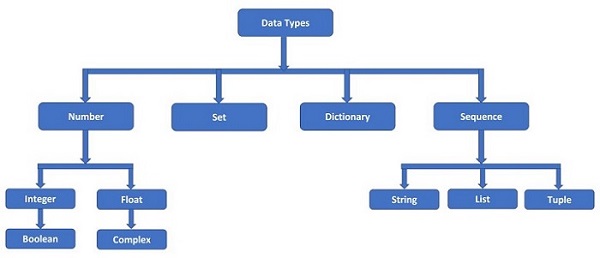
    Python supports the following built-in data types −

    data_types

    1. Python Numeric Data Types

    Python numeric data types store numeric values. Number objects are created when you assign a value to them. For example −

    var1 =1# int data type
    var2 =True# bool data type
    var3 =10.023# float data type
    var4 =10+3j# complex data type

    Python supports four different numerical types and each of them have built-in classes in Python library, called int, bool, float and complex respectively −

    • int (signed integers)
    • float (floating point real values)
    • complex (complex numbers)

    A complex number is made up of two parts – real and imaginary. They are separated by ‘+’ or ‘-‘ signs. The imaginary part is suffixed by ‘j’ which is the imaginary number. The square root of -1 (&bsol;sqrt{-1}), is defined as imaginary number. Complex number in Python is represented as x+yj, where x is the real part, and y is the imaginary part. So, 5+6j is a complex number.

    >>>type(5+6j)<class'complex'>

    Here are some examples of numbers −

    intfloatcomplex
    100.03.14j
    0O77715.2045.j
    -786-21.99.322e-36j
    08032.3+e18.876j
    0x17-90.-.6545+0J
    -0x260-32.54e1003e+26J
    0x6970.2-E124.53e-7j

    Example of Numeric Data Types

    Following is an example to show the usage of Integer, Float and Complex numbers:

    # integer variable.
    a=100print("The type of variable having value", a," is ",type(a))# float variable.
    c=20.345print("The type of variable having value", c," is ",type(c))# complex variable.
    d=10+3jprint("The type of variable having value", d," is ",type(d))

    2. Python String Data Type

    Python string is a sequence of one or more Unicode characters, enclosed in single, double or triple quotation marks (also called inverted commas). Python strings are immutable which means when you perform an operation on strings, you always produce a new string object of the same type, rather than mutating an existing string.

    As long as the same sequence of characters is enclosed, single or double or triple quotes don’t matter. Hence, following string representations are equivalent.

    >>>'TutorialsPoint''TutorialsPoint'>>>"TutorialsPoint"'TutorialsPoint'>>>'''TutorialsPoint''''TutorialsPoint'

    A string in Python is an object of str class. It can be verified with type() function.

    >>>type("Welcome To TutorialsPoint")<class'str'>

    A string is a non-numeric data type. Obviously, we cannot perform arithmetic operations on it. However, operations such as slicing and concatenation can be done. Python’s str class defines a number of useful methods for string processing. Subsets of strings can be taken using the slice operator ([ ] and [:] ) with indexes starting at 0 in the beginning of the string and working their way from -1 at the end.

    The plus (+) sign is the string concatenation operator and the asterisk (*) is the repetition operator in Python.

    Example of String Data Type

    str='Hello World!'print(str)# Prints complete stringprint(str[0])# Prints first character of the stringprint(str[2:5])# Prints characters starting from 3rd to 5thprint(str[2:])# Prints string starting from 3rd characterprint(str*2)# Prints string two timesprint(str+"TEST")# Prints concatenated string

    This will produce the following result −

    Hello World!
    H
    llo
    llo World!
    Hello World!Hello World!
    Hello World!TEST
    

    3. Python Sequence Data Types

    Sequence is a collection data type. It is an ordered collection of items. Items in the sequence have a positional index starting with 0. It is conceptually similar to an array in C or C++. There are following three sequence data types defined in Python.

    • List Data Type
    • Tuple Data Type
    • Range Data Type

    Python sequences are bounded and iterable – Whenever we say an iterable in Python, it means a sequence data type (for example, a list).

    (a) Python List Data Type

    Python Lists are the most versatile compound data types. A Python list contains items separated by commas and enclosed within square brackets ([]). To some extent, Python lists are similar to arrays in C. One difference between them is that all the items belonging to a Python list can be of different data type where as C array can store elements related to a particular data type.

    >>>[2023,"Python",3.11,5+6j,1.23E-4]

    A list in Python is an object of list class. We can check it with type() function.

    >>>type([2023,"Python",3.11,5+6j,1.23E-4])<class'list'>

    As mentioned, an item in the list may be of any data type. It means that a list object can also be an item in another list. In that case, it becomes a nested list.

    >>>[['One','Two','Three'],[1,2,3],[1.0,2.0,3.0]]

    A list can have items which are simple numbers, strings, tuple, dictionary, set or object of user defined class also.

    The values stored in a Python list can be accessed using the slice operator ([ ] and [:]) with indexes starting at 0 in the beginning of the list and working their way to end -1. The plus (+) sign is the list concatenation operator, and the asterisk (*) is the repetition operator.

    Example of List Data Type

    list=['abcd',786,2.23,'john',70.2]
    tinylist =[123,'john']print(list)# Prints complete listprint(list[0])# Prints first element of the listprint(list[1:3])# Prints elements starting from 2nd till 3rd print(list[2:])# Prints elements starting from 3rd elementprint(tinylist *2)# Prints list two timesprint(list+ tinylist)# Prints concatenated lists

    This produce the following result −

    ['abcd', 786, 2.23, 'john', 70.2]
    abcd
    [786, 2.23]
    [2.23, 'john', 70.2]
    [123, 'john', 123, 'john']
    ['abcd', 786, 2.23, 'john', 70.2, 123, 'john']
    

    (b) Python Tuple Data Type

    Python tuple is another sequence data type that is similar to a list. A Python tuple consists of a number of values separated by commas. Unlike lists, however, tuples are enclosed within parentheses (…).

    A tuple is also a sequence, hence each item in the tuple has an index referring to its position in the collection. The index starts from 0.

    >>>(2023,"Python",3.11,5+6j,1.23E-4)

    In Python, a tuple is an object of tuple class. We can check it with the type() function.

    >>>type((2023,"Python",3.11,5+6j,1.23E-4))<class'tuple'>

    As in case of a list, an item in the tuple may also be a list, a tuple itself or an object of any other Python class.

    >>>(['One','Two','Three'],1,2.0,3,(1.0,2.0,3.0))

    To form a tuple, use of parentheses is optional. Data items separated by comma without any enclosing symbols are treated as a tuple by default.


  • Variables

    Python Variables

    Python variables are the reserved memory locations used to store values with in a Python Program. This means that when you create a variable you reserve some space in the memory.

    Based on the data type of a variable, memory space is allocated to it. Therefore, by assigning different data types to Python variables, you can store integers, decimals or characters in these variables.

    Memory Addresses

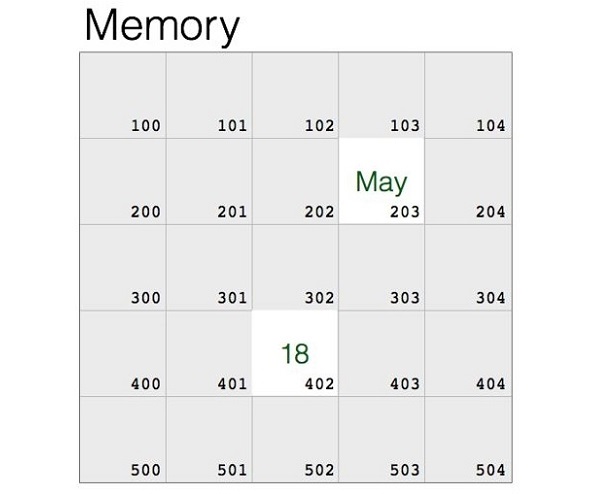
    Data items belonging to different data types are stored in computer’s memory. Computer’s memory locations are having a number or address, internally represented in binary form. Data is also stored in binary form as the computer works on the principle of binary representation. In the following diagram, a string May and a number 18 is shown as stored in memory locations.

    memory

    If you know the assembly language, you will covert these data items and the memory address, and give a machine language instruction. However, it is not easy for everybody. Language translator such as Python interpreter performs this type of conversion. It stores the object in a randomly chosen memory location. Python’s built-in id() function returns the address where the object is stored.

    >>>"May"
    May
    >>>id("May")2167264641264>>>1818>>>id(18)140714055169352

    Once the data is stored in the memory, it should be accessed repeatedly for performing a certain process. Obviously, fetching the data from its ID is cumbersome. High level languages like Python make it possible to give a suitable alias or a label to refer to the memory location.

    In the above example, let us label the location of May as month, and location in which 18 is stored as age. Python uses the assignment operator (=) to bind an object with the label.

    >>> month="May">>> age=18

    The data object (May) and its name (month) have the same id(). The id() of 18 and age are also same.

    >>>id(month)2167264641264>>>id(age)140714055169352

    The label is an identifier. It is usually called as a variable. A Python variable is a symbolic name that is a reference or pointer to an object.

    Creating Python Variables

    Python variables do not need explicit declaration to reserve memory space or you can say to create a variable. A Python variable is created automatically when you assign a value to it. The equal sign (=) is used to assign values to variables.

    The operand to the left of the = operator is the name of the variable and the operand to the right of the = operator is the value stored in the variable. For example −

    Example to Create Python Variables

    This example creates different types (an integer, a float, and a string) of variables.

    counter =100# Creates an integer variable
    miles   =1000.0# Creates a floating point variable
    name    ="Zara Ali"# Creates a string variable

    Printing Python Variables

    Once we create a Python variable and assign a value to it, we can print it using print() function. Following is the extension of previous example and shows how to print different variables in Python:

    Example to Print Python Variables

    This example prints variables.

    counter =100# Creates an integer variable
    miles   =1000.0# Creates a floating point variable
    name    ="Zara Ali"# Creates a string variableprint(counter)print(miles)print(name)

    Here, 100, 1000.0 and “Zara Ali” are the values assigned to countermiles, and name variables, respectively. When running the above Python program, this produces the following result −

    100
    1000.0
    Zara Ali
    

    Deleting Python Variables

    You can delete the reference to a number object by using the del statement. The syntax of the del statement is −

    del var1[,var2[,var3[....,varN]]]]

    You can delete a single object or multiple objects by using the del statement. For example −

    del var
    del var_a, var_b
    

    Example

    Following examples shows how we can delete a variable and if we try to use a deleted variable then Python interpreter will throw an error:

    counter =100print(counter)del counter
    print(counter)

    This will produce the following result:

    100
    Traceback (most recent call last):
      File "main.py", line 7, in <module>
    
    print (counter)
    NameError: name 'counter' is not defined
  • Syntax

    The Python syntax defines a set of rules that are used to create a Python Program. The Python Programming Language Syntax has many similarities to Perl, C, and Java Programming Languages. However, there are some definite differences between the languages.

    First Python Program

    Let us execute a Python program to print “Hello, World!” in two different modes of Python Programming. (a) Interactive Mode Programming (b) Script Mode Programming.

    Python – Interactive Mode Programming

    We can invoke a Python interpreter from command line by typing python at the command prompt as following −

    $ python3
    Python 3.10.6(main, Mar 102023,10:55:28)[GCC 11.3.0] on linux
    Type "help","copyright","credits"or"license"for more information.>>>

    Here >>> denotes a Python Command Prompt where you can type your commands. Let’s type the following text at the Python prompt and press the Enter −

    >>>print("Hello, World!")

    If you are running older version of Python, like Python 2.4.x, then you would need to use print statement without parenthesis as in print “Hello, World!”. However in Python version 3.x, this produces the following result −

    Hello, World!
    

    Python – Script Mode Programming

    We can invoke the Python interpreter with a script parameter which begins the execution of the script and continues until the script is finished. When the script is finished, the interpreter is no longer active.

    Let us write a simple Python program in a script which is simple text file. Python files have extension .py. Type the following source code in a test.py file −

    print (“Hello, World!”)

    We assume that you have Python interpreter path set in PATH variable. Now, let’s try to run this program as follows −

    $ python3 test.py
    

    This produces the following result −

    Hello, World!
    

    Let us try another way to execute a Python script. Here is the modified test.py file −

    Open Compiler

    #!/usr/bin/python3print("Hello, World!")

    We assume that you have Python interpreter available in /usr/bin directory. Now, try to run this program as follows −

    $ chmod +x test.py     # This is to make file executable
    $./test.py
    

    This produces the following result −

    Hello, World!
    

    Python Identifiers

    A Python identifier is a name used to identify a variablefunctionclassmodule or other object. An identifier starts with a letter A to Z or a to z or an underscore (_) followed by zero or more letters, underscores and digits (0 to 9).

    Python does not allow punctuation characters such as &commat;, $, and % within identifiers.

    Python is a case sensitive programming language. Thus, Manpower and manpower are two different identifiers in Python.

    Here are naming conventions for Python identifiers −

    • Python Class names start with an uppercase letter. All other identifiers start with a lowercase letter.
    • Starting an identifier with a single leading underscore indicates that the identifier is private identifier.
    • Starting an identifier with two leading underscores indicates a strongly private identifier.
    • If the identifier also ends with two trailing underscores, the identifier is a language-defined special name.

    Python Reserved Words

    The following list shows the Python keywords. These are reserved words and you cannot use them as constant or variable or any other identifier names. All the Python keywords contain lowercase letters only.

    andasassert
    breakclasscontinue
    defdelelif
    elseexceptFalse
    finallyforfrom
    globalifimport
    inislambda
    Nonenonlocalnot
    orpassraise
    returnTruetry
    whilewithyield

    Python Lines and Indentation

    Python programming provides no braces to indicate blocks of code for class and function definitions or flow control. Blocks of code are denoted by line indentation, which is rigidly enforced.

    The number of spaces in the indentation is variable, but all statements within the block must be indented the same amount. For example −

    ifTrue:print("True")else:print("False")

    However, the following block generates an error −

    ifTrue:print("Answer")print("True")else:print("Answer")print("False")

    Thus, in Python all the continuous lines indented with same number of spaces would form a block. The following example has various statement blocks −

    Do not try to understand the logic at this point of time. Just make sure you understood various blocks even if they are without braces.

    import sys
    
    try:# open file streamfile=open(file_name,"w")except IOError:print"There was an error writing to", file_name
       sys.exit()print"Enter '", file_finish,print"' When finished"while file_text != file_finish:
       file_text =raw_input("Enter text: ")if file_text == file_finish:# close the filefile.close
    
      breakfile.write(file_text)file.write("\n")file.close()
    file_name =raw_input("Enter filename: ")iflen(file_name)==0:print"Next time please enter something" sys.exit()try:file=open(file_name,"r")except IOError:print"There was an error reading file" sys.exit() file_text =file.read()file.close()print file_text

    Python Multi-Line Statements

    Statements in Python typically end with a new line. Python does, however, allow the use of the line continuation character (\) to denote that the line should continue. For example −

    total = item_one + \
    
        item_two + \
        item_three

    Statements contained within the [], {}, or () brackets do not need to use the line continuation character. For example following statement works well in Python −

    days =['Monday','Tuesday','Wednesday','Thursday','Friday']

    Quotations in Python

    Python accepts single (‘), double (“) and triple (”’ or “””) quotes to denote string literals, as long as the same type of quote starts and ends the string.

    The triple quotes are used to span the string across multiple lines. For example, all the following are legal −

    word ='word'print(word)
    
    sentence ="This is a sentence."print(sentence)
    
    paragraph ="""This is a paragraph. It is
     made up of multiple lines and sentences."""print(paragraph)

    Comments in Python

    A comment is a programmer-readable explanation or annotation in the Python source code. They are added with the purpose of making the source code easier for humans to understand, and are ignored by Python interpreter

    Just like most modern languages, Python supports single-line (or end-of-line) and multi-line (block) comments. Python comments are very much similar to the comments available in PHP, BASH and Perl Programming languages.

    A hash sign (#) that is not inside a string literal begins a comment. All characters after the # and up to the end of the physical line are part of the comment and the Python interpreter ignores them.

    # First commentprint("Hello, World!")# Second comment

    This produces the following result −

    Hello, World!
    

    You can type a comment on the same line after a statement or expression −

    name ="Madisetti"# This is again comment

    You can comment multiple lines as follows −

    # This is a comment.# This is a comment, too.# This is a comment, too.# I said that already.

    Following triple-quoted string is also ignored by Python interpreter and can be used as a multiline comments:

    '''
    This is a multiline
    comment.
    '''

    Using Blank Lines in Python Programs

    A line containing only whitespace, possibly with a comment, is known as a blank line and Python totally ignores it.

    In an interactive interpreter session, you must enter an empty physical line to terminate a multiline statement.

    Waiting for the User

    The following line of the program displays the prompt, the statement saying Press the enter key to exit, and waits for the user to take action −

    #!/usr/bin/pythonraw_input("\n\nPress the enter key to exit.")

    Here, “\n\n” is used to create two new lines before displaying the actual line. Once the user presses the key, the program ends. This is a nice trick to keep a console window open until the user is done with an application.

    Multiple Statements on a Single Line

    The semicolon ( ; ) allows multiple statements on the single line given that neither statement starts a new code block. Here is a sample snip using the semicolon −

    import sys; x ='foo'; sys.stdout.write(x +'\n')

    Multiple Statement Groups as Suites

    A group of individual statements, which make a single code block are called suites in Python. Compound or complex statements, such as if, while, def, and class require a header line and a suite.

    Header lines begin the statement (with the keyword) and terminate with a colon ( : ) and are followed by one or more lines which make up the suite. For example −

    if expression :
       suite
    elif expression :
       suite
    else:
       suite
    

    Command Line Arguments in Python

    Many programs can be run to provide you with some basic information about how they should be run. Python enables you to do this with -h −

    $ python3 -h
    usage: python3 [option]...[-c cmd |-m mod |file|-][arg]...
    Options and arguments (and corresponding environment variables):-c cmd : program passed inas string (terminates option list)-d     : debug output from parser (also PYTHONDEBUG=x)-E     : ignore environment variables (such as PYTHONPATH)-h     :print this help message and exit
    
    [ etc.]

    You can also program your script in such a way that it should accept various options. Command Line Arguments is an advanced topic and should be studied a bit later once you have gone through rest of the Python concepts.

  • Virtual Environment

    Python virtual environments create a virtual installation of Python inside a project directory. Users can then install and manage Python packages for each project. This allows users to be able to install packages and modify their Python environment without fear of breaking packages installed in other environments.

    What is Virtual Environment in Python?

    A Python virtual environment is:

    • Considered as disposable.
    • Used to contain a specific Python interpreter and software libraries and binaries which are needed to support a project.
    • Contained in a directory, conventionally either named venv or .venv in the project directory.
    • Not considered as movable or copyable.

    When you install Python software on your computer, it is available for use from anywhere in the filesystem. This is a system-wide installation.

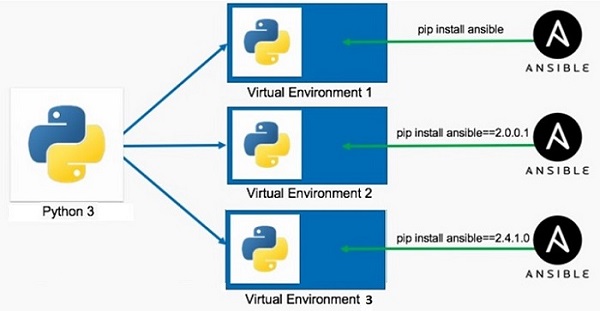
    While developing an application in Python, one or more libraries may be required to be installed using the pip utility (e.g., pip3 install somelib). Moreover, an application (let us say App1) may require a particular version of the library − say somelib 1.0. At the same time another Python application (for example App2) may require newer version of same library say somelib 2.0. Hence by installing a new version, the functionality of App1 may be compromised because of conflict between two different versions of same library.

    This conflict can be avoided by providing two isolated environments of Python in the same machine. These are called virtual environment. A virtual environment is a separate directory structure containing isolated installation having a local copy of Python interpreter, standard library and other modules.

    The following figure shows the purpose of advantage of using virtual environment. Using the global Python installation, more than one virtual environments are created, each having different version of the same library, so that conflict is avoided.

    python virtual environment

    Creation of Virtual Environments in Python using venv

    This functionality is supported by venv module in standard Python distribution. Use following commands to create a new virtual environment.

    C:\Users\Acer>md\pythonapp
    C:\Users\Acer>cd\pythonapp
    C:\pythonapp>python -m venv myvenv
    

    Here, myvenv is the folder in which a new Python virtual environment will be created showing following directory structure −

    Directory of C:\pythonapp\myvenv
    22-02-202309:53<DIR>.22-02-202309:53<DIR>..22-02-202309:53<DIR> Include
    22-02-202309:53<DIR> Lib
    22-02-202309:5377 pyvenv.cfg
    22-02-202309:53<DIR> Scripts
    

    The utilities for activating and deactivating the virtual environment as well as the local copy of Python interpreter will be placed in the scripts folder.

    Directory of C:\pythonapp\myvenv\scripts
    22-02-202309:53<DIR>.22-02-202309:53<DIR>..22-02-202309:532,063 activate
    22-02-202309:53992 activate.bat
    22-02-202309:5319,611 Activate.ps1
    22-02-202309:53393 deactivate.bat
    22-02-202309:53106,349 pip.exe
    22-02-202309:53106,349 pip3.10.exe
    22-02-202309:53106,349 pip3.exe
    22-02-202309:53242,408 python.exe
    22-02-202309:53232,688 pythonw.exe
    

    Activating Virtual Environment

    To enable this new virtual environment, execute activate.bat in Scripts folder.

    C:\pythonapp>myvenv\scripts\activate
    (myvenv) C:\pythonapp>

    Note the name of the virtual environment in the parentheses. The Scripts folder contains a local copy of Python interpreter. You can start a Python session in this virtual environment.

    Checking If Python is Running Inside a Virtual Environment?

    To confirm whether this Python session is in virtual environment check the sys.path.

    (myvenv) C:\pythonapp>python
    Python 3.10.1(tags/v3.10.1:2cd268a, Dec 62021,19:10:37)[MSC v.192964 bit (AMD64)] on win32
    Type "help","copyright","credits"or"license"for more information.>>>import sys
    >>> sys.path
    ['','C:\\Python310\\python310.zip','C:\\Python310\\DLLs','C:\\Python310\\lib','C:\\Python310','C:\\pythonapp\\myvenv','C:\\pythonapp\\myvenv\\lib\\site-packages']>>>

    The scripts folder of this virtual environment also contains pip utilities. If you install a package from PyPI, that package will be active only in current virtual environment.

    Deactivating Virtual Environment

    To deactivate this environment, run deactivate.bat.

  • Environment Setup

    First step in the journey of learning Python is to install it on your machine. Today most computer machines, especially having Linux OS, have Python pre-installed. However, it may not be the latest version.

    Python is available on a wide variety of platforms including Linux and Mac OS X. Let’s understand how to set up our Python environment.

    • Unix (Solaris, Linux, FreeBSD, AIX, HP/UX, SunOS, IRIX, etc.)
    • Win 9x/NT/2000
    • Macintosh (Intel, PPC, 68K)
    • OS/2
    • DOS (multiple versions)
    • PalmOS
    • Nokia mobile phones
    • Windows CE
    • Acorn/RISC OS
    • BeOS
    • Amiga
    • VMS/OpenVMS
    • QNX
    • VxWorks
    • Psion

    Python has also been ported to the Java and .NET virtual machines

    Local Environment Setup

    Open a terminal window and type “python” to find out if it is already installed and which version is installed. If Python is already installed then you will get a message something like as follows:

    $ python
    Python 3.11.2 (main, Feb 8 2023, 14:49:24) [GCC 9.4.0] on linux
    Type "help", "copyright", "credits" or "license" for more information.

    >>>
    Downloading Python
    The most up-to-date and current source code, binaries, documentation, news, etc., is available on the official website of Python https://www.python.org/

    You can download Python documentation from https://www.python.org/doc/. The documentation is available in HTML, PDF, and PostScript formats.

    Installing Python
    Python distribution is available for a wide variety of platforms. You need to download only the binary code applicable for your platform and install Python.

    If the binary code for your platform is not available, you need a C compiler to compile the source code manually. Compiling the source code offers more flexibility in terms of choice of features that you require in your installation.

    Here is a quick overview of installing Python on various platforms −

    Install Python on Ubuntu Linux
    To check whether Python is already installed, open the Linux terminal and enter the following command −

    $ python3.11 --version
    In Ubuntu Linux, the easiest way to install Python is to use apt Advanced Packaging Tool. It is always recommended to update the list of packages in all the configured repositories.

    $ sudo apt update
    Even after the update, the latest version of Python may not be available for install, depending upon the version of Ubuntu you are using. To overcome this, add the deadsnakes repository.

    $ sudo apt-get install software-properties-common
    $ sudo add-apt-repository ppa:deadsnakes/ppa
    Update the package list again.

    $ sudo apt update
    To install the latest Python 3.11 version, enter the following command in the terminal −

    $ sudo apt-get install python3.11
    Check whether it has been properly installed.

    $ python3
    Python 3.11.2 (main, Feb 8 2023, 14:49:24) [GCC 9.4.0] on linux
    Type "help", "copyright", "credits" or "license" for more information.

    >>> print ("Hello World")
    Hello World

    >>>
    Install Python on other Linux
    Here are the simple steps to install Python on Unix/Linux machine.

    Open a Web browser and go to https://www.python.org/downloads/.

    Follow the link to download zipped source code available for Unix/Linux.

    Download and extract files.

    Editing the Modules/Setup file if you want to customize some options.

    Now issue the following commands:

    $ run ./configure script
    $ make
    $ make install
    This installs Python at standard location /usr/local/bin and its libraries at /usr/local/lib/pythonXX where XX is the version of Python.

    Using Yum Command
    Red Hat Enterprise Linux (RHEL 8) does not install Python 3 by default. We usually use yum command on CentOS and other related variants. The procedure for installing Python-3 on RHEL 8 is as follows:

    $ sudo yum install python3
    Install Python on Windows
    It should be noted that Python's version 3.10 onwards cannot be installed on Windows 7 or earlier operating systems.

    The recommended way to install Python is to use the official installer. A link to the latest stable version is given on the home page itself. It is also found at https://www.python.org/downloads/windows/.

    You can find embeddable packages and installers for 32 as well as 64-bit architecture.