Author: saqibkhan

  • DELETE JOIN

    Simple deletion operation in SQL can be performed on a single record or multiple records of a table. And to delete records from multiple tables, the most straightforward approach would be to delete records from one table at a time.

    However, SQL makes it easier by allowing the deletion operation to be performed on multiple tables simultaneously. This is achieved using Joins.

    The SQL DELETE… JOIN Clause

    The purpose of Joins in SQL is to combine records of two or more tables based on common columns/fields. Once the tables are joined, performing the deletion operation on the obtained result-set will delete records from all the original tables at a time.

    For example, consider a database of an educational institution. It consists of various tables: Departments, StudentDetails, LibraryPasses, LaboratoryPasses etc. When a set of students are graduated, all their details from the organizational tables need to be removed, as they are unwanted. However, removing the details separately from multiple tables can be cumbersome.

    To make it simpler, we will first retrieve the combined data of all graduated students from all the tables using Joins; then, this joined data is deleted from all the tables using DELETE statement. This entire process can be done in one single query.

    Syntax

    Following is the basic syntax of the SQL DELETE… JOIN statement −

    DELETEtable(s)FROM table1 JOIN table2
    ON table1.common_field = table2.common_field;

    When we say JOIN here, we can use any type of Join: Regular Join, Natural Join, Inner Join, Outer Join, Left Join, Right Join, Full Join etc.

    Example

    To demonstrate this deletion operation, we must first create tables and insert values into them. We can create these tables using CREATE TABLE queries as shown below.

    Create a table named CUSTOMERS, which contains the personal details of customers including their name, age, address and salary etc. Using the following query −

    CREATETABLE CUSTOMERS (
       ID INTNOTNULL,
       NAME VARCHAR(20)NOTNULL,
       AGE INTNOTNULL,
       ADDRESS CHAR(25),
       SALARY DECIMAL(18,2),PRIMARYKEY(ID));

    Now, insert values into this table using the INSERT statement as follows −

    INSERTINTO CUSTOMERS VALUES(1,'Ramesh',32,'Ahmedabad',2000.00),(2,'Khilan',25,'Delhi',1500.00),(3,'Kaushik',23,'Kota',2000.00),(4,'Chaitali',25,'Mumbai',6500.00),(5,'Hardik',27,'Bhopal',8500.00),(6,'Komal',22,'Hyderabad',4500.00),(7,'Muffy',24,'Indore',10000.00);

    The table will be created as −

    IDNAMEAGEADDRESSSALARY
    1Ramesh32Ahmedabad2000.00
    2Khilan25Delhi1500.00
    3Kaushik23Kota2000.00
    4Chaitali25Mumbai6500.00
    5Hardik27Bhopal8500.00
    6Komal22Hyderabad4500.00
    7Muffy24Indore10000.00

    Let us create another table ORDERS, containing the details of orders made and the date they are made on.

    CREATETABLE ORDERS (
       OID INTNOTNULL,DATEVARCHAR(20)NOTNULL,
       CUSTOMER_ID INTNOTNULL,
       AMOUNT DECIMAL(18,2));

    Using the INSERT statement, insert values into this table as follows −

    INSERTINTO ORDERS VALUES(102,'2009-10-08 00:00:00',3,3000.00),(100,'2009-10-08 00:00:00',3,1500.00),(101,'2009-11-20 00:00:00',2,1560.00),(103,'2008-05-20 00:00:00',4,2060.00);

    The table is displayed as follows −

    OIDDATECUSTOMER_IDAMOUNT
    1022009-10-08 00:00:0033000.00
    1002009-10-08 00:00:0031500.00
    1012009-11-20 00:00:0021560.00
    1032008-05-20 00:00:0042060.00

    Following DELETE… JOIN query removes records from these tables at once −

    DELETE a
    FROM CUSTOMERS AS a INNERJOIN ORDERS AS b
    ON a.ID = b.CUSTOMER_ID;

    Output

    The output will be displayed in SQL as follows −

    Query OK, 3 rows affected (0.01 sec)
    

    Verification

    We can verify whether the changes are reflected in a table by retrieving its contents using the SELECT statement as follows −

    SELECT*FROM CUSTOMERS;

    The table is displayed as follows −

    IDNAMEAGEADDRESSSALARY
    1Ramesh32Ahmedabad2000.00
    5Hardik27Bhopal8500.00
    6Komal22Hyderabad4500.00
    7Muffy24Indore10000.00

    Since, we only deleted records from CUSTOMERS table, the changes will not be reflected in the ORDERS table. We can verify it using the following query.

    SELECT*FROM ORDERS;

    The ORDERS table is displayed as −

    OIDDATECUSTOMER_IDAMOUNT
    1022009-10-08 00:00:0033000.00
    1002009-10-08 00:00:0031500.00
    1012009-11-20 00:00:0021560.00
    1032008-05-20 00:00:0042060.00

    DELETE… JOIN with WHERE Clause

    The ON clause in DELETE… JOIN query is used to apply constraints on the records. In addition to it, we can also use the WHERE clause to make the filtration stricter. Observe the query below. Here, we are deleting the records of customers, in the CUSTOMERS table, whose salary is lower than Rs. 2000.00.

    DELETE a
    FROM CUSTOMERS AS a INNERJOIN ORDERS AS b
    ON a.ID = b.CUSTOMER_ID
    WHERE a.SALARY <2000.00;

    Output

    On executing the query, following output is displayed.

    Query OK, 1 row affected (0.01 sec)
    

    Verification

    We can verify whether the changes are reflected in a table by retrieving its contents using the SELECT statement as follows −

    SELECT*FROM CUSTOMERS;

    The CUSTOMERS table after deletion is as follows −

    IDNAMEAGEADDRESSSALARY
    1Ramesh32Ahmedabad2000.00
    3Kaushik23Kota2000.00
    4Chaitali25Mumbai6500.00
    5Hardik27Bhopal8500.00
    6Komal22Hyderabad4500.00
    7Muffy24Indore10000.00

    Since we only deleted records from the CUSTOMERS table, the changes will not be reflected in the ORDERS table. We can verify it using the following query −

    SELECT*FROM ORDERS;

    The ORDERS table is displayed as −

    OIDDATECUSTOMER_IDAMOUNT
    1022009-10-08 00:00:0033000.00
    1002009-10-08 00:00:0031500.00
    1012009-11-20 00:00:0021560.00
    1032008-05-20 00:00:0042060.00
  • Self Join

    Self Join, as its name suggests, is a type of join that combines the records of a table with itself.

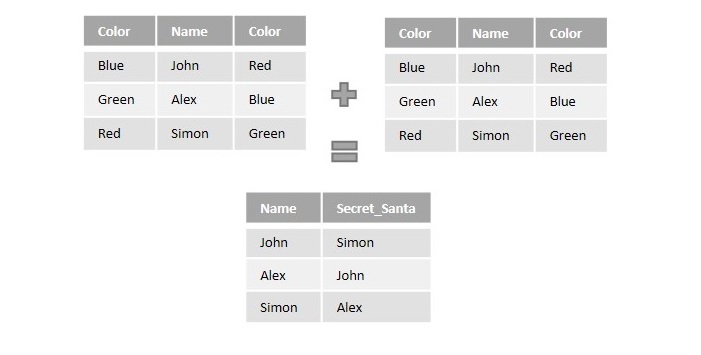
    Suppose an organization, while organizing a Christmas party, is choosing a Secret Santa among its employees based on some colors. It is designed to be done by assigning one color to each of its employees and having them pick a color from the pool of various colors. In the end, they will become the Secret Santa of an employee this color is assigned to.

    As we can see in the figure below, the information regarding the colors assigned and a color each employee picked is entered into a table. The table is joined to itself using self join over the color columns to match employees with their Secret Santa.

    Self Join

    The SQL Self Join

    The SQL Self Join is used to join a table to itself as if the table were two tables. To carry this out, alias of the tables should be used at least once.

    Self Join is a type of inner join, which is performed in cases where the comparison between two columns of a same table is required; probably to establish a relationship between them. In other words, a table is joined with itself when it contains both Foreign Key and Primary Key in it.

    Unlike queries of other joins, we use WHERE clause to specify the condition for the table to combine with itself; instead of the ON clause.

    Syntax

    Following is the basic syntax of SQL Self Join −

    SELECT column_name(s)FROM table1 a, table1 b
    WHERE a.common_field = b.common_field;

    Here, the WHERE clause could be any given expression based on your requirement.

    Example

    Self Join only requires one table, so, let us create a CUSTOMERS table containing the customer details like their names, age, address and the salary they earn.

    CREATETABLE CUSTOMERS (
       ID INTNOTNULL,
       NAME VARCHAR(20)NOTNULL,
       AGE INTNOTNULL,
       ADDRESS CHAR(25),
       SALARY DECIMAL(18,2),PRIMARYKEY(ID));

    Now, insert values into this table using the INSERT statement as follows −

    INSERTINTO CUSTOMERS VALUES(1,'Ramesh',32,'Ahmedabad',2000.00),(2,'Khilan',25,'Delhi',1500.00),(3,'Kaushik',23,'Kota',2000.00),(4,'Chaitali',25,'Mumbai',6500.00),(5,'Hardik',27,'Bhopal',8500.00),(6,'Komal',22,'Hyderabad',4500.00),(7,'Muffy',24,'Indore',10000.00);

    The table will be created as −

    IDNAMEAGEADDRESSSALARY
    1Ramesh32Ahmedabad2000.00
    2Khilan25Delhi1500.00
    3Kaushik23Kota2000.00
    4Chaitali25Mumbai6500.00
    5Hardik27Bhopal8500.00
    6Komal22Hyderabad4500.00
    7Muffy24Indore10000.00

    Now, let us join this table using the following Self Join query. Our aim is to establish a relationship among the said Customers on the basis of their earnings. We are doing this with the help of the WHERE clause.

    SELECT a.ID, b.NAME as EARNS_HIGHER, a.NAME 
    as EARNS_LESS, a.SALARY as LOWER_SALARY
    FROM CUSTOMERS a, CUSTOMERS b
    WHERE a.SALARY < b.SALARY;

    Output

    The resultant table displayed will list out all the customers that earn lesser than other customers −

    IDEARNS_HIGHEREARNS_LESSLOWER_SALARY
    2RameshKhilan1500.00
    2KaushikKhilan1500.00
    6ChaitaliKomal4500.00
    3ChaitaliKaushik2000.00
    2ChaitaliKhilan1500.00
    1ChaitaliRamesh2000.00
    6HardikKomal4500.00
    4HardikChaitali6500.00
    3HardikKaushik2000.00
    2HardikKhilan1500.00
    1HardikRamesh2000.00
    3KomalKaushik2000.00
    2KomalKhilan1500.00
    1KomalRamesh2000.00
    6MuffyKomal4500.00
    5MuffyHardik8500.00
    4MuffyChaitali6500.00
    3MuffyKaushik2000.00
    2MuffyKhilan1500.00
    1MuffyRamesh2000.00

    Self Join with ORDER BY Clause

    After joining a table with itself using self join, the records in the combined table can also be sorted in an order, using the ORDER BY clause.

    Syntax

    Following is the syntax for it −

    SELECT column_name(s)FROM table1 a, table1 b
    WHERE a.common_field = b.common_field
    ORDERBY column_name;

    Example

    Let us join the CUSTOMERS table with itself using self join on a WHERE clause; then, arrange the records in an ascending order using the ORDER BY clause with respect to a specified column, as shown in the following query.

    SELECT  a.ID, b.NAME as EARNS_HIGHER, a.NAME 
    as EARNS_LESS, a.SALARY as LOWER_SALARY
    FROM CUSTOMERS a, CUSTOMERS b
    WHERE a.SALARY < b.SALARY
    ORDERBY a.SALARY;

    Output

    The resultant table is displayed as follows −

    IDEARNS_HIGHEREARNS_LESSLOWER_SALARY
    2RameshKhilan1500.00
    2KaushikKhilan1500.00
    2ChaitaliKhilan1500.00
    2HardikKhilan1500.00
    2KomalKhilan1500.00
    2MuffyKhilan1500.00
    3ChaitaliKaushik2000.00
    1ChaitaliRamesh2000.00
    3HardikKaushik2000.00
    1HardikRamesh2000.00
    3KomalKaushik2000.00
    1KomalRamesh2000.00
    3MuffyKaushik2000.00
    1MuffyRamesh2000.00
    6ChaitaliKomal4500.00
    6HardikKomal4500.00
    6MuffyKomal4500.00
    4HardikChaitali6500.00
    4MuffyChaitali6500.00
    5MuffyHardik8500.00

    Not just the salary column, the records can be sorted based on the alphabetical order of names, numerical order of Customer IDs etc.

  • Full Join

    The SQL Full Join

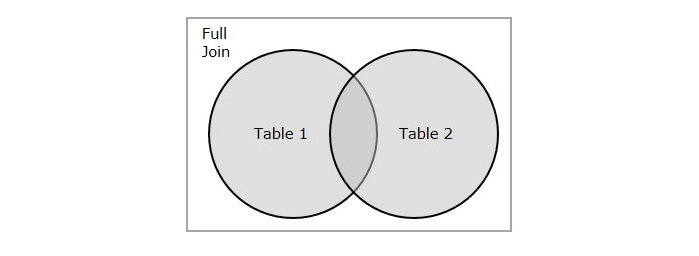
    SQL Full Join creates a new table by joining two tables as a whole. The joined table contains all records from both the tables and fills NULL values for missing matches on either side. In short, full join is a type of outer join that combines the result-sets of both left and right joins.

    MySQL does not support Full Outer Join. Instead, you can imitate its working by performing union operation between the result-sets obtained from Left Join and Right Join.

    Let us understand this concept in detail with the help of a Venn diagram below. Assume that we have two tables as two sets (represented by circles). The result-set (or newly joined table) obtained using full join is nothing but the union of these two sets.

    Full Join

    You can also achieve the equivalent result-set of FULL JOIN by performing the UNION operation on result-sets of the LEFT JOIN and RIGHT JOIN.

    Syntax

    Following is the basic syntax of Full Join in SQL −

    SELECT column_name(s)FROM table1
    FULLJOIN table2
    ON table1.column_name = table2.column_name;

    Example

    Assume we have created a table named CUSTOMERS, which contains the personal details of customers including their name, age, address and salary etc.Using the following query −

    CREATETABLE CUSTOMERS (
       ID INTNOTNULL,
       NAME VARCHAR(20)NOTNULL,
       AGE INTNOTNULL,
       ADDRESS CHAR(25),
       SALARY DECIMAL(18,2),PRIMARYKEY(ID));

    Now insert values into this table using the INSERT statement as follows −

    INSERTINTO CUSTOMERS VALUES(1,'Ramesh',32,'Ahmedabad',2000.00),(2,'Khilan',25,'Delhi',1500.00),(3,'Kaushik',23,'Kota',2000.00),(4,'Chaitali',25,'Mumbai',6500.00),(5,'Hardik',27,'Bhopal',8500.00),(6,'Komal',22,'Hyderabad',4500.00),(7,'Muffy',24,'Indore',10000.00);

    The table will be created as −

    IDNAMEAGEADDRESSSALARY
    1Ramesh32Ahmedabad2000.00
    2Khilan25Delhi1500.00
    3Kaushik23Kota2000.00
    4Chaitali25Mumbai6500.00
    5Hardik27Bhopal8500.00
    6Komal22Hyderabad4500.00
    7Muffy24Indore10000.00

    Let us create another table ORDERS, containing the details of orders made and the date they are made on.

    CREATETABLE ORDERS (
       OID INTNOTNULL,DATEVARCHAR(20)NOTNULL,
       CUSTOMER_ID INTNOTNULL,
       AMOUNT DECIMAL(18,2));

    Using the INSERT statement, insert values into this table as follows −

    INSERTINTO ORDERS VALUES(102,'2009-10-08 00:00:00',3,3000.00),(100,'2009-10-08 00:00:00',3,1500.00),(101,'2009-11-20 00:00:00',2,1560.00),(103,'2008-05-20 00:00:00',4,2060.00);

    The table is displayed as follows −

    OIDDATECUSTOMER_IDAMOUNT
    1022009-10-08 00:00:0033000.00
    1002009-10-08 00:00:0031500.00
    1012009-11-20 00:00:0021560.00
    1032008-05-20 00:00:0042060.00

    Following query joins the two tables CUSTOMERS and ORDERS in SQL Server −

    SELECT ID, NAME, AMOUNT,DATEFROM CUSTOMERS
    FULLJOIN ORDERS
    ON CUSTOMERS.ID = ORDERS.CUSTOMER_ID;

    Output

    The resultant table is produced as follows −

    IDNAMEAMOUNTDATE
    1RameshNULLNULL
    2Khilan15602009-11-20 00:00:00
    3Kaushik30002009-10-08 00:00:00
    3Kaushik15002009-10-08 00:00:00
    4Chaitali20602008-05-20 00:00:00
    5HardikNULLNULL
    6KomalNULLNULL
    7MuffyNULLNULL

    Joining Multiple Tables with Full Join

    The Full Join query can also be used to join more than just two tables. To do that, we sequentially combine two tables at a time, until all the tables are joined together.

    Note that in MySQL database, there is no provision to directly use the FULL JOIN keyword to perform join operation on multiple tables. Instead, calculate the UNION of LEFT JOIN and RIGHT JOIN on two tables at a time, until all the tables are joined.

    Syntax

    The syntax to join multiple tables using Full Join is given below −

    SELECT column1, column2, column3...FROM table1
    FULLJOIN table2
    ON condition_1
    FULLJOIN table3
    ON condition_2
    ........FULLJOIN tableN
    ON condition_N;

    Example

    To demonstrate Full Join, let us consider the sample tables CUSTOMERS and ORDERS that we previously created, and create another table name EMPLOYEE using the following query −

    CREATETABLE EMPLOYEE (
       EID INTNOTNULL,
       EMPLOYEE_NAME VARCHAR(30)NOTNULL,
       SALES_MADE DECIMAL(20));

    Now, we can insert values into this empty tables using the INSERT statement as follows −

    INSERTINTO EMPLOYEE VALUES(102,'SARIKA',4500),(100,'ALEKHYA',3623),(101,'REVATHI',1291),(103,'VIVEK',3426);

    The EMPLOYEE table created, will be as shown below −

    EIDEMPLOYEE_NAMENAMESALES_MADE
    102SARIKA4500
    100ALEKHYA3623
    101REVATHI1291
    103VIVEK3426

    Let us join these three tables using the full join query given below −

    SELECT CUSTOMERS.ID, CUSTOMERS.NAME, ORDERS.DATE, EMPLOYEE.EMPLOYEE_NAME 
    FROM CUSTOMERS 
    FULLJOIN ORDERS 
    ON CUSTOMERS.ID = ORDERS.CUSTOMER_ID 
    FULLJOIN EMPLOYEE 
    ON ORDERS.OID = EMPLOYEE.EID;

    Through this query, we will display the id, name of the customer along with the date on which the orders are made and the name of the employee who sold the item.

    Output

    The resultant table is obtained as follows −

    IDNAMEDATEEMPLOYEE_NAME
    1RameshNULLNULL
    2Khilan2009-11-20 00:00:00REVATHI
    3Kaushik2009-10-08 00:00:00ALEKHYA
    3Kaushik2009-10-08 00:00:00SARIKA
    4Chaitali2008-05-20 00:00:00VIVEK
    5HardikNULLNULL
    6KomalNULLNULL
    7MuffyNULLNULL

    Full Join with WHERE Clause

    Joins use the ON clause to filter records by default. Let us suppose there is a further requirement to filter these records based on a certain condition/constraint, we can also make use of the WHERE clause with Joins.

    Syntax

    The syntax of Full Join when used with WHERE clause is given below −

    SELECT column_name(s)FROM table1
    FULLJOIN table2
    ON table1.column_name = table2.column_name
    WHERE condition;

    Example

    Consider the previous two tables CUSTOMERS and ORDERS, and join them using the following Full Join query by applying some constraints using the WHERE clause.

    SELECT ID, NAME,DATE, AMOUNT FROM CUSTOMERS
    FULLJOIN ORDERS
    ON CUSTOMERS.ID = ORDERS.CUSTOMER_ID
    WHERE ORDERS.AMOUNT >2000.00;

    Output

    The resultant table after applying the WHERE clause with full join contains the rows that has amount values greater than 2000.00 −

    IDNAMEDATEAMOUNT
    3Kaushik2009-10-08 00:00:003000.00
    4Chaitali2008-05-20 00:00:002060.00

  • Cross Join

    The SQL Cross Join

    An SQL Cross Join is a basic type of inner join that is used to retrieve the Cartesian product (or cross product) of two individual tables. That means, this join will combine each row of the first table with each row of second table (i.e. permutations).

    A Cartesian product, or a cross product, is the result achieved from multiplication of two sets. This is done by multiplying all the possible pairs from both the sets.

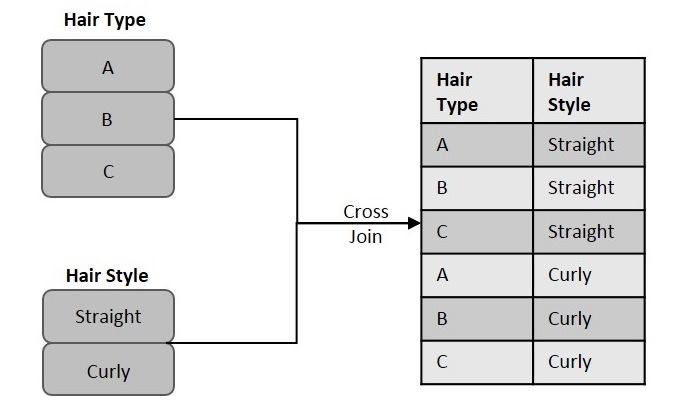
    The sample figure below illustrates the cross join in a simple manner.

    Cross Join

    As you can see, we considered two table columns: Hair Style and Hair Type. Each of these columns contain some records that need to be matched. Hence, using cross join, we combine each record in the “Hair Style” column with all records in the “Hair Type” column. The resultant table obtained is considered as the Cartesian product or Joined table.

    Syntax

    Following is the basic syntax of the Cross Join query in SQL −

    SELECT column_name(s)FROM table1
    CROSSJOIN table2;

    Example

    Assume we have created a table named CUSTOMERS, which contains the personal details of customers including their name, age, address and salary etc., using the following query −

    CREATETABLE CUSTOMERS (
       ID INTNOTNULL,
       NAME VARCHAR(20)NOTNULL,
       AGE INTNOTNULL,
       ADDRESS CHAR(25),
       SALARY DECIMAL(18,2),PRIMARYKEY(ID));

    Now, insert values into this table using the INSERT statement as follows −

    INSERTINTO CUSTOMERS VALUES(1,'Ramesh',32,'Ahmedabad',2000.00),(2,'Khilan',25,'Delhi',1500.00);

    The table will be created as −

    IDNAMEAGEADDRESSSALARY
    1Ramesh32Ahmedabad2000.00
    2Khilan25Delhi1500.00

    Let us create another table ORDERS, containing the details of orders made and the date they are made on.

    CREATETABLE ORDERS (
       OID INTNOTNULL,DATEVARCHAR(20)NOTNULL,
       CUSTOMER_ID INTNOTNULL,
       AMOUNT DECIMAL(18,2));

    Using the INSERT statement, insert values into this table as follows −

    INSERTINTO ORDERS VALUES(100,'2009-10-08 00:00:00',3,1500.00),(101,'2009-11-20 00:00:00',2,1560.00);

    The table is displayed as follows −

    OIDDATECUSTOMER_IDAMOUNT
    1002009-10-08 00:00:0031500.00
    1012009-11-20 00:00:0021560.00

    Now, if we execute the following Cross Join query on these two tables given above, the cross join combines each row in CUSTOMERS table with each row in ORDERS table.

    SELECT  ID, NAME, AMOUNT,DATEFROM CUSTOMERS
    CROSSJOIN ORDERS;

    Output

    The resultant table is as follows −

    IDNAMEAMOUNTDATE
    2Khilan1500.002009-10-08 00:00:00
    1Ramesh15602009-11-20 00:00:00
    2Khilan15602009-11-20 00:00:00
    1Ramesh1500.002009-10-08 00:00:00

    Joining Multiple Tables with Cross Join

    We can also join more than two tables using cross join. In this case, multiple-way permutations are displayed and the resultant table is expected to contain way more records than the individual tables.

    Syntax

    Following is the syntax to join multiple tables using cross join in SQL −

    SELECT column_name(s)FROM table1
    CROSSJOIN table2
    CROSSJOIN table3
    CROSSJOIN table4
    ............CROSSJOIN tableN;

    Example

    Assume we have created another table named ORDER_RANGE using the following query −

    CREATETABLE ORDER_RANGE (
       SNO INTNOTNULL,
       ORDER_RANGE VARCHAR(20)NOTNULL);

    Now, we can insert values into this empty tables using the INSERT statement as follows −

    INSERTINTO ORDER_RANGE VALUES(1,'1-100'),(2,'100-200'),(3,'200-300');

    The ORDER_RANGE table is created as follows −

    SNOORDER_RANGE
    11-100
    2100-200
    3200-300

    Following query combines the three tables CUSTOMERS, ORDERS and ORDER_RANGE, using cross join −

    SELECT ID, NAME, AMOUNT,DATE, ORDER_RANGE
    FROM CUSTOMERS
    CROSSJOIN ORDERS
    CROSSJOIN ORDER_RANGE;

    Output

    The resultant table is given below −

    IDNAMEAMOUNTDATEORDER_RANGE
    2Khilan15602009-11-20 00:00:001-100
    1Ramesh15602009-11-20 00:00:001-100
    2Khilan1500.002009-10-08 00:00:001-100
    1Ramesh1500.002009-10-08 00:00:001-100
    2Khilan15602009-11-20 00:00:00100-200
    1Ramesh15602009-11-20 00:00:00100-200
    2Khilan1500.002009-10-08 00:00:00100-200
    1Ramesh1500.002009-10-08 00:00:00100-200
    2Khilan15602009-11-20 00:00:00200-300
    1Ramesh15602009-11-20 00:00:00200-300
    2Khilan1500.002009-10-08 00:00:00200-300
    1Ramesh1500.002009-10-08 00:00:00200-300

  • Right Join

    SQL Joins are used to retrieve records from multiple tables based on a given condition. A Join includes the records that satisfy the given condition and outer join results a table that contains both matched and unmatched rows.

    Left Outer Join, as discussed in the previous tutorial, is used to find the union of two tables with respect to the left table. In this tutorial, let us discuss about the Right outer join.

    The SQL Right Join

    The Right Join or Right Outer Join query in SQL returns all rows from the right table, even if there are no matches in the left table. In short, a right join returns all the values from the right table, plus matched values from the left table or NULL in case of no matching join predicate.

    Right Join

    If the ON clause matches zero records in the left table; the join will still return a row in the result, but with a NULL value in each column of the left table.

    Syntax

    Following is the basic syntax of Right Join in SQL −

    SELECT table1.column1, table2.column2...FROM table1
    RIGHTJOIN table2
    ON table1.common_field = table2.common_field;

    Example

    The tables we are using in this example are named CUSTOMERS and ORDERS.

    Assume we are creating a table named CUSTOMERS, which contains the personal details of customers including their name, age, address and salary etc.

    CREATETABLE CUSTOMERS (
       ID INTNOTNULL,
       NAME VARCHAR(20)NOTNULL,
       AGE INTNOTNULL,
       ADDRESS CHAR(25),
       SALARY DECIMAL(18,2),PRIMARYKEY(ID));

    Now, insert values into this table using the INSERT statement as follows −

    INSERTINTO CUSTOMERS VALUES(1,'Ramesh',32,'Ahmedabad',2000.00),(2,'Khilan',25,'Delhi',1500.00),(3,'Kaushik',23,'Kota',2000.00),(4,'Chaitali',25,'Mumbai',6500.00),(5,'Hardik',27,'Bhopal',8500.00),(6,'Komal',22,'Hyderabad',4500.00),(7,'Muffy',24,'Indore',10000.00);

    The table will be created as −

    IDNAMEAGEADDRESSSALARY
    1Ramesh32Ahmedabad2000.00
    2Khilan25Delhi1500.00
    3Kaushik23Kota2000.00
    4Chaitali25Mumbai6500.00
    5Hardik27Bhopal8500.00
    6Komal22Hyderabad4500.00
    7Muffy24Indore10000.00

    Let us create another table ORDERS, containing the details of orders made and the date they are made on.

    CREATETABLE ORDERS (
       OID INTNOTNULL,DATEVARCHAR(20)NOTNULL,
       CUSTOMER_ID INTNOTNULL,
       AMOUNT DECIMAL(18,2));

    Using the INSERT statement, insert values into this table as follows −

    INSERTINTO ORDERS VALUES(102,'2009-10-08 00:00:00',3,3000.00),(100,'2009-10-08 00:00:00',3,1500.00),(101,'2009-11-20 00:00:00',2,1560.00),(103,'2008-05-20 00:00:00',4,2060.00);

    The table is displayed as follows −

    OIDDATECUSTOMER_IDAMOUNT
    1022009-10-08 00:00:0033000.00
    1002009-10-08 00:00:0031500.00
    1012009-11-20 00:00:0021560.00
    1032008-05-20 00:00:0042060.00

    Now, let us join these two tables using the Right Join query as follows −

    SELECT ID, NAME, AMOUNT,DATEFROM CUSTOMERS
    RIGHTJOIN ORDERS
    ON CUSTOMERS.ID = ORDERS.CUSTOMER_ID;

    Output

    This would produce the following result −

    IDNAMEAMOUNTDATE
    3Kaushik3000.002009-10-08 00:00:00
    3Kaushik1500.002009-10-08 00:00:00
    2Khilan1560.002009-11-20 00:00:00
    4Chaitali2060.002008-05-20 00:00:00

    Joining Multiple Tables with Right Join

    Like Left Join, Right Join also joins multiple tables. However, the contrast occurs where the second table is returned as a whole instead of the first.

    In addition, the rows of first table are matched with the rows in second table. If the records are not matched and the number of records in the second table is greater than the first, NULL is returned as the values in first table.

    Syntax

    Following is the syntax to join multiple tables using Right Join −

    SELECT column1, column2, column3...FROM table1
    RIGHTJOIN table2
    ON condition_1
    RIGHTJOIN table3
    ON condition_2
    ........RIGHTJOIN tableN
    ON condition_N;

    Example

    Here, let us consider the previously created tables CUSTOMERS and ORDERS; and create a new table named EMPLOYEE using the following query −

    CREATETABLE EMPLOYEE (
       EID INTNOTNULL,
       EMPLOYEE_NAME VARCHAR(30)NOTNULL,
       SALES_MADE DECIMAL(20));

    Now, we can insert values into this empty tables using the INSERT statement as follows −

    INSERTINTO EMPLOYEE VALUES(102,'SARIKA',4500),(100,'ALEKHYA',3623),(101,'REVATHI',1291),(103,'VIVEK',3426);

    The details of EMPLOYEE table can be seen below −

    EIDEMPLOYEE_NAMESALES_MADE
    102SARIKA4500
    100ALEKHYA3623
    101REVATHI1291
    103VIVEK3426

    Following query joins these three tables using the Right Join query −

    SELECT CUSTOMERS.ID, CUSTOMERS.NAME, 
    ORDERS.DATE, EMPLOYEE.EMPLOYEE_NAME
    FROM CUSTOMERS
    RIGHTJOIN ORDERS
    ON CUSTOMERS.ID = ORDERS.CUSTOMER_ID
    RIGHTJOIN EMPLOYEE
    ON ORDERS.OID = EMPLOYEE.EID;

    Through this query, we will display the id, name of the customer along with the date on which the orders are made and the name of the employee who sold the item.

    Output

    The resultant table is obtained as follows −

    IDNAMEDATEEMPLOYEE_NAME
    3Kaushik2009-10-08 00:00:00SARIKA
    3Kaushik2009-10-08 00:00:00ALEKHYA
    2Khilan2009-11-20 00:00:00REVATHI
    4Chaitali2008-05-20 00:00:00VIVEK

    Right Join with WHERE Clause

    A WHERE Clause is used to filter out records that satisfy the condition specified by it. This clause can be used with the Right Join query to apply certain filters on the joined result-set.

    Syntax

    The syntax of Right Join when used with WHERE clause is given below −

    SELECT column_name(s)FROM table1
    RIGHTJOIN table2
    ON table1.column_name = table2.column_name
    WHERE condition;

    Example

    Records in the combined database tables can be filtered using the WHERE clause. Consider the previous two tables CUSTOMERS and ORDERS; and join them using the right join query by applying some constraints using the WHERE clause.

    SELECT ID, NAME,DATE, AMOUNT FROM CUSTOMERS
    RIGHTJOIN ORDERS
    ON CUSTOMERS.ID = ORDERS.CUSTOMER_ID
    WHERE ORDERS.AMOUNT >1000.00;

    Output

    The resultant table after applying the where clause with right join contains the rows that has amount values greater than 1000.00 −

    IDNAMEDATEAmount
    3Kaushik2009-10-08 00:00:003000.00
    3Kaushik2009-10-08 00:00:001500.00
    2Khilan2009-11-20 00:00:001560.00
    4Chaitali2008-05-20 00:00:002060.00

  • Left Join

    Joins are used to retrieve records from two or more tables based on a logical relation between them. This relation is defined using a join condition. As we discussed in the previous chapters, there are two types of Joins −

    • Inner Join
    • Outer Join

    Left Join is a type of outer join that retrieves all the records from the first table and matches them to the records in second table. First of all, let us understand what is outer join.

    What is Outer Join?

    Outer Join is used to join multiple database tables into a combined result-set, that includes all the records, even if they don’t satisfy the join condition. NULL values are displayed against these records where the join condition is not met.

    This scenario only occurs if the left table (or the first table) has more records than the right table (or the second table), or vice versa.

    There are three types of outer joins, namely −

    • Left (Outer) Join: Retrieves all the records from the first table, Matching records from the second table and NULL values in the unmatched rows.
    • Right (Outer) Join: Retrieves all the records from the second table, Matching records from the first table and NULL values in the unmatched rows.
    • Full (Outer) Join: Retrieves records from both the tables and fills the unmatched values with NULL.

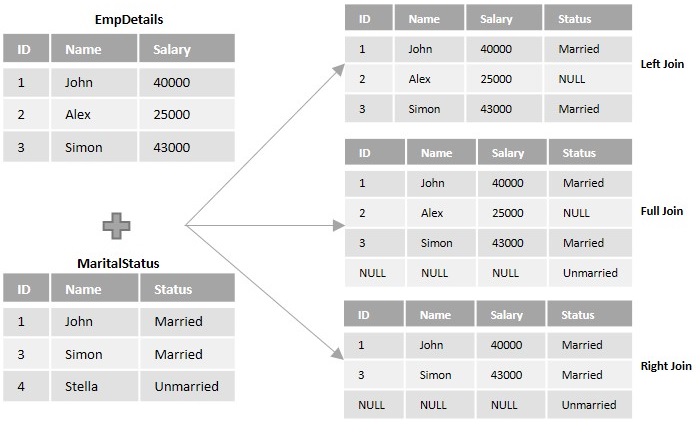
    Following diagram illustrates various outer joins between two tables namely, EmpDetails and MaritalStatus. Here, the join operation is presumed based on the join-predicate EmpDetails.EmpID = MaritalStatus.EmpID.Right Join

    The SQL Left Join

    Left Join or Left Outer Join in SQL combines two or more tables, where the first table is returned wholly; but, only the matching record(s) are retrieved from the consequent tables. If zero (0) records are matched in the consequent tables, the join will still return a row in the result, but with NULL in each column from the right table.Left Join

    If the number of rows in first table is less than the number of rows in second table, the rows in second table that do not have any counterparts in the first table will be discarded from the result.

    Syntax

    Following is the basic syntax of Left Join in SQL −

    SELECT column_name(s)FROM table1
    LEFTJOIN table2
    ON table1.column_name = table2.column_name;

    Example

    To understand this query better, let us create some tables in an existing database and join them using Left Join or Left Outer Join.

    Assume we have created a table named CUSTOMERS, which contains the personal details of customers including their name, age, address and salary, using the following query.

    CREATETABLE CUSTOMERS (
       ID INTNOTNULL,
       NAME VARCHAR(20)NOTNULL,
       AGE INTNOTNULL,
       ADDRESS CHAR(25),
       SALARY DECIMAL(18,2),PRIMARYKEY(ID));

    Now insert values into this table using the INSERT statement as follows −

    INSERTINTO CUSTOMERS VALUES(1,'Ramesh',32,'Ahmedabad',2000.00),(2,'Khilan',25,'Delhi',1500.00),(3,'Kaushik',23,'Kota',2000.00),(4,'Chaitali',25,'Mumbai',6500.00),(5,'Hardik',27,'Bhopal',8500.00),(6,'Komal',22,'Hyderabad',4500.00),(7,'Muffy',24,'Indore',10000.00);

    The table will be created as −

    IDNAMEAGEADDRESSSALARY
    1Ramesh32Ahmedabad2000.00
    2Khilan25Delhi1500.00
    3Kaushik23Kota2000.00
    4Chaitali25Mumbai6500.00
    5Hardik27Bhopal8500.00
    6Komal22Hyderabad4500.00
    7Muffy24Indore10000.00

    Let us create another table ORDERS, containing the details of orders made and the date they are made on.

    CREATETABLE ORDERS (
       OID INTNOTNULL,DATEVARCHAR(20)NOTNULL,
       CUSTOMER_ID INTNOTNULL,
       AMOUNT DECIMAL(18,2));

    Using the INSERT statement, insert values into this table as follows −

    INSERTINTO ORDERS VALUES(102,'2009-10-08 00:00:00',3,3000.00),(100,'2009-10-08 00:00:00',3,1500.00),(101,'2009-11-20 00:00:00',2,1560.00),(103,'2008-05-20 00:00:00',4,2060.00);

    The table is displayed as follows −

    OIDDATECUSTOMER_IDAMOUNT
    1022009-10-08 00:00:0033000.00
    1002009-10-08 00:00:0031500.00
    1012009-11-20 00:00:0021560.00
    1032008-05-20 00:00:0042060.00

    Following left join query, retrieves the details of customers who made an order at the specified date and who did not. If there is no match found, the query below will return NULL in that record.

    SELECT ID, NAME, AMOUNT,DATEFROM CUSTOMERS
    LEFTJOIN ORDERS
    ON CUSTOMERS.ID = ORDERS.CUSTOMER_ID;

    Output

    The resultant table is obtained as −

    IDNAMEAMOUNTDATE
    1RameshNULLNULL
    2Khilan1560.002009-11-20 00:00:00
    3Kaushik1500.002009-10-08 00:00:00
    3Kaushik3000.002009-10-08 00:00:00
    4Chaitali2060.002008-05-20 00:00:00
    5HardikNULLNULL
    6KomalNULLNULL
    7MuffyNULLNULL

    As we can see in the table above, only Khilan, Kaushik and Chaitali made purchases on the mentioned dates in ORDERS table; hence, the records are matched. The other customers in CUSTOMERS table did not make purchases on the specified dates, so the records are returned as NULL.

    Joining Multiple Tables with Left Join

    Similar to the Inner Join query, Left Join also joins multiple tables where the first table is returned as it is and the remaining tables are matched with the rows in the first table. If the records are not matched, NULL is returned.

    The syntax to join multiple tables using Left Join is given below −

    SELECT column1, column2, column3...FROM table1
    LEFTJOIN table2
    ON condition_1
    LEFTJOIN table3
    ON condition_2
    ........LEFTJOIN tableN
    ON condition_N;

    Example

    To demonstrate Left Join with multiple tables, let us consider the previously created tables CUSTOMERS and ORDERS. In addition to these we will create the EMPLOYEE table using the following query −

    CREATETABLE EMPLOYEE (
       EID INTNOTNULL,
       EMPLOYEE_NAME VARCHAR(30)NOTNULL,
       SALES_MADE DECIMAL(20));

    Now, we can insert values into this empty tables using the INSERT statement as follows −

    INSERTINTO EMPLOYEE VALUES(102,'SARIKA',4500),(100,'ALEKHYA',3623),(101,'REVATHI',1291),(103,'VIVEK',3426);

    The EMPLOYEE table consists of the details of employees in an organization and sales made by them.

    EIDEMPLOYEE_NAMESALES_MADE
    102SARIKA4500
    100ALEKHYA3623
    101REVATHI1291
    103VIVEK3426

    Following query joins the CUSTOMERS, ORDERS and EMPLOYEE tables using the left join −

    SELECT CUSTOMERS.ID, CUSTOMERS.NAME, 
    ORDERS.DATE, EMPLOYEE.EMPLOYEE_NAME
    FROM CUSTOMERS
    LEFTJOIN ORDERS
    ON CUSTOMERS.ID = ORDERS.CUSTOMER_ID
    LEFTJOIN EMPLOYEE
    ON ORDERS.OID = EMPLOYEE.EID;

    Through this query, we will display the id, name of the customer along with the date on which the orders are made and the name of the employee who sold the item.

    Output

    The resultant table is obtained as follows −

    IDNAMEDATEEMPLOYEE_NAME
    1RameshNULLNULL
    2Khilan2009-11-20 00:00:00REVATHI
    3Kaushik2009-10-08 00:00:00ALEKHYA
    3Kaushik2009-10-08 00:00:00SARIKA
    4Chaitali2008-05-20 00:00:00VIVEK
    5HardikNULLNULL
    6KomalNULLNULL
    7MuffyNULLNULL

    As we can see in the table above, the customer Kaushik made three orders, in which two are sold by employee Alekhya and one is sold by Sarika. Khilan and Chaitali made one order each, that are sold by Revathi and Vivek respectively. The dates on which these orders are made will also be displayed. If the orders are not made on the specific dates, NULL is returned.

    Left Join with WHERE Clause

    Along with the ON clause, a WHERE clause can also be applied on the obtained result-set after Left Join is implemented. Doing this will filter the data further.

    Syntax

    The syntax of Left Join when used with WHERE clause is given below −

    SELECT column_name(s)FROM table1
    LEFTJOIN table2
    ON table1.column_name = table2.column_name
    WHERE condition;

    Example

    Records in the combined database tables can be filtered using the WHERE clause. Consider the previous two tables CUSTOMERS and ORDERS; and join them using the left join query by applying some constraints using the WHERE clause.

    SELECT ID, NAME,DATE, AMOUNT FROM CUSTOMERS
    LEFTJOIN ORDERS
    ON CUSTOMERS.ID = ORDERS.CUSTOMER_ID
    WHERE ORDERS.AMOUNT >2000.00;

    Output

    The resultant table after applying the where clause with left join contains the rows that has amount values greater than 2000.00 −

    IDNAMEDATEAMOUNT
    3Kaushik2009-10-08 00:00:003000.00
    4Chaitali2008-05-20 00:00:002060.00
  • Inner Join

    An SQL Join clause is used to combine multiple related tables in a database, based on common fields/columns.

    There are two major types of joins: Inner Join and Outer Join. Other joins like Left Join, Right Join, Full Join etc. Are just subtypes of these two major joins. In this tutorial, we will only learn about the Inner Join.

    The SQL Inner Join

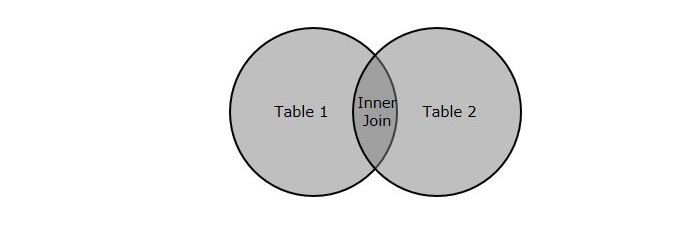
    The SQL Inner Join is a type of join that combines multiple tables by retrieving records that have matching values in both tables (in the common column).

    It compares each row of the first table with each row of the second table, to find all pairs of rows that satisfy the join-predicate. When the join-predicate is satisfied, the column values from both tables are combined into a new table.

    Inner Join

    The Inner Join is also referred as Equijoin. It is the default join; i.e., even if the “Join“keyword is used instead of “Inner Join“, tables are joined using matching records of common columns.

    Explanation

    Let us look at an example scenario to have a better understanding.

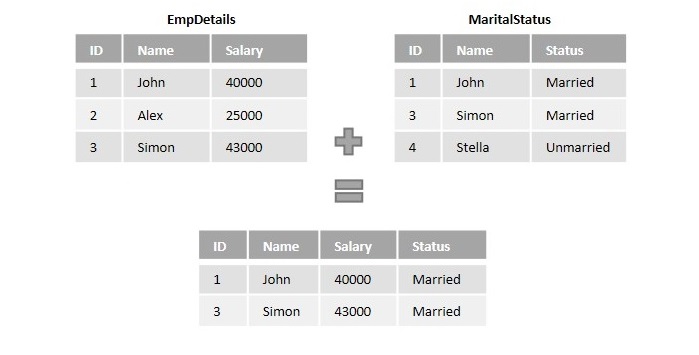
    Suppose we have the information of employees in a company divided between two tables namely EmpDetails and Marital status. Where,

    • EmpDetails table holds details like Employee ID, Name and Salary.
    • MaritalStatus table holds the details Employee ID, Age, and Marital Status.
    Inner Join

    When we perform the Inner Join operation on these two tables based on the join-predicate EmpDetails.EmpID = MaritalStatus.EmpID, the resultant records hold the following info: ID, Name, Salary, Age and, Status of the matched records.

    Syntax

    Following is the basic syntax of SQL Inner Join −

    SELECT column_name(s)FROM table1
    INNERJOIN table2
    ON table1.column_name = table2.column_name;

    Example

    Assume we have created a table named CUSTOMERS, which contains the personal details of customers including their name, age, address and salary etc., using the following query −

    CREATETABLE CUSTOMERS (
       ID INTNOTNULL,
       NAME VARCHAR(20)NOTNULL,
       AGE INTNOTNULL,
       ADDRESS CHAR(25),
       SALARY DECIMAL(18,2),PRIMARYKEY(ID));

    Now insert values into this table using the INSERT statement as follows −

    INSERTINTO CUSTOMERS VALUES(1,'Ramesh',32,'Ahmedabad',2000.00),(2,'Khilan',25,'Delhi',1500.00),(3,'Kaushik',23,'Kota',2000.00),(4,'Chaitali',25,'Mumbai',6500.00),(5,'Hardik',27,'Bhopal',8500.00),(6,'Komal',22,'Hyderabad',4500.00),(7,'Muffy',24,'Indore',10000.00);

    The table will be created as −

    IDNAMEAGEADDRESSSALARY
    1Ramesh32Ahmedabad2000.00
    2Khilan25Delhi1500.00
    3Kaushik23Kota2000.00
    4Chaitali25Mumbai6500.00
    5Hardik27Bhopal8500.00
    6Komal22Hyderabad4500.00
    7Muffy24Indore10000.00

    Let us create another table ORDERS, containing the details of orders made and the date they are made on.

    CREATETABLE ORDERS (
       OID INTNOTNULL,DATEVARCHAR(20)NOTNULL,
       CUSTOMER_ID INTNOTNULL,
       AMOUNT DECIMAL(18,2));

    Using the INSERT statement, insert values into this table as follows −

    INSERTINTO ORDERS VALUES(102,'2009-10-08 00:00:00',3,3000.00),(100,'2009-10-08 00:00:00',3,1500.00),(101,'2009-11-20 00:00:00',2,1560.00),(103,'2008-05-20 00:00:00',4,2060.00);

    The table is displayed as follows −

    OIDDATECUSTOMER_IDAMOUNT
    1022009-10-08 00:00:0033000.00
    1002009-10-08 00:00:0031500.00
    1012009-11-20 00:00:0021560.00
    1032008-05-20 00:00:0042060.00

    Let us now combine these two tables using the Inner Join query as shown below −

    SELECT ID, NAME, AMOUNT,DATEFROM CUSTOMERS
    INNERJOIN ORDERS
    ON CUSTOMERS.ID = ORDERS.CUSTOMER_ID;

    Output

    The result of this query is obtained as follows −

    IDNAMEAMOUNTDATE
    3Kaushik3000.002009-10-08 00:00:00
    3Kaushik1500.002009-10-08 00:00:00
    2Khilan1560.002009-11-20 00:00:00
    4Chaitali2060.002008-05-20 00:00:00

    Joining Multiple Tables Using Inner Join

    Until now, we have only learnt how to join two tables using Inner Join. However, we can also join as many tables as possible, using Inner Join, by specifying the condition (with which these tables are to be joined).

    Syntax

    Following is the syntax to join more than two tables using Inner Join −

    SELECT column1, column2, column3...FROM table1
    INNERJOIN table2
    ON condition_1
    INNERJOIN table3
    ON condition_2
    ........INNERJOIN tableN
    ON condition_N;

    Note that, even in this case, only two tables can be joined together on a single condition. This process is done sequentially until all the tables are combined.

    Example

    Let us make use of the previous tables CUSTOMERS and ORDERS along with a new table EMPLOYEE. We will create the EMPLOYEE table using the query below −

    CREATETABLE EMPLOYEE (
       EID INTNOTNULL,
       EMPLOYEE_NAME VARCHAR(30)NOTNULL,
       SALES_MADE DECIMAL(20));

    Now, we can insert values into this empty tables using the INSERT statement as follows −

    INSERTINTO EMPLOYEE VALUES(102,'SARIKA',4500),(100,'ALEKHYA',3623),(101,'REVATHI',1291),(103,'VIVEK',3426);

    The details of EMPLOYEE table can be seen below.

    EIDEMPLOYEE_NAMESALES_MADE
    102SARIKA4500
    100ALEKHYA3623
    101REVATHI1291
    103VIVEK3426

    Using the following query, we can combine three tables CUSTOMERS, ORDERS and EMPLOYEE.

    SELECT OID,DATE, AMOUNT, EMPLOYEE_NAME FROM CUSTOMERS
    INNERJOIN ORDERS
    ON CUSTOMERS.ID = ORDERS.CUSTOMER_ID
    INNERJOIN EMPLOYEE
    ON ORDERS.OID = EMPLOYEE.EID;

    Output

    The result of the inner join query above is shown as follows −

    OIDDATEAMOUNTEMPLOYEE_NAME
    1022009-10-08 00:00:003000.00SARIKA
    1002009-10-08 00:00:001500.00ALEKHYA
    1012009-11-20 00:00:001560.00REVATHI
    1032008-05-20 00:00:002060.00VIVEK

    Inner Join with WHERE Clause

    Clauses in SQL work with the purpose of applying constraints while retrieving data using SQL queries. There are various clauses that SQL uses to constraint the data; such as WHERE clause, GROUP BY clause, ORDER BY clause, UNION clause etc.

    The WHERE clause is used to filter the data from tables. This clause specifies a condition to retrieve only those records that satisfy it.

    Inner Join uses WHERE clause to apply more constraints on the data to be retrieved. For instance, while retrieving the employee records of an organization, if we only want to check the data of employees that earn more than 25000 in a month, we need to specify a WHERE condition (salary > 25000) to retrieve only those employee records.

    Syntax

    The syntax of Inner Join when used with WHERE clause is given below −

    SELECT column_name(s)FROM table1
    INNERJOIN table2
    ON table1.column_name = table2.column_name
    WHERE condition;

    Example

    In this example we are joining the tables CUSTOMERS and ORDERS using the inner join query and we are applying some constraints on the result using the WHERE clause.

    Here, we are retrieving the ID and NAME from the CUSTOMERS table and DATE and AMOUNT from the ORDERS table where the amount paid is higher than 2000.

    SELECT ID, NAME,DATE, AMOUNT FROM CUSTOMERS
    INNERJOIN ORDERS
    ON CUSTOMERS.ID = ORDERS.CUSTOMER_ID
    WHERE ORDERS.AMOUNT >2000.00;

    Output

    The resultant table after applying the where clause with inner join contains the rows that has AMOUNT values greater than 2000.00 −

    IDNAMEDATEAMOUNT
    3Kaushik2009-10-08 00:00:003000.00
    4Chaitali2008-05-20 00:00:002060.00
  • Joins

    The SQL Join Clause

    The SQL Join clause is used to combine data from two or more tables in a database. When the related data is stored across multiple tables, joins help you to retrieve records combining the fields from these tables using their foreign keys.

    The part of the Join clause that specifies the columns on which records from two or more tables are joined is known as join-predicate. This predicate is usually specified along with the ON clause and uses various comparison operators such as, <, >, <>, <=, >=, !=, BETWEEN, LIKE, and NOT etc. We can also connect multiple join predicates with logical operators AND, OR, and NOT.

    We can use JOINs along with update and delete, SQL queries to update and delete records from across multiple tables. When you retrieve a table using joins, the resultant table displayed is not stored anywhere in the database.

    Syntax

    Following is the basic syntax of a the SQL JOIN CLAUSE −

    SELECT column_name(s)FROM table1
    JOIN table2;

    Example

    Assume we have created a CUSTOMERS table that contains details of the customers of an organization using the following query −

    CREATETABLE CUSTOMERS (
       ID INTNOTNULL,
       NAME VARCHAR(20)NOTNULL,
       AGE INTNOTNULL,
       ADDRESS CHAR(25),
       SALARY DECIMAL(18,2),PRIMARYKEY(ID));

    Now insert values into this table using the INSERT statement as follows −

    INSERTINTO CUSTOMERS VALUES(1,'Ramesh',32,'Ahmedabad',2000.00),(2,'Khilan',25,'Delhi',1500.00),(3,'Kaushik',23,'Kota',2000.00),(4,'Chaitali',25,'Mumbai',6500.00),(5,'Hardik',27,'Bhopal',8500.00),(6,'Komal',22,'Hyderabad',4500.00),(7,'Muffy',24,'Indore',10000.00);

    The CUSTOMERS table will be created as follows −

    IDNAMEAGEADDRESSSALARY
    1Ramesh32Ahmedabad2000.00
    2Khilan25Delhi1500.00
    3Kaushik23Kota2000.00
    4Chaitali25Mumbai6500.00
    5Hardik27Bhopal8500.00
    6Komal22Hyderabad4500.00
    7Muffy24Indore10000.00

    Following is another table ORDERS which contains the order details made by the customers.

    CREATETABLE ORDERS (
       OID INTNOTNULL,DATEVARCHAR(20)NOTNULL,
       CUSTOMER_ID INTNOTNULL,
       AMOUNT DECIMAL(18,2));

    Using the INSERT statement, insert values into this table as follows −

    INSERTINTO ORDERS VALUES(102,'2009-10-08 00:00:00',3,3000.00),(100,'2009-10-08 00:00:00',3,1500.00),(101,'2009-11-20 00:00:00',2,1560.00),(103,'2008-05-20 00:00:00',4,2060.00);

    The ORDERS table will be created as follows −

    OIDDATECUSTOMER_IDAMOUNT
    1022009-10-08 00:00:0033000.00
    1002009-10-08 00:00:0031500.00
    1012009-11-20 00:00:0021560.00
    1032008-05-20 00:00:0042060.00

    Following query performs the join operation on the tables CUSTMERS and ORDERS −

    SELECT ID, NAME, AGE, AMOUNT 
    FROM CUSTOMERS 
    JOIN ORDERS 
    ON CUSTOMERS.ID = ORDERS.CUSTOMER_ID;

    Output

    By executing the query above, the resultant table is displayed and contains the values present in ID, NAME, AGE fields of CUSTOMERS table and AMOUNT field of ORDERS table.

    IDNAMEAGEAMOUNT
    3Kaushik233000
    3Kaushik231500
    2Khilan251560
    4Chaitali252060

    Types of joins in SQL

    SQL provides various types of Joins that are categorized based on the way data across multiple tables are joined together. They are listed as follows −

    Inner Join

    An INNER JOIN is the default join which retrieves the intersection of two tables. It compares each row of the first table with each row of the second table. If the pairs of these rows satisfy the join-predicate, they are joined together.

    Outer Join

    An Outer Join retrieves all the records in two tables even if there is no counterpart row of one table in another table, unlike Inner Join. Outer join is further divided into three subtypes – Left Join, Right Join and Full Join.

    Following are the different types of outer Joins −

    • LEFT JOIN − returns all rows from the left table, even if there are no matches in the right table.
    • RIGHT JOIN − returns all rows from the right table, even if there are no matches in the left table.
    • FULL JOIN − returns rows when there is a match in one of the tables.

    Other Joins

    In addition to these there are two more joins −

    • SELF JOIN − is used to join a table to itself as if the table were two tables, temporarily renaming at least one table in the SQL statement.
    • CROSS Join − returns the Cartesian product of the sets of records from the two or more joined tables.
  • Alias Syntax

    You can rename a table or a column in a database temporarily by giving them another pseudo name. This pseudo name is known as Alias. The use of aliases is to address a specific table or a column in an SQL statement without changing their original name in the database. Aliases are created with the AS keyword.

    Aliases can be especially useful when working with complex queries involving multiple tables or columns with similar names. By assigning temporary names to these tables or columns, you can make your SQL query more readable and easier to understand.

    The SQL Aliasing

    Aliases are used to address database tables with a shorter or more meaningful name within an SQL query. The basic syntax of a table alias is as follows.

    SELECT column1, column2....FROM table_name AS alias_name;

    Example

    Assume we have created a table with name CUSTOMERS in MySQL database using CREATE TABLE statement as shown below −

    CREATETABLE CUSTOMERS (
       ID INTNOTNULL,
       NAME VARCHAR(20)NOTNULL,
       AGE INTNOTNULL,
       ADDRESS CHAR(25),
       SALARY DECIMAL(18,2),PRIMARYKEY(ID));

    Following query inserts values into this table using the INSERT statement −

    INSERTINTO CUSTOMERS VALUES(1,'Ramesh',32,'Ahmedabad',2000.00),(2,'Khilan',25,'Delhi',1500.00),(3,'Kaushik',23,'Kota',2000.00),(4,'Chaitali',25,'Mumbai',6500.00),(5,'Hardik',27,'Bhopal',8500.00),(6,'Komal',22,'Hyderabad',4500.00),(7,'Muffy',24,'Indore',10000.00);

    The CUSTOMERS table obtained is as follows −

    IDNAMEAGEADDRESSSALARY
    1Ramesh32Ahmedabad2000.00
    2Khilan25Delhi1500.00
    3Kaushik23Kota2000.00
    4Chaitali25Mumbai6500.00
    5Hardik27Bhopal8500.00
    6Komal22Hyderabad4500.00
    7Muffy24Indore10000.00

    Now, we are creating the second table ORDERS using CREATE TABLE statement as shown below −

    CREATETABLE ORDERS (
       OID INTNOTNULL,
       DATES DATETIMENOTNULL,
       CUSTOMER_ID INTNOTNULL,
       AMOUNT INTNOTNULL,PRIMARYKEY(OID));

    Following query inserts values into this table using the INSERT statement −

    INSERTINTO ORDERS VALUES(102,'2009-10-08 00:00:00',3,3000),(100,'2009-10-08 00:00:00',3,1500),(101,'2009-11-20 00:00:00',2,1560),(103,'2008-05-20 00:00:00',4,2060);

    The ORDERS table obtained is as shown below −

    OIDDATECUSTOMER_IDAMOUNT
    1022009-10-08 00:00:0033000.00
    1002009-10-08 00:00:0031500.00
    1012009-11-20 00:00:0021560.00
    1032008-05-20 00:00:0042060.00

    Now, the following query shows the usage of a table alias. The CUSTOMERS table is aliased as ‘C’ and the ORDERS table is aliased as ‘O’ −

    SELECT C.ID, C.NAME, C.AGE, O.AMOUNT 
    FROM CUSTOMERS AS C, ORDERS AS O
    WHERE  C.ID = O.CUSTOMER_ID;

    Output

    This would produce the following result −

    IDNAMEAGEAMOUNT
    3Kaushik233000.00
    3Kaushik231500.00
    2Khilan251560.00
    4Chaitali252060.00

    Aliasing Column Names

    We can also use an alias for a column name in SQL to give it a different name in the result set of a query. The basic syntax of a column alias is as follows −

    SELECT column_name AS alias_name
    FROM table_name;

    Example

    Following is the usage of a column alias. Here, the NAME column is aliased as ‘CUSTOMER_NAME’ −

    SELECT ID AS CUSTOMER_ID, NAME AS CUSTOMER_NAME
    FROM CUSTOMERS;

    Output

    This would produce the following result −

    CUSTOMER_IDCUSTOMER_NAME
    1Ramesh
    2Khilan
    3Kaushik
    4Chaitali
    5Hardik
    6Komal
    7Muffy

    Aliasing with Self Join

    The SQL Self Join is used to join a table to itself as if the table were two tables. During this process, we need to use alias for one of the tables with a temporary name to avoid misunderstandings. This renaming is done using aliases.

    Syntax

    Following is the syntax for performing a self-join with aliases −

    SELECT column_name(s)FROM my_table a, my_table b
    ON a.join_column = b.join_column;

    Example

    Now, let us join the CUSTOMERS table to itself using the following Self Join query. Our aim is to establish a relationship among customers on the basis of their earnings. In here, we are using aliases with column names as well as with the table names −

    SELECT 
       a.ID, b.NAME as EARNS_HIGHER, 
       a.NAME as EARNS_LESS, 
       a.SALARY as LOWER_SALARY
    FROM CUSTOMERS a, CUSTOMERS b
    WHERE a.SALARY 
    Output
    Output of the above query isas follows −
    
    
    ID
    EARNS_HIGHER
    EARNS_LESS
    LOWER_SALARY
    
    
    2
    Ramesh
    Khilan
    1500.002
    Kaushik
    Khilan
    1500.006
    Chaitali
    Komal
    4500.003
    Chaitali
    Kaushik
    2000.002
    Chaitali
    Khilan
    1500.001
    Chaitali
    Ramesh
    2000.006
    Hardik
    Komal
    4500.004
    Hardik
    Chaitali
    6500.003
    Hardik
    Kaushik
    2000.002
    Hardik
    Khilan
    1500.001
    Hardik
    Ramesh
    2000.003
    Komal
    Kaushik
    2000.002
    Komal
    Khilan
    1500.001
    Komal
    Ramesh
    2000.006
    Muffy
    Komal
    4500.005
    Muffy
    Hardik
    8500.004
    Muffy
    Chaitali
    6500.003
    Muffy
    Kaushik
    2000.002
    Muffy
    Khilan
    1500.001
    Muffy
    Ramesh
    2000.00
  • EXCEPT

    The SQL EXCEPT Operator

    The EXCEPT operator in SQL is used to retrieve all the unique records from the left operand (query), except the records that are present in the result set of the right operand (query).

    In other words, this operator compares the distinct values of the left query with the result set of the right query. If a value from the left query is found in the result set of the right query, it is excluded from the final result.

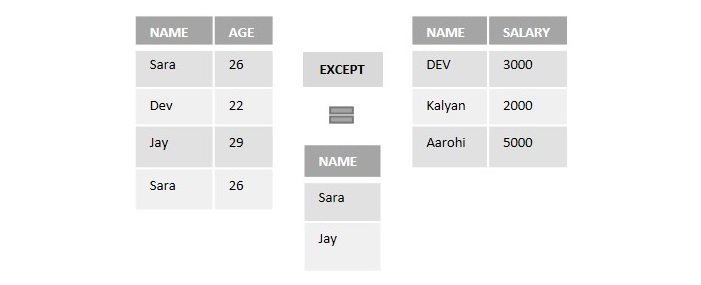
    For better understanding consider two tables with records as shown in the following image −

    Except

    If we perform the EXCEPT operator on the above two tables to retrieve the names, it will display the distinct records only from the first table which are not in common with the records of the second table.

    Here, “Dev” is common in both tables. So, the EXECPT operator will eliminate it and retrieves only “Sara” and “Jay” as output.

    MySQL database does not support the EXCEPT operator. Instead of this, we can use the DISTINCT keyword along with the LEFT JOIN clause to retrieve distinct values from the left table.

    Syntax

    Following is the SQL syntax of the EXCEPT operator in Microsoft SQL server −

    SELECT column1, column2,..., columnN
    FROM table1, table2,..., tableN
    [Conditions]//optionalEXCEPTSELECT column1, column2,..., columnN
    FROM table1, table2,..., tableN
    [Conditions]//optional

    The number and order of columns in both SELECT statements should be the same.

    Example

    First of all, let us create a table named STUDENTS using the following query −

    CREATETABLE STUDENTS(
       ID INTNOTNULL, 
       NAME VARCHAR(20)NOTNULL, 
       SUBJECT VARCHAR(20)NOTNULL, 
       AGE INTNOTNULL, 
       HOBBY VARCHAR(20)NOTNULL,PRIMARYKEY(ID));

    Let’s insert some values into the table using the following query −

    INSERTINTO STUDENTS VALUES(1,'Naina','Maths',24,'Cricket'),(2,'Varun','Physics',26,'Football'),(3,'Dev','Maths',23,'Cricket'),(4,'Priya','Physics',25,'Cricket'),(5,'Aditya','Chemistry',21,'Cricket'),(6,'Kalyan','Maths',30,'Football'),(7,'Aditya','Chemistry',21,'Cricket'),(8,'Kalyan','Chemistry',32,'Cricket');

    The table produced is as shown below −

    IDNAMESUBJECTAGEHOBBY
    1NainaMathematics24Cricket
    2VarunPhysics26Football
    3DevMathematics23Cricket
    4PriyaPhysics25Cricket
    5AdityaChemistry21Cricket
    6KalyanMathematics30Football
    7AdityaChemistry21Cricket
    8KalyanChemistry32Cricket

    Now, let us create another table named STUDENTS_HOBBY using the following query −

    CREATETABLE STUDENTS_HOBBY(
       ID INTNOTNULL, 
       NAME VARCHAR(20)NOTNULL, 
       HOBBY VARCHAR(20)NOTNULL, 
       AGE INTNOTNULL,PRIMARYKEY(ID));

    Once the table is created, let us insert some values to the table using the query below −

    INSERTINTO STUDENTS_HOBBY VALUES(1,'Vijay','Cricket',18),(2,'Varun','Football',26),(3,'Surya','Cricket',19),(4,'Karthik','Cricket',25),(5,'Sunny','Football',26),(6,'Dev','Cricket',23);

    The table created is as follows −

    IDNAMEHOBBYAGE
    1VijayCricket18
    2VarunFootball26
    3SuryaCricket19
    4KarthikCricket25
    5SunnyFootball26
    6DevCricket23

    Now, let us perform the except operation on the above two tables −

    SELECT NAME, HOBBY, AGE FROM STUDENTS
    EXCEPTSELECT NAME, HOBBY, AGE FROM STUDENTS_HOBBY;

    Output

    Output of the above query is as shown below −

    NAMEHOBBYAGE
    AdityaCricket21
    KalyanCricket32
    KalyanFootball30
    NainaCricket24
    PriyaCricket25

    EXCEPT with BETWEEN Operator

    We can use the EXCEPT operator with the BETWEEN operator in SQL to exclude records that fall within a specified range.

    Example

    In the following SQL query, we are retrieving the records of students aged between 20 and 30 from the STUDENTS table, excluding those who are also aged between 20 and 30 from the STUDENTS_HOBBY table −

    SELECT NAME, HOBBY, AGE
    FROM STUDENTS
    WHERE AGE BETWEEN20AND30EXCEPTSELECT NAME, HOBBY, AGE 
    FROM STUDENTS_HOBBY
    WHERE AGE BETWEEN20AND30

    Output

    When we execute the program query, the output is obtained as follows −

    NAMEHOBBYAGE
    AdityaCricket21
    KalyanFootball30
    NainaCricket24
    PriyaCricket25

    Except with IN Operator

    The IN operator is used to filter a result set based on a list of specified values. We can also use the EXCEPT operator with the IN operator in SQL to exclude records that matches values in the specified list.

    Example

    Here, we are retrieving the records of students with Cricket as a hobby, from the STUDENTS table, excluding those who also have Cricket as hobby from the STUDENTS_HOBBY table −

    SELECT NAME, HOBBY, AGE FROM STUDENTS
    WHERE HOBBY IN('Cricket')EXCEPTSELECT NAME, HOBBY, AGE FROM STUDENTS_HOBBY
    WHERE HOBBY IN('Cricket')

    Output

    Following is the output of the above query −

    NAMEHOBBYAGE
    AdityaCricket21
    KalyanCricket32
    NainaCricket24
    PriyaCricket25

    EXCEPT with LIKE Operator

    The LIKE operator is used to perform pattern matching on a string. The EXCEPT operator can also be used with the LIKE operator in SQL to exclude rows that matches with the specified pattern.

    Example

    In here, we are retrieving records from the STUDENTS table where the values in the HOBBY column starts with ‘F’, while excluding similar rows from the STUDENTS_HOBBY table −

    SELECT ID, NAME, HOBBY, AGE FROM STUDENTS
    WHERE HOBBY LIKE'F%'EXCEPTSELECT ID, NAME, HOBBY, AGE FROM STUDENTS_HOBBY
    WHERE HOBBY LIKE'F%';

    Output

    The output for the above query is produced as given below −

    IDNAMEHOBBYAGE
    6KalyanFootball30