Author: saqibkhan

  • Common Table Expression

    A Common Table Expression (CTE) can make it easier to manage and write complex queries by making them more readable and simple, like database views and derived tables. We can reuse or rewrite the query by breaking down the complex queries into simple blocks.

    The SQL Common Table Expression

    The WITH clause in MySQL is used to specify a Common Table Expression.

    A Common Table Expression (CTE) in SQL is a one-time result set, i.e. it is a temporary table that exists only during the execution of a single query. It allows us to work with data specifically within that query, such as using it in SELECTUPDATEINSERTDELETECREATEVIEW, OR MERGE statements.

    CTE is temporary because it cannot be stored anywhere for later use; once the query is executed, it is lost.

    The MySQL WITH Clause

    To specify common table expressions, we use WITH clause that consists of one or more comma-separated subclauses. Within each subclause, we can present a subquery that produces a result set and assigns a name to this subquery.

    You cannot use the WITH clause in MySQL versions before 8.0.

    Syntax

    Following is the syntax to create a CTE using WITH clause −

    WITH CTE_NAME (column_name)AS(query)SELECT*FROM CTE_NAME;

    Where,

    • CTE_NAME − It is the name assigned to the CTE.
    • column_name − It is the column names for the CTE, which can be useful for improving query readability.
    • query − It defines the CTE and it can be any valid SQL query.
    • After defining the CTE, you can reference it in subsequent queries within the same session.

    Example

    Assume we have created a table named CUSTOMERS in MySQL database using CREATE TABLE statement as shown below −

    CREATETABLE CUSTOMERS (
       ID INTNOTNULL,
       NAME VARCHAR(20)NOTNULL,
       AGE INTNOTNULL,
       ADDRESS CHAR(25),
       SALARY DECIMAL(18,2),PRIMARYKEY(ID));

    Now, we are inserting some records into the above created table −

    INSERTINTO CUSTOMERS VALUES(1,'Ramesh',32,'Ahmedabad',2000.00),(2,'Khilan',25,'Delhi',1500.00),(3,'Kaushik',23,'Kota',2000.00),(4,'Chaitali',25,'Mumbai',6500.00),(5,'Hardik',27,'Bhopal',8500.00),(6,'Komal',22,'Hyderabad',4500.00),(7,'Muffy',24,'Indore',10000.00);

    The table created is as shown below −

    IDNAMEAGEADDRESSSALARY
    1Ramesh32Ahmedabad2000.00
    2Khilan25Delhi1500.00
    3Kaushik23Kota2000.00
    4Chaitali25Mumbai6500.00
    5Hardik27Bhopal8500.00
    6Komal22Hyderabad4500.00
    7Muffy24Indore10000.00

    Here, we are creating a Common Table Expression (CTE) named CUSTOMER_AGE that selects all customers with an age of 23. We are then retrieving the ID, NAME, and AGE of these customers from the CTE.

    WITH CUSTOMER_AGE AS(SELECT*FROM customers WHERE AGE =23)SELECT ID, NAME, AGE FROM CUSTOMER_AGE;

    Output

    Following is the output of the above query −

    IDNAMEAGE
    3Kaushik23

    CTE from Multiple Tables

    We can also create a Common Table Expression (CTE) that combines data from multiple tables by using JOIN operations within the CTE’s subquery. To do this, we need to use the comma operator to separate each CTE definition, effectively merging them into a single statement.

    Syntax

    Following is the basic syntax for multiple Common Table Expression (CTE) −

    WITH
       CTE_NAME1 (column_name)AS(query),
       CTE_NAME2 (column_name)AS(query)SELECT*FROM CTE_NAME1
    UNIONALLSELECT*FROM CTE_NAME2;

    We can use multiple Common Table Expressions (CTEs) with various SQL operations, such as UNION, UNION ALL, JOIN, INTERSECT, or EXCEPT.

    Example

    In here, we are defining two CTEs namely ‘CUSTOMERS_IN_DELHI’ and ‘CUSTOMERS_IN_MUMBAI’ to segregate customers based on their addresses in Delhi and Mumbai. Then, we are using the UNION ALL operator to combine the results from both CTEs into a single result set, retrieving customer information from both cities.

    WITH
    CUSTOMERS_IN_DELHI AS(SELECT*FROM CUSTOMERS WHERE ADDRESS ='Delhi'),
    CUSTOMERS_IN_MUMBAI AS(SELECT*FROM CUSTOMERS WHERE ADDRESS ='Mumbai')SELECT ID, NAME, ADDRESS FROM CUSTOMERS_IN_DELHI
    UNIONALLSELECT ID, NAME, ADDRESS FROM CUSTOMERS_IN_MUMBAI;

    Output

    Output of the above query is as shown below −

    IDNAMEADDRESS
    2KhilanDelhi
    4ChaitaliMumbai

    Recursive CTE

    A common table expression is a query that keeps referring back to its own result in a loop repeatedly until it returns an empty result.

    A recursive query continually iterates across a subset of the data during its execution, and defines itself in a self-referencing manner. This self-referencing mechanism allows it to repeatedly process and expand its results until a stopping condition is met.

    To make a CTE recursive, it must include a UNION ALL statement and provide a second definition of the query that utilizes the CTE itself. This allows the CTE to repeatedly reference to its own results, creating a recursive behaviour in the query.

    Example

    Now, we are using a recursive CTE named recursive_cust to retrieve data from the ‘CUSTOMERS’ table created above. Initially, we are selecting customers with salaries above 3000 and then recursively appending customers older than 25 to the result set using the UNION ALL operator −

    WITH recursive_cust (ID, NAME, ADDRESS, AGE)AS(SELECT ID, NAME, ADDRESS, AGE
       FROM CUSTOMERS
       WHERE SALARY >3000UNIONALLSELECT ID, NAME, ADDRESS, AGE
       FROM CUSTOMERS
       WHERE AGE >25)SELECT*FROM recursive_cust;

    Output

    When the above query is executed, all data from the customers table whose age is greater than 25 or salary is greater than 3000 will be displayed recursively as shown below −

    IDNAMEADDRESSAGE
    4ChaitaliMumbai25
    5HardikBhopal27
    6KomalHyderabad22
    7MuffyIndore24
    1RameshAhmedabad32
    5HardikBhopal27

    Example

    In the following query, we are using a recursive CTE named Numbers to generate and display numbers from 1 to 5. The recursive part continually adds 1 to the previous value until it reaches 5, creating a sequence −

    WITH RECURSIVE Numbers AS(SELECT1AS N
      UNIONALLSELECT N +1FROM Numbers WHERE N <5)SELECT n FROM Numbers;

    Output

    After executing the above query, we get the following output −

    N
    1
    2
    3
    4
    5

    Advantages of CTE

    Following are the advantages of the CTE −

    • CTE makes the code maintenance easier.
    • It increases the readability of the code.
    • It increases the performance of the query.
    • CTE allows for the simple implementation of recursive queries.

    Disadvantages of CTE

    Following are the disadvantages of the CTE −

    • CTE can only be referenced once by the recursive member.
    • We cannot use the table variables and CTEs as parameters in a stored procedure.
    • A CTE can be used in place of a view, but a CTE cannot be nested while views can.
  • Cursors

    A database cursor solves the problem of impedance mismatch. It acts as a filter between the result of a SQL query and the statements that process this result.

    Cursors in SQL

    Cursor is a temporary memory that is allocated by the database server at the time of performing the Data Manipulation Language operations on a table, such as INSERT, UPDATE and DELETE etc. It is used to retrieve and manipulate data stored in the SQL table.

    In MySQL, you cannot declare a cursor directly outside of a stored procedure or function. Cursors are generally declared within stored procedures, functions, or blocks of SQL code in MySQL database.

    Using cursors, we can perform multiple operations on each row of a result set, with or without returning the original data.

    Properties of Cursors

    Following are the properties of MySQL Cursors −

    • READ ONLY − We cannot update or modify any records in the table using the MySQL cursors. We can just fetch and process data from a table.
    • Non-Scrollable − We can retrieve records from a table in a single direction, i.e. from the first record or the last. We cannot move backward or jump to a specific position within the result set.
    • Asensitive Cursor − An asensitive cursor operates directly on the actual data in the database, it does not create a copy of the data. If any change is made to the data by other connections, it can affect the data that the cursor is working with.

    In addition to the Asensitive cursor there is another type known as Insensitive Cursor. An insensitive cursor uses a temporary copy of the data. Therefore, these cursors are insensitive (not affected) to the changes that are made in the table.

    Life Cycle of the Cursor

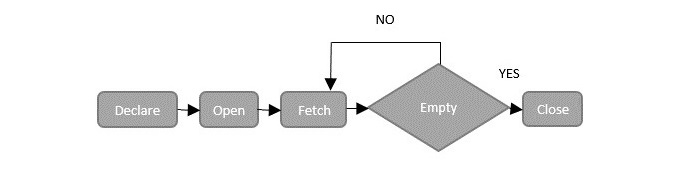
    There are four steps to manage these cursors. Following diagram illustrates the lifecycle of an SQL cursor −

    Cursor Lifecycle

    Now, let us discuss the phases of life cycle of the cursor one-by-one.

    Declare Cursor Statement

    In MySQL we can declare a cursor using the DECLARE statement and associate it with a SELECT statement to retrieve records from a database table.

    However, this SELECT statement associated with a cursor does not use the INTO clause, as it’s purpose is to fetch and process rows rather than assigning values to variables.

    Syntax

    Following is the syntax to declare a cursor in MySQL database −

    DECLARE cursor_name CURSORFOR select_statement;

    Open Cursor Statement

    After declaring a cursor in MySQL, the next step is to open the cursor using the OPEN statement. It initializes the result-set, allowing us to fetch and process rows from the associated SELECT statement in the cursor.

    Syntax

    Following is the syntax to open a cursor in MySQL database −

    OPEN cursor_name;

    Fetch Cursor Statement

    Then, we can use the FETCH statement to retrieve the current row pointed by the cursor, and with each FETCH, the cursor moves to the next row in the result set. This allows us to process each row one by one.

    Syntax

    Following is the syntax to fetch a cursor in MySQL database −

    FETCH cursor_name INTO variable_list;

    Close Cursor Statement

    Once all the rows are fetched, we must close the cursor to release the memory associated with it. We can do this using the CLOSE statement.

    Syntax

    Following is the syntax to close a cursor in MySQL database −

    CLOSE cursor_name;

    Example

    In this example, let us see how to manage a cursor in a stored procedure.

    Assume we have created a table with the name CUSTOMERS using the CREATE TABLE statement as follows −

    CREATETABLE CUSTOMERS (
       ID INTNOTNULL,
       NAME VARCHAR(20)NOTNULL,
       AGE INTNOTNULL,
       ADDRESS CHAR(25),
       SALARY DECIMAL(18,2),PRIMARYKEY(ID));

    Now, let us insert some records into the CUSTOMERS table using the INSERT statement as follows −

    INSERTINTO CUSTOMERS VALUES(1,'Ramesh',32,'Ahmedabad',2000.00),(2,'Khilan',25,'Delhi',1500.00),(3,'Kaushik',23,'Kota',2000.00),(4,'Chaitali',25,'Mumbai',6500.00);

    Now, we will create a backup table named ‘CUSTOMERS_BACKUP’ to store customer data −

    CREATETABLE CUSTOMERS_BACKUP (
       ID INTNOTNULL,
       NAME VARCHAR(20)NOTNULL,PRIMARYKEY(ID));

    Here, we are creating a stored procedure named FetchCustomers to fetch customer names from the CUSTOMERS table and inserting them one by one into the BACKUP table. We are using a cursor to iterate through the rows and a handler to detect the end of the result-set, ensuring all names are processed −

    DELIMITER//CREATEPROCEDURE FetchCustomers()BEGINDECLARE done INTDEFAULTFALSE;DECLARE customer_id INT;DECLARE customer_name VARCHAR(255);DECLARE auto_id INT;-- Declare cursorDECLARE MY_CURSOR CURSORFORSELECT id, name FROM CUSTOMERS;-- Declare exit handlerDECLARECONTINUEHANDLERFORNOT FOUND SET done =TRUE;-- Open cursorOPEN MY_CURSOR;-- Fetch and insert rows
       read_loop: LOOPFETCH MY_CURSOR INTO customer_id, customer_name;IF done =1THENLEAVE read_loop;ENDIF;-- Insert the fetched data into the backup tableINSERTINTO customers_backup VALUES(customer_id, customer_name);-- Get the last auto-generated ID used in the insertionSET auto_id = LAST_INSERT_ID();ENDLOOP;-- Close cursorCLOSE MY_CURSOR;END//DELIMITER;

    Once we create the procedure successfully, we can execute it using the CALL statement as shown below −

    CALL FetchCustomers();

    Verification

    You can verify the contents of the CUSTOMERS_BACKUP table using the SELECT statement as shown below −

    SELECT*FROM CUSTOMERS_BACKUP;

    The contents of the table would be −

    IDNAME
    1Ramesh
    2Khilan
    3Kaushik
    4Chaitali
  • Date & Time

    SQL provides multiple datatypes and functions to handle Date and Time values in a database. This is because Date and Time values are represented in various formats. For instance, there are two common ways to represent a date value: DD/MM/YYYY and MM/DD/YYYY. Similarly, there is more than a single way to represent time values.

    For a database to recognize such data given in any format, we make use of multiple datatypes and functions.

    The only tricky part about storing the Date and Time data in a database is making sure that the values are inserted in the tables with the same format as the datatype.

    Different database systems use different datatypes and functions to store and handle the Date and Time data.

    Date & Time Datatypes in SQL

    Date and time datatypes are used in SQL to store date and time values in various formats. The datatypes available in SQL are listed below.

    S.No.Datatype & DescriptionStorage
    1datetimeIt stores date and time both from January 1, 1753 to December 31, 9999 with an accuracy of 3.33 milliseconds; with the format: YYYY-MM-DD HH:MI:SS.8 bytes
    2datetime2It stores date and time both from January 1, 0001 to December 31, 9999 with an accuracy of 100 nanoseconds.6 – 8 bytes
    3smalldatetimeIt stores date and time both from January 1, 1900 to June 6, 2079 with an accuracy of 1 minute. It is stored in the format of YYYY-MM-DD HH:MI:SS.4 bytes
    4dateIt stores date only from January 1, 0001 to December 31 9999, in the format: YYYY-MM-DD.3 bytes
    5timeIt store time only to an accuracy of 100 nanoseconds.3 – 5 bytes
    6datetimeoffsetIt is the same of the datetime2 with the addition of the time zone offset.8 – 10 bytes
    7timestampIt stores the unique number that gets updated every time a row gets created or modified. It does not correspond to real time and is based on internal time. Each table may have only one timestamp variable.

    Example

    In the following example, let us create a table named SALES_DETAILS which accepts only date and time values in different formats.

    CREATETABLE SALES_DETAILS(
       orderDate DATE, 
       shippingDate DATETIME, 
       deliveredDate TIMESTAMP,timeTIME);

    To insert values into this table, use the following query −

    INSERTINTO SALES_DETAILS VALUES('2023-02-01','2023-02-01 :10:00','2023-02-03 :18:00','18:00');

    Output

    The table will be created as follows −

    orderDateshippingDatedeliveredDatetime
    2023-02-012023-02-01 :10:002023-02-03 :18:0018:00

    Date & Time Functions in SQL

    SQL also provides multiple functions to handle date and time values.

    For instance, there are different functions to retrieve the current timestamp in different formats. Let us see some of such functions below −

    CURDATE() Function

    To get the current date, we use the CURDATE() function in MySQL. The format of the resultant date will be ‘YYYY-MM-DD’ (string) or YYYYMMMDD (numeric).

    SELECT CURDATE();

    Output

    When we execute the above query, we get the current days date −

    CURDATE()
    2023-08-22

    NOW() Function

    The MySQL NOW() function will retrieve the current date and time value as a timestamp based on the context and, the value returned will be in either of the two formats: ‘YYYY-MM-DD hh:mm:ss’ and ‘YYYYMMDDhhmmss’.

    SELECTNOW();

    Output

    When we execute the above SQL query, we get the current date with time as follow −

    NOW()
    2023-08-22 15:30:25

    CURRENT_TIMESTAMP() Function

    The MySQL CURRENT_TIMESTAMP() function is used to get the current timestamp. The value returned will be in ‘YYYY-MM-DD hh:mm:ss’ (string) or YYYYMMDDhhmmss (numeric) format. This function is a synonym for NOW().

    SELECTCURRENT_TIMESTAMP();

    Output

    When we run the above SQL query, we get the following output −

    CURRENT_TIMESTAMP()
    2023-08-22 15:31:32

  • Auto Increment

    The SQL Auto Increment is used to automatically add unique sequential values into a column of a table.

    We usually define the Auto Increment on a column while creating a table. And when we insert new records into the table, the unique values are added to them.

    When we use Auto Increment on a table column, there is no need to insert NOT NULL values to that column. If we provide such values, they will overwrite the unique identities and the increment will be continued (only) on the NULL values (if any); causing ambiguity on the data.

    Different RDBMS support the Auto Increment feature in different ways.

    Auto Increment in MySQL

    In MySQL, you can add the auto-increment feature to a column of a table using the attribute named AUTO_INCREMENT.

    By default, when we define the AUTO_INCREMENT attribute on a column, the unique values are generated from “1”; and for each new record we enter into the table, the values in the column will increment by 1. Thus, the first record inserted will have a value of 1, the second record will have a value of 2, and so on.

    Syntax

    Following is the syntax to add AUTO_INCREMENT attribute to a column of a table in MySQL −

    CREATETABLE table_name(
       column1 datatype AUTO_INCREMENT,
       column2 datatype,
       column3 datatype,.....
       columnN datatype
    );

    Example

    In the query to we are creating a table named CUSTOMERS and adding the AUTO_INCREMENT to the column named ID −

    CREATETABLE CUSTOMERS(
       ID INTPRIMARYKEYAUTO_INCREMENT,
       NAME VARCHAR(20)NOTNULL,
       AGE INTNOTNULL,
       ADDRESS CHAR(25),
       SALARY DECIMAL(18,2));

    Now, let us insert values into the CUSTOMERS table using the INSERT statement −

    INSERTINTO CUSTOMERS (NAME, AGE, ADDRESS, SALARY)VALUES("Ramesh",32,"Ahmedabad",2000.00),("Khilan",25,"Delhi",1500.00),("Kaushik",23,"Kota",2000.00),("Chaitali",25,"Mumbai",6500.00);

    Verification

    To verify this, you need to retrieve the contents of the CUSTOMERS using the SELECT query as −

    SELECT*FROM CUSTOMERS;

    Output

    Following is the output of the above query, here you can observe that the ID values are generated automatically −

    IDNAMEAGEADDRESSSALARY
    1Ramesh32Ahmedabad2000.00
    2Khilan25Delhi1500.00
    3Kaushik23Kota2000.00
    4Chaitali25Mumbai6500.00

    AUTO_INCREMENT on Existing Columns

    MySQL also allows you to implement the AUTO_INCREMENT attribute on an existing table, using the ALTER TABLE statement.

    Following query starts incrementing the ID values from 5 in the CUSTOMERS table CUSTOMERS −

    ALTERTABLE CUSTOMERS AUTO_INCREMENT=100;

    Now, let us insert more records to see if the ID values are auto incremented.

    INSERTINTO CUSTOMERS(NAME, AGE, ADDRESS, SALARY)VALUES("Hardik",27,"Bhopal",8500.00),("Komal",22,"MP",4500.00),("Muffy",24,"Indore",10000.00);

    To view the above table data, we use the following SELECT query −

    SELECT*FROM CUSTOMERS;

    Output

    The output of the above query is shown below. It shows the auto increment in action. We are getting the ID values of the newly inserted records begins at 100.

    IDNAMEAGEADDRESSSALARY
    1Ramesh32Ahmedabad2000.00
    2Khilan25Delhi1500.00
    3Kaushik23Kota2000.00
    4Chaitali25Mumbai6500.00
    100Hardik27Bhopal8500.00
    101Komal22Hyderabad4500.00
    102Muffy24Indore10000.00

    Auto Increment in SQL Server

    In SQL Server, there is no direct command/query to perform Auto Increment. Instead, we use the IDENTITY() property. This property works similar to the AUTO_INCREMENT attribute in MySQL. It generates unique, sequential numbers automatically and it is mostly used on the PRIMARY KEY constraint.

    Syntax

    Following is the basic syntax of IDENTITY() property in SQL Server −

    CREATETABLE table_name (
       column1 datatype IDENTITY[(seed, increment)],
       column2 datatype,
       column3 datatype,.....
       columnN datatype
    );

    This property accepts two parameters. The same are described below:

    • seed: It sets the starting value for the auto-incrementing column.
    • increment: It specifies how much the value increases by for each new row.

    Example

    In the following example, we are using the IDENTITY() property on the ID column of table named CUSTOMERS −

    CREATETABLE CUSTOMERS(
       ID INTPRIMARYKEYIDENTITY(1,1),
       NAME VARCHAR(20)NOTNULL,
       AGE INTNOTNULL,
       ADDRESS CHAR(25),
       SALARY DECIMAL(18,2));

    After creating the table, we are inserting some records using the following query −

    INSERTINTO CUSTOMERS(NAME, AGE, ADDRESS, SALARY)VALUES('Ramesh',32,'Ahmedabad',2000.00),('Khilan',25,'Delhi',1500.00),('Kaushik',23,'Kota',2000.00),('Chaitali',25,'Mumbai',6500.00);

    To view the table data, we use the following SELECT query −

    SELECT*FROM CUSTOMERS;

    Output

    Following is an output of the above query, where ID values are generated automatically −

    IDNAMEAGEADDRESSSALARY
    1Ramesh32Ahmedabad2000.00
    2Khilan25Delhi1500.00
    3Kaushik23Kota2000.00
    4Chaitali25Mumbai6500.00
  • Using Sequences

    Sequences in SQL are database objects that generate a sequence of unique integer values. They are frequently used in databases because many applications require that each row in a table must contain unique values and sequences provide an easy way to generate them.

    Sequences are a feature of many SQL database management systems, such as Oracle, PostgreSQL, SQL server, and IBM DB2.

    MySQL does not support the CREATE SEQUENCE statement to create sequences for table rows or columns. Instead, we can use AUTO_INCREMENT attribute.

    Sequences in MySQL

    In MySQL, we use the AUTO_INCREMENT attribute to generate unique integer values (sequences) for a column. By default, the sequence starts with an initial value of 1 and increments by 1 for each new row.

    Syntax

    Following is the syntax of AUTO_INCREMENT attribute in MySQL −

    CREATETABLE table_name (
    	column1 datatype AUTO_INCREMENT,
    	column2 datatype,
    	column3 datatype,...
    	columnN datatype
    );

    Example

    In the following example, we are creating a table named CUSTOMERS. In addition to that, we are defining AUTO_INCREMENT on ID column of the table.

    CREATETABLE CUSTOMERS (
       ID INTAUTO_INCREMENT,
       NAME VARCHAR(20)NOTNULL,
       AGE INTNOTNULL,
       ADDRESS CHAR(25),
       SALARY DECIMAL(18,2),PRIMARYKEY(ID));

    Here, we are adding some records into the above created table −

    INSERTINTO CUSTOMERS VALUES(NULL,'Ramesh',32,'Ahmedabad',2000.00),(NULL,'Khilan',25,'Delhi',1500.00),(NULL,'Kaushik',23,'Kota',2000.00),(NULL,'Chaitali',25,'Mumbai',6500.00),(NULL,'Hardik',27,'Bhopal',8500.00),(NULL,'Komal',22,'Hyderabad',4500.00),(NULL,'Muffy',24,'Indore',10000.00);

    The table will be created as follows −

    IDNAMEAGEADDRESSSALARY
    1Ramesh32Ahmedabad2000.00
    2Khilan25Delhi1500.00
    3Kaushik23Kota2000.00
    4Chaitali25Mumbai6500.00
    5Hardik27Bhopal8500.00
    6Komal22Hyderabad4500.00
    7Muffy24Indore10000.00

    As we can see in the above table, the values in the ID column are auto incremented.

    Starting a Sequence at a Particular Value in MySQL

    By default, MySQL sequences start from 1. To start a sequence with a different value, we use the AUTO_INCREMENT in combination with the ALTER statement.

    Syntax

    Following is the syntax to start the sequence with different value −

    ALTERTABLE table_name AUTO_INCREMENT=value;

    In the following query, we are creating a table named BUYERS with AUTO_INCREMENT defined on the ID column.

    CREATETABLE BUYERS (
       ID INTAUTO_INCREMENT,
       NAME VARCHAR(20)NOTNULL,
       AGE INTNOTNULL,
       ADDRESS CHAR(25),
       SALARY DECIMAL(18,2),PRIMARYKEY(ID));

    Here, we are making the sequence start with 100 using the ALTER Statement as shown below −

    ALTERTABLE BUYERS AUTO_INCREMENT=100;

    Now, we are adding records into the BUYERS table using the INSERT INTO statement −

    INSERTINTO BUYERS (NAME, AGE, ADDRESS, SALARY)VALUES('Ramesh',32,'Ahmedabad',2000.00),('Khilan',25,'Delhi',1500.00),('Kaushik',23,'Kota',2000.00),('Chaitali',25,'Mumbai',6500.00),('Hardik',27,'Bhopal',8500.00),('Komal',22,'Hyderabad',4500.00),('Muffy',24,'Indore',10000.00);

    The table will be created as −

    IDNAMEAGEADDRESSSALARY
    100Ramesh32Ahmedabad2000.00
    101Khilan25Delhi1500.00
    102Kaushik23Kota2000.00
    103Chaitali25Mumbai6500.00
    104Hardik27Bhopal8500.00
    105Komal22Hyderabad4500.00
    106Muffy24Indore10000.00

    As observed in the table above, the values in the “ID” column begin with 100 instead of 1.

    Sequences in SQL Server

    In SQL server, a sequence can be created using the CREATE SEQUENCE statement. The statement specifies the name of the sequence, the starting value, the increment, and other properties of the sequence.

    Syntax

    Following is the syntax to create a sequence in SQL −

    CREATE SEQUENCE Sequence_Name
    STARTWITH Initial_Value
    INCREMENT BY Increment_Value
    MINVALUE Minimum_Value
    MAXVALUE Maximum_Value
    CYCLE|NOCYCLE;

    Here,

    • Sequence_Name − This specifies the name of the sequence.
    • Initial_Value − This specifies the starting value from where the sequence should start.
    • Increment_Value − This specifies the value by which the sequence will increment by itself. This can be valued positively or negatively.
    • Minimum_Value − This specifies the minimum value of the sequence.
    • Maximum_Value − This specifies the maximum value of the sequence.
    • Cycle − When the sequence reaches its Maximum_Value, it starts again from the beginning.
    • Nocycle − An exception will be thrown if the sequence exceeds the Maximum_Value.

    Example

    First of all, let us create a table named CUSTOMERS using the following query −

    CREATETABLE CUSTOMERS (
       ID INT,
       NAME VARCHAR(20)NOTNULL,
       AGE INTNOTNULL,
       ADDRESS CHAR(25),
       SALARY DECIMAL(18,2),);

    We are inserting some records in the above-created table using INSERT INTO statement as shown in the query below −

    INSERTINTO CUSTOMERS VALUES(NULL,'Ramesh',32,'Ahmedabad',2000.00),(NULL,'Khilan',25,'Delhi',1500.00),(NULL,'Kaushik',23,'Kota',2000.00),(NULL,'Chaitali',25,'Mumbai',6500.00),(NULL,'Hardik',27,'Bhopal',8500.00),(NULL,'Komal',22,'Hyderabad',4500.00),(NULL,'Muffy',24,'Indore',10000.00);

    The table is successfully created in the SQL database.

    IDNAMEAGEADDRESSSALARY
    NULLRamesh32Ahmedabad2000.00
    NULLKhilan25Delhi1500.00
    NULLKaushik23Kota2000.00
    NULLChaitali25Mumbai6500.00
    NULLHardik27Bhopal8500.00
    NULLKomal22Hyderabad4500.00
    NULLMuffy24Indore10000.00

    Now, create a sequence using the following query −

    CREATE SEQUENCE My_Sequence ASINTSTARTWITH1
    INCREMENT BY1
    MINVALUE 1
    MAXVALUE 7CYCLE;

    In the above query, the sequence is named My_Sequence and it starts with the value 1 and increments by 1 each time a value is generated. The sequence has a maximum value of 5 and cycles back to the starting value when it reaches the maximum value.

    Once the sequence is created, it can be used to generate unique integer values. Now, let us update the data in the ID column of the CUSTOMERS table using the following query −

    UPDATE CUSTOMERS SET ID =NEXTVALUEFOR my_Sequence;

    Output

    When you execute the above query, the output is obtained as follows −

    (7 rows affected)
    

    Verification

    Let us verify whether is sequence is updated in the ID column of the table or not using the following query −

    SELECT*FROM CUSTOMERS;

    The table will be displayed as −

    IDNAMEAGEADDRESSSALARY
    1Ramesh32Ahmedabad2000.00
    2Khilan25Delhi1500.00
    3Kaushik23Kota2000.00
    4Chaitali25Mumbai6500.00
    5Hardik27Bhopal8500.00
    6Komal22Hyderabad4500.00
    7Muffy24Indore10000.00
  • Handling Duplicates

    Sometimes, tables or result sets contain duplicate records. While in most cases, duplicates are allowed, there are situations where it is necessary to prevent duplicate records and remove them from a database table.

    Why is Handling Duplicates in SQL Necessary?

    Handling duplicates in an SQL database becomes necessary to prevent the following consequences −

    • The existence of duplicates in an organizational database will lead to logical errors.
    • Duplicate data occupies space in the storage, which leads to decrease in usage efficiency of a database.
    • Due to the increased use of resources, the overall cost of the handling resources rises.
    • With increase in logical errors due to the presence of duplicates, the conclusions derived from data analysis in a database will also be erroneous.

    This chapter will describe how to prevent the occurrence of duplicate records in a table and how to remove the already existing duplicate records.

    Preventing Duplicate Entries

    To prevent the entry of duplicate records into a table, we can define a PRIMARY KEY or a UNIQUE Index on the relevant fields. These database constraints ensure that each entry in the specified column or set of columns is unique.

    Example

    Let us create a CUSTOMERS table using the following query −

    CREATETABLE CUSTOMERS (
       FIRST_NAME CHAR(20),
       LAST_NAME CHAR(20),
       SEX CHAR(10));

    As we have not defined any constraints on the table, duplicate records can be inserted into it. To prevent such cases, add a PRIMARY KEY constraint on relevant fields (say LAST_NAME and FIRST_NAME together) −

    ALTERTABLE CUSTOMERS 
    ADDPRIMARYKEY(LAST_NAME, FIRST_NAME);

    Using INSERT IGNORE Query:

    Alternatively, we can use the INSERT IGNORE statement to insert records without generating an error for duplicates as shown below −

    INSERTIGNOREINTO CUSTOMERS (LAST_NAME, FIRST_NAME)VALUES('Jay','Thomas'),('Jay','Thomas');

    As you can see below, the table will only consist of a single record (ignoring the duplicate value).

    FIRST_NAMELAST_NAMESEX
    ThomasJayNULL

    Using REPLACE Query:

    Or, use the REPLACE statement to replace duplicates as shown in the following query −

    REPLACEINTO CUSTOMERS (LAST_NAME, FIRST_NAME)VALUES('Ajay','Kumar'),('Ajay','Kumar');

    The table will contain the following records −

    FIRST_NAMELAST_NAMESEX
    KumarAjayNULL
    ThomasJayNULL

    The choice between the INSERT IGNORE and REPLACE statements should be made based on the desired duplicate-handling behaviour. The INSERT IGNORE statement retains the first set of duplicate records and discards any subsequent duplicates. Conversely, the REPLACE statement preserves the last set of duplicates and erases any earlier ones.

    Using UNIQUE Constraint:

    Another way to enforce uniqueness in a table is by adding a UNIQUE constraint rather than a PRIMARY KEY constraint −

    CREATETABLE BUYERS (
       FIRST_NAME CHAR(20)NOTNULL,
       LAST_NAME CHAR(20)NOTNULL,
       SEX CHAR(10),UNIQUE(LAST_NAME, FIRST_NAME));

    Counting and Identifying Duplicates

    To count and identify duplicate records based on specific columns, we can use the COUNT function and GROUP BY clause.

    Example

    Following is the query to count duplicate records with FIRST_NAME and LAST_NAME in the BUYERS −

    SELECTCOUNT(*)as repetitions, LAST_NAME, FIRST_NAME
    FROM BUYERS
    GROUPBY LAST_NAME, FIRST_NAME
    HAVING repetitions >1;

    This query will return a list of all the duplicate records in the PERSON_TABLE table. To identify sets of values that are duplicated, follow the steps given below −

    • Determine which columns contain the values that may be duplicated.
    • List those columns in the column selection list, along with the COUNT(*).
    • List the columns in the GROUP BY clause as well.
    • Add a HAVING clause that eliminates the unique values by requiring the group counts to be greater than one.

    Eliminating Duplicates from a Table

    We can use the DISTINCT keyword along with the SELECT statement to retrieve unique records from a table.

    SELECTDISTINCT LAST_NAME, FIRST_NAME
    FROM BUYERS
    ORDERBY LAST_NAME;

    Alternatively, you can include a GROUP BY clause specifying the columns you are selecting to eliminate duplicates −

    SELECT LAST_NAME, FIRST_NAME
    FROM BUYERS
    GROUPBY LAST_NAME, FIRST_NAME;

  • Sub Queries

    SQL Subqueries

    An SQL Subquery, is a SELECT query within another query. It is also known as Inner query or Nested query and the query containing it is the outer query.

    The outer query can contain the SELECT, INSERT, UPDATE, and DELETE statements. We can use the subquery as a column expression, as a condition in SQL clauses, and with operators like =, >, <, >=, <=, IN, BETWEEN, etc.

    Rules to be followed

    Following are the rules to be followed while writing subqueries −

    • Subqueries must be enclosed within parentheses.
    • Subqueries can be nested within another subquery.
    • A subquery must contain the SELECT query and the FROM clause always.
    • A subquery consists of all the clauses an ordinary SELECT clause can contain: GROUP BY, WHERE, HAVING, DISTINCT, TOP/LIMIT, etc. However, an ORDER BY clause is only used when a TOP clause is specified. It can’t include COMPUTE or FOR BROWSE clause.
    • A subquery can return a single value, a single row, a single column, or a whole table. They are called scalar subqueries.

    Subqueries with the SELECT Statement

    Subqueries are most frequently used with the SELECT statement. The basic syntax is as follows −

    SELECT column_name [, column_name ]FROM table1 [, table2 ]WHERE  column_name 
    OPERATOR (SELECT column_name [,column_name ]FROM table1 [, table2 ][WHERE]);

    Example

    In the following query, we are creating a table named CUSTOMERS −

    CREATETABLE CUSTOMERS (
       ID INTNOTNULL,
       NAME VARCHAR(20)NOTNULL,
       AGE INTNOTNULL,
       ADDRESS CHAR(25),
       SALARY DECIMAL(18,2),PRIMARYKEY(ID));

    Here, we are inserting records into the above-created table using INSERT INTO statement −

    INSERTINTO CUSTOMERS VALUES(1,'Ramesh',32,'Ahmedabad',2000.00),(2,'Khilan',25,'Delhi',1500.00),(3,'Kaushik',23,'Kota',2000.00),(4,'Chaitali',25,'Mumbai',6500.00),(5,'Hardik',27,'Bhopal',8500.00),(6,'Komal',22,'Hyderabad',4500.00),(7,'Muffy',24,'Indore',10000.00);

    The table is displayed as −

    IDNAMEAGEADDRESSSALARY
    1Ramesh32Ahmedabad2000.00
    2Khilan25Delhi1500.00
    3kaushik23Kota2000.00
    4Chaitali25Mumbai6500.00
    5Hardik27Bhopal8500.00
    6Komal22Hyderabad4500.00
    7Muffy24Indore10000.00

    Now, let us check the following subquery with a SELECT statement.

    SELECT*FROM CUSTOMERS 
    WHERE ID IN(SELECT ID FROM CUSTOMERS WHERE SALARY >4500);

    This would produce the following result −

    IDNAMEAGEADDRESSSALARY
    4Chaitali25Mumbai6500.00
    5Hardik27Bhopal8500.00
    7Muffy24Indore10000.00

    Subqueries with the INSERT Statement

    We can also use the subqueries along with the INSERT statements. The data returned by the subquery is inserted into another table.

    The basic syntax is as follows −

    INSERTINTO table_name [(column1 [, column2 ])]SELECT[*|column1 [, column2 ]FROM table1 [, table2 ][WHEREVALUE OPERATOR ]

    Example

    In the following example, we are creating another table CUSTOMERS_BKP with similar structure as CUSTOMERS table −

    CREATETABLE CUSTOMERS_BKP (
       ID INTNOTNULL,
       NAME VARCHAR(20)NOTNULL,
       AGE INTNOTNULL,
       ADDRESS CHAR(25),
       SALARY DECIMAL(18,2),PRIMARYKEY(ID));

    Now to copy the complete records of CUSTOMERS table into the CUSTOMERS_BKP table, we can use the following query −

    INSERTINTO CUSTOMERS_BKP 
    SELECT*FROM CUSTOMERS 
    WHERE ID IN(SELECT ID FROM CUSTOMERS);

    The above query produces the following output −

    Query OK, 7 rows affected (0.01 sec)
    Records: 7  Duplicates: 0  Warnings: 0
    

    Verification

    Using the SELECT statement, we can verify whether the records from CUSTOMERS table have been inserted into CUSTOMERS_BKP table or not −

    SELECT*FROM CUSTOMERS_BKP;

    The table will be displayed as −

    IDNAMEAGEADDRESSSALARY
    1Ramesh32Ahmedabad2000.00
    2Khilan25Delhi1500.00
    3kaushik23Kota2000.00
    4Chaitali25Mumbai6500.00
    5Hardik27Bhopal8500.00
    6Komal22Hyderabad4500.00
    7Muffy24Indore10000.00

    Subqueries with the UPDATE Statement

    A subquery can also be used with the UPDATE statement. You can update single or multiple columns in a table using a subquery.

    The basic syntax is as follows −

    UPDATEtableSET column_name = new_value 
    [WHERE OPERATOR [VALUE](SELECT COLUMN_NAME FROM TABLE_NAME [WHERE]);

    Example

    We have the CUSTOMERS_BKP table available which is backup of CUSTOMERS table. The following example updates SALARY by 0.25 times in the CUSTOMERS table for all the customers whose AGE is greater than or equal to 27.

    UPDATE CUSTOMERS 
    SET SALARY = SALARY *0.25WHERE AGE IN(SELECT AGE FROM CUSTOMERS_BKP WHERE AGE >=27);

    Following is the output of the above query −

    Query OK, 2 rows affected (0.01 sec)
    Rows matched: 2  Changed: 2  Warnings: 0
    

    Verification

    This would impact two rows and if you verify the contents of the CUSTOMERS using the SELECT statement as shown below.

    SELECT*FROM CUSTOMERS;

    The table will be displayed as −

    IDNAMEAGEADDRESSSALARY
    1Ramesh32Ahmedabad500.00
    2Khilan25Delhi1500.00
    3kaushik23Kota2000.00
    4Chaitali25Mumbai6500.00
    5Hardik27Bhopal2125.00
    6Komal22Hyderabad4500.00
    7Muffy24Indore10000.00

    Subqueries with the DELETE Statement

    The subquery can be used with the DELETE statement as well; like with any other statements mentioned above.

    The basic syntax is as follows −

    DELETEFROM TABLE_NAME
    [WHERE OPERATOR [VALUE](SELECT COLUMN_NAME FROM TABLE_NAME)[WHERE)];

    Example

    We have a CUSTOMERS_BKP table available which is a backup of the CUSTOMERS table. The following example deletes the records from the CUSTOMERS table for all the customers whose AGE is greater than or equal to 27.

    DELETEFROM CUSTOMERS 
    WHERE AGE IN(SELECT AGE FROM CUSTOMERS_BKP WHERE AGE >=27);

    The above query generate the following output −

    OK, 2 rows affected (0.01 sec)
    

    Verification

    If you verify the contents of the CUSTOMERS table using the SELECT statement as shown below.

    SELECT*FROM CUSTOMERS;

    The table will be displayed as −

    IDNAMEAGEADDRESSSALARY
    2Khilan25Delhi1500.00
    3kaushik23Kota2000.00
    4Chaitali25Mumbai6500.00
    6Komal22Hyderabad4500.00
    7Muffy24Indore10000.00
  • Wildcard Routes

    Wildcard Routes in Angular

    In Angular, wildcard routes are used to match any path, whether it is valid or not. If the user navigates to an “invalid” or “undefined URL”, you can use a wildcard route to catch that URL and navigate to a specified fallback component, such as HomeLogin, or PageNotFound, depending on your application’s needs.

    Wildcard routes are defined using a double asterisk (**) symbols. This special route matches any URL that doesn’t match any of the predefined routes in the route configuration.

    Real-time Scenario

    For example, if a user tries to access a path like /dashboard, which is not defined in the routes array, the wildcard route will match and can redirect them to a default or error component, such as a PageNotFound component.

    Syntax of Angular Wildcard Routes

    Below is the syntax to create a Angular Wildcard Routes −

    const routes: Routes =[{ path:'**', component: SomeComponent }];

    Here,

    • **: The wildcard path that matches any URL, whether valid or invalid.
    • SomeComponent: The component that will be rendered when the URL is invalid (e.g., Login, Home, or PageNotFound).

    Example of Angular Wildcard Routes

    Below is a example of using the Wildcard Routes in a Angular project −

    Step 1: Create a pagenotfound component

    ng generate ccomponent pagenotfound
    

    Step 2: Define wildcard route

    import{ Routes }from'@angular/router';import{ HomeComponent }from'./home/home.component';import{ AboutComponent }from'./about/about.component';import{ ViewItemComponent }from'./view-item/view-item.component';import{ PagenotfoundComponent }from'./pagenotfound/pagenotfound.component';exportconst routes: Routes =[{path:'home', component: HomeComponent},{path:'about', component: AboutComponent},{path:'view/:id', component: ViewItemComponent},{path:'**', component: PagenotfoundComponent}];

    Step 2: Add your routes to your application

    <h1>Angular Routing</h1><a routerLink="/home">Home</a><br><a routerLink="/about">About</a><a routerLink="/view/1">View Item1</a><br><a routerLink="/view/2">View Item2</a><router-outlet></router-outlet>

    Now run the application and try to enter an invalid URL:

    Wildcard routes

    By observing the URL in the above GIF, you can see that whenever a user tries to access an invalid or undefined URL, it will automatically redirect to the “page not found” page.

  • Transactions

    SQL Transactions

    A transaction is a unit or sequence of work that is performed on a database. Transactions are accomplished in a logical order, whether in a manual fashion by a user or automatically by some sort of a database program.

    A transaction is the propagation of one or more changes to the database. For example, if you are creating, updating or deleting a record from the table, then you are performing a transaction on that table. It is important to control these transactions to ensure the data integrity and to handle database errors.

    Practically, you will club many SQL queries into a group and you will execute all of them together as a part of a transaction.

    Properties of Transactions

    Transactions have the following four standard properties, usually referred to by the acronym ACID.

    • Atomicity − ensures that all operations within the work unit are completed successfully. Otherwise, the transaction is aborted at the point of failure and all the previous operations are rolled back to their former state.
    • Consistency − ensures that the database properly changes states upon a successfully committed transaction.
    • Isolation − enables transactions to operate independently of and transparent to each other.
    • Durability − ensures that the result or effect of a committed transaction persists in case of a system failure.

    Transactional Control Commands

    Transactional control commands are only used with the DML Commands such as – INSERT, UPDATE and DELETE. They cannot be used while creating tables or dropping them because these operations are automatically committed in the database. Following commands are used to control transactions.

    • COMMIT − to save the changes.
    • ROLLBACK − to roll back the changes.
    • SAVEPOINT − creates points within the groups of transactions in which to ROLLBACK.
    • SET TRANSACTION − Places a name on a transaction.

    The COMMIT Command

    The COMMIT command is the transactional command used to save changes invoked by a transaction. It saves all the transactions occurred on the database since the last COMMIT or ROLLBACK.

    The syntax for the COMMIT command is as follows.

    COMMIT;

    Example

    Firstly, let us create a table names CUSTOMERS using the following query −

    CREATETABLE CUSTOMERS (
       ID INTNOTNULL,
       NAME VARCHAR(20)NOTNULL,
       AGE INTNOTNULL,
       ADDRESS CHAR(25),
       SALARY DECIMAL(18,2),PRIMARYKEY(ID));

    We are inserting some records into the above-created table −

    INSERTINTO CUSTOMERS VALUES(1,'Ramesh',32,'Ahmedabad',2000.00),(2,'Khilan',25,'Delhi',1500.00),(3,'Kaushik',23,'Kota',2000.00),(4,'Chaitali',25,'Mumbai',6500.00),(5,'Hardik',27,'Bhopal',8500.00),(6,'Komal',22,'Hyderabad',4500.00),(7,'Muffy',24,'Indore',10000.00);

    The table will be created as follows −

    IDNAMEAGEADDRESSSALARY
    1Ramesh32Ahmedabad2000.00
    2Khilan25Delhi1500.00
    3Kaushik23Kota2000.00
    4Chaitali25Mumbai6500.00
    5Hardik27Bhopal8500.00
    6Komal22Hyderabad4500.00
    7Muffy24Indore10000.00

    Following query would delete those records from the table which have AGE as 25 and then COMMIT the changes in the database.

    DELETEFROM CUSTOMERS WHERE AGE =25;COMMIT;

    Verification

    The two rows from the table would be deleted and if you verify the contents of the CUSTOMERS table using the SELECT statement as −

    SELECT*FROM CUSTOMERS;

    The table will be displayed as follows −

    IDNAMEAGEADDRESSSALARY
    1Ramesh32Ahmedabad2000.00
    3Kaushik23Kota2000.00
    5Hardik27Bhopal8500.00
    6Komal22Hyderabad4500.00
    7Muffy24Indore10000.00

    The ROLLBACK Command

    The ROLLBACK command is the transactional command used to undo transactions that have not already been saved to the database. This command can only undo transactions since the last COMMIT or ROLLBACK.

    The syntax for a ROLLBACK command is as follows −

    ROLLBACK;

    Example

    Consider the CUSTOMERS table having the following records −

    IDNAMEAGEADDRESSSALARY
    1Ramesh32Ahmedabad2000.00
    2Khilan25Delhi1500.00
    3Kaushik23Kota2000.00
    4Chaitali25Mumbai6500.00
    5Hardik27Bhopal8500.00
    6Komal22Hyderabad4500.00
    7Muffy24Indore10000.00

    Following query would delete those records from the table where the AGE value is 25 and then ROLLBACK the changes in the database.

    DELETEFROM CUSTOMERS WHERE AGE =25;ROLLBACK;

    Verification

    The delete operation would not impact the table and the SELECT statement would produce the following result.

    IDNAMEAGEADDRESSSALARY
    1Ramesh32Ahmedabad2000.00
    2Khilan25Delhi1500.00
    3Kaushik23Kota2000.00
    4Chaitali25Mumbai6500.00
    5Hardik27Bhopal8500.00
    6Komal22Hyderabad4500.00
    7Muffy24Indore10000.00

    The SAVEPOINT Command

    A SAVEPOINT is a logical rollback point in a transaction.

    Usually, when you execute the ROLLBACK command, it undoes the changes until the last COMMIT. But, if you create save points you can partially roll the transaction back to these points. You can create multiple save points between two commits.

    The syntax to create a SAVEPOINT among the transactions is as shown below.

    SAVEPOINT savepoint_name;

    Then, to roll back to the SAVEPOINT created, you can use the following syntax −

    ROLLBACKTO savepoint_name;

    Example

    Following is an example where you plan to delete the three different records from the CUSTOMERS table. You want to create a SAVEPOINT before each delete, so that you can ROLLBACK to any SAVEPOINT at any time to return the appropriate data to its original state.

    Consider the CUSTOMERS table having the following records.

    IDNAMEAGEADDRESSSALARY
    1Ramesh32Ahmedabad2000.00
    2Khilan25Delhi1500.00
    3Kaushik23Kota2000.00
    4Chaitali25Mumbai6500.00
    5Hardik27Bhopal8500.00
    6Komal22Hyderabad4500.00
    7Muffy24Indore10000.00

    The following code block contains the series of operations.

    SAVEPOINT SP1;
    Query OK,0rows affected (0.00 sec)DELETEFROM CUSTOMERS WHERE ID=1;
    Query OK,1row affected (0.01 sec)SAVEPOINT SP2;
    Query OK,0rows affected (0.00 sec)DELETEFROM CUSTOMERS WHERE ID=2;
    Query OK,0rows affected (0.00 sec)SAVEPOINT SP3;
    Query OK,0rows affected (0.00 sec)DELETEFROM CUSTOMERS WHERE ID=3;
    Query OK,1row affected (0.01 sec)

    Now that the three deletions have taken place, let us assume that you have changed your mind and decided to ROLLBACK to the SAVEPOINT that you identified as SP2. Because SP2 was created after the first deletion, the last two deletions are undone −

    ROLLBACKTO SP2;

    Verification

    If you display the CUSTOMERS table, you can notice that only the first deletion took place since you rolled back to SP2.

    IDNAMEAGEADDRESSSALARY
    2Khilan25Delhi1500.00
    3Kaushik23Kota2000.00
    4Chaitali25Mumbai6500.00
    5Hardik27Bhopal8500.00
    6Komal22Hyderabad4500.00
    7Muffy24Indore10000.00

    The RELEASE SAVEPOINT Command

    The RELEASE SAVEPOINT command is used to remove an existing SAVEPOINT.

    The syntax for a RELEASE SAVEPOINT command is as follows.

    RELEASESAVEPOINT SAVEPOINT_NAME;

    Once a SAVEPOINT has been released, you can no longer use the ROLLBACK command to undo transactions performed since the last SAVEPOINT.

    The SET TRANSACTION Command

    The SET TRANSACTION command can be used to initiate a database transaction. This command is used to specify characteristics for the transaction that follows. For example, you can specify a transaction to be read only or read write.

    Syntax

    The syntax for a SET TRANSACTION command is as follows.

    SETTRANSACTION[READWRITE|READ ONLY ];

  • NULL Values

    SQL uses the term NULL to represent a non-existent data value in the database. These values are not the same as an empty string or a zero. They don’t hold any space in the database and are used to signify the absence of a value or the unknown value in a data field.

    Some common reasons why a value may be NULL −

    • The value may not be provided during the data entry.
    • The value is not yet known.

    Since the NULL values are basically non-existent, you cannot use comparison operators such as = , <, or > with them. However, you can check if a value is NULL using the IS NULL, “NOT NULL” or IS NOT NULL operators.

    Creating a Table without NULL Values

    NULL values can be inserted in any column of a table as they are not associated with any specific data type. However, when a column is defined with the “NOT NULL” keyword, an error is raised whenever you try to insert NULL values into that specific column.

    Syntax

    The basic syntax of NOT NULL while creating a table is as follows −

    CREATETABLEtable-name (
       column1 datatype NOTNULL,
       column2 datatype NOTNULL,...
       columnN datatype
    );

    Here, NOT NULL signifies that column should always accept an explicit value of the given data type. You can insert NULL values into the columns where we did not use NOT NULL.

    Example

    Let us create a table with the name CUSTOMERS in the SQL database using the CREATE statement as shown in the query below −

    CREATETABLE CUSTOMERS(
       ID INTNOTNULL,
       NAME VARCHAR(20)NOTNULL,
       AGE INTNOTNULL,
       ADDRESS CHAR(25),
       SALARY DECIMAL(18,2),PRIMARYKEY(ID));

    Let us insert some values into the above created table using the following query −

    INSERTINTO CUSTOMERS VALUES(1,'Ramesh',32,'Ahmedabad',2000.00),(2,'Khilan',25,'Delhi',1500.00),(3,'Kaushik',23,'Kota',2000.00),(4,'Chaitali',25,'Mumbai',6500.00),(5,'Hardik',27,'Bhopal',8500.00),(6,'Komal',22,'Hyderabad',NULL),(7,'Muffy',24,'Indore',NULL);

    The table is successfully created in the database.

    IDNAMEAGEADDRESSSALARY
    1Ramesh32Ahmedabad2000.00
    2Khilan25Delhi1500.00
    3Kaushik23Kota2000.00
    4Chaitali25Mumbai6500.00
    5Hardik27Bhopal8500.00
    6Komal22HyderabadNULL
    7Muffy24IndoreNULL

    Now, let us retrieve the records present in the table that are not null using the IS NOT NULL operator −

    SELECT ID, NAME, AGE, ADDRESS, SALARY 
    FROM CUSTOMERS 
    WHERE SALARY ISNOTNULL;

    The above query would produce the following result −

    IDNAMEAGEADDRESSSALARY
    1Ramesh32Ahmedabad2000.00
    2Khilan25Delhi1500.00
    3Kaushik23Kota2000.00
    4Chaitali25Mumbai6500.00
    5Hardik27Bhopal8500.00

    You can also retrieve the NULL records present in the table using IS NULL operator in the SELECT query as shown below −

    SELECT ID, NAME, AGE, ADDRESS, SALARY 
    FROM CUSTOMERS 
    WHERE SALARY ISNULL;

    The above query would produce the following result −

    IDNAMEAGEADDRESSSALARY
    6Komal22HyderabadNULL
    7Muffy24IndoreNULL

    Updating NULL Values in a Table

    You can update the NULL values present in a table using the UPDATE statement in SQL. To do so, you can use the IS NULL operator in your WHERE clause to filter the rows containing NULL values and then set the new value using the SET keyword.

    Example

    Consider the previously created table and update the NULL value(s) present in the table using the UPDATE statement as shown below −

    UPDATE CUSTOMERS SET SALARY =9000WHERE SALARY ISNULL;

    Output

    When you execute the above query, the output is obtained as follows −

    Query OK, 2 rows affected (0.01 sec)
    Rows matched: 2  Changed: 2  Warnings: 0
    

    Verification

    Let us verify whether the specified record(s) in the table is updated or not using the following query −

    SELECT*FROM CUSTOMERS;

    On executing the above query, the output is displayed as follows −

    IDNAMEAGEADDRESSSALARY
    1Ramesh32Ahmedabad2000.00
    2Khilan25Delhi1500.00
    3Kaushik23Kota2000.00
    4Chaitali25Mumbai6500.00
    5Hardik27Bhopal8500.00
    6Komal22Hyderabad9000.00
    7Muffy24Indore9000.00

    Deleting Records with NULL Values

    You can delete records containing NULL values from a table using the DELETE FROM statement. You first check whether the table consists of NULL values using the IS NULL operator in WHERE clause and delete the records that are filtered.

    Example

    Consider the previously created CUSTOMERS table and delete the NULL value(s) present in the table using the DELETE statement as shown below −

    DELETEFROM CUSTOMERS WHERE SALARY ISNULL;

    Output

    When you execute the above query, the output is obtained as follows −

    Query OK, 2 rows affected (0.01 sec)
    

    Verification

    Let us verify whether the filtered record(s) in the table is deleted or not, by displaying the table using a SELECT statement.

    SELECT*FROM CUSTOMERS;

    The table will be displayed as −

    IDNAMEAGEADDRESSSALARY
    1Ramesh32Ahmedabad2000.00
    2Khilan25Delhi1500.00
    3Kaushik23Kota2000.00
    4Chaitali25Mumbai6500.00
    5Hardik27Bhopal8500.00