Author: saqibkhan

  • Validation

    It is important that the state of an object of Active Record class is validated before saving the same in the underlying database. This is essential to ensure the integrity of the data. For example, your model might have email as one of the attributes. It must be ensured that the user enters a valid email address before saving the record.

    Rails provides model-level validations to ensure that only valid data is saved into your database. There are many built-in helpers, and you can create your own validation methods as well.

    Rails runs the validations before saving a new object or updating an existing object to the database. If any validations fail, the object will be marked as invalid and Active Record will not perform the INSERT or UPDATE operation.

    Validation takes place when any of the following methods of Active Record are called:

    • create
    • create!
    • save
    • save!
    • update
    • update!

    Methods with exclamation mark(!) at the end raise an exception when a record is invalid.

    You can also run the save method by skipping the validation.

    save(validate:false)

    Let us first declare a Person model as below:

    rails generate model Person name:string age: integer
    

    Then migrate this model

    rails db:migrate

    In the person.rb, add the validation rule aas:

    classPerson<ApplicationRecord
      validates :name, presence:trueend

    Open the Ruby console, and declare a Person object

    library(dev)> p =Person.new=>#<Person:0x00000243d3c9af40...Checkif the object is valid
    library(dev)> p.valid?=>false

    Declare another object and check the validity

    library(dev)> p =Person.new(name:"Ravi", age:21)=>#<Person:0x00000243cf159ec8...
    library(dev)> p.valid?=>true

    Modify the model to add another validity rule, age shoulf be numeric and greater than 0.

    classPerson<ApplicationRecord
      validates :name, presence:true
      validates :age, numericality:{ greater_than:0}end

    If you declare an object as follows, and check if it is valid

    library(dev)> p =Person.new(name:"Ravi", age:0)=>#<Person:0x0000026df640c228...
    library(dev)> p.valid?=>false

    The save method on invalid object returns false

     library(dev)> p.save
    =>false

    If you try to skip the validation while running the save operation, Rails throws an error.

    library(dev)> p.save!(library):4:in `<main>':Validation failed:Age must be greater than 0(ActiveRecord::RecordInvalid)

    Validates Method

    You can add validations to a model using the validates method inside the model class. This ensures that data meets certain conditions before being saved to the database.

    Iin Rails, validates is a class method, provided by ActiveModel::Validations. It is used to declare validation rules for a model’s attributes.

    classPerson<ApplicationRecord
      validates :name, presence:trueend

    The method should have the parameters:

    • *attributes − Takes one or more attribute names (like :title).
    • **options − Takes a hash of validation rules (presence: true, length: { minimum: 3 }, etc.).

    Validation Helpers

    There are many pre-defined validation helpers to be used inside your class definitions. Each helper accepts an arbitrary number of attribute names. The :on and :message options define when the validation should be run and what is the error message when the validation fails.

    Presence Validation

    This validation ensures that a particular field is not empty. In the above Person model, name cannot be empty.

    classPerson<ApplicationRecord
      validates :name, presence:trueend

    Length Validation

    This validation is commonly used to restrict the length of a string field. For example, if the Person model has a password field and you want to ensure it to be at least 8 characters long, you would write the following code −

    classPerson<ApplicationRecord
      validates :password, length:{ minimum:8}end

    The other length constraint options are:

    • :minimum – The attribute cannot have less than the specified length.
    • :maximum – The attribute cannot have more than the specified length.
    • :in (or :within) – The attribute length must be included in a given interval.
    • :is – The attribute length must be equal to the given value.

    Numericality Validation

    Use this validation to ensure that a particular field is a number. For example,

    classperson<ApplicationRecord
      validates :age, numericality:{ greater_than_or_equal_to:18}end

    This will ensure the age field is a number greater than or equal to 18.

    Following options can be used to specify the validation rules:

    • :greater_than – Specifies the value must be greater than the supplied value.
    • :greater_than_or_equal_to – Specifies the value must be greater than or equal to the value.
    • :equal_to – Specifies the value must be equal to the supplied value.
    • :less_than – Specifies the value must be less than the supplied value.
    • :less_than_or_equal_to – Specifies the value must be less than or equal to the supplied value.
    • :other_than – Specifies the value must be other than the supplied value.
    • :in – Specifies the value must be in the supplied range.
    • :odd – Specifies the value must be an odd number.
    • :even – Specifies the value must be an even number.
    • :only_integer – specifies the value “must be an integer”.

    Confirmation Validation

    You should use this helper when you have two text fields that should receive exactly the same content. For example, the Person model has a field named as email and you want to confirm an email address.

    classPerson<ApplicationRecord
      validates :email, confirmation:trueend

    Comparison Validation

    This validation helps you perform a comparison between any two comparable values.

    classPerson<ApplicationRecord
      validates :age, comparison:{ greater_than::min_age}end

    Options available:

    • :greater_than – Specifies the value must be greater than the supplied value.
    • :greater_than_or_equal_to – Specifies the value must be greater than or equal to the supplied value.
    • :equal_to – Specifies the value must be equal to the supplied value.
    • :less_than – Specifies the value must be less than the supplied value.
    • :less_than_or_equal_to – Specifies the value must be less than or equal to the supplied value
    • :other_than – Specifies the value must be other than the supplied value.

    Inclusion Validation

    This helper validates that the attributes’ values are included in a given set. In fact, this set can be any enumerable object.

    classStudent<ApplicationRecord
      validates :subject, inclusion:{in:%w(PhyCheMaths}end

    Exclusion Validation

    This helper is the opposite of inclusion as it validates that the attributes’ values are not included in a given set.

    Uniqueness Validation

    This validator ensures that the attribute’s value is unique right before the object gets saved.

    classPerson<ApplicationRecord
      validates :RollNo, uniqueness:trueend

    Multiple Validations

    You can use multiple validations on a single field by chaining validations together.

     validates :userid,:presence=>true,:length=> length:{minimum:10, maximum:50},:uniqueness=>true,:confirmation=>true

    Validation methods with older Rails syntax (before Rails 3) are still supported for backward compatibility. Examples:

    • validates_presence_of
    • validates_numericality_of
    • validates_length_of
    • validates_inclusion_of
    • validates_confirmation_of

    Custom Validation

    In addition to the built-in validation methods, Rails also allows you to create custom validations. For example, if you want to ensure that the name attribute in the Person model is always capitalized, you could write a custom validation method:

    classPerson<ApplicationRecord
      validate :CustomValidatorprivatedefCustomValidator
    
      errors.add(:name,"must be capitalized")unless name.nil?|| name == name.capitalize
    endend</pre>
  • Active Records

    Rails Active Record is the Object/Relational Mapping (ORM) layer supplied with Rails. It closely follows the standard ORM model, which is as follows −

    • Tables map to classes,
    • Rows map to objects and
    • Columns map to object attributes.

    Rails Active Records provide an interface and binding between the tables in a relational database and the Ruby program code that manipulates database records. Ruby method names are automatically generated from the field names of database tables.

    Each Active Record object has CRUD (Create, Read, Update, and Delete) methods for database access. This strategy allows simple designs and straightforward mappings between database tables and application objects.

    • Each entity (such as book) gets a table in the database named after it, but in the plural (books).
    • Each such entity-matching table has a field called id, which contains a unique integer for each record inserted into the table.
    • Given entity x and entity y, if entity y belongs to entity x, then table y has a field called x_id.
    • The bulk of the fields in any table store the values for that entity’s simple properties (anything that’s a number or a string).

    Creating Active Record Files (Models)

    To create the Active Record files for our entities for library application, introduced in the previous chapter, issue the following command from the top level of the application directory.

    Assuming that you have created a new Rails app named Library −

    malhar@ubuntu:~/library$ rails generate model Book
    
      invoke  active_record
      create    db/migrate/20250226073251_create_books.rb
      create    app/models/book.rb
      invoke    test_unit
      create      test/models/book_test.rb
      create      test/fixtures/books.yml

    Similarly, generate Subject model −

    malhar@ubuntu:~/library$ rails generate model Subject
    
      invoke  active_record
      create    db/migrate/20250226073318_create_subjects.rb
      create    app/models/subject.rb
      invoke    test_unit
      create      test/models/subject_test.rb
      create      test/fixtures/subjects.yml

    You’re telling the generator to create models called Book and Subject to store instances of books and subjects. Notice that you are capitalizing Book and Subject and using the singular form. This is a Rails paradigm that you should follow each time you create a model.

    When you use the generate tool, Rails creates the actual model file that holds all the methods unique to the model and the business rules you define, a unit test file for performing test-driven development, a sample data file (called fixtures) to use with the unit tests, and a Rails migration that makes creating database tables and columns easy.

    Apart from creating many other files and directories, this will create files named book.rb and subject.rb containing a skeleton definition in the app/models directory.

    Content available in book.rb −

    classBook<ActiveRecord::Baseend

    Content available in subject.rb

    classSubject<ActiveRecord::Baseend

    Creating Associations between Models

    When you have more than one model in your rails application, you would need to create connection between those models. You can do this via associations.

    Active Record supports three types of associations −

    • one-to-one − A one-to-one relationship exists when one item has exactly one of another item. For example, a person has exactly one birthday or a dog has exactly one owner.
    • one-to-many − A one-to-many relationship exists when a single object can be a member of many other objects. For instance, one subject can have many books.
    • many-to-many − A many-to-many relationship exists when the first object is related to one or more of a second object, and the second object is related to one or many of the first object.

    You indicate these associations by adding declarations to your models: has_onehas_manybelongs_to, and has_and_belongs_to_many.

    Now, you need to tell Rails what relationships you want to establish within the library data system. To do so, modify book.rb and subject.rb to look like this −

    classBook<ActiveRecord::Base
       belongs_to :subjectend

    We have used a singular subject in the above example, because one Book can belong to a single Subject.

    classSubject<ActiveRecord::Base
       has_many :booksend

    We have used plural books here, because one subject can have multiple books.

    Implementing Validations on Models

    The implementation of validations is done in a Rails model. The data you are entering into the database is defined in the actual Rails model, so it only makes sense to define what valid data entails in the same location.

    The validations are −

    • The value of title field should not be NULL.
    • The value of price field should be numeric.

    Open book.rb in the app\model subdirectory and put the following validations −

    classBook<ActiveRecord::Base
       belongs_to :subject
       validates_presence_of :title
       validates_numericality_of :price,:message=>"Error Message"end
    • validates_presence_of − protects “NOT NULL” fields against missing user input.
    • validates_numericality_of − prevents the user, entering non numeric data.

    Besides the validations mentioned above, there are other common validations.

    Built in Validation Methods

    Rails provides many inbuilt validation helpers as follows:

    • validates_length_of : used to check length requirements of the attribute. For example:
    validates_length_of :password,:minimum=>8,:maximum=>20
    • validates_inclusion_of : checks to see if an attribute is in a list of choices. For example:
    validates_inclusion_of :status,:usertype=>['admin','manager','developer','tester']
    • validates_associated: is used to check associations with other models. For example:
    classSubject<ApplicationRecord
    
    has_many :books
    validates_associated :booksend</pre>
    • validates_confirmation_of : is used to validate a password or email address field with a confirmation.
    validates_confirmation_of :user_name,:password

    It is also possible to check multiple validations in one statement. For example,

    validates :userid,:presence=>true,:length=> length:{minimum:10, maximum:50},:uniqueness=>true,:confirmation=>true

    What is Next?

    In the next chapter, we will learn Rails Migration, which allows you to use Ruby to define changes to your database schema, making it possible to use a version control system to keep things synchronized with the actual code.

  • Database Setup

    Before starting with this chapter, make sure your database server is up and running. Ruby on Rails recommends to create three databases – a database each for development, testing, and production environment. According to convention, their names should be −

    • library_development
    • library_production
    • library_test

    You should initialize all three of them and create a user and password for them with full read and write privileges.

    We shall learn how to set up MySQL and PostgreSQL databases for use with your Rails app.

    Install MySQL/PostgreSQL

    On Ubuntu (or inside WSL on Windows), install MySQL with following command −

    sudo apt install mysql-server mysql-client
    

    This installs the MySQL database server, and the client for interacting with MySQL.

    After installation, start and enable the MySQL service −

    sudo systemctl start mysql
    sudo systemctl enable mysql
    

    To install PostgreSQL, use the command −

    sudo apt install postgresql postgresql-contrib
    

    This installs PostgreSQL along with additional contributed utilities. Start and enable the server with the following command:

    Start PostgreSQL −

    sudo systemctl start postgresql
    sudo systemctl enable postgresql
    

    For Windows, install MySQL by downloading the installer ((mysql-installer-community-8.0.41.0.msi)) from https://dev.mysql.com/downloads/installer/.

    To install PostgreSQL, download and run the installer (postgresql-17.4-1-windows-x64.exe) from https://www.postgresql.org/download/windows/.

    Database Setup for MySQL

    you can manually create the databases inside a MySQL console, using the root user ID for our application.

    mysql>createdatabase library_development;
    Query OK,1row affected (0.01 sec)
    
    mysql>grantallprivilegeson library_development.*to'root'@'localhost' identified by'password';
    Query OK,0rows affected (0.00 sec)
    
    mysql> FLUSH PRIVILEGES;
    Query OK,0rows affected (0.00 sec)

    You can do the same thing for two more databases library_production and library_test.

    When you create a new Rails application from the command line, you can specify the database type with -d option

    rails new library -d mysql
    

    Configuring database.yml

    At this point, you need to let Rails know about the user name and password for the databases. You do this in the file database.yml, available in the library\config subdirectory of Rails Application you created. This file has live configuration sections for MySQL databases. In each of the sections you use, you need to change the username and password lines to reflect the permissions on the databases you’ve created.

    default: &default
      adapter: mysql2
      encoding: utf8mb4
      pool: <%= ENV.fetch("RAILS_MAX_THREADS") { 5 } %>
      username: root
      password:
      socket: /var/run/mysqld/mysqld.sock
    development:
      <<: *defaultdatabase: library_development
    test:
      <<: *defaultdatabase: library_test
    production:
      primary: &primary_production
    
    &lt;&lt;: *defaultdatabase: library_production
    username: library
    password: &lt;%= ENV["LIBRARY_DATABASE_PASSWORD"]%&gt;
    cache:
    &lt;&lt;: *primary_production
    database: library_production_cache
    migrations_paths: db/cache_migrate
    queue:
    &lt;&lt;: *primary_production
    database: library_production_queue
    migrations_paths: db/queue_migrate
    cable:
    &lt;&lt;: *primary_production
    database: library_production_cable
    migrations_paths: db/cable_migrate

    Database Setup for PostgreSQL

    If you want to use the PostgreSQL database for your library project, you can create the required databases with PgAdmin the popular PostgreSQL management tool.

    Database Setup for PostgreSQL

    Similarly, create the test and production databases.

    Create a new Rails project named as library with RubyMine, and choose PostgreSQL database.

    Database PostgreSQL

    Configuring database.yml

    When the application is created, the file database.yml, available in the library\config subdirectory of Rails Application you created. This file has live configuration sections for PostgreSQL databases. In each of the sections, you need to change the username and password lines to reflect the permissions on the databases you’ve created.

    default: &default
      adapter: postgresql
      encoding: unicode
      pool: <%= ENV.fetch("RAILS_MAX_THREADS") { 5 } %>
    
    development:
      <<: *defaultdatabase: library_development
      username: library
      password:
      host: localhost
      port: 5432
    
    test:
      <<: *defaultdatabase: library_test
    
    production:
      primary: &primary_production
    
    &lt;&lt;: *defaultdatabase: library_production
    username: library
    password: &lt;%= ENV["LIBRARY_DATABASE_PASSWORD"]%&gt;
    cache:
    &lt;&lt;: *primary_production
    database: library_production_cache
    migrations_paths: db/cache_migrate
    queue:
    &lt;&lt;: *primary_production
    database: library_production_queue
    migrations_paths: db/queue_migrate
    cable:
    &lt;&lt;: *primary_production
    database: library_production_cable
    migrations_paths: db/cable_migrate

    What is Next?

    The next two chapters explain how to model your database tables and how to manage those using Rails Migrations.

  • Examples


    In this chapter, we will create a simple but operational online library system for holding and managing the books.

    This application has a basic architecture and will be built using two ActiveRecord models to describe the types of data that is stored −

    • Books, which describes an actual listing.
    • Subject, which is used to group books together.

    Workflow for Creating Rails Applications

    A recommended work flow for creating Rails Application is as follows −

    • Use the rails command to create the basic skeleton of the application.
    • Create a database on the PostgreSQL server to hold your data.
    • Configure the application to know where your database is located and the login credentials for it.
    • Create Rails Active Records (Models), because they are the business objects you’ll be working with in your controllers.
    • Generate Migrations that simplify the creating and maintaining of database tables and columns.
    • Write Controller Code to put a life in your application.
    • Create Views to present your data through User Interface.

    So, let us start with creating our library application.

    Creating an Empty Rails Web Application

    Rails is both a runtime web application framework and a set of helper scripts that automate many of the things you do when developing a web application. In this step, we will use one such helper script to create the entire directory structure and the initial set of files to start our Library System application.

    • Go into ruby installation directory to create your application.
    • Run the following command to create a skeleton for library application. It will create the directory structure in the current directory.
    tp> rails new library
    

    This will create a subdirectory for the library application containing a complete directory tree of folders and files for an empty Rails application. Check a complete directory structure of the application. Check Rails Directory Structure for more detail.

    Most of our development work will be creating and editing files in the library/app subdirectories. Here’s a quick run down of how to use them −

    • The controllers subdirectory is where Rails looks to find controller classes. A controller handles a web request from the user.
    • The views subdirectory holds the display templates to fill in with data from our application, convert to HTML, and return to the user’s browser.
    • The models subdirectory holds the classes that model and wrap the data stored in our application’s database. In most frameworks, this part of the application can grow pretty messy, tedious, verbose, and error-prone. Rails makes it dead simple.
    • The helpers subdirectory holds any helper classes used to assist the model, view, and controller classes. This helps to keep the model, view, and controller code small, focused, and uncluttered.

    Starting Web Server

    Rails web application can run under virtually any web server, but the most convenient way to develop a Rails web application is to use the built-in WEBrick web server. Let’s start this web server and then browse to our empty library application −

    This server will be started from the application directory as follows. It runs on port number 3000.

    tp> cd ruby\library 
    tp\ruby\library\> Rails server
    

    It generates the auto code to start the server as shown below −

    Rails Server

    This will start your WEBrick web server.

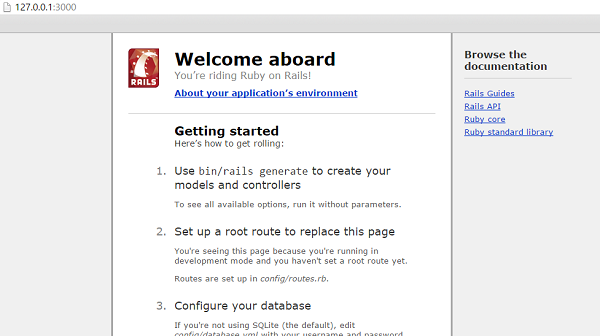
    Now open your browser and browse to http://127.0.0.1:3000. If everything is gone fine, then you should see a greeting message from WEBrick, otherwise there is something wrong with your setting. If everything goes well it will generate the output as follows.

    Web Server

    What is next?

    The next chapter explains how to create databases for your application and what is the configuration required to access these created databases.

    Further, we will see what Rails Migration is and how it is used to maintain database tables.

  • Bundler

    In Rails, Bundler is a dependency management tool that ensures your application has the correct versions of the required gems. A gem in Ruby is a packaged Ruby library that provides functionality for Ruby applications. Gems are hosted on RubyGems.org, which is the official Ruby package repository.

    The main role of Bundler is to manage and install the gem dependencies specified in the Gemfile.

    When a new application is created, Rails does the following behind the scenes:

    • Generates the Gemfile with default gems.
    • Runs bundle install automatically, which:
    • Resolves dependencies.
    • Installs required gems.
    • Creates the Gemfile.lock file to lock exact gem versions.

    Gemfile

    When you create a new Rails application and run rails server, Rails internally calls Bundler to load the required gems. The rails new command sets up the Rails project and generates various files, including Gemfile.

    Here’s a section of the Gemfile created automatically by Rails new command:

    source "https://rubygems.org"# Bundle edge Rails instead: gem "rails", github: "rails/rails", branch: "main"
    gem "rails","~> 8.0.1"# The modern asset pipeline for Rails [https://github.com/rails/propshaft]
    gem "propshaft"# Use sqlite3 as the database for Active Record
    gem "sqlite3",">= 2.1"# Use the Puma web server [https://github.com/puma/puma]
    gem "puma",">= 5.0"# Use JavaScript with ESM import maps [https://github.com/rails/importmap-rails]
    gem "importmap-rails"# Hotwire's SPA-like page accelerator [https://turbo.hotwired.dev]
    gem "turbo-rails"# Hotwire's modest JavaScript framework [https://stimulus.hotwired.dev]
    gem "stimulus-rails"# Build JSON APIs with ease [https://github.com/rails/jbuilder]
    gem "jbuilder"

    It also runs bundle install, which resolves dependencies and creates Gemfile.lock.

    Gemfile.lock

    This file is auto-generated by Bundler when bundle install is run. It locks the exact versions of the installed gems to ensure consistency. For example −

    GEM
      remote: https://rubygems.org/
      specs:
    
    actioncable (8.0.1)
      actionpack (=8.0.1)
      activesupport (=8.0.1)
      nio4r (~&gt;2.0)
      websocket-driver (&gt;=0.6.1)
      zeitwerk (~&gt;2.6)
    actionmailbox (8.0.1)
      actionpack (=8.0.1)
      activejob (=8.0.1)
      activerecord (=8.0.1)
      activestorage (=8.0.1)
      activesupport (=8.0.1)
      mail (&gt;=2.8.0)</pre>

    However, you need to run bundle install manually if you manually modify Gemfile (e.g., adding a new gem).

    If you pull the project from GitHub, you have to run bundle install since Gemfile.lock might not match your system. Sometimes, a required gem is missing when running rails server. You need to add a new gem to a Rails application when you require additional functionality that is not provided by the Rails framework itself.

    To add a New Gem, you can add it directly using Bundler −

    bundle add gem_name
    

    Or manually, add it to Gemfile −

    gem 'gem_name'

    Then run:

    bundle install
    

    Common Bundler commands are as follows:

    • bundle install − Installs all gems listed in Gemfile.
    • bundle update − Updates gems to the latest versions allowed by the Gemfile.
    • bundle exec <command> − Runs a command using gems from Bundler (e.g., bundle exec rails server).
    • bundle add <gem_name> − Adds a gem to the Gemfile and installs it.
    • bundle remove <gem_name> − Removes a gem from the Gemfile.
  • Rails Console

    Rails API provides a useful feature called Console. The console is an interactive tool for testing the code in our Rails application.

    Before opening a console session, let us define a Person model with name and age columns.

    rails generate model Person name:string age: integer
    
      invoke  active_record
      create  db/migrate/20250227112053_create_people.rb
      create  app/models/person.rb
      invoke  test_unit
      create  test/models/person_test.rb
      create  test/fixtures/people.yml

    This will create Person class derived from ApplicationRecord:

    classPerson<ApplicationRecordend

    As in the previous chapter, run the migration on this model.

    PSC:\Users\mlath\RubymineProjects\library> rails db:migrate==20250227112053CreatePeople: migrating =====================================-- create_table(:people)->0.0230s
    ==20250227112053CreatePeople: migrated (0.0247s)==============================20250227112941Persons: migrating ============================================20250227112941Persons: migrated (0.0000s)=================================

    Open a PowerShell or Command prompt if using Windows, or a terminal if on Ubuntu. Make sure that you are logged into the project directory (library in this case).

    PSC:\Users\mlath\RubymineProjects\library> rails console
    Loading development environment (Rails8.0.1)
    library(dev)>

    You can check the version of Rails installation in the console window.

    library(dev)>Rails.version
    =>"8.0.1"

    All the resources of the project, including the Person model can be accessed in the console. To get the list of columns defined in Person model, use column_names property.

    library(dev)>Person.column_names
    =>["id","name","age","created_at","updated_at"]

    Note that Rails adds created_at and updated_at columns.

    The new() function of the Person class creates a new Person object.

    library(dev)> p1 =Person.new(name:"Ravi", age:21)=>#<Person:0x000002ac6815e228 id: nil, name: "Ravi", 
       age:21, created_at:nil, updated_at:nil>

    The object is placed in the memory. To save it persistently in the database, call the save() function.

    library(dev)> p1.save
      TRANSACTION(0.6ms)BEGIN/*application='Library'*/TRANSACTION(0.7ms)BEGIN/*application='Library'*/PersonCreate(4.6ms)INSERTINTO"people"("name","age","created_at","updated_at")VALUES('Ravi',21,'2025-02-27 12:29:12.006534','2025-02-27 12:29:12.006534')RETURNING"id"/*application='Library'*/TRANSACTION(1.5ms)COMMIT/*application='Library'*/=>true

    The auto-created fields created_at and updated_at bear the time stamp:

    library(dev)> p1
    =>#<Person:0x000002ac6815e228
     id:1,
     name:"Ravi",
     age:21,
     created_at:"2025-02-27 12:29:12.006534000 +0000",
     updated_at:"2025-02-27 12:29:12.006534000 +0000">

    The create() function creates a new object and save it in the database.

    library(dev)>Person.create(name:"Raja", age:25)TRANSACTION(1.0ms)BEGIN/*application='Library'*/PersonCreate(2.8ms)INSERTINTO"people"("name","age","created_at","updated_at")VALUES('Raja',25,'2025-02-27 12:30:33.474115','2025-02-27 12:30:33.474115')RETURNING"id"/*application='Library'*/TRANSACTION(39.1ms)COMMIT/*application='Library'*/=>#<Person:0x000002ac690d6908
     id:2,
     name:"Raja",
     age:25,
     created_at:"2025-02-27 12:30:33.474115000 +0000",
     updated_at:"2025-02-27 12:30:33.474115000 +0000">

    The all() function retrieves all the records in the underlying table.

    library(dev)>Person.all
      PersonLoad(1.0ms)SELECT"people".*FROM"people"/* loading for pp */LIMIT11/*application='Library'*/=>[#<Person:0x000002ac690dc588
      id:1,
      name:"Ravi",
      age:21,
      created_at:"2025-02-27 12:29:12.006534000 +0000",
      updated_at:"2025-02-27 12:29:12.006534000 +0000">,#<Person:0x000002ac690dc308
      id:2,
      name:"Raja",
      age:25,
      created_at:"2025-02-27 12:30:33.474115000 +0000",
      updated_at:"2025-02-27 12:30:33.474115000 +0000">]

    Rails also adds id as the primary ley for the model. You can fetch a given record by calling the find() function and giving id as an argument.

    To find the record with id=1 −

    library(dev)> p1=Person.find(1)PersonLoad(0.9ms)SELECT"people".*FROM"people"WHERE"people"."id"=1LIMIT1/*application='Library'*/=>#<Person:0x000002ac690db048...

    To modify a record, assign a new value to one or more attributes (columns) and call save() function. Let us change the name of person with id=1 to Ravindra.

    library(dev)> p1.name="Ravindra"=>"Ravindra"
    library(dev)> p1.save
      TRANSACTION(0.6ms)BEGIN/*application='Library'*/PersonUpdate(4.2ms)UPDATE"people"SET"name"='Ravindra',"updated_at"='2025-02-27 12:34:14.306655'WHERE"people"."id"=1/*application='Library'*/TRANSACTION(38.3ms)COMMIT/*application='Library'*/=>true

    Note that Rails translates this function call to the equivalent UPDATE query.

    You can apply filter to conditionally fetch records from the underlying table. You can use all the comparison operators in the where() function.

    library(dev)>Person.where("age > ?",25)PersonLoad(1.7ms)SELECT"people".*FROM"people"WHERE(age >25)/* loading for pp */LIMIT11/*application='Library'*/=>[#<Person:0x000002ac6993ac98
      id:2,
      name:"Raja",
      age:30,
      created_at:"2025-02-27 12:30:33.474115000 +0000",
      updated_at:"2025-02-27 12:36:04.560314000 +0000">]

    Here also Rails internally executes an equivalent SELECT query .

    The update() function works as an equivalent foe assigning new value to a column and calling save() function. Let us update the name of a record with id=2.

    library(dev)> p1.update(name:"Rajendra")TRANSACTION(0.6ms)BEGIN/*application='Library'*/PersonUpdate(2.9ms)UPDATE"people"SET"name"='Rajendra',"updated_at"='2025-02-27 12:38:06.880558'WHERE"people"."id"=2/*application='Library'*/TRANSACTION(38.8ms)COMMIT/*application='Library'*/=>true

    How can you delete a record from the table? Let us first add a new record , Rails assigns a unique id to it.

    library(dev)>Person.create(name:"Roger", age:20)TRANSACTION(0.9ms)BEGIN/*application='Library'*/PersonCreate(2.9ms)INSERTINTO"people"("name","age","created_at","updated_at")VALUES('Roger',20,'2025-02-27 12:40:00.051918','2025-02-27 12:40:00.051918')RETURNING"id"/*application='Library'*/TRANSACTION(39.3ms)COMMIT/*application='Library'*/=>#<Person:0x000002ac69935f18
     id:3,
     name:"Roger",
     age:20,
     created_at:"2025-02-27 12:40:00.051918000 +0000",
     updated_at:"2025-02-27 12:40:00.051918000 +0000">
    library(dev)> p1 =Person.find(3)PersonLoad(0.9ms)SELECT"people".*FROM"people"WHERE"people"."id"=3LIMIT1/*application='Library'*/=>#<Person:0x000002ac6993e9d8...

    To delete an instance of the Person model, call the destroy function.

    library(dev)> p1.destroy
      TRANSACTION(0.6ms)BEGIN/*application='Library'*/PersonDestroy(2.0ms)DELETEFROM"people"WHERE"people"."id"=3/*application='Library'*/TRANSACTION(39.6ms)COMMIT/*application='Library'*/=>#<Person:0x000002ac6993e9d8
     id:3,
     name:"Roger",
     age:20,
     created_at:"2025-02-27 12:40:00.051918000 +0000",
     updated_at:"2025-02-27 12:40:00.051918000 +0000">

    This executes the DELETE query as can be seen from the console log.

    Most of the actions required to create and manage a Rails application are performed using various commands. For example Rails new creates the directory structure for a new application, Rails generate allows you to generate components such as ActiveRecord and migrations.

    Here is the list of Rails commands:

    • bin/rails console
    • bin/rails server
    • bin/rails test
    • bin/rails generate
    • bin/rails db:migrate
    • bin/rails db:create
    • bin/rails routes
    • bin/rails dbconsole
    • rails new app_name

    The dbconsole is also another useful console command. It opens the console of the corresponding database which you have used as a backend for your application. In this case, the library application has been created with PostgreSQL as the backend. Hence, dbconsole opens the psql console.

    C:\Users\mlath\RubymineProjects\library>rails dbconsole
    Passwordfor user postgres: 
    psql (16.2)WARNING:Console code page (437) differs from Windows code page (1252)8-bit characters might not work correctly.See psql reference
    
         page "Notes for Windows users"for details.Type"help"for help.
    library_development=#

  • Directory Structure

    When you use the Rails helper script to create your application, it creates the entire directory structure for the application. Rails knows where to find things it needs within this structure, so you don’t have to provide any input.

    Shown below is a top-level view of a directory tree created by the helper script at the time of application creation. Except for minor changes between releases, every Rails project will have the same structure, with the same naming conventions. This consistency gives you a tremendous advantage; you can quickly move between Rails projects without relearning the project’s organization.

    To understand this directory structure, let’s use the application created in the Installation chapter. It can be created using a simple helper command −

    rails new myapp
    

    Directory Structure

    Now, go into the myapp application root directory. You will find a directory structure in Windows as follows −

    Ruby on Rails Directory Structure

    Folders and Files

    Each subfolder and the file in the application directory is created for a specific purpose. Now let’s explain the purpose of each directory.

    FolderPurpose
    app/It organizes your application components. It’s got subdirectories that hold the view (views and helpers), controller (controllers), and the backend business logic (models).
    bin/Contains the rails script that starts your app and can contain other scripts you use to set up, update, deploy, or run your application.
    config/It organizes your application components. It’s got subdirectories that hold the view (views and helpers), controller (controllers), and the backend business logic (models).
    db/Usually, your Rails application will have model objects that access relational database tables. You can manage the relational database with scripts you create and place in this directory.
    lib/You’ll put libraries here, unless they explicitly belong elsewhere (such as vendor libraries).
    log/Error logs go here. Rails creates scripts that help you manage various error logs. You’ll find separate logs for the server (server.log) and each Rails environment (development.log, test.log, and production.log).
    public/Like the public directory for a web server, this directory has web files that don’t change, such as JavaScript files (public/javascripts), graphics (public/images), stylesheets (public/stylesheets), and HTML files (public).
    script/This directory holds scripts to launch and manage the various tools that you’ll use with Rails. For example, there are scripts to generate code (generate) and launch the web server (server).
    storage/Contains SQLite databases and Active Storage files for Disk Service. This is covered in Active Storage Overview.
    test/The tests you write and those that Rails creates for you, all goes here. You’ll see a subdirectory for mocks (mocks), unit tests (unit), fixtures (fixtures), and functional tests (functional).
    tmp/Rails uses this directory to hold temporary files (like cache and pid files) for intermediate processing.
    vendor/Libraries provided by third-party vendors (such as security libraries or database utilities beyond the basic Rails distribution) go here, this includes vendored gems.
    .git/Contains Git repository files.
    .github/Contains GitHub specific files.
    .kamal/Contains Kamal secrets and deployment hooks.

    Apart from these directories, there will be the following files available in the application directory −

    FilePurpose
    config.ruRack configuration for Rack-based servers used to start the application.
    DockerfileConfiguration file for Docker.
    Gemfile
    Gemfile.lockThese files allow you to specify what gem dependencies are needed for your Rails application. These files are used by the Bundler gem.
    RakefileThis file locates and loads tasks that can be run from the command line. The task definitions are defined throughout the components of Rails. Rather than changing Rakefile, you should add your own tasks by adding files to the lib/tasks directory of your application.
    README.mdThis is a brief instruction manual for your application. You should edit this file to tell others what your application does, how to set it up, and so on.
    .dockerignoreThis file tells Docker which files it should not copy into the container.
    .gitattributesThis file defines metadata for specific paths in a Git repository. This metadata can be used by Git and other tools to enhance their behavior.
    .gitignoreThis file tells Git which files (or patterns) it should ignore.
    .rubocop.ymlThis file contains the configuration for RuboCop.
    .ruby-versionThis file contains the default Ruby version.

    The app subdirectory includes the following folders −

    FolderPurpose
    app/controllersThe controllers subdirectory is where Rails looks to find the controller classes. A controller handles a web request from the user.
    app/helpersThe helpers subdirectory holds any helper classes used to assist the model, view, and controller classes. This helps to keep the model, view, and controller code small, focused, and uncluttered.
    app/modelsThe models subdirectory holds the classes that model and wrap the data stored in our application’s database. In most frameworks, this part of the application can grow pretty messy, tedious, verbose, and error-prone. Rails makes it dead simple!
    app/viewsThe views subdirectory holds the display templates to fill in with data from our application, convert to HTML, and return to the user’s browser.
    app/views/layoutsHolds the template files for layouts to be used with views. This models the common header/footer method of wrapping views. In your views, define a layout using the <tt>layout:default</tt> and create a file named default.html.erb. Inside default.html.erb, call <% yield %> to render the view using this layout.
  • Framework

    A framework is a program, set of programs, and/or code library that writes most of your application for you. When you use a framework, your job is to write the parts of the application that make it do the specific things you want.

    When you set out to write a Rails application, leaving aside the configuration and other housekeeping chores, you have to perform three primary tasks −

    Describe and Model your Application’s Domain

    The domain is the universe of your application. The domain may be a music store, a university, a dating service, an address book, or a hardware inventory. So here you have to figure out what’s in it, what entities exist in this universe and how the items in it relate to each other. This is equivalent to modeling a database structure to keep the entities and their relationship.

    Specify What can Happen in this Domain

    The domain model is static; you have to make it dynamic. Addresses can be added to an address book. Musical scores can be purchased from music stores. Users can log in to a dating service. Students can register for classes at a university. You need to identify all the possible scenarios or actions that the elements of your domain can participate in.

    Choose and Design the Publicly Available Views of the Domain

    At this point, you can start thinking in Web-browser terms. Once you’ve decided that your domain has students, and that they can register for classes, you can envision a welcome page, a registration page, and a confirmation page, etc. Each of these pages, or views, shows the user how things stand at a certain point.

    Ruby on Rails MVC Framework

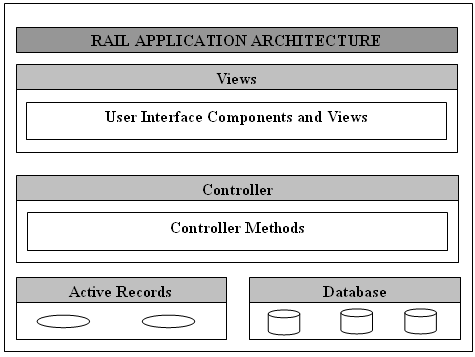
    The Rails framework follows a Model View Controller (MVC) pattern. The Model View Controller principle divides the work of an application into three separate but closely cooperative subsystems.

    Model (ActiveRecord)

    It maintains the relationship between the objects and the database and handles validation, association, transactions, and more.

    This subsystem is implemented in ActiveRecord library, which provides an interface and binding between the tables in a relational database and the Ruby program code that manipulates database records. Ruby method names are automatically generated from the field names of database tables.

    View (ActionView)

    It is a presentation of data in a particular format, triggered by a controller’s decision to present the data. They are script-based template systems like JSP, ASP, PHP, and very easy to integrate with AJAX technology.

    This subsystem is implemented in ActionView library, which is an Embedded Ruby (ERb) based system for defining presentation templates for data presentation. Every Web connection to a Rails application results in the displaying of a view.

    Controller (ActionController)

    The facility within the application that directs traffic, on the one hand, querying the models for specific data, and on the other hand, organizing that data (searching, sorting, messaging it) into a form that fits the needs of a given view.

    This subsystem is implemented in ActionController, which is a data broker sitting between ActiveRecord (the database interface) and ActionView (the presentation engine).

    Pictorial Representation of MVC Framework

    Given below is a pictorial representation of Ruby on Rails Framework −

    Rails Framework

    Directory Representation of MVC Framework

    Assuming a standard, default installation over Ubuntu Linux as explained in the Installation chapter, you can find them like this −

    Log into the gems directory of the installation directory of Ruby −

    malhar@ubuntu:~$ cd ~/.rvm/gems/ruby-3.4.1/gems

    You will see subdirectories including (but not limited to) the following −

    malhar@ubuntu:~/.rvm/gems/ruby-3.4.1/gems$ ls -1
    actioncable-8.0.1
    actionmailbox-8.0.1
    actionmailer-8.0.1
    actionpack-8.0.1
    actiontext-8.0.1
    actionview-8.0.1
    activejob-8.0.1
    activemodel-8.0.1
    activerecord-8.0.1
    activestorage-8.0.1
    activesupport-8.0.1
    addressable-2.8.7......

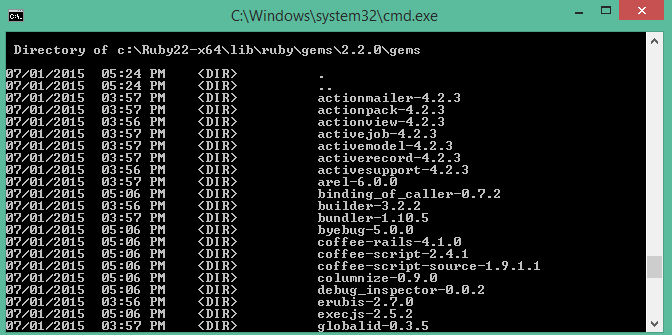
    Over a Windows installation, you can find them like this −

    Go to the directory where the gems are located −

    C:\Ruby33-x64\lib\ruby\gems\3.3.0\gems
    

    You will see subdirectories including (but not limited to) the following −

    MVC

    ActionView and ActionController are bundled together under ActionPack.

    ActiveRecord provides a range of programming techniques and shortcuts for manipulating data from an SQL database. ActionController and ActionView provides facilities for manipulating and displaying that data. Rails ties it all together.

  • Hello World

    To get the “Hello world” message displayed in the browser with a Rails application, you need to create a route, a controller with an action and a view.

    • route maps a request to a controller action. In Rails, a route is the part of the URL that determines how an incoming HTTP request is directed to the appropriate controller and action for processing.
    • Controller is a Ruby class, which inherits from ApplicationController class, and its public methods are actions.
    • Views in Rails are templates, usually written in a mixture of HTML and Ruby. They are saved with the .erb extension (stands for embedded Ruby).

    Rails Generate Command

    Rails comes with a powerful command line tool called the generate command. It can be used for different purposes. Different types of generators will be displayed with the following command −

    >rails generate
    Usage:
      bin/rails generate GENERATOR[args][options]General options:-h,[--help]# Print generator's options and usage-p,[--pretend]# Run but do not make any changes-f,[--force]# Overwrite files that already exist-s,[--skip]# Skip files that already exist-q,[--quiet]# Suppress status outputPlease choose a generator below.Rails:
      application_record
      authentication
      benchmark
      channel
      controller
      generator
      helper
      integration_test
      jbuilder
      job
      mailbox
      mailer
      migration
      model
      resource
      scaffold
    ...

    Rails Generate Controller Command

    Rails generators are built on top of Thor, a simple and efficient tool for building selfdocumenting command line utilities. Let us generate a Controller for our application.

    The syntax of the rails generate controller command is as follows −

    rails generate controller ControllerName[action1 action2 ...][options]

    In this syntax −

    • ControllerName − The name of the controller you want to create.
    • [action1 action2 …] − A space-separated list of actions (methods) you want to define in the controller.

    For each action, Rails will generate corresponding view files in the appropriate directory.

    Open your terminal, navigate to your Rails project directory, and run the following command to create a controller named index and an action named index.

    rails generate controller index index
    

    This command generates −

    • The controller itself
    • A views folder for the controller
    • A view file for the specified actions
    • A test file for this controller
    • A helper file for extracting logic in our views

    The following activity will appear in the terminal window −

    create  app/controllers/index_controller.rb
    
      route   get "index/index"
      invoke  erb
      create  app/views/index
      create  app/views/index/index.html.erb
      invoke  test_unit
      create  test/controllers/index_controller_test.rb
      invoke  helper
      create  app/helpers/index_helper.rb
      invoke  test_unit

    In Ruby on Rails, an action in a controller is essentially a method defined within the controller class.

    Edit the index_controller.rb file to include the definition of index action as follows −

    classIndexController<ApplicationControllerdefindexendend

    We now need to provide a template to be rendered by the index action. Rails assumes that the template is named as index.html and attaches .erb as its extension. This file embeds Ruby code inside HTML script.

    Open a new file in the editor. Save the following HTML code and save it as index.html.erb

    <h1 style="text-align: center;">Hello World</h1>

    To tell Rails the root route should render the index action, open the config/routes.rb file and define a route for the root URL (/). Modify it to look like this −

    Rails.application.routes.draw do
      root "index#index"end

    Run the Rails Server

    Rerun the Rails server if not already running, and visit the http://localhost:3000 URL, instead of the Rails welcome page, you should get the Hello World message displayed in the browser.

    Run the Rails Server
  • IDEs

    An Integrated Development Environment (IDE) is an essential software tool that makes the process of development and packaging process a lot easier, convenient and efficient. An IDE provides a one-stop solution for editing the code, compiling and debugging it, and running the application. IDEs also have features such as syntax highlighting, document generation, and version control etc.

    Several IDEs are available for Rails. This chapter introduces some of the widely used IDEs for Ruby on Rails.

    RubyMine

    Developed by JetBrains, RubyMine is one of the most popular IDEs amongst the Rails developers. Code completion, powerful refactoring and debugging and integration with Git are some of its important features. RubyMine also supports various web technologies, such as HTML, CSS, and JavaScript, thus making it a great choice for web development.

    RubyMine is a proprietary software, however it comes with a 30-day trial version. It is available for use on Windows, macOS as well as Linux. It can be downloaded from https://www.jetbrains.com/ruby/download/.

    For Ubuntu Linux, you can install RubyMine with the following command −

    sudo snap install rubymine classic
    

    To install on Windows, download the latest installer (RubyMine-2024.3.2.1.exe) and run the installation wizard, keeping most of the default settings.

    After the installation is complete, launch RubyMine and start a new Rails project.

    RubyMine

    Under the Rails tab, select application, specify the Ruby interpreter, Rails version and the project folder path.

    RubyMine 1

    Click on the Create button. RubyMine creates the folder structure of a Rails project. Open the terminal (View > Tool Windows > Terminal) and start the Puma server with the command −

    ~\RubymineProjects\NewRailsProject> rails server
    

    You can now visit http://localhost:3000 to get the welcome page displayed.

    VS Code

    Visual Studio code is one of the most popular IDEs as it supports multiple languages through its extensions library. You can customize the VS Code installation by loading certain Ruby and Rails-specific extensions.

    After launching the VS Code application, search and install the following extensions −

    Ruby LSP

    The Ruby LSP is an implementation of the language server protocol for Ruby, used to improve rich features in editors.

    Ruby LSP

    Rails

    This extension provides Ruby on Rails support for Visual Studio Code.

    Ruby Visual Studio Code

    Ruby Solargraph

    Solargraph is a language server that provides intellisense, code completion, and inline documentation for Ruby.

    Ruby Solargraph

    ERB Formatter

    This extension provides formatting for .erb files (embedded Ruby templates).

    ERB files

    After installing these extensions, you need to modify the GemFile in your application to install the corresponding gems.

    group :developmentdo# Use console on exceptions pages [https://github.com/rails/web-console]
      gem "web-console"
      gem "ruby-lsp"# For Ruby LSP in VS Code
      gem "solargraph"# For code intelligence and autocompletionend

    Then run the command −

    bundle install
    

    Restart VS Code and create a new Rails project.

    Other Popular IDEs and Code Editors

    In addition to RubyMine and VS Code, the following IDEs/code editors are also used for Rails development:

    Atom by GitHub is an open-source text editor. Atom can be customized for Ruby on Rails development environment with the installation of the Atom Ruby IDE package and other relevant plugins.

    Sublime Text is a lightweight text editor. With the addition of packages like Sublime Text 3 Ruby on Rails, it can work as a proficient Ruby on Rails IDE.