In State pattern a class behavior changes based on its state. This type of design pattern comes under behavior pattern.
In State pattern, we create objects which represent various states and a context object whose behavior varies as its state object changes.
Implementation
We are going to create a State interface defining an action and concrete state classes implementing the State interface. Context is a class which carries a State.
StatePatternDemo, our demo class, will use Context and state objects to demonstrate change in Context behavior based on type of state it is in.
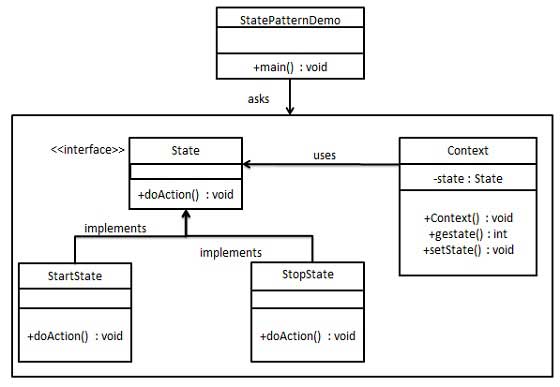
Step 1
Create an interface.
State.java
public interface State {
   public void doAction(Context context);
}
Explore our latest online courses and learn new skills at your own pace. Enroll and become a certified expert to boost your career.
Step 2
Create concrete classes implementing the same interface.
StartState.java
public class StartState implements State {

   public void doAction(Context context) {
  System.out.println("Player is in start state");
  context.setState(this);	   }

   public String toString(){
  return "Start State";   }
}
StopState.java
public class StopState implements State {

   public void doAction(Context context) {
  System.out.println("Player is in stop state");
  context.setState(this);	   }

   public String toString(){
  return "Stop State";   }
}
Step 3
Create Context Class.
Context.java
public class Context {
   private State state;

   public Context(){
  state = null;   }

   public void setState(State state){
  this.state = state;		   }

   public State getState(){
  return state;   }
}
Step 4
Use the Context to see change in behaviour when State changes.
StatePatternDemo.java
public class StatePatternDemo {
   public static void main(String[] args) {
  Context context = new Context();
  StartState startState = new StartState();
  startState.doAction(context);
  System.out.println(context.getState().toString());
  StopState stopState = new StopState();
  stopState.doAction(context);
  System.out.println(context.getState().toString());   }
}
Step 5
Verify the output.
Player is in start state
Start State
Player is in stop state
Stop State
Leave a Reply