File operations in C refer to the various tasks that can be performed on files stored in a computer’s storage, such as creating, reading, writing, and closing them. These process let C program work with data that stays around after the program is done running, which is different from ordinary input/output, which only works with the console.
File Operations in C
Following are the file operations −
- Opening/Creating a file
- Writing to a file
- Reading from a file
- Closing a file
Let’s briefly discuss the file operations mentioned above. We have already covered these methods in detail in the File I/O chapter. Since there are additional file operations, we will cover all of them in detail in this chapter.
Opening/Creating a File
File opening is the first step, whether it is to open an existing file or create a new one to perform operations on it. In C, the fopen() function is used to create a new file or open an existing file.
Letâs see how we can open or create a file. The syntax is given below −
FILE *fopen(constchar*filename,constchar*mode);Here, filename is the name of the file to be opened, and mode defines the file’s opening mode.
Here, filename is the name of the file to be opened, and mode defines the file’s opening mode.
Writing to a File
Writing to a file means the process of sending data from your programâs memory to a file stored on a persistent storage device, such as a hard drive, SSD, or USB drive.
The following library functions are provided to write data in a file opened in writeable mode −
- fputc() − Writes a single character to a file.
- fputs() − Writes a string to a file.
- fprintf() − Writes a formatted string (data) to a file.
Below are the syntax to write in a file −
// Write a single character to a fileintfputc(int c, FILE *fp);// Write a string to a fileintfputs(constchar*s, FILE *fp);// Writes a formatted string (data) to a file.intfprintf(FILE *stream,constchar*format [, argument,...])Reading from a File
When you read from a file in C, you get data from a file on a storage device and load it into your program’s memory so you can work with it.
The following library functions are provided to read data from a file that is opened in read mode −
- fgetc(): Reads a single character from a file.
- fgets(): Reads a string from a file.
- fscanf(): Reads a formatted string from a file.
Below are the syntax to reading from a file −
// Reads a single character from a fileintfgetc(FILE * fp);// Reads a string from a file.intfgets(buffer,sizeof(buffer), FILE *fp);// Reads a formatted string from a file.intfscanf(FILE *stream,constchar*format,...)Closing a File
Closing a file requires using the fclose() function after performing operations on it.
Below is the syntax to close a opened file −
intfclose(FILE *fp);Example: File Operations in C
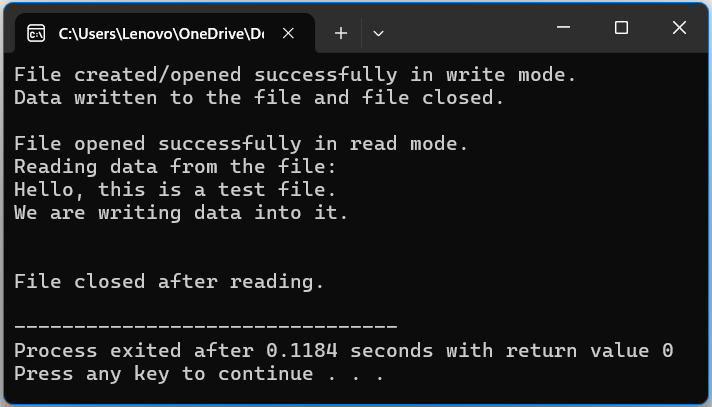
In this C example, we will demonstrate each file operation that we discussed above −
#include <stdio.h>intmain(){

   FILE * file;char data[100];// Creating/Opening a file in write mode
   file =fopen("example.txt","w");if(file ==NULL){printf("Error! Could not open file.\n");return1;}printf("File created/opened successfully in write mode.\n");// Writing to the filefprintf(file,"Hello, this is a test file.\n");fprintf(file,"We are writing data into it.\n");// Closing after writing    fclose(file);printf("Data written to the file and file closed.\n\n");// Opening the file again in read mode
   file =fopen("example.txt","r");if(file ==NULL){printf("Error! Could not open file for reading.\n");return1;}printf("File opened successfully in read mode.\n");// Reading from the fileprintf("Reading data from the file:\n");while(fgets(data,sizeof(data), file)!=NULL){printf("%s", data);}// Closing the filefclose(file);printf("\n\nFile closed after reading.\n");return0;}
Following is the output
Additional File Operations
There are also additional file operations that can be performed on a file, such as removing, rewinding, renaming, and handling errors.
Removing a File
Removing a file means deleting a specified file from storage. For example, if you have completed all tasks and operations on a file and want to delete it from storage, you can use the remove() function to delete the file.
Below is the syntax to remove/delete a file in C
intremove(FILE *fp);Example: Removing a File
In the following, example we demonstrate how to remove a file
#include <stdio.h>intmain(){// Create a file to remove
   FILE *file =fopen("remove_example.txt","w");if(file ==NULL){printf("Error creating file.\n");return1;}fprintf(file,"This file will be removed.\n");fclose(file);// Remove the fileif(remove("remove_example.txt")==0){printf("File removed successfully.\n");}else{perror("Error removing file");}return0;}
Following is the output −
File removed successfully.
Rename a File
Rename means change the name of an existing file.
Below is the syntax to rename an existing file −
rename("existing file name","new file name");Example: Rename a File
In this following c program, we demonstrate how we can rename the file −
#include <stdio.h>intmain(){char oldName[]="example.txt";char newName[]="renamed_example.txt";// Renaming the fileif(rename(oldName, newName)==0){printf("File renamed successfully from '%s' to '%s'.\n", oldName, newName);}else{perror("Error renaming file");}return0;}Following is the output −
File renamed successfully from 'example.txt' to 'renamed_example.txt'.
Rewind a File
Rewind a file means moves the file pointer back to the beginning of the file. It is useful when you want to re-read the file form the start.
Below is the syntax to rewind a file −
intrewind(FILE *fp);Example: Rewind a File
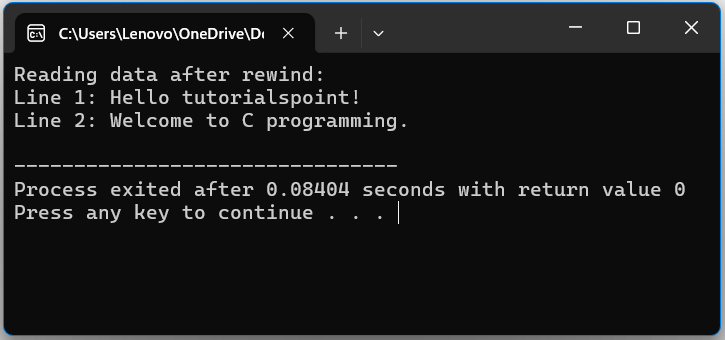
In this example, we demonstrate how to rewind the a pointer in file.
#include <stdio.h>intmain(){
   FILE *file;char data[100];// Open file in write mode and add some data
   file =fopen("example.txt","w+");if(file ==NULL){printf("Error! Could not open file.\n");return1;}// Writing data to the filefprintf(file,"Line 1: Hello tutorialspoint!\n");fprintf(file,"Line 2: Welcome to C programming.\n");// Move file pointer to beginningrewind(file);printf("Reading data after rewind:\n");while(fgets(data,sizeof(data), file)!=NULL){printf("%s", data);}// Close the filefclose(file);return0;}
Following is the output −
Error Handling of a File
Error handling helps in identifying file-related errors.
Example
In the following c program, we demonstrate the working of error handling of file −
#include <stdio.h>intmain(){

   FILE *file;char data[100];// Creating/Opening a file in write mode
   file =fopen("example.txt","w");if(file ==NULL){printf("Error! Could not open file.\n");return1;}return0;}
Following is the output, if we trying running the code online −
Error! Could not open file.
Conclusion
File operations in C enable program to create, read, write, rename, rewind, and delete files on a regular basis. These procedures allow data to remain after program execution, while good error handling provides safe and dependable file management.
Leave a Reply