Angular component goes through a series of stages/events during its existence. Before moving further in the journey of learning Angular, it is necessary to understand how a component interacts with the framework and the DOM throughout its existence.
When an angular component is constructed, it first goes through the change detection phase, where it checks whether there are any changes in the input and then acts accordingly. Then, the initialization phase kicks on and continues to other phases and finally gets destroyed in the destruction phase.
Component Lifecycle Phases in Angular
The different stages of the Angular Components Lifecycle are as follows −
Creation: It is the first phase where a component is instantiated.
Change Detection: Then, Angular try to detect changes in the View and Content of the application.
Rendering: After change detection, the new template is updated.
Destruction: The Component is destroyed at the end.
Component Lifecycle Hook in Angular
Each phase of the angular component is associated with a lifecycle hook interface which can be implemented to perform arbitrary action in that particular phase. Generally, the lifecycle hooks refer to the methods of lifecycle hook interfaces. Let’s see the phases, their sequence and the corresponding hooks.
Phases
Lifecycle Hooks
Description
Creation
Constructor
Constructor runs when Angular instantiates the component for the first time.
Change Detection
ngOnChanges()
Change detection is the first phase, where the angular component will check the inputs for changes and act accordingly. It has a corresponding lifecycle hook, ngOnChanges(). This hook runs before the ngOnInit() during the first initialization process.
ngOnInit()
The ngOnInit() lifecycle hook runs exactly once after ngOnChanges(). It is raised to do the necessary initialization process based on the initial input.
ngDoCheck()
Next, Angular tries to detect the changes in the component and act accordingly. The lifecycle hook used for checking is ngDoCheck(). This hook is invoked even if there is not change in the input bound properties. Avoid defining this hook as it might affect the page’s performance.
ngAfterContentInit()
This lifecycle hook is called only once after the initialization of all children nested inside the content of component.
ngAfterContentchecked()
It is invoked during every change detection phase after the children nested inside the component’s content have been checked for changes.
ngAfterViewInit()
Next is the view initialization phase, where angular sets the various child views of the component template. The lifecycle hook used for view initialization phase is ngAfterViewInit().
ngAfterViewchecked()
Now, Angular tries to detect the changes in the view of the component/directive. The lifecycle hook for view checking phase is ngAfterViewchecked().
Rendering
afterNextRender()
It runs only once when all components have been rendered to the DOM.
afterRender()
Runs every time after all components have been rendered to the DOM.
Destruction
ngOnDestroy()
In the final phase, ngOnDestroy() hook is called to destroy the component/directive.
Execution Order of Component Lifecyle Hooks
Let us see the lifecycle sequence of an arbitrary component/directive through its hooks.
ngOnChanges
ngOnInit
ngDoCheck
ngAfterContentInit
ngAfterContentChecked
ngAfterViewInit
ngAfterViewChecked
ngOnChanges
ngDocheck
ngAfterContentChecked
ngAfterViewchecked
Repeation of Step 8 – 11 until destruction
ngOnDestroy
Example
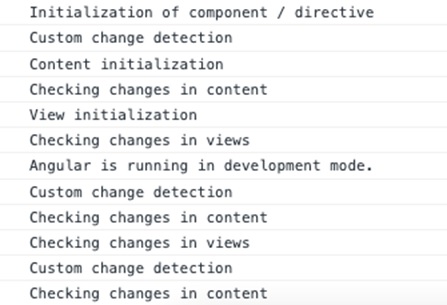
Let us create a new component, MyLifecycleComponent, wire up all hooks and check the sequence of the lifecylce using console output.
Step 1: Create a new component using angular CLI as shown below −
ng generate component my-lifecycle-sample
This will create a new component and its related template and styles as shown below.
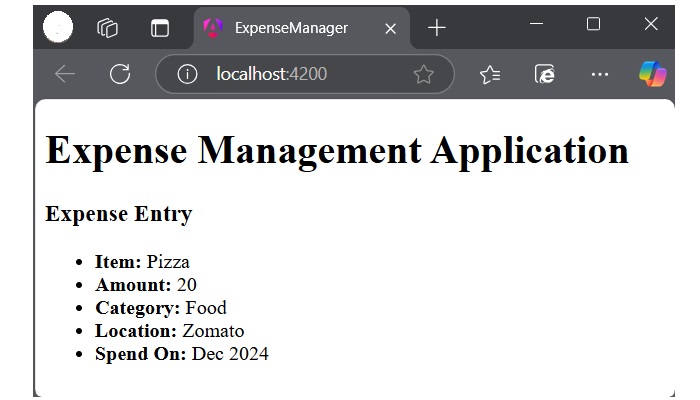
Run the application using ng serve and test the console through developer tool in the browser. It will show all the lifecycle events executing in the above discussed order.
Leave a Reply