HTML is a static language. It defines the structure and presentation of web content but cannot produce dynamic interactions by itself. As a result, creating interactive web applications, like online games or real-time chat systems, can be challenging with HTML alone. For dynamic functionalities, Web developers often turn to JavaScript, a scripting language that complements HTML’s static nature.
Developers often use JavaScript frameworks to develop dynamic web applications,
HTML extends its capabilities to data storage with technologies like XML. It enables the structured storage of data within web documents, making it retrievable and usable by applications. This data accessibility is vital in modern web development.
As Tim Bray, co-editor of the XML specification, said, “XML is a widely-used standard for representing structured data.”
HTML’s loose syntax grants developers flexibility. It allows for creative experimentation and adapts to various content types. This versatility is crucial for crafting diverse web experiences.
Jeff Atwood, co-founder of Stack Overflow, noted, “HTML is the canvas of the web. It’s the foundation for the entire web experience.”
HTML is simple and easy to learn. It is so easy to learn that school students can use HTML to create their own basic website with images and colors.
Vincent Tan, a web developer, aptly puts it, “HTML is like building with Lego bricks; it’s easy to grasp and lets you create beautiful structures quickly.”
One of HTML’s important advantages is its cost-efficiency. Developers don’t need to purchase licenses or additional software to create HTML content.
This cost-effectiveness has led to HTML being the foundation of the web, as observed by Marc Andreessen, co-founder of Netscape: “HTML is precisely what we were trying to prevent—a rich programming environment for developing custom applications on top of a general-purpose computer.”
HTML enjoys widespread browser support, making it a universal language for web content. Web browsers like Chrome, Firefox, Safari, and Internet Explorer obey HTML standards so that their web pages look the same on all different platforms.
As Tim Berners-Lee, the inventor of the World Wide Web, said, “HTML is the lingua franca for publishing on the Web.“
Lingua Franca: A language that is adopted as a common language between speakers whose native languages are different.
You can use this HTML color picker tool to choose and customize colors for your web projects. You can get HEX, RGB, and HSL color values instantly by picking the color from the given color wheel.
Pick and Preview Colors
You can make any colors using combinations of RED, GREEN, and BLUE. If you set the maximum intensity of all three colors, then the resulting color will be white. Similarly, if you give zero intensity for all RGB values, you will get black color.
An HTML validator is a tool that parses each line of code in order to find syntax errors and to check whether the HTML and CSS codes comply with the latest standards set by the World Wide Consortium (W3C).
The most frequently used validators are as follows −
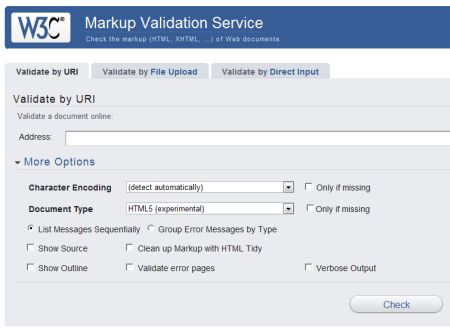
The W3C Markup Validator
The W3C Markup Validator checks the markup validity of Web documents in HTML, XHTML, SMIL, MathML, etc. This validator is part of Unicorn, W3C’s unified validator service.
To use this validator for HTML, you need to use More Options and select Document Type as HTML (experimental) as shown below.
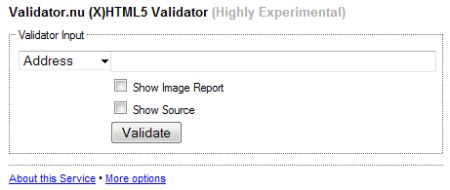
The Validator.nu (X)HTML Validator
Here is the another currently known HTML5 validators: Henri’s Validator.nu (X)HTML5 Validator (Highly Experimental) −
Modernizr is a small JavaScript Library that detects whether a particular feature of web technologies is available or not in the users browser. It provides an easy way to detect any new feature so that we can take corresponding action based on the browsers capabilities. For example, if a browser does not support a video feature then we can display a simple message regarding the same. We can also create CSS rules based on the feature availability and these rules would be applied automatically on the webpage if the browser does not support a new feature.
Before we start using Modernizr, we are required to include its javascript library in our HTML page header as follows −
Following is the simple syntax to handle supported and non supported features −
<!-- In your CSS: -->
.no-audio #music {
   display: none; <!-- to not show Audio options -->
}
.audio #music button {
  <!-- Style the Play and Pause buttons nicely -->
}

<!-- In your HTML: --><div id="music"><audio><source src="audio.ogg" /><source src="audio.mp3" /></audio><button id="play">Play</button><button id="pause">Pause</button></div>
Here it is notable that you need to prefix “no-” to every feature/property you want to handle for the browser which does not support them.
Following code snippet can be added to detect a particular feature through Javascript −
if (Modernizr.audio) {
   <!-- properties for browsers that
   support audio -->
}

else{
   <!-- properties for browsers that
   does not support audio -->
}
Features detected by Modernizr
Following is the list of features which can be detected by Modernizr −