Affinity Propagation is a clustering algorithm that identifies “exemplars” in a dataset and assigns each data point to one of these exemplars. It is a type of clustering algorithm that does not require a pre-specified number of clusters, making it a useful tool for exploratory data analysis. Affinity Propagation was introduced by Frey and Dueck in 2007 and has since been widely used in many fields such as biology, computer vision, and social network analysis.
The idea behind Affinity Propagation is to iteratively update two matrices: the responsibility matrix and the availability matrix. The responsibility matrix contains information about how well-suited each data point is to serve as an exemplar for another data point, while the availability matrix contains information about how much each data point wants to select another data point as an exemplar. The algorithm alternates between updating these two matrices until convergence is achieved. The final exemplars are chosen based on the maximum values in the responsibility matrix.
Implementation in Python
In Python, the Scikit-learn library provides the AffinityPropagation class for implementing the Affinity Propagation algorithm. The class takes several parameters, including the preference parameter, which controls how many exemplars are chosen, and the damping factor, which controls the convergence speed of the algorithm.
Here is an example of how to implement Affinity Propagation using the Scikit-learn library in Python −
Example
from sklearn.cluster import AffinityPropagation
from sklearn.datasets import make_blobs
import matplotlib.pyplot as plt

# generate a dataset
X, _ = make_blobs(n_samples=100, centers=4, random_state=0)# create an instance of the AffinityPropagation class
af = AffinityPropagation(preference=-50)# fit the model to the dataset
af.fit(X)# print the cluster labels and the exemplarsprint("Cluster labels:", af.labels_)print("Exemplars:", af.cluster_centers_indices_)#Plot the result
plt.figure(figsize=(7.5,3.5))
plt.scatter(X[:,0], X[:,1], c=af.labels_, cmap='viridis')
plt.scatter(af.cluster_centers_[:,0], af.cluster_centers_[:,1], marker='x', color='red')
plt.show()
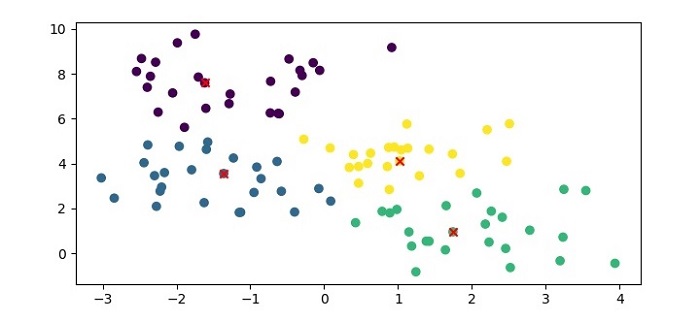
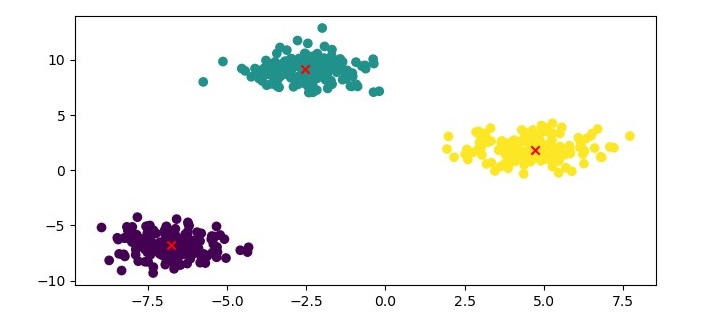
In this example, we first generate a synthetic dataset using the make_blobs() function from Scikit-learn. We then create an instance of the AffinityPropagation class with a preference value of -50 and fit the model to the dataset using the fit() method. Finally, we print the cluster labels and the exemplars identified by the algorithm.
Output
When you execute this code, it will produce the following plot as the output −
In addition, it will print the following output on the terminal −
The preference parameter in Affinity Propagation controls the number of exemplars that are chosen. A higher preference value leads to more exemplars, while a lower preference value leads to fewer exemplars. The damping factor controls the convergence speed of the algorithm, with larger damping factors leading to slower convergence.
Overall, Affinity Propagation is a powerful clustering algorithm that can identify the number of clusters automatically and does not require a pre-specified number of clusters. However, it can be computationally expensive and may not work well with very large datasets.
Advantages of Affinity Propagation
Following are the advantages of using Affinity Propagation −
Affinity Propagation can identify the number of clusters automatically without specifying the number of clusters in advance.
It can handle clusters of arbitrary shapes and sizes.
It can handle datasets with noisy or incomplete data.
It is relatively insensitive to the choice of initial parameters.
It has been shown to outperform other clustering algorithms on certain types of datasets.
Disadvantages of Affinity Propagation
Following are some of the disadvantages of using Affinity Propagation −
It can be computationally expensive for large datasets or datasets with many features.
It may converge to suboptimal solutions, especially when the data has a high degree of variability or noise.
It can be sensitive to the choice of the damping factor, which controls the rate of convergence.
It may produce many small clusters or clusters with only one or a few members, which may not be meaningful.
It can be difficult to interpret the resulting clusters, as the algorithm does not provide explicit information about the meaning or characteristics of the clusters.
BIRCH (Balanced Iterative Reducing and Clustering hierarchies) is a hierarchical clustering algorithm that is designed to handle large datasets efficiently. The algorithm builds a treelike structure of clusters by recursively partitioning the data into subclusters until a stopping criterion is met.
BIRCH uses two main data structures to represent the clusters: Clustering Feature (CF) and Sub-Cluster Feature (SCF). CF is used to summarize the statistical properties of a set of data points, while SCF is used to represent the structure of subclusters.
BIRCH clustering has three main steps −
Initialization − BIRCH constructs an empty tree structure and sets the maximum number of CFs that can be stored in a node.
Clustering − BIRCH reads the data points one by one and adds them to the tree structure. If a CF is already present in a node, BIRCH updates the CF with the new data point. If there is no CF in the node, BIRCH creates a new CF for the data point. BIRCH then checks if the number of CFs in the node exceeds the maximum threshold. If the threshold is exceeded, BIRCH creates a new subcluster by recursively partitioning the CFs in the node.
Refinement − BIRCH refines the tree structure by merging the subclusters that are similar based on a distance metric.
Implementation of BIRCH Clustering in Python
To implement BIRCH clustering in Python, we can use the scikit-learn library. The scikitlearn library provides a BIRCH class that implements the BIRCH algorithm.
Here is an example of how to use the BIRCH class to cluster a dataset −
Example
from sklearn.datasets import make_blobs
from sklearn.cluster import Birch
import matplotlib.pyplot as plt

# Generate sample data
X, y = make_blobs(n_samples=1000, centers=10, cluster_std=0.50,
random_state=0)# Cluster the data using BIRCH
birch = Birch(threshold=1.5, n_clusters=4)
birch.fit(X)
labels = birch.predict(X)# Plot the results
plt.figure(figsize=(7.5,3.5))
plt.scatter(X[:,0], X[:,1], c=labels, cmap='winter')
plt.show()
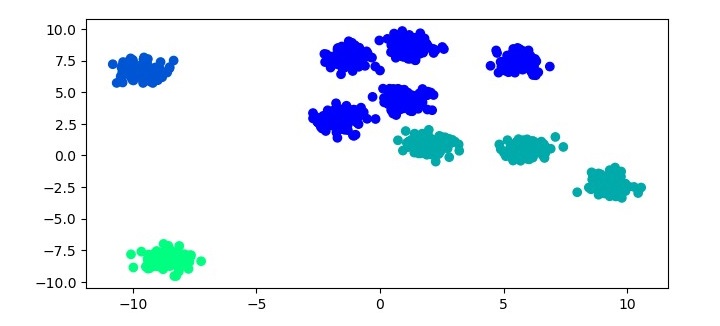
In this example, we first generate a sample dataset using the make_blobs function from scikit-learn. We then cluster the dataset using the BIRCH algorithm. For the BIRCH algorithm, we instantiate a Birch object with the threshold parameter set to 1.5 and the n_clusters parameter set to 4. We then fit the Birch object to the dataset using the fit method and predict the cluster labels using the predict method. Finally, we plot the results using a scatter plot.
Output
When you execute the given program, it will produce the following plot as the output −
Advantages of BIRCH Clustering
BIRCH clustering has several advantages over other clustering algorithms, including −
Scalability − BIRCH is designed to handle large datasets efficiently by using a treelike structure to represent the clusters.
Memory efficiency − BIRCH uses CF and SCF data structures to summarize the statistical properties of the data points, which reduces the memory required to store the clusters.
Fast clustering − BIRCH can cluster the data points quickly because it uses an incremental clustering approach.
Disadvantages of BIRCH Clustering
BIRCH clustering also has some disadvantages, including −
Sensitivity to parameter settings − The performance of BIRCH clustering can be sensitive to the choice of parameters, such as the maximum number of CFs that can be stored in a node and the threshold value used to create subclusters.
Limited ability to handle non-spherical clusters − BIRCH assumes that the clusters are spherical, which means it may not perform well on datasets with nonspherical clusters.
Limited flexibility in the choice of distance metric − BIRCH uses the Euclidean distance metric by default, which may not be appropriate for all datasets.
HDBSCAN builds a hierarchy of clusters using a mutual-reachability graph, which is a graph where each data point is a node and the edges between them are weighted by a measure of similarity or distance. The graph is built by connecting two points with an edge if their mutual reachability distance is below a given threshold.
The mutual reachability distance between two points is the maximum of their reachability distances, which is a measure of how easily one point can be reached from the other. The reachability distance between two points is defined as the maximum of their distance and the minimum density of any point along their path.
The hierarchy of clusters is then extracted from the mutual-reachability graph using a minimum spanning tree (MST) algorithm. The leaves of the MST correspond to the individual data points, while the internal nodes correspond to clusters of varying sizes and shapes.
The HDBSCAN algorithm then applies a condensed tree algorithm to the MST to extract the clusters. The condensed tree is a compact representation of the MST that only includes the internal nodes of the tree. The condensed tree is then cut at a certain level to obtain the clusters, with the level of the cut determined by a user-defined minimum cluster size or a heuristic based on the stability of the clusters.
Implementation in Python
HDBSCAN is available as a Python library that can be installed using pip. The library provides an implementation of the HDBSCAN algorithm along with several useful functions for data preprocessing and visualization.
Installation
To install HDBSCAN, open a terminal window and type the following command −
pip install hdbscan
Usage
To use HDBSCAN, first import the hdbscan library −
import hdbscan
Next, we generate a sample dataset using the make_blobs() function from scikit-learn −
# generate random dataset with 1000 samples and 3 clusters
X, y = make_blobs(n_samples=1000, centers=3, random_state=42)
Now, create an instance of the HDBSCAN class and fit it to the data −
clusterer = hdbscan.HDBSCAN(min_cluster_size=10, metric='euclidean')# fit the data to the clusterer
clusterer.fit(X)
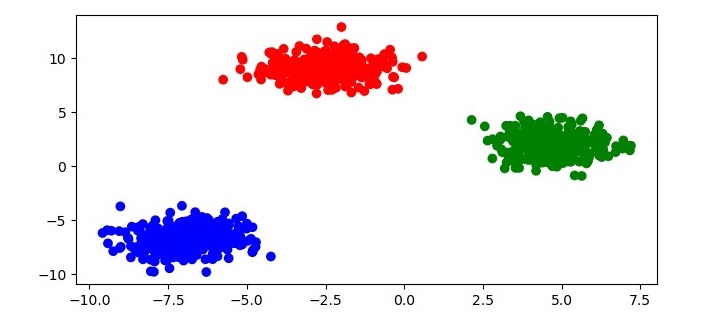
This will apply HDBSCAN to the dataset and assign each point to a cluster. To visualize the clustering results, you can plot the data with color each point according to its cluster label −
# get the cluster labels
labels = clusterer.labels_

# create a colormap for the clusters
colors = np.array([x for x in'bgrcmykbgrcmykbgrcmykbgrcmyk'])
colors = np.hstack([colors]*20)# plot the data with each point colored according to its cluster label
plt.figure(figsize=(7.5,3.5))
plt.scatter(X[:,0], X[:,1], c=colors[labels])
plt.show()
This code will produce a scatter plot of the data with each point colored according to its cluster label as follows −
HDBSCAN also provides several parameters that can be adjusted to fine-tune the clustering results −
min_cluster_size − The minimum size of a cluster. Points that are not part of any cluster are labeled as noise.
min_samples − The minimum number of samples in a neighborhood for a point to be considered a core point.
cluster_selection_epsilon − The radius of the neighborhood used for cluster selection.
metric − The distance metric used to measure the similarity between points.
Advantages of HDBSCAN Clustering
HDBSCAN has several advantages over other clustering algorithms −
Better handling of clusters of varying densities − HDBSCAN can identify clusters of different densities, which is a common problem in many datasets.
Ability to detect clusters of different shapes and sizes − HDBSCAN can identify clusters that are not necessarily spherical, which is another common problem in many datasets.
No need to specify the number of clusters − HDBSCAN does not require the user to specify the number of clusters, which can be difficult to determine a priori.
Robust to noise − HDBSCAN is robust to noisy data and can identify outliers as noise points.
OPTICS is like DBSCAN (Density-Based Spatial Clustering of Applications with Noise), another popular density-based clustering algorithm. However, OPTICS has several advantages over DBSCAN, including the ability to identify clusters of varying densities, the ability to handle noise, and the ability to produce a hierarchical clustering structure.
Implementation of OPTICS in Python
To implement OPTICS clustering in Python, we can use the scikit-learn library. The scikit-learn library provides a class called OPTICS that implements the OPTICS algorithm.
Here’s an example of how to use the OPTICS class in scikit-learn to cluster a dataset −
Example
from sklearn.cluster import OPTICS
from sklearn.datasets import make_blobs
import matplotlib.pyplot as plt

# Generate sample data
X, y = make_blobs(n_samples=2000, centers=4, cluster_std=0.60, random_state=0)# Cluster the data using OPTICS
optics = OPTICS(min_samples=50, xi=.05)
optics.fit(X)# Plot the results
labels = optics.labels_
plt.figure(figsize=(7.5,3.5))
plt.scatter(X[:,0], X[:,1], c=labels, cmap='turbo')
plt.show()
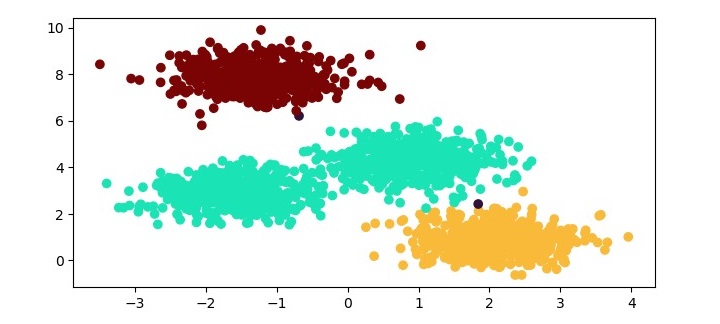
In this example, we first generate a sample dataset using the make_blobs function from scikit-learn. We then instantiate an OPTICS object with the min_samples parameter set to 50 and the xi parameter set to 0.05. The min_samples parameter specifies the minimum number of samples required for a cluster to be formed, and the xi parameter controls the steepness of the cluster hierarchy. We then fit the OPTICS object to the dataset using the fit method. Finally, we plot the results using a scatter plot, where each data point is colored according to its cluster label.
Output
When you execute this program, it will produce the following plot as the output −
Advantages of OPTICS Clustering
Following are the advantages of using OPTICS clustering −
Ability to handle clusters of varying densities − OPTICS can handle clusters that have varying densities, unlike some other clustering algorithms that require clusters to have uniform densities.
Ability to handle noise − OPTICS can identify noise data points that do not belong to any cluster, which is useful for removing outliers from the dataset.
Hierarchical clustering structure − OPTICS produces a hierarchical clustering structure that can be useful for analyzing the dataset at different levels of granularity.
Disadvantages of OPTICS Clustering
Following are some of the disadvantages of using OPTICS clustering.
Sensitivity to parameters − OPTICS requires careful tuning of its parameters, such as the min_samples and xi parameters, which can be challenging.
Computational complexity − OPTICS can be computationally expensive for large datasets, especially when using a high min_samples value.
The DBSCAN Clustering algorithm works as follows −
Randomly select a data point that has not been visited.
If the data point has at least minPts neighbors within distance eps, create a new cluster and add the data point and its neighbors to the cluster.
If the data point does not have at least minPts neighbors within distance eps, mark the data point as noise and continue to the next data point.
Repeat steps 1-3 until all data points have been visited.
Implementation in Python
We can implement the DBSCAN algorithm in Python using the scikit-learn library. Here are the steps to do so −
Load the dataset
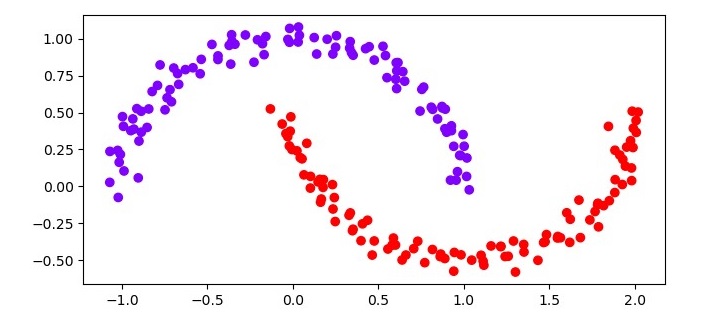
The first step is to load the dataset. We will use the make_moons function from the scikitlearn library to generate a toy dataset with two moons.
from sklearn.datasets import make_moons
X, y = make_moons(n_samples=200, noise=0.05, random_state=0)
Perform DBSCAN clustering
The next step is to perform DBSCAN clustering on the dataset. We will use the DBSCAN class from the scikit-learn library. We will set the minPts parameter to 5 and the “eps” parameter to 0.2.
from sklearn.cluster import DBSCAN
clustering = DBSCAN(eps=0.2, min_samples=5)
clustering.fit(X)
Visualize the results
The final step is to visualize the results of the clustering. We will use the Matplotlib library to create a scatter plot of the dataset colored by the cluster assignments.
import matplotlib.pyplot as plt
plt.scatter(X[:,0], X[:,1], c=clustering.labels_, cmap='rainbow')
plt.show()
Example
Here is the complete implementation of DBSCAN clustering in Python −
from sklearn.datasets import make_moons
X, y = make_moons(n_samples=200, noise=0.05, random_state=0)from sklearn.cluster import DBSCAN

clustering = DBSCAN(eps=0.2, min_samples=5)
clustering.fit(X)import matplotlib.pyplot as plt
plt.figure(figsize=(7.5,3.5))
plt.scatter(X[:,0], X[:,1], c=clustering.labels_, cmap='rainbow')

plt.show()
Output
The resulting scatter plot should show two distinct clusters, each corresponding to one of the moons in the dataset. The noise data points should be colored black.
Advantages of DBSCAN
Following are the advantages of using DBSCAN clustering −
DBSCAN can handle clusters of arbitrary shape, unlike k-means, which assumes that clusters are spherical.
It does not require prior knowledge of the number of clusters in the dataset, unlike k-means.
It can detect outliers, which are points that do not belong to any cluster. This is because DBSCAN defines clusters as dense regions of points, and points that are far from any dense region are considered outliers.
It is relatively insensitive to the initial choice of parameters, such as the epsilon and min_samples parameters, unlike k-means.
It is scalable to large datasets, as it only needs to compute pairwise distances between neighboring points, rather than all pairs of points.
Disadvantages of DBSCAN
Following are the disadvantages of using DBSCAN clustering −
It can be sensitive to the choice of the epsilon and min_samples parameters. If these parameters are not chosen carefully, DBSCAN may fail to identify clusters or merge them incorrectly.
It may not work well on datasets with varying densities, as it assumes that all clusters have the same density.
It may produce different results for different runs on the same dataset, due to the non-deterministic nature of the algorithm.
It may be computationally expensive for high-dimensional datasets, as the distance computations become more expensive as the number of dimensions increases.
It may not work well on datasets with noise or outliers if the density of the noise or outliers is too high. In such cases, the noise or outliers may be wrongly assigned to clusters.
Density-based clustering is based on the idea that clusters are regions of high density separated by regions of low density.
The algorithm works by first identifying “core” data points, which are data points that have a minimum number of neighbors within a specified distance. These core data points form the center of a cluster.
Next, the algorithm identifies “border” data points, which are data points that are not core data points but have at least one core data point as a neighbor.
Finally, the algorithm identifies “noise” data points, which are data points that are not core data points or border data points.
Popular Density-based Clustering Algorithms
Here are the most common density-based clustering algorithms −
DBSCAN Clustering
The DBSCAN (Density-Based Spatial Clustering of Applications with Noise) algorithm is one of the most common density-based clustering algorithms. The DBSCAN algorithm requires two parameters: the minimum number of neighbors (minPts) and the maximum distance between core data points (eps).
OPTICS Clustering
OPTICS (Ordering Points to Identify the Clustering Structure) is a density-based clustering algorithm that operates by building a reachability graph of the dataset. The reachability graph is a directed graph that connects each data point to its nearest neighbors within a specified distance threshold. The edges in the reachability graph are weighted according to the distance between the connected data points. The algorithm then constructs a hierarchical clustering structure by recursively splitting the reachability graph into clusters based on a specified density threshold.
HDBSCAN Clustering
HDBSCAN (Hierarchical Density-Based Spatial Clustering of Applications with Noise) is a clustering algorithm that is based on density clustering. It is a newer algorithm that builds upon the popular DBSCAN algorithm and offers several advantages over it, such as better handling of clusters of varying densities and the ability to detect clusters of different shapes and sizes.
In the next three chapters, we will discuss all the three density-based clustering algorithms in detail along with their implementation in Python.
Hierarchical clustering is an unsupervised learning algorithm that is used to group together the unlabeled data points having similar characteristics. Hierarchical clustering algorithms falls into following two categories −
Agglomerative hierarchical algorithms − In agglomerative hierarchical algorithms, each data point is treated as a single cluster and then successively merge or agglomerate (bottom-up approach) the pairs of clusters. The hierarchy of the clusters is represented as a dendrogram or tree structure.
Divisive hierarchical algorithms − On the other hand, in divisive hierarchical algorithms, all the data points are treated as one big cluster and the process of clustering involves dividing (Top-down approach) the one big cluster into various small clusters.
Steps to Perform Agglomerative Hierarchical Clustering
We are going to explain the most used and important Hierarchical clustering i.e. agglomerative. The steps to perform the same is as follows −
Step 1 − Treat each data point as single cluster. Hence, we will be having say K clusters at start. The number of data points will also be K at start.
Step 2 − Now, in this step we need to form a big cluster by joining two closet datapoints. This will result in total of K-1 clusters.
Step 3 − Now, to form more clusters we need to join two closet clusters. This will result in total of K-2 clusters.
Step 4 − Now, to form one big cluster repeat the above three steps until K would become 0 i.e. no more data points left to join.
Step 5 − At last, after making one single big cluster, dendrograms will be used to divide into multiple clusters depending upon the problem.
Role of Dendrograms in Agglomerative Hierarchical Clustering
As we discussed in the last step, the role of dendrogram started once the big cluster is formed. Dendrogram will be used to split the clusters into multiple cluster of related data points depending upon our problem. It can be understood with the help of following example −
Example 1
To understand, let’s start with importing the required libraries as follows −
%matplotlib inline
import matplotlib.pyplot as plt
import numpy as np
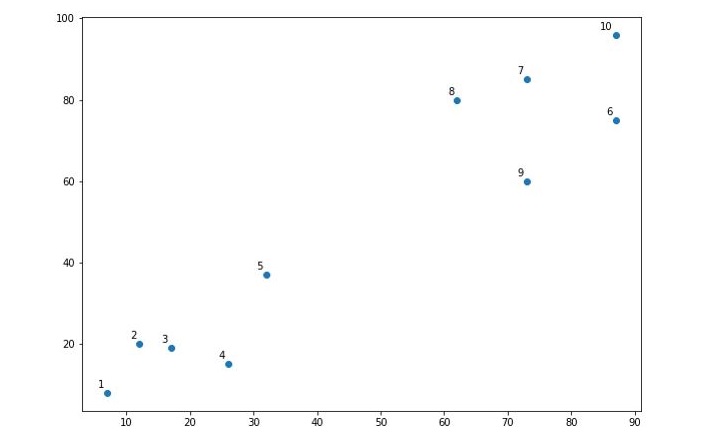
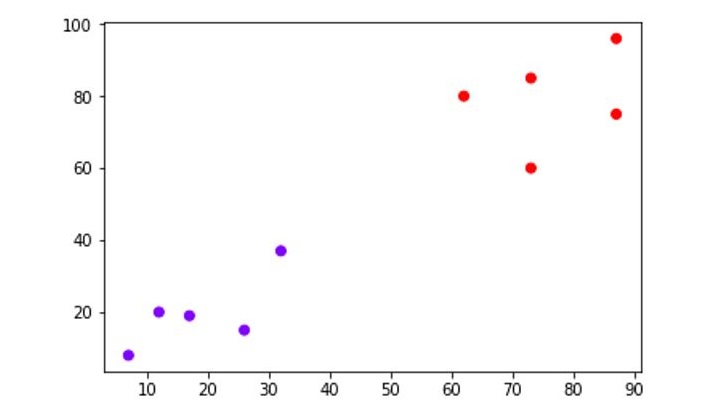
Next, we will be plotting the datapoints we have taken for this example −
When you execute this code, it will produce the following plot as the output −
From the above diagram, it is very easy to see we have two clusters in our datapoints but in real-world data, there can be thousands of clusters.
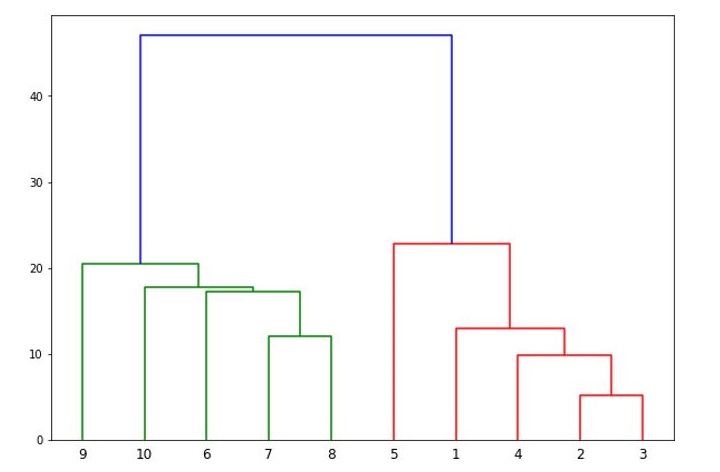
Next, we will be plotting the dendrograms of our datapoints by using Scipy library −
from scipy.cluster.hierarchy import dendrogram, linkage
from matplotlib import pyplot as plt
linked = linkage(X,'single')
labelList =range(1,11)
plt.figure(figsize=(10,7))

dendrogram(linked, orientation='top',labels=labelList,
distance_sort='descending',show_leaf_counts=True)

plt.show()
It will produce the following plot −
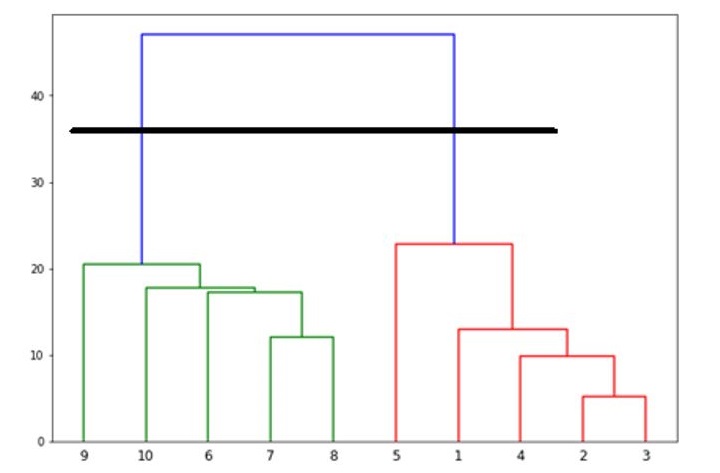
Now, once the big cluster is formed, the longest vertical distance is selected. A vertical line is then drawn through it as shown in the following diagram. As the horizontal line crosses the blue line at two points hence the number of clusters would be two.
Next, we need to import the class for clustering and call its fit_predict method to predict the cluster. We are importing AgglomerativeClustering class of sklearn.cluster library −
from sklearn.cluster import AgglomerativeClustering

cluster = AgglomerativeClustering(n_clusters=2, affinity='euclidean',
linkage='ward')

cluster.fit_predict(X)
Next, plot the cluster with the help of following code −
The following diagram shows the two clusters from our datapoints.
Example 2
As we understood the concept of dendrograms from the simple example above, let’s move to another example in which we are creating clusters of the data point in Pima Indian Diabetes Dataset by using hierarchical clustering −
import matplotlib.pyplot as plt
import pandas as pd
%matplotlib inline
import numpy as np

from pandas import read_csv
path =r"C:\pima-indians-diabetes.csv"
headernames =['preg','plas','pres','skin','test','mass','pedi','age','class']
data = read_csv(path, names=headernames)
array = data.values
X = array[:,0:8]
Y = array[:,8]

patient_data = data.iloc[:,3:5].values
import scipy.cluster.hierarchy as shc
plt.figure(figsize=(10,7))
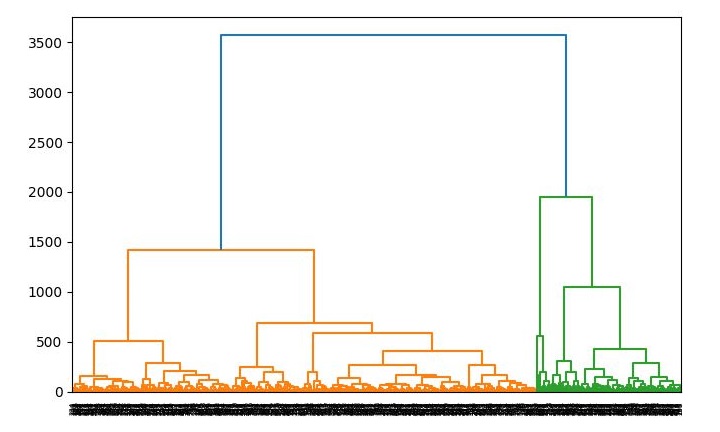
plt.title("Patient Dendograms")

dend = shc.dendrogram(shc.linkage(data, method='ward'))from sklearn.cluster import AgglomerativeClustering
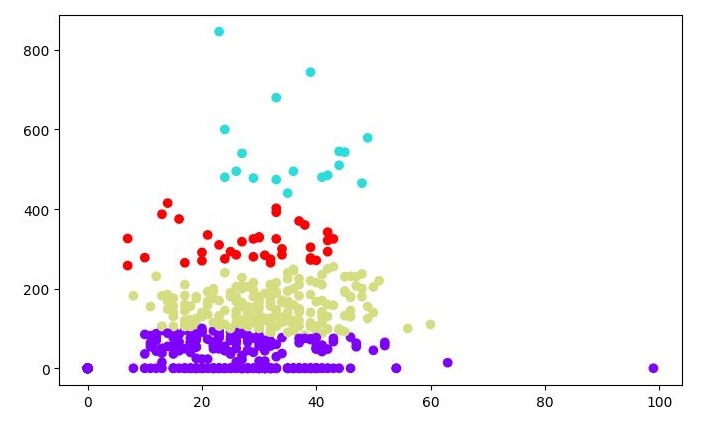
cluster = AgglomerativeClustering(n_clusters=4, affinity='euclidean', linkage='ward')
cluster.fit_predict(patient_data)

plt.figure(figsize=(7.2,5.5))
plt.scatter(patient_data[:,0], patient_data[:,1], c=cluster.labels_,
cmap='rainbow')
Output
When you run this code, it will produce the following two plots as the output −
The Mean-Shift clustering algorithm is a non-parametric clustering algorithm that works by iteratively shifting the mean of a data point towards the densest area of the data. The densest area of the data is determined by the kernel function, which is a function that assigns weights to the data points based on their distance from the mean. The kernel function used in Mean-Shift clustering is usually a Gaussian function.
The Mean-Shift clustering algorithm is a powerful clustering algorithm used in unsupervised learning. Unlike K-means clustering, it does not make any assumptions; hence it is a non-parametric algorithm.
The difference between K-Means algorithm and Mean-Shift is that later one does not need to specify the number of clusters in advance because the number of clusters will be determined by the algorithm w.r.t data.
Working of Mean-Shift Algorithm
We can understand the working of Mean-Shift clustering algorithm with the help of following steps −
Step 1 − First, start with the data points assigned to a cluster of their own.
Step 2 − Next, this algorithm will compute the centroids.
Step 3 − In this step, location of new centroids will be updated.
Step 4 − Now, the process will be iterated and moved to the higher density region.
Step 5 − At last, it will be stopped once the centroids reach at position from where it cannot move further.
The Mean-Shift clustering algorithm is a density-based clustering algorithm, which means that it identifies clusters based on the density of the data points rather than the distance between them. In other words, the algorithm identifies clusters based on the areas where the density of the data points is highest.
Implementation of Mean-Shift Clustering in Python
The Mean-Shift clustering algorithm can be implemented in Python programming language using the scikit-learn library. The scikit-learn library is a popular machine learning library in Python that provides various tools for data analysis and machine learning. The following steps are involved in implementing the Mean-Shift clustering algorithm in Python using the scikit-learn library −
Step 1 − Import the necessary libraries
The numpy library is used for scientific computing in Python, while the matplotlib library is used for data visualization. The sklearn.cluster library contains the MeanShift class, which is used for implementing the Mean-Shift clustering algorithm in Python.
The estimate_bandwidth function is used to estimate the bandwidth of the kernel function, which is an important parameter in the Mean-Shift clustering algorithm.
import numpy as np
import matplotlib.pyplot as plt
from sklearn.cluster import MeanShift, estimate_bandwidth
Step 2 − Generate the data
In this step, we generate a random dataset with 500 data points and 2 features. We use the numpy.random.randn function to generate the data.
# Generate the data
X = np.random.randn(500,2)
Step 3 − Estimate the bandwidth of the kernel function
In this step, we estimate the bandwidth of the kernel function using the estimate_bandwidth function. The bandwidth is an important parameter in the Mean-Shift clustering algorithm, which determines the width of the kernel function.
# Estimate the bandwidth
bandwidth = estimate_bandwidth(X, quantile=0.1, n_samples=100)
Step 4 − Initialize the Mean-Shift clustering algorithm
In this step, we initialize the Mean-Shift clustering algorithm using the MeanShift class. We pass the bandwidth parameter to the class to set the width of the kernel function.
# Initialize the Mean-Shift algorithm
ms = MeanShift(bandwidth=bandwidth, bin_seeding=True)
Step 5 − Train the model
In this step, we train the Mean-Shift clustering algorithm on the dataset using the fit method of the MeanShift class.
# Train the model
ms.fit(X)
Step 6 − Visualize the results
# Visualize the results
labels = ms.labels_
cluster_centers = ms.cluster_centers_
n_clusters_ =len(np.unique(labels))print("Number of estimated clusters:", n_clusters_)# Plot the data points and the centroids
plt.figure(figsize=(7.5,3.5))
plt.scatter(X[:,0], X[:,1], c=labels, cmap='viridis')
plt.scatter(cluster_centers[:,0], cluster_centers[:,1], marker='*', s=300, c='r')
plt.show()
In this step, we visualize the results of the Mean-Shift clustering algorithm. We extract the cluster labels and the cluster centers from the trained model. We then print the number of estimated clusters. Finally, we plot the data points and the centroids using the matplotlib library.
Complete Example
Here is the complete implementation example of Mean-Shift Clustering Algorithm in python −
import numpy as np
import matplotlib.pyplot as plt
from sklearn.cluster import MeanShift, estimate_bandwidth

# Generate the data
X = np.random.randn(500,2)# Estimate the bandwidth
bandwidth = estimate_bandwidth(X, quantile=0.1, n_samples=100)# Initialize the Mean-Shift algorithm
ms = MeanShift(bandwidth=bandwidth, bin_seeding=True)# Train the model
ms.fit(X)# Visualize the results
labels = ms.labels_
cluster_centers = ms.cluster_centers_
n_clusters_ =len(np.unique(labels))print("Number of estimated clusters:", n_clusters_)# Plot the data points and the centroids
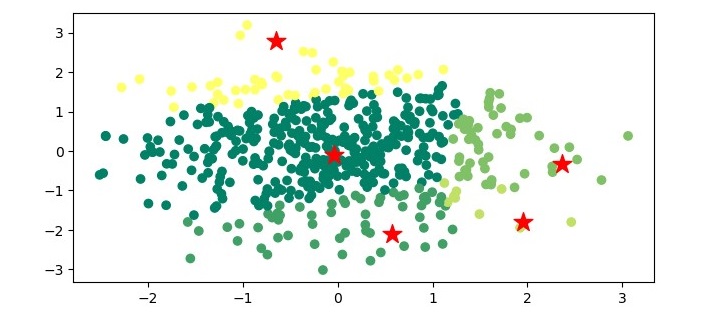
plt.figure(figsize=(7.5,3.5))
plt.scatter(X[:,0], X[:,1], c=labels, cmap='summer')
plt.scatter(cluster_centers[:,0], cluster_centers[:,1], marker='*',
s=200, c='r')
plt.show()
Output
When you execute the program, it will produce the following plot as the output −
Example
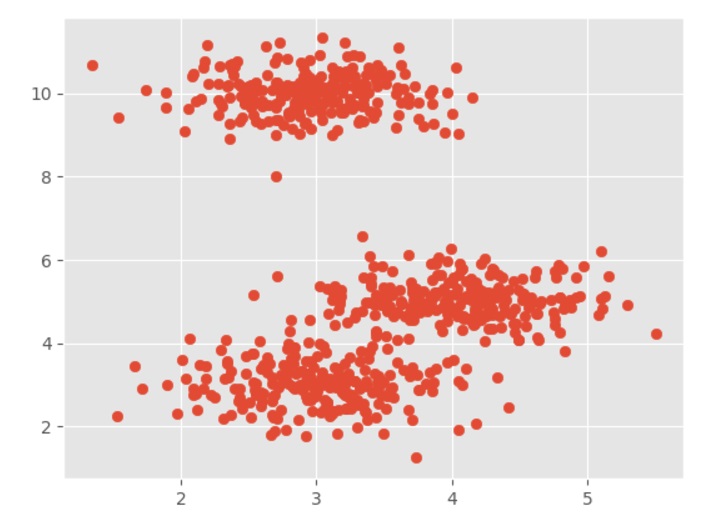
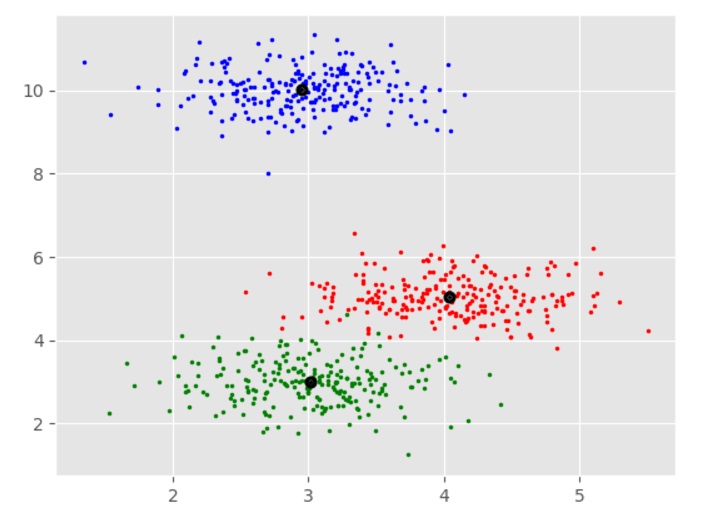
It is a simple example to understand how Mean-Shift algorithm works. In this example, we are going to first generate 2D dataset containing 4 different blobs and after that will apply Mean-Shift algorithm to see the result.
%matplotlib inline
import numpy as np
from sklearn.cluster import MeanShift
import matplotlib.pyplot as plt
from matplotlib import style
style.use("ggplot")from sklearn.datasets import make_blobs
centers =[[3,3,3],[4,5,5],[3,10,10]]
X, _ = make_blobs(n_samples =700, centers = centers, cluster_std =0.5)
plt.scatter(X[:,0],X[:,1])
plt.show()
Output
ms = MeanShift()
ms.fit(X)
labels = ms.labels_
cluster_centers = ms.cluster_centers_
print(cluster_centers)
n_clusters_ =len(np.unique(labels))print("Estimated clusters:", n_clusters_)
colors =10*['r.','g.','b.','c.','k.','y.','m.']for i inrange(len(X)):
The Mean-Shift clustering algorithm has several applications in various fields. Some of the applications of Mean-Shift clustering are as follows −
Computer vision − Mean-Shift clustering is widely used in computer vision for object tracking, image segmentation, and feature extraction.
Image processing − Mean-Shift clustering is used for image segmentation, which is the process of dividing an image into multiple segments based on the similarity of the pixels.
Anomaly detection − Mean-Shift clustering can be used for detecting anomalies in data by identifying the areas with low density.
Customer segmentation − Mean-Shift clustering can be used for customer segmentation in marketing by identifying groups of customers with similar behavior and preferences.
Social network analysis − Mean-Shift clustering can be used for clustering users in social networks based on their interests and interactions.
Advantages and Disadvantages
Let’s discuss some advantages and disadvantages of the means-shift clustering algorithm.
Advantages
The following are some advantages of Mean-Shift clustering algorithm −
It does not need to make any model assumption as like in K-means or Gaussian mixture.
It can also model the complex clusters which have nonconvex shape.
It only needs one parameter named bandwidth which automatically determines the number of clusters.
There is no issue of local minima as like in K-means.
No problem generated from outliers.
Disadvantages
The following are some disadvantages of Mean-Shift clustering algorithm −
Mean-shift algorithm does not work well in case of high dimension, where number of clusters changes abruptly.
We do not have any direct control on the number of clusters but in some applications, we need a specific number of clusters.
It cannot differentiate between meaningful and meaningless modes.
The K-medoids clustering algorithm can be summarized as follows −
Initialize k medoids − Select k random data points from the dataset as the initial medoids.
Assign data points to medoids − Assign each data point to the nearest medoid.
Update medoids − For each cluster, select the data point that minimizes the sum of distances to all the other data points in the cluster, and set it as the new medoid.
Repeat steps 2 and 3 until convergence or a maximum number of iterations is reached.
Implementation in Python
To implement K-medoids clustering in Python, we can use the scikit-learn library. The scikit-learn library provides the KMedoids class, which can be used to perform K-medoids clustering on a dataset.
First, we need to import the required libraries −
from sklearn_extra.cluster import KMedoids
from sklearn.datasets import make_blobs
import matplotlib.pyplot as plt
Next, we generate a sample dataset using the make_blobs() function from scikit-learn −
X, y = make_blobs(n_samples=500, centers=3, random_state=42)
Here, we generate a dataset with 500 data points and 3 clusters.
Next, we initialize the KMedoids class and fit the data −
from sklearn_extra.cluster import KMedoids
from sklearn.datasets import make_blobs
import matplotlib.pyplot as plt
# Generate sample data
X, y = make_blobs(n_samples=500, centers=3, random_state=42)# Cluster the data using KMedoids
kmedoids = KMedoids(n_clusters=3, random_state=42)
kmedoids.fit(X)# Plot the results
plt.figure(figsize=(7.5,3.5))
plt.scatter(X[:,0], X[:,1], c=kmedoids.labels_, cmap='viridis')
plt.scatter(kmedoids.cluster_centers_[:,0],
kmedoids.cluster_centers_[:,1], marker='x', color='red')
plt.show()
Output
Here, we plot the data points as a scatter plot and color them based on their cluster labels. We also plot the medoids as red crosses.
K-Medoids Clustering – Advantages
Here are the advantages of using K-medoids clustering −
Robust to outliers and noise − K-medoids clustering is more robust to outliers and noise than K-means clustering because it uses a representative data point, called a medoid, to represent the center of the cluster.
Can handle non-Euclidean distance metrics − K-medoids clustering can be used with any distance metric, including non-Euclidean distance metrics, such as Manhattan distance and cosine similarity.
Computationally efficient − K-medoids clustering has a computational complexity of O(k*n^2), which is lower than the computational complexity of K-means clustering.
K-Medoids Clustering – Disadvantages
The disadvantages of using K-medoids clustering are as follows −
Sensitive to the choice of k − The performance of K-medoids clustering can be sensitive to the choice of k, the number of clusters.
Not suitable for high-dimensional data − K-medoids clustering may not perform well on high-dimensional data because the medoid selection process becomes computationally expensive.
K-means clustering algorithm computes the centroids and iterates until we it finds optimal centroid. It assumes that the number of clusters are already known. It is also called flat clustering algorithm. The number of clusters identified from data by algorithm is represented by ‘K’ in K-means.
In this algorithm, the data points are assigned to a cluster in such a manner that the sum of the squared distance between the data points and centroid would be minimum. It is to be understood that less variation within the clusters will lead to more similar data points within same cluster.
Working of K-Means Algorithm
We can understand the working of K-Means clustering algorithm with the help of following steps −
Step 1 − First, we need to specify the number of clusters, K, need to be generated by this algorithm.
Step 2 − Next, randomly select K data points and assign each data point to a cluster. In simple words, classify the data based on the number of data points.
Step 3 − Now it will compute the cluster centroids.
Step 4 − Next, keep iterating the following until we find optimal centroid which is the assignment of data points to the clusters that are not changing any more −4.1 − First, the sum of squared distance between data points and centroids would be computed.4.2 − Now, we have to assign each data point to the cluster that is closer than other cluster (centroid).4.3 − At last compute the centroids for the clusters by taking the average of all data points of that cluster.
K-means follows Expectation-Maximization approach to solve the problem. The Expectation-step is used for assigning the data points to the closest cluster and the Maximization-step is used for computing the centroid of each cluster.
While working with K-means algorithm we need to take care of the following things −
While working with clustering algorithms including K-Means, it is recommended to standardize the data because such algorithms use distance-based measurement to determine the similarity between data points.
Due to the iterative nature of K-Means and random initialization of centroids, K-Means may stick in a local optimum and may not converge to global optimum. That is why it is recommended to use different initializations of centroids.
The K-Means algorithm is a straightforward and efficient algorithm, and it can handle large datasets. However, it has some limitations, such as its sensitivity to the initial centroids, its tendency to converge to local optima, and its assumption of equal variance for all clusters.
Objective of K-means Clustering
The main goals of cluster analysis are −
To get a meaningful intuition from the data we are working with.
Cluster-then-predict where different models will be built for different subgroups.
Implementation of K-Means Algorithm Using Python
Python has several libraries that provide implementations of various machine learning algorithms, including K-Means clustering. Let’s see how to implement the K-Means algorithm in Python using the scikit-learn library.
Example 1
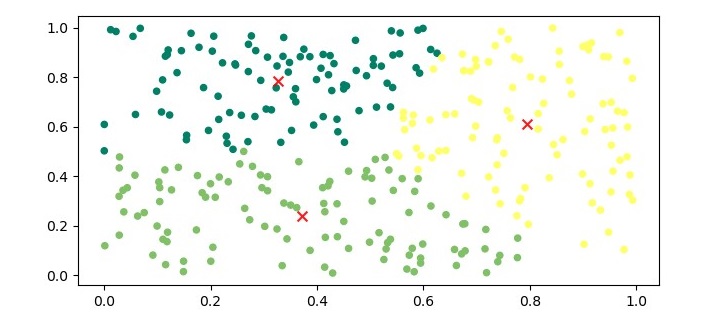
It is a simple example to understand how k-means works. In this example, we generate 300 random data points with two features. And apply K-means algorithm to generate clusters.
Step 1 − Import Required Libraries
To implement the K-Means algorithm in Python, we first need to import the required libraries. We will use the numpy and matplotlib libraries for data processing and visualization, respectively, and the scikit-learn library for the K-Means algorithm.
import numpy as np
import matplotlib.pyplot as plt
from sklearn.cluster import KMeans
Step 2 − Generate Data
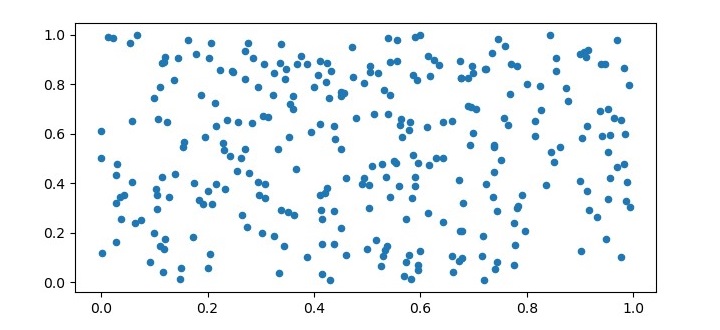
To test the K-Means algorithm, we need to generate some sample data. In this example, we will generate 300 random data points with two features. We will visualize the data also.
X = np.random.rand(300,2)

plt.figure(figsize=(7.5,3.5))
plt.scatter(X[:,0], X[:,1], s=20, cmap='summer');
plt.show()
Output
Step 3 − Initialize K-Means
Next, we need to initialize the K-Means algorithm by specifying the number of clusters (K) and the maximum number of iterations.
kmeans = KMeans(n_clusters=3, max_iter=100)
Step 4 − Train the Model
After initializing the K-Means algorithm, we can train the model by fitting the data to the algorithm.
kmeans.fit(X)
Step 5 − Visualize the Clusters
To visualize the clusters, we can plot the data points and color them based on their assigned cluster.
The output of the above code will be a plot with the data points colored based on their assigned cluster, and the centroids marked with an ‘x’ symbol in red color.
Example 2
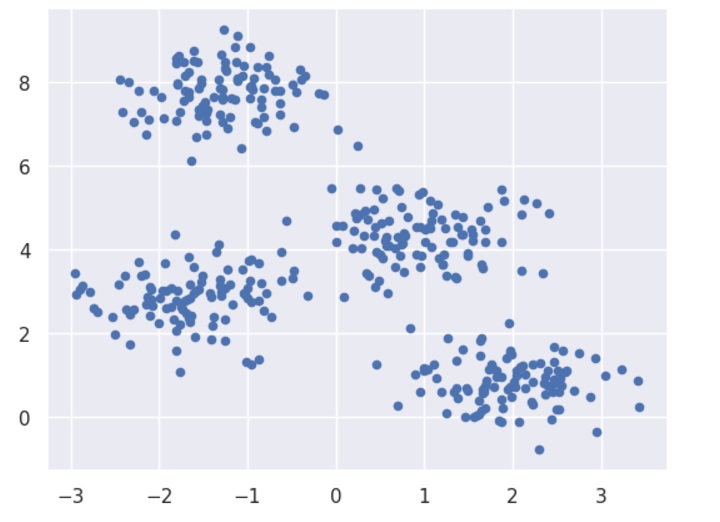
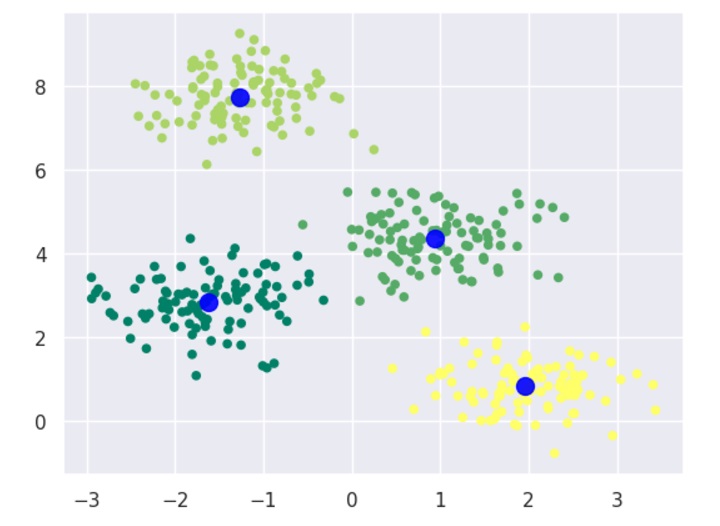
In this example, we are going to first generate 2D dataset containing 4 different blobs and after that will apply k-means algorithm to see the result.
First, we will start by importing the necessary packages −
%matplotlib inline
import matplotlib.pyplot as plt
import seaborn as sns; sns.set()import numpy as np
from sklearn.cluster import KMeans
The following code will generate the 2D, containing four blobs −
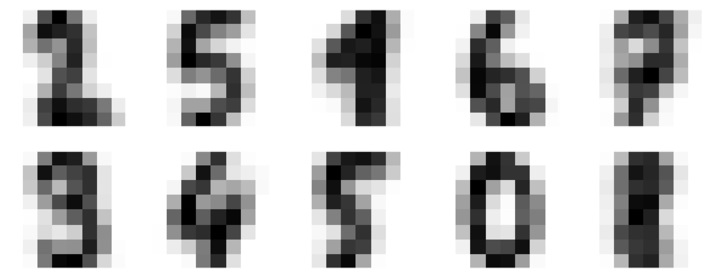
Let us move to another example in which we are going to apply K-means clustering on simple digits dataset. K-means will try to identify similar digits without using the original label information.
First, we will start by importing the necessary packages −
%matplotlib inline
import matplotlib.pyplot as plt
import seaborn as sns; sns.set()import numpy as np
from sklearn.cluster import KMeans
Next, load the digit dataset from sklearn and make an object of it. We can also find number of rows and columns in this dataset as follows −
from sklearn.datasets import load_digits
digits = load_digits()
digits.data.shape
Output
(1797, 64)
The above output shows that this dataset is having 1797 samples with 64 features.
We can perform the clustering as we did in Example 1 above −
As output, we will get following image showing clusters centers learned by k-means.
The following lines of code will match the learned cluster labels with the true labels found in them −
from scipy.stats import mode
labels = np.zeros_like(clusters)for i inrange(10):
   mask =(clusters == i)
   labels[mask]= mode(digits.target[mask])[0]
Next, we can check the accuracy as follows −
from sklearn.metrics import accuracy_score
accuracy_score(digits.target, labels)
Output
0.7935447968836951
The above output shows that the accuracy is around 80%.
Advantages of K-Means Clustering Algorithm
The following are some advantages of K-Means clustering algorithms −
It is very easy to understand and implement.
If we have large number of variables then, K-means would be faster than Hierarchical clustering.
On re-computation of centroids, an instance can change the cluster.
Tighter clusters are formed with K-means as compared to Hierarchical clustering.
Disadvantages of K-Means Clustering Algorithm
The following are some disadvantages of K-Means clustering algorithms −
It is a bit difficult to predict the number of clusters i.e. the value of k.
Output is strongly impacted by initial inputs like number of clusters (value of k).
Order of data will have strong impact on the final output.
It is very sensitive to rescaling. If we will rescale our data by means of normalization or standardization, then the output will completely change.final output.
It is not good in doing clustering job if the clusters have a complicated geometric shape.
Applications of K-Means Clustering
K-Means clustering is a versatile algorithm with various applications in several fields. Here we have highlighted some of the important applications −
Image Segmentation
K-Means clustering can be used to segment an image into different regions based on the color or texture of the pixels. This technique is widely used in computer vision applications, such as object recognition, image retrieval, and medical imaging.
Customer Segmentation
K-Means clustering can be used to segment customers into different groups based on their purchasing behavior or demographic characteristics. This technique is widely used in marketing applications, such as customer retention, loyalty programs, and targeted advertising.
Anomaly Detection
K-Means clustering can be used to detect anomalies in a dataset by identifying data points that do not belong to any cluster. This technique is widely used in fraud detection, network intrusion detection, and predictive maintenance.
Genomic Data Analysis
K-Means clustering can be used to analyze gene expression data to identify different groups of genes that are co-regulated or co-expressed. This technique is widely used in bioinformatics applications, such as drug discovery, disease diagnosis, and personalized medicine.