Year: 2025

  • Classes and Objects

    Ruby is a perfect Object Oriented Programming Language. The features of the object-oriented programming language include −

    • Data Encapsulation
    • Data Abstraction
    • Polymorphism
    • Inheritance

    These features have been discussed in the chapter Object Oriented Ruby.

    An object-oriented program involves classes and objects. A class is the blueprint from which individual objects are created. In object-oriented terms, we say that your bicycle is an instance of the class of objects known as bicycles.

    Take the example of any vehicle. It comprises wheels, horsepower, and fuel or gas tank capacity. These characteristics form the data members of the class Vehicle. You can differentiate one vehicle from the other with the help of these characteristics.

    A vehicle can also have certain functions, such as halting, driving, and speeding. Even these functions form the data members of the class Vehicle. You can, therefore, define a class as a combination of characteristics and functions.

    A class Vehicle can be defined as −

    ClassVehicle{Number no_of_wheels
       Number horsepower
       Characters type_of_tank
       NumberCapacityFunction speeding {}Function driving {}Function halting {}}

    By assigning different values to these data members, you can form several instances of the class Vehicle. For example, an airplane has three wheels, horsepower of 1,000, fuel as the type of tank, and a capacity of 100 liters. In the same way, a car has four wheels, horsepower of 200, gas as the type of tank, and a capacity of 25 liters.

    Defining a Class in Ruby

    To implement object-oriented programming by using Ruby, you need to first learn how to create objects and classes in Ruby.

    A class in Ruby always starts with the keyword class followed by the name of the class. The name should always be in initial capitals. The class Customer can be displayed as −

    class Customer
    end
    

    You terminate a class by using the keyword end. All the data members in the class are between the class definition and the end keyword.

    Variables in a Ruby Class

    Ruby provides four types of variables −

    • Local Variables − Local variables are the variables that are defined in a method. Local variables are not available outside the method. You will see more details about method in subsequent chapter. Local variables begin with a lowercase letter or _.
    • Instance Variables − Instance variables are available across methods for any particular instance or object. That means that instance variables change from object to object. Instance variables are preceded by the at sign (@) followed by the variable name.
    • Class Variables − Class variables are available across different objects. A class variable belongs to the class and is a characteristic of a class. They are preceded by the sign @@ and are followed by the variable name.
    • Global Variables − Class variables are not available across classes. If you want to have a single variable, which is available across classes, you need to define a global variable. The global variables are always preceded by the dollar sign ($).

    Example

    Using the class variable @@no_of_customers, you can determine the number of objects that are being created. This enables in deriving the number of customers.

    classCustomer@@no_of_customers =0end

    Creating Objects in Ruby using new Method

    Objects are instances of the class. You will now learn how to create objects of a class in Ruby. You can create objects in Ruby by using the method new of the class.

    The method new is a unique type of method, which is predefined in the Ruby library. The new method belongs to the class methods.

    Here is the example to create two objects cust1 and cust2 of the class Customer −

    cust1 =Customer.new
    cust2 =Customer.new

    Here, cust1 and cust2 are the names of two objects. You write the object name followed by the equal to sign (=) after which the class name will follow. Then, the dot operator and the keyword new will follow.

    Custom Method to Create Ruby Objects

    You can pass parameters to method new and those parameters can be used to initialize class variables.

    When you plan to declare the new method with parameters, you need to declare the method initialize at the time of the class creation.

    The initialize method is a special type of method, which will be executed when the new method of the class is called with parameters.

    Here is the example to create initialize method −

    classCustomer@@no_of_customers =0definitialize(id, name, addr)@cust_id = id
    
      @cust_name = name
      @cust_addr = addr
    endend

    In this example, you declare the initialize method with id, name, and addr as local variables. Here, def and end are used to define a Ruby method initialize. You will learn more about methods in subsequent chapters.

    In the initialize method, you pass on the values of these local variables to the instance variables @cust_id, @cust_name, and @cust_addr. Here local variables hold the values that are passed along with the new method.

    Now, you can create objects as follows −

    cust1 =Customer.new("1","John","Wisdom Apartments, Ludhiya")
    cust2 =Customer.new("2","Poul","New Empire road, Khandala")

    Member Functions in Ruby Class

    In Ruby, functions are called methods. Each method in a class starts with the keyword def followed by the method name.

    The method name always preferred in lowercase letters. You end a method in Ruby by using the keyword end.

    Here is the example to define a Ruby method −

    classSampledeffunction
    
      statement 1
      statement 2endend</pre>

    Here, statement 1 and statement 2 are part of the body of the method function inside the class Sample. These statments could be any valid Ruby statement. For example we can put a method puts to print Hello Ruby as follows −

    classSampledefhello
    
      puts "Hello Ruby!"endend</pre>

    Now in the following example, create one object of Sample class and call hello method and see the result −

    #!/usr/bin/rubyclassSampledefhello
    
      puts "Hello Ruby!"endend# Now using above class to create objects
    object =Sample.new object.hello

    This will produce the following result −

    Hello Ruby!
    

    Simple Case Study

    Here is a case study if you want to do more practice with class and objects.

    Ruby Class Case Study
  • Syntax

    Let us write a simple program in ruby. All ruby files will have extension .rb. So, put the following source code in a test.rb file.

    #!/usr/bin/ruby -w
    
    puts "Hello, Ruby!";

    Here, we assumed that you have Ruby interpreter available in /usr/bin directory. Now, try to run this program as follows −

    $ ruby test.rb
    

    This will produce the following result −

    Hello, Ruby!
    

    You have seen a simple Ruby program, now let us see a few basic concepts related to Ruby Syntax.

    Whitespace in Ruby Program

    Whitespace characters such as spaces and tabs are generally ignored in Ruby code, except when they appear in strings. Sometimes, however, they are used to interpret ambiguous statements. Interpretations of this sort produce warnings when the -w option is enabled.

    Example

    a + b is interpreted as a+b ( Here a is a local variable)
    a  +b is interpreted as a(+b) ( Here a is a method call)
    

    Line Endings in Ruby Program

    Ruby interprets semicolons and newline characters as the ending of a statement. However, if Ruby encounters operators, such as &plus;, −, or backslash at the end of a line, they indicate the continuation of a statement.

    Ruby Identifiers

    Identifiers are names of variables, constants, and methods. Ruby identifiers are case sensitive. It means Ram and RAM are two different identifiers in Ruby.

    Ruby identifier names may consist of alphanumeric characters and the underscore character ( _ ).

    Reserved Words

    The following list shows the reserved words in Ruby. These reserved words may not be used as constant or variable names. They can, however, be used as method names.

    BEGINdonextthen
    ENDelseniltrue
    aliaselsifnotundef
    andendorunless
    beginensureredountil
    breakfalserescuewhen
    caseforretrywhile
    classifreturnwhile
    definself__FILE__
    defined?modulesuper__LINE__

    Here Document in Ruby

    “Here Document” refers to build strings from multiple lines. Following a << you can specify a string or an identifier to terminate the string literal, and all lines following the current line up to the terminator are the value of the string.

    If the terminator is quoted, the type of quotes determines the type of the line-oriented string literal. Notice there must be no space between << and the terminator.

    Here are different examples −

    #!/usr/bin/ruby -w
    
    print <<EOF
       This is the first way of creating
       here document ie. multiple line string.
    EOF
    
    print <<"EOF";# same as aboveThis is the second way of creating
       here document ie. multiple line string.EOF
    
    print <<EOC                 # execute commands
    	echo hi there
    	echo lo there
    EOC
    
    print <<"foo",<<"bar"# you can stack themI said foo.
    foo
    	I said bar.
    bar
    

    This will produce the following result −

       This is the first way of creating
       her document ie. multiple line string.
       This is the second way of creating
       her document ie. multiple line string.
    hi there
    lo there
    
      I said foo.
      I said bar.

    Ruby BEGIN Statement

    Syntax

    BEGIN {
       code
    }
    

    Declares code to be called before the program is run.

    Example

    #!/usr/bin/ruby
    
    puts "This is main Ruby Program"BEGIN{
       puts "Initializing Ruby Program"}

    This will produce the following result −

    Initializing Ruby Program
    This is main Ruby Program
    

    Ruby END Statement

    Syntax

    END {
       code
    }
    

    Declares code to be called at the end of the program.

    Example

    #!/usr/bin/ruby
    
    puts "This is main Ruby Program"END{
       puts "Terminating Ruby Program"}BEGIN{
       puts "Initializing Ruby Program"}

    This will produce the following result −

    Initializing Ruby Program
    This is main Ruby Program
    Terminating Ruby Program
    

    Ruby Comments

    A comment hides a line, part of a line, or several lines from the Ruby interpreter. You can use the hash character (#) at the beginning of a line −

    # I am a comment. Just ignore me.
    

    Or, a comment may be on the same line after a statement or expression −

    name = "Madisetti" # This is again comment
    

    You can comment multiple lines as follows −

    # This is a comment.
    # This is a comment, too.
    # This is a comment, too.
    # I said that already.
    

    Here is another form. This block comment conceals several lines from the interpreter with =begin/=end −

    =begin
    This is a comment.
    This is a comment, too.
    This is a comment, too.
    I said that already.
    =end
  • Environment Setup

    Local Environment Setup

    If you are still willing to set up your environment for Ruby programming language, then let’s proceed. This tutorial will teach you all the important topics related to environment setup. We would recommend you to go through the following topics first and then proceed further −

    • Ruby Installation on Linux/Unix − If you are planning to have your development environment on Linux/Unix Machine, then go through this chapter.
    • Ruby Installation on Windows − If you are planning to have your development environment on Windows Machine, then go through this chapter.
    • Ruby Command Line Options − This chapter list out all the command line options, which you can use along with Ruby interpreter.
    • Ruby Environment Variables − This chapter has a list of all the important environment variables to be set to make Ruby Interpreter works.

    Popular Ruby Editors

    To write your Ruby programs, you will need an editor −

    • If you are working on Windows machine, then you can use any simple text editor like Notepad or Edit plus.
    • VIM (Vi IMproved) is a very simple text editor. This is available on almost all Unix machines and now Windows as well. Otherwise, your can use your favorite vi editor to write Ruby programs.
    • RubyWin is a Ruby Integrated Development Environment (IDE) for Windows.
    • Ruby Development Environment (RDE) is also a very good IDE for windows users.

    Interactive Ruby (IRb)

    Interactive Ruby (IRb) provides a shell for experimentation. Within the IRb shell, you can immediately view expression results, line by line.

    This tool comes along with Ruby installation so you have nothing to do extra to have IRb working.

    Just type irb at your command prompt and an Interactive Ruby Session will start as given below −

    $irb
    irb 0.6.1(99/09/16)
    irb(main):001:0>defhello
    irb(main):002:1> out ="Hello World"
    irb(main):003:1> puts out
    irb(main):004:1>endnil
    irb(main):005:0> hello
    HelloWorldnil
    irb(main):006:0>

    Do not worry about what we did here. You will learn all these steps in subsequent chapters.

    What is Next?

    We assume now you have a working Ruby Environment and you are ready to write the first Ruby Program. The next chapter will teach you how to write Ruby programs.

  • Overview

    Ruby is a pure object-oriented programming language. It was created in 1993 by Yukihiro Matsumoto of Japan.

    You can find the name Yukihiro Matsumoto on the Ruby mailing list at www.ruby-lang.org. Matsumoto is also known as Matz in the Ruby community.

    Ruby is “A Programmer’s Best Friend”.

    Ruby has features that are similar to those of Smalltalk, Perl, and Python. Perl, Python, and Smalltalk are scripting languages. Smalltalk is a true object-oriented language. Ruby, like Smalltalk, is a perfect object-oriented language. Using Ruby syntax is much easier than using Smalltalk syntax.

    Features of Ruby

    • Ruby is an open-source and is freely available on the Web, but it is subject to a license.
    • Ruby is a general-purpose, interpreted programming language.
    • Ruby is a true object-oriented programming language.
    • Ruby is a server-side scripting language similar to Python and PERL.
    • Ruby can be used to write Common Gateway Interface (CGI) scripts.
    • Ruby can be embedded into Hypertext Markup Language (HTML).
    • Ruby has a clean and easy syntax that allows a new developer to learn very quickly and easily.
    • Ruby has similar syntax to that of many programming languages such as C++ and Perl.
    • Ruby is very much scalable and big programs written in Ruby are easily maintainable.
    • Ruby can be used for developing Internet and intranet applications.
    • Ruby can be installed in Windows and POSIX environments.
    • Ruby support many GUI tools such as Tcl/Tk, GTK, and OpenGL.
    • Ruby can easily be connected to DB2, MySQL, Oracle, and Sybase.
    • Ruby has a rich set of built-in functions, which can be used directly into Ruby scripts.

    Tools You Will Need

    For performing the examples discussed in this tutorial, you will need a latest computer like Intel Core i3 or i5 with a minimum of 2GB of RAM (4GB of RAM recommended). You also will need the following software −

    • Linux or Windows 95/98/2000/NT or Windows 7 operating system.
    • Apache 1.3.19-5 Web server.
    • Internet Explorer 5.0 or above Web browser.
    • Ruby 1.8.5

    This tutorial will provide the necessary skills to create GUI, networking, and Web applications using Ruby. It also will talk about extending and embedding Ruby applications.

    What is Next?

    The next chapter guides you to where you can obtain Ruby and its documentation. Finally, it instructs you on how to install Ruby and prepare an environment to develop Ruby applications.

  • Ruby Tutorial

    What is Ruby?

    Ruby is an open-source and high-level programming language, which is known for its simplicity and developer-friendliness. This is designed by Yukihiro Matsumoto with the purpose of making programming more enjoyable and productive for developers. Ruby includes a lot of key features like its Object-Oriented, Dynamic Typing, Readable Syntax, and a large Standard Library collection.

    Why to Learn Ruby?

    Ruby is a simple and expressive programming language, which provides various advantages to programmers, especially in fields like web development, automation tasks, scripting, etc. Here in the following, we will discuss its features and advantages.

    • Simplicity and Readable Syntax: Ruby’s syntax is designed in a very clean and concise way, which provides easy-to-read, write, and understand code leading to increased productivity by allowing developers to focus more on problem-solving rather than complex syntax.
    • Powerful Frameworks: Ruby also provides popular web development frameworks like Ruby on Rails (RoR), which is a popular framework used for web development allowing developers to build complex applications more efficiently.
    • Strong Community and Ecosystem: Ruby also provides a supportive and active community, where users will find many libraries, tools, and resources. RubyGems repository offers a large set of collections of reusable code and libraries to accelerate development.
    • Prototyping: This is great for prototyping ideas and applications as its dynamic nature allows rapid iterations. This makes Ruby ideal for startups and developers.

    Characteristics of Ruby

    The following are important characteristics of Ruby programming:

    • Object-oriented:
      Ruby is purely object-oriented, which means everything in Ruby is an object including primitive data types like numbers, strings, and nil.
    • Dynamic Typing and Concise Syntax:
      In ruby, you don’t need to explicitly declare any variable types, it is automatically determined at runtime, providing greater flexibility and its syntax is to be designed clean, simple, and human-readable.
    • Automatic Memory Management (Garbage Collection):
      Ruby also provides flexibility by automatically managing memory allocation and deallocation with garbage collection, helping reduce complexity and the risk of memory leaks.
    • Large Standard Library:
      Ruby also has a large standard library consisting of many built-in classes and methods, covering a wide range of tasks like file I/O and data manipulation, etc.
    • Metaprogramming:
      It also allows to modify objects and classes during runtime. This provides flexibility as programs can dynamically be altered thus supporting Metaprogramming.

    Ruby Hello, World! Program

    To start with any programming, the very basic program is to print “Hello World!” Here we will print it in Ruby by using the puts. Below is an example of code to print “Hello, World!”. You can try it using the Edit & Run button.

    # Ruby code to print Hello, World!
    puts "Hello, World!"

    Ruby Online Compiler

    We provide an easy, user-friendly, and fast Ruby online compiler, where you can write, save, run, and share your Ruby programs. Click on this link to open it: Ruby Online Compiler

    Applications of Ruby

    Ruby is a general-purpose programming language, which has a wide range of applications that have been discussed in the given following.

    • Web and API Development:
      Ruby on Rails is one of the most popular frameworks for web development, where Rails is a full-stack web framework, which is used for building dynamic and database-driven websites. Example GitHub, Shopify, Airbnb, etc. Similarly, it is also commonly used for building RESTful APIs and web services. example Stripe and Twilio.
    • Scripting and Automation:
      Ruby’s concise syntax and rich libraries make it the best choice for creating command-line tools, scripting, and automating repetitive tasks like file manipulation, data processing, System administration and testing, etc.
    • Data Extraction and Analysis:
      Ruby’s powerful libraries like RMagick for image processing, Nokogiri for parsing HTML and XML, and HTTParty for making HTTP requests help in web scraping, data extraction, and analysis.
    • DevOps and System Administration:
      Ruby is also used in DevOps and system administration tasks, with tools like Chef (a configuration management tool) and Puppet, which are built using Ruby.
    • Application Development:
      Unlike C++ or Python, ruby can also used for developing various applications like game development, E-commerce Development, Social Media Platforms, etc.

    Jobs or Careers with Ruby

    Ruby’s nature of rapid development cycle, ease of use, and ability to handle interactions make it a great choice for site and application development, although it’s not used for large-scale platforms. Here in the following, we will discuss a few of its career options.

    • Ruby on Rails and Ruby Developer
    • Software Engineer
    • DevOps Engineer
    • Full-Stack Developer
    • Data Analyst/Scientist
    • Product and Community Manager
    • API Developer
    • Game Developer

    Target Audience: Who should Learn Ruby?

    This tutorial covers all key information from basic to advanced concepts related to Ruby scripting languages, which is useful for both aspiring and experienced programmers, web developers especially those who work with Ruby on Rails, Full-Stack Developers, also for Startups and Entrepreneurs as it allows for rapid development of web applications, Developers who interested in prototyping, test and driven developers and DevOps developers etc.

    Prerequisites to Learn Ruby

    Before you start practicing with various types of examples given in this tutorial, we are making an assumption that you are already aware of computer programs like basic computer literacy, basic knowledge of text editors and IDEs (like VS Code and Sublime Text, etc.), familiarity with version control system like git.

  • What’s New?

    Install Angular 9

    If you want to work with Angular 9, first you need to setup Angular 9 CLI using the below command:

    npm install -g @angular/cli@^9.0.0 
    

    After executing this command, you can check the version using the below command:

    ng version 
    

    Angular 9 Updates

    Lets understand Angular 9 updates in brief.

    Ivy compiler

    Ivy compiler becomes the default compiler in Angular 9. This makes apps will be faster and very efficient. Whereas, Angular 8 Ivy is optional. We have to enable it inside tsconfig.json file.

    Ivy compiler supports the following features:

    • Performs faster testing: TestBed implementation helps to test more efficient.
    • Improved CSS class and styles: Ivy styles are easily merged and designed as predictable.
    • Improved type checking: This feature helps to find the errors earlier in development process.
    • Enhanced debugging: Ivy comes with more tools to enable better debugging features. This will be helpful to show useful stack trace so that we can easily jump to the instruction.
    • Ahead-of-Time compiler: This is one of the important improvements in compilers performance. AOT builds are very faster.
    • Improved internationalization: i18n substitutions helps to build more than ten times faster than previous versions.

    Reliable ng update

    ng updates are very reliable. It contains clear progress updates and runs all of the migrations. This can be done using the below command:

    ng update --create-commits
    

    Here,

    create-commits flag is used to commit your code after each migration.

    Improved Dependency Injection

    @Injectable service helps to add injector in your application. providedIn meta data provides new option, platform to ensure the object can be used and shared by all application. It is defined below:

    @Injectable({
       providedIn:'platform'})classMyService{...}

    TypeScript 3.8

    Angular 9 is designed to support 3.8 version. TypeScript 3.8 brings support for the below features:

    • Type-Only Imports and Exports.
    • ECMAScript Private Fields.
    • Top-Level await.
    • JSDoc Property Modifiers.
    • export * as ns Syntax.

    Angular 9.0.0-next.5

    Angular 9.0.0-next.5 build has small size of main.js file, which makes better performance compare to previous version of Angular 8.

    IDE enhancement

    Angular 9 provides improves IDE supports. TextMate grammar enables for syntax highlighting in inline and external templates.

  • User Input

    The term user input in Angular refers to the data or information that users provide to an Angular application through various means such as typing, clicking, or speaking. It helps users to interact with and control the application. Furthermore, it is necessary for a user-friendly and dynamic experience.

    In Angular, you can make use of the DOM element structure of HTML to change the values of the elements at run time. This change occurs based on user input. You can use it to gather feedback, make decisions, and perform tasks based on user preferences and needs.

    Taking User Input in Angular

    In Angular, we can get input from user through the following ways −

    Using Template-Driven Forms

    Template-driven forms are used for simple use cases where form validation and control are not too complex. These forms use the ngModel directive for two-way data binding between the form fields and the component class. Creating this type of form is very easy as it requires minimal setup.

    Example

    Let’s see an example of template driven form where we take input from user.

    app.component.html

    <form #userForm="ngForm"><label for="name">Name:</label><input type="text" id="name"[(ngModel)]="user.name" name="name" required><label for="email">Email:</label><input type="email" id="email"[(ngModel)]="user.email" name="email" required><button(click)="submitForm()">Submit</button></form>

    app.component.ts

    import{ Component }from'@angular/core';import{ CommonModule }from'@angular/common';import{ FormsModule }from'@angular/forms';
    
    @Component({
      selector:'app-root',
      standalone:true,
      imports:[CommonModule, FormsModule],
      templateUrl:'./app.component.html',
      styleUrls:['./app.component.css']})exportclassAppComponent{
      user ={ name:'', email:''};submitForm(){
    
    console.log(this.user);}}</pre>

    Using Reactive Forms

    Reactive forms are used when you need more control over form validation, form elements, and form states. They are built using FormControlFormGroup, and FormArray classes. These forms are used for larger, more complex forms.

    Example

    In this example, we will see a reactive form where we take input from user.

    app.component.html

    <form [formGroup]="userForm"(ngSubmit)="submitForm()"><label for="name">Name:</label><input id="name" formControlName="name" required><label for="email">Email:</label><input id="email" formControlName="email" required><button type="submit"[disabled]="!userForm.valid">Submit</button></form>

    app.component.ts

    import{ Component }from'@angular/core';import{ FormBuilder, FormGroup, Validators, ReactiveFormsModule }from'@angular/forms';import{ CommonModule }from'@angular/common';
    
    @Component({
      selector:'app-root',
      standalone:true,
      imports:[CommonModule, ReactiveFormsModule],
      templateUrl:'./app.component.html',
      styleUrls:['./app.component.css']})exportclassAppComponent{
      userForm: FormGroup;constructor(private fb: FormBuilder){this.userForm =this.fb.group({
    
      name:['', Validators.required],
      email:['',[Validators.required, Validators.email]],});}submitForm(){
    console.log(this.userForm.value);}}</pre>

    Using Event Binding

    Angular provides option to listen and fire action for each user initiated event in a typical web application. Event binding is the process of targeting an event in a HTML element/component and set a responder for the target event. An event can be set for an HTML element/component by including the event name inside the bracket (( )) and assigning a template statement. The template statement will execute once the event is fired by the user.

    Example

    Let us create a button and set an action to the button's click event.

    Step 1: Create a submit button.

    <button type="submit>Submit</button>

    Step 2: Create an action method in the component.

    myAction(){alert('I am the action function for click event');}

    Step 3: Bind our myAction() method to click event of the button as shown below −

    <button type="submit"(click)="myAction()">Submit</button>

    Now, myAction() will execute whenever the submit button is clicked by the user.

    Using Template Reference Variables

    The syntax to declare a template reference variables is #var (# along with variable name). Angular allows the variable to be declared as attributes of an element available in the template. The type and value of the template reference variable depend on where it is declared.

    1. If a variable is declared inside an element, then it refers to the HTML element.

    <button #btn>Click Here</button>

    Here, btn refers to the button object of type HtmlButtonElement

    2. If a variable is declared inside a component, then it refers to the component instance.

    <app-comp #mycomp></app-comp>

    Here, mycomp refers to the component instance and can access the internal of the referenced component.

    3. If a variable is declared inside a template (ng-template, a tag used to create template within a template), then it refers to the instance of the template.

    <ng-template #mytemplate><div>Hi, I am template within the template</div></ng-template>

    Here, mytemplate refers to the instance of the template.

    4. If a variable is declared inside a custom web component, then it refers to the custom HTML element.

    <my-card #mycard>Click Here</my-card>

    Here, mycard refers to the custom web component, my-card

    Let us see how to create a template reference variable, firstname to refer to an input element as shown below −

    <input #firstname id="firstname" type="text" name="firstname" value="John" />

    Here,

    • firstname is the template reference variable
    • firstname represents the instance of HtmlInputElement element. HtmlInputElement is a type in DOM to represent the input element.
    • firstname can access all properties and methods of HtmlInputElement element

    The template reference variable can be used in template statement and text interpolation.

  • Lifecycle Hooks

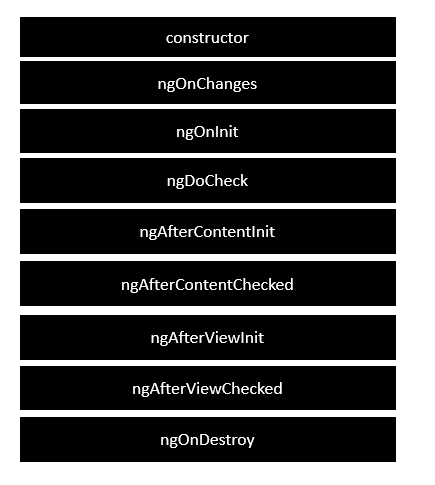
    Angular application goes through an entire set of processes or has a lifecycle right from its initiation to the end of the application.

    The following diagram shows the entire processes in the lifecycle of the Angular 2 application.

    Lifecycle

    Following is a description of each lifecycle hook.

    • ngOnChanges − When the value of a data bound property changes, then this method is called.
    • ngOnInit − This is called whenever the initialization of the directive/component after Angular first displays the data-bound properties happens.
    • ngDoCheck − This is for the detection and to act on changes that Angular can’t or won’t detect on its own.
    • ngAfterContentInit − This is called in response after Angular projects external content into the component’s view.
    • ngAfterContentChecked − This is called in response after Angular checks the content projected into the component.
    • ngAfterViewInit − This is called in response after Angular initializes the component’s views and child views.
    • ngAfterViewChecked − This is called in response after Angular checks the component’s views and child views.
    • ngOnDestroy − This is the cleanup phase just before Angular destroys the directive/component.

    Following is an example of implementing one lifecycle hook. In the app.component.ts file, place the following code.

    import{ 
       Component 
    }from'@angular/core';@Component({ 
       selector:'my-app', 
       template:'<div> {{values}} </div> '})exportclassAppComponent{ 
       values ='';ngOnInit(){this.values ="Hello";}}

    In the above program, we are calling the ngOnInit lifecycle hook to specifically mention that the value of the this.values parameter should be set to Hello.

    Once you save all the code changes and refresh the browser, you will get the following output.

    Hello
  • Testing & Building a Project

    In this chapter will discuss the following topics −

    • To test Angular Project
    • To build Angular Project

    Testing Angular Project

    During the project setup, the required packages for testing are already installed. There is a .spec.ts file created for every new component, service, directive, etc. We are going to use jasmine to write our test cases.

    For any changes added to your component, services, directives or any other files created, you can include your test cases in the respective .spec.ts files. So most of the unit testing can be covered at the beginning itself.

    To run the test cases, the command used is as follows−

    ng test
    

    Below is the app.component.spec.ts file for app.component.ts −

    import{ TestBed, async }from'@angular/core/testing';import{ RouterTestingModule }from'@angular/router/testing';import{ AppComponent }from'./app.component';describe('AppComponent',()=>{beforeEach(async(()=>{
    
      TestBed.configureTestingModule({
         imports:[
            RouterTestingModule
         ],
         declarations:[
            AppComponent
         ],}).compileComponents();}));it('should create the app',()=&gt;{const fixture = TestBed.createComponent(AppComponent);const app = fixture.debugElement.componentInstance;expect(app).toBeTruthy();});it(should have as title 'angular7-app',()=&gt;{const fixture = TestBed.createComponent(AppComponent);const app = fixture.debugElement.componentInstance;expect(app.title).toEqual('angular7-app');});it('should render title in a h1 tag',()=&gt;{const fixture = TestBed.createComponent(AppComponent);
      fixture.detectChanges();const compiled = fixture.debugElement.nativeElement;expect(compiled.querySelector('h1').textContent).toContain('Welcome to angular7-app!');})});</pre>

    app.component.ts

    import{ Component }from'@angular/core';@Component({
       selector:'app-root',
       templateUrl:'./app.component.html',
       styleUrls:['./app.component.css']})exportclassAppComponent{
       title ='angular7-app';}

    Now let us run the command to see the test cases running.

    Ng Test
    Run The Command

    The test cases status is shown in the command line as shown above and will also open up in the browser as shown below −

    Karma

    Incase of any failure, it will show the details as follows −

    To do that, let us change the app.component.spec.ts as follows −

    import{ TestBed, async }from'@angular/core/testing';import{ RouterTestingModule }from'@angular/router/testing';import{ AppComponent }from'./app.component';describe('AppComponent',()=>{beforeEach(async(()=>{
    
      TestBed.configureTestingModule({
         imports:[
            RouterTestingModule
         ],
         declarations:[
            AppComponent
         ],}).compileComponents();}));it('should create the app',()=&gt;{const fixture = TestBed.createComponent(AppComponent);const app = fixture.debugElement.componentInstance;expect(app).toBeTruthy();});it(should have as title 'angular7-app',()=&gt;{const fixture = TestBed.createComponent(AppComponent);const app = fixture.debugElement.componentInstance;expect(app.title).toEqual('Angular 7');// change the 
      title from angular7-app to Angular 7});it('should render title in a h1 tag',()=&gt;{const fixture = TestBed.createComponent(AppComponent);
      fixture.detectChanges();const compiled = fixture.debugElement.nativeElement;expect(compiled.querySelector('h1').textContent).toContain('Welcome to angular7-app!');});});</pre>

    In the above file, the test cases check for the title, Angular 7. But in app.component.ts, we have the title, angular7-app as shown below −

    import{ Component }from'@angular/core';@Component({
       selector:'app-root',
       templateUrl:'./app.component.html',
       styleUrls:['./app.component.css']})exportclassAppComponent{
       title ='angular7-app';}

    Here the test case will fail and below are the details shown in command line and browser.

    In command line

    Following screen is displayed in command line −

    Command Line

    In browser

    Following screen is displayed in the browser −

    Karma Connected

    All the failed test-cases for your project will be displayed as shown above in command line and browser.

    Similarly, you can write test cases for your services, directives and the new components which will be added to your project.

    Building Angular 7 Project

    Once you are done with the project in Angular, we need to build it so that it can be used in production or stating.

    The configuration for build, i.e., production, staging, development, testing needs to be defined in your src/environments.

    At present, we have the following environments defined in src/environment −

    Environments

    You can add files based on your build to src/environment, i.e., environment.staging.ts, enviornment.testing.ts, etc.

    At present, we will try to build for production environment. The file environment.ts contains default environment settings and details of the file as follows −

    export const environment = {
       production: false
    };
    

    To build the file for production, we need to make the production: true in environment.ts as follows −

    export const environment = {
       production: true
    };
    

    The default environment file has to be imported inside components as follows −

    app.component.ts

    import{ Component }from'@angular/core';import{ environment }from'./../environments/environment';@Component({
       selector:'app-root',
       templateUrl:'./app.component.html',
       styleUrls:['./app.component.css']})exportclassAppComponent{
       title ='angular7-app';}

    The environment replacement from default to production which we are trying to do are defined inside angular.json fileReplacements section as follows −

    "production":{"fileReplacements":[{"replace":"src/environments/environment.ts","with":"src/environments/environment.prod.ts"}],}

    When the command for build runs, the file gets replaced to src/environments/environment.prod.ts. The additional configuration like staging or testing can be added here as shown in the below example −

    "configurations":{"production":{...},"staging":{"fileReplacements":[{"replace":"src/environments/environment.ts","with":"src/environments/environment.staging.ts"}]}}

    So the command to run the build is as follows −

    ng build --configuration = production // for production environment
    ng build --configuration = staging // for stating environment
    

    Now let us run the build command for production, the command will create a dist folder inside our project which will have the final files after build.

    Ng Build
    Dist Folder

    The final files are build inside dist/ folder which can be hosted on the production server at your end.

    Dist
  • Error Handling

    Errors are the unexpected issue or problem that occurs during the execution of a program. Incorrect syntax, invalid input, system failures or bug in API logic could be the possible reasons for these errors. These errors may affect the user experience in negative way, hence, it is necessary to handle them at compile time.

    Error handling is the process of detecting and resolving these errors or exceptions before execution. Angular provides a number of ways to handle the errors that we are going to learn in this tutorial.

    Handling Errors in Angular

    There are multiple ways to handle errors in Angular, which are given below −

    Using ErrorHandler Class

    The ErrorHandler is a built-in class of the Angular @angular/core package. It provides a hook to catch errors globally. When something goes wrong, like any unhandled exception occurs anywhere in the application, this class catches that exception and prints the error messages on console.

    Remember! the ErrorHandler class simply prints the error message so that developers can see what went wrong and fix it. However, you can replace this default behavior by creating a custom ErrorHandler.

    Extend the ErrorHandler class and override its handleError() method as shown below to create a custom behavior of this class −

    import{ Injectable, ErrorHandler }from'@angular/core';
    
    @Injectable({
       providedIn:'root'})exportclassGlobalErrorHandlerimplementsErrorHandler{handleError(error: any):void{// Log the error to an external service or display a message
    
      console.error("An error occurred:", error);// Create any custom behavior}}</pre>

    Using HttpInterceptor Interface

    The HttpInterceptor is an interface that is used for handling HTTP-specific errors, such as network issues, server errors, etc. It can intercept and modify HTTP requests or responses. Think of it as a service that can check and change the data going to and coming from a server.

    To use an HttpInterceptor, create a class that implements the HttpInterceptor interface and define the intercept() method. This method takes an HTTP request and a handler, and it returns an observable of the HTTP event. Inside this method, you can modify the request or response as needed.

    import{ Injectable }from'@angular/core';import{ HttpEvent, HttpInterceptor, HttpHandler, HttpRequest }from'@angular/common/http';import{ Observable }from'rxjs';import{ catchError }from'rxjs/operators';import{ throwError }from'rxjs';
    
    @Injectable({
       providedIn:'root'})exportclassErrorInterceptorimplementsHttpInterceptor{intercept(req: HttpRequest<any>, next: HttpHandler): Observable<HttpEvent<any>>{return next.handle(req).pipe(catchError((error)=>{// Handle error 
    
            console.error('HTTP Error:', error);returnthrowError(error);}));}}</pre>

    Using Try-Catch Blocks

    In Angular, errors can occur during component lifecycle. To handle these errors, you can use the a try-catch block within the ngOnInit(), which is a component lifecycle hook defined by OnInit interface. It is important to implement this interface as it helps to check if component is properly initialized.

    The try block is used to wrap the code that might throw an error during its execution. And, the catch block is used to handle any errors or exceptions that occur within the try block.

    Here, you can see a component with try-catch block:

    import{ Component, OnInit }from'@angular/core';import{ CommonModule }from'@angular/common';
    
    @Component({
      selector:'app-example',
      standalone:true,
      imports:[CommonModule],
      templateUrl:'./example.component.html',
      styleUrls:['./example.component.css']})exportclassExampleComponentimplementsOnInit{ngOnInit(){try{// code that might throw an errorthrownewError("Error message");}catch(error){
    
      console.error("error caught", error);}}}</pre>

    Using Validation

    Validation is used in Angular Forms to validate whether the user input is in the correct format or not before submission. The reactive forms and template-driven forms has built-in validators to handle validation errors.

    With reactive forms, you can easily validate user input and display custom error messages as shown in the following code block −

    import{ Component }from'@angular/core';import{ FormBuilder, FormGroup, Validators }from'@angular/forms';import{ CommonModule }from'@angular/common';
    
    @Component({
       selector:'app-registration',
       standalone:true,
       imports:[CommonModule],
       templateUrl:'./registration.component.html',
       styleUrls:['./registration.component.css']})exportclassRegistrationComponent{
       registrationForm: FormGroup;constructor(private fb: FormBuilder){this.registrationForm =this.fb.group({
    
         username:['',[Validators.required, Validators.minLength(4)]],
         email:['',[Validators.required, Validators.email]],});}onSubmit(){if(this.registrationForm.invalid){this.showValidationErrors();return;}}privateshowValidationErrors(){
      Object.keys(this.registrationForm.controls).forEach(control=&gt;{const formControl =this.registrationForm.get(control);if(formControl?.invalid){
            console.error(${control} is invalid);}});}}</pre>

    Print Page