TheHTTP standard verbGETcan be used in HTTP protocol to get (retrieve) a resource (data) from the server. The purpose of theGET method is to request data from the server. The server will check for the specified resource in the server and send it back if it is available.
In Angular, the HttpClient service class provides a get() method to request data from the server using the HTTP GET verb. Let’s learn more about this method, including it’s signature, parameters, and real-time usage:
Signature of the get() Method
Following is the signature (different from syntax) of the HttpClient get() method −
options − represents the options to be send along with the resource URL.
Observable<T> − The return type, where ‘T’ represents the expected response type.
Working Example
To work out the HTTP client-server communication, we need to create a backend web application and expose a set of web APIs. These web APIs can be requested from the client. Let’s create a sample server application, Expense API App, to provide CRUD REST APIs (mainly GET requests) for managing expenses.
Step 1: Go to your favorite workspace as shown below −
cd /go/to/your/favorite/workspace
Step 2: Create a new folder, expense-rest-api, and move into the folder −
mkdir expense-rest-api && cd expense-rest-api
Step 3: Create a new application using the init sub-command provided by the npm command as shown below −
npm init
Note: Once you run the above command, it will ask a few questions and answer all of them with default answers.
Step 4: Install express and cors packages to create node-based web applications −
npm install express cors --save
Step 5: Install SQLite package to store the expenses in the SQLite-based database −
npm install sqlite3 --save
Step 6: Create a new file with the name sqlitedb.js, and add the below code to initialize the database with expense table and sample expense entries. An expense table will be used to store the expense items −
var sqlite3 =require('sqlite3').verbose()constDBSOURCE="expensedb.sqlite"let db =newsqlite3.Database(DBSOURCE,(err)=>{if(err){
  console.error(err.message)throw err   }else{
  console.log('Connected to the SQLite database.')
  db.run(`CREATE TABLE IF NOT EXISTS expense (
     id INTEGER PRIMARY KEY AUTOINCREMENT,
     item text,
     amount real,
     category text,
     location text,
     spendOn text,
     createdOn text
  )`,(err)=>{if(err){
           console.log(err);}else{var insert ='INSERT INTO expense (item, amount, category, location, spendOn, createdOn) VALUES (?,?,?,?,?,?)'
           db.run(insert,['Pizza',10,'Food','KFC','2020-05-26 10:10','2020-05-26 10:10'])
           db.run(insert,['Pizza',9,'Food','Mcdonald','2020-05-28 11:10','2020-05-28 11:10'])
           db.run(insert,['Pizza',12,'Food','Mcdonald','2020-05-29 09:22','2020-05-29 09:22'])
           db.run(insert,['Pizza',15,'Food','KFC','2020-06-06 16:18','2020-06-06 16:18'])
           db.run(insert,['Pizza',14,'Food','Mcdonald','2020-06-01 18:14','2020-05-01 18:14'])}});}});
module.exports = db
Step 7: Open the index.js file, and place the below code −
var express =require("express")var cors =require('cors')var db =require("./sqlitedb.js")var app =express()
app.use(cors());var bodyParser =require("body-parser");
app.use(express.urlencoded({ extended:true}));
app.use(express.json());varHTTP_PORT=8000
app.listen(HTTP_PORT,()=>{
console.log("Server running on port %PORT%".replace("%PORT%",HTTP_PORT))});
app.get("/",(req, res, next)=>{
res.json({"message":"Ok"})});
app.get("/api/expense",(req, res, next)=>{var sql ="select * from expense"var params =[]
db.all(sql, params,(err, rows)=>{if(err){
Here, the code will create six below-mentioned REST API endpoints:
/endpoint returns an OK message to make sure the application is working fine.
/api/expense endpoint returns all expense items available in the database.
/api/expense/:id endpoint returns the expense entry based on the expense entry ID.
Step 8: Now, run the application using the below command −
node index.js
Step 9: To test the application, open your friendly browser (chrome) and go to http://localhost:8000/ URL. It should return the below message if the application is working fine −
{
   "message": "Ok"
}
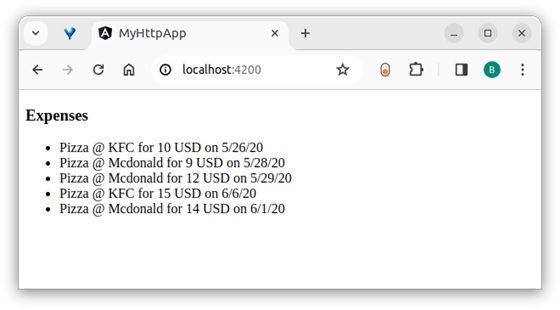
Let us create a working angular example to get all expense items from the above server application by using the HttpClient service class andget()method −
Angular Sample Application
Step 1: Run the below command to create an angular application −
ng new my-http-app
Enable angular routing and CSS as shown below −
? Would you like to add Angular routing? Yes
? Which stylesheet format would you like to use? CSS
Step 2: Enable HTTP communication in the application by importing HttpClientModule in the root component configuration file (app.component.ts) −
Step 9: Call the get method of this.http (HttpClient instance) object by passing the URL and options to get the expense object from the server. Then, set the expenses into our local variable, expenses −
exportclassListExpensesComponentimplementsOnInit{
   expenses: Expense[]=[];constructor(private http: HttpClient){}ngOnInit():void{this.http.get<Expense[]>('http://localhost:8000/api/expense',{'observe':'body','responseType':'json'}).subscribe( data =>{this.expenses = data as Expense[]console.log(this.expenses)})}}
Here,
Sets the Expense[] as the type of the object returned by the server. The server will send the array of expense objects in its body in JSON format.
Subscribed to the request (this.http.get) object. Then parsed the subscribed data as an array of expense objects and set it to a local expense variable (this.expenses).
Step 10: The complete code of the ListExpensesComponent is as follows −
Leave a Reply