HTTP Client is a client-side programming that provides the HTTP server access to various resources and services. It allows the client (a browser or application) to send HTTP requests and receive responses from the server.
HTTP client programming is an important feature in every modern web application. Nowadays, many applications expose their functionality through REST APIs, which work over the HTTP protocol.
To support this, the Angular team offers extensive tools to enable HTTP communication with servers. Angular provides a module called HttpClientModule and a service called HttpClient to handle HTTP programming.
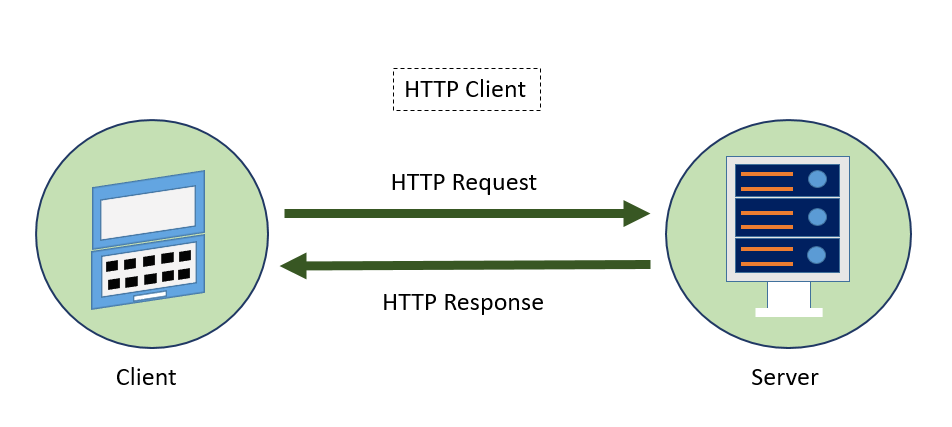
The following diagram provides a clear understanding of the HTTP Client, and the request and response mechanism −
Let us learn how to use the HttpClient service in this chapter. Developers should have a basic understanding of HTTP programming to understand the concepts discussed in this chapter.
Expense REST API
The prerequisite for HTTP programming is a basic understanding of the HTTP protocol and REST API techniques. HTTP programming involves two parts: the server and the client. Angular provides support for creating client-side applications, while Express (a popular web framework) provides support for creating server-side applications.
Let us create anExpense Rest APIusing the express framework and then access it from ourExpenseManagerapplication using the Angular HttpClient service.
Open a command prompt and create a new folder, express-rest-api.
cd /go/to/workspace
mkdir express-rest-api
cd expense-rest-api
Initialize a new node application using the below command −
npm init
After running the npm init commond will ask some basic questions like project name (express-rest-API), entry point (server.js), etc., as mentioned below −
This utility will walk you through creating a package.json file.
It only covers the most common items, and tries to guess sensible defaults.
See 'npm help json' for definitive documentation on these fields and
exactly what they do.
Use 'npm install <pkg>' afterwards to install a package and save
it as a dependency in the package.json file.
Press ^C at any time to quit.
package name: (expense-rest-api)
version: (1.0.0)
description: Rest api for Expense Application
entry point: (index.js) server.js
test command:
git repository:
keywords:
author:
license: (ISC)
About to write to \path\to\workspace\expense-rest-api\package.json: {
"name": "expense-rest-api",
"version": "1.0.0",
"description": "Rest api for Expense Application",
"main": "server.js",
"scripts": {
"test": "echo \"Error: no test specified\" && exit 1"
},
"author": "",
"license": "ISC"
}
Is this OK? (yes) yes
Installexpress, SQLite, andcorsmodules using the below command −
npm install express sqlite3 cors
Create a new filewith the name sqlitedb.jsand place the below code −
var sqlite3 =require('sqlite3').verbose()constDBSOURCE="expensedb.sqlite"let db =newsqlite3.Database(DBSOURCE,(err)=>{if(err){
console.error(err.message)throw err
}else{
console.log('Connected to the SQLite database.')
db.run(`CREATE TABLE expense (
id INTEGER PRIMARY KEY AUTOINCREMENT,
item text,
amount real,
category text,
location text,
spendOn text,
createdOn text
)`,(err)=>{if(err){
console.log(err);}else{var insert ='INSERT INTO expense (item, amount, category, location, spendOn, createdOn) VALUES (?,?,?,?,?,?)'
Here, we are creating a new SQLite database and loading some sample data.
Now, open server.js and place the below code (if you are not able to see the file in your application create it manually within the root directory) −
var express =require("express")var cors =require('cors')var db =require("./sqlitedb.js")var app =express()
app.use(cors());var bodyParser =require("body-parser");
app.use(bodyParser.urlencoded({ extended:false}));
app.use(bodyParser.json());varHTTP_PORT=8000
app.listen(HTTP_PORT,()=>{
console.log("Server running on port %PORT%".replace("%PORT%",HTTP_PORT))});
app.get("/",(req, res, next)=>{
Finally, we created a simple CURD REST API for expense entry, and we can access the REST API from our Angular application to learn the HttpClient module.
Configure Http client
Let’s learn how to configurethe HttpClientservice. The HttpClientservice is available inside theHttpClientModulemodule, which is available inside the @angular/common/http package.
To register HttpClientModule module. You need to import the HttpClientModule in AppComponent:
Let us create a new servicenamed ExpenseEntryServicein your ExpenseManagerapplication to interact withExpense REST API. ExpenseEntryService will get the latest expense entries, insert new expense entries, modify existing expense entries, and delete the unwanted expense entries.
Open the command prompt and go to the project root folder:
cd /go/to/expense-manager
Start the application by running the below command:
ng serve
Run the below command to generate an Angular service with the name ExpenseService:
ng generate service ExpenseEntry
This will create two Typescript files (expense entry service & its testing file) as specified below:
The HttpClient provides a get() method to fetch data from a web page. The main argument is the target web URL. Another optional argument is the option object with the below format −
headers: HTTP Headers of the request, either as string, an array of string, or an array of HttpHeaders.
observe: Process the response and return the specific content of the response. Possible values are body, response, and events. The default option of the observer is the body.
params: HTTP parameters of the request, either as string, array of string, or array of HttpParams.
reportProgress: Whether to report the progress of the process or not (true or false).
responseType: Refers to format of the response. Possible values are arraybuffer, blob, JSON, and text.
withCredentials: Whether the request has credentials or not (true or false).
Note: All options are optional, you can choose to use them or not.
The get() method returns the response of the request as Observable. The returned Observable emits the data when the response is received from the server.
Theget()method has an option to return observables, which emits a typed response as well. The sample code to get a typed response (ExpenseEntry) is as follows:
Error handling is one of the important aspects of HTTP programming. Encountering errors is one of the common scenarios in HTTP programming.
Errors in HTTP Programming can be categorized into two groups −
Client-side issues can occur due to network failure, misconfiguration, etc. If a client-side error happens, then theget()method throwsan ErrorEventobject.
Server-side issues can occur due to wrong URL, server unavailability, server programming errors, etc.
Let us write a simple error handling for our ExpenseEntryService service.
privatehttpErrorHandler(error: HttpErrorResponse){if(error.error instanceofErrorEvent){console.error("A client side error occurs. The error message is "+ error.message);}else{console.error("An error happened in server. The HTTP status code is "+ error.status +" and the error returned is "+ error.message);}returnthrowError("Error occurred. Pleas try again");}
The error function can be called in get() as specified below −
As we mentioned earlier, errors can happen, and one way is to handle them by implementing the error handling. Another option is to try for a certain number of times. If the request fails due to a network issue or the HTTP server is temporarily offline, the next request may succeed.
We can usethe rxjslibrary"retry"operator in this scenario as specified below :
Let us do the actual coding to fetch the expenses from Expense Rest API in our ExpenseManager application.
Open the command prompt and go to the project root folder:
cd /go/to/expense-manager
Start the application by running the following command:
ng serve
Now, add the getExpenseEntries() and httpErrorHandler() methods in ExpenseEntryService (src/app/expense-entry.service.ts) service as follows:
getExpenseEntries(): Observable<ExpenseEntry[]>{returnthis.httpClient.get<ExpenseEntry[]>(this.expenseRestUrl,this.httpOptions).pipe(retry(3),catchError(this.httpErrorHandler));}getExpenseEntry(id:number): Observable<ExpenseEntry>{returnthis.httpClient.get<ExpenseEntry>(this.expenseRestUrl +"/"+ id,this.httpOptions).pipe(retry(3),catchError(this.httpErrorHandler));}privatehttpErrorHandler(error: HttpErrorResponse){if(error.error instanceofErrorEvent){console.error("A client side error occurs. The error message is "+ error.message);}else{console.error("An error happened in server. The HTTP status code is "+
		 error.status +" and the error returned is "+ error.message);}returnthrowError("Error occurred. Pleas try again");}
Here,
getExpenseEntries() calls the get() method using expense end point and also configures the error handler. Also, it configures httpClient to try for maximum of 3 times in case of failure. Finally, it returns the response from server as typed (ExpenseEntry[]) Observable object.
getExpenseEntry is similar to getExpenseEntries() except it passes the id of the ExpenseEntry object and gets ExpenseEntry Observable object.
The complete coding of ExpenseEntryService is as follows:
headers:newHttpHeaders({'Content-Type':'application/json'})};constructor(private httpClient : HttpClient){}getExpenseEntries(): Observable<ExpenseEntry[]>{returnthis.httpClient.get<ExpenseEntry[]>(this.expenseRestUrl,this.httpOptions).pipe(retry(3),catchError(this.httpErrorHandler));}getExpenseEntry(id:number): Observable<ExpenseEntry>{returnthis.httpClient.get<ExpenseEntry>(this.expenseRestUrl +"/"+ id,this.httpOptions).pipe(retry(3),catchError(this.httpErrorHandler));}privatehttpErrorHandler(error: HttpErrorResponse){if(error.error instanceofErrorEvent){console.error("A client side error occurs. The error message is "+ error.message);}else{console.error("An error happened in server. The HTTP status code is "+ error.status +" and the error returned is "+ error.message);}returnthrowError("Error occurred. Pleas try again");}}</pre>
Open theExpenseEntryListComponent and go to the "src-entry-list-entry-list.component.ts" file and injectExpenseEntryServicethrough the constructor as specified below:
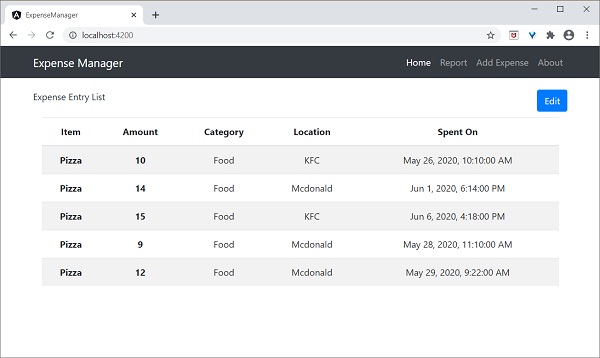
Finally, check the application and you will see the below response:
HTTP POST
The HTTP POST is similar to HTTP GET except that the post request will send the necessary data as posted content along with the request. HTTP POST is used to insert new records into the system. HttpClientprovidesthe post()method, which is similar toget(), except it supports an extra argument to send the data to the server.
Let us add a new method, addExpenseEntry() in our ExpenseEntryService to add new expense entry as mentioned below:
The HTTP PUT is similar to HTTP POST requests. This is used to update existing records in the system. The HttpClientprovidesa put()method, which is similar topost().
Update expense entry
Let us add a new method, updateExpenseEntry() in our ExpenseEntryService to update existing expense entry as mentioned below:
The HTTP DELETE is similar to the HTTP GET request. It is used to delete entries in the system. The HttpClientprovidesa delete()method, which is similar toget().
Delete expense entry
Let us add a new method, deleteExpenseEntry() in our ExpenseEntryService to delete existing expense entries as mentioned below:
Leave a Reply