Form validation is a process used to check whether the user input is in the correct format or not before submission. The validation process can be used to verify the format of email addresses and phone numbers as they have specific formats. Also, you can verify if the given input meets specific constraints like a minimum or maximum length. The form validation can prevent errors by catching invalid input before it is processed or sent to the server.
As we know, Angular has two kinds of forms. The first one is template-driven forms, and the other is reactive forms. The validation is implemented in two different ways. In template-driven forms, directives are used within the template to validate the form. In reactive forms, a model-driven approach is used where validation logic is defined in the component class.
Built-in Angular Validators
The Validator class in Angular provides a set of built-in validator functions that validate the form controls. A list of validator functions is −
SNo.
Validators & Descriptions
1.
minThis validator is used to check whether the control’s value is greater than or equal to the specified number.
2.
maxUnlike min, the max validator checks if the control’s value is less than or equal to a specified number.
3.
requiredWhen required validator is applied, it checks if the input field has a value and marks the form control as invalid if it is empty. This validator is used in mandatory fields of a form to ensure that users provide the necessary information before submitting the form.
4.
requiredTrueIf applied, it checks whether the value is true. Commonly used for checkbox validation.
5.
emailTo make sure the control’s value is a valid email address format, the email validator is used.
6.
minLengthIt validates that the control’s value is at least a specified length.
7.
maxLengthThis validators ensures that the control’s value does not exceed a specified length.
8.
patternIt validates that the control’s value matches a specified regular expression.
9.
nullValidatorIt is a no operation validator that always returns null. Commonly used for validation control.
10.
composeCombines multiple synchronous validators into one validator function. It returns an error map if any of the individual validators fail.
11.
composeAsyncSimilar to compose, but it combines asynchronous validators and returns an observable that emits either null for valid or an error object for invalid.
Validation in Angular Template-Driven Forms
In Angular, Template-Driven Forms are forms where the validation is applied directly in the HTML template using Angular’s built-in directives, like required, minlength, maxlength, and more. This type of form uses ngModel directive for two-way data binding and needs less code than Reactive Forms.
Example
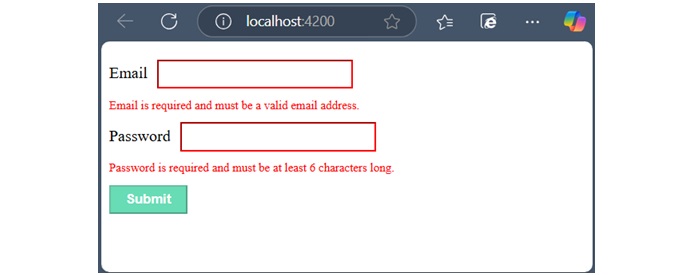
In the below example, we will see how to use the validation in Template-Driven Form.
Email is required and must be a valid email address.</div></div><div><label for="password">Password</label><input class="input-box" type="password" id="password" name="password"[(ngModel)]="user.password" required minlength="6" #password="ngModel"><div *ngIf="password.invalid && password.touched"class="error">
Password is required and must be at least 6 characters long.</div></div><button class="btn" type="submit"[disabled]="userForm.invalid">Submit</button></form><router-outlet /></pre>
Step 2: Add the below code inside component class −
Leave a Reply