Django’s ORM API provides useful functionality for performing CRUD operations on the data stored in the tables of relational databases.
The create(), update() and delete() methods perform their respective operations on an already existing table. However, you often need to make changes to the model structure itself, by adding, deleting or altering the attributes of the model. Django’s admin interface can be helpful in handling these activities.
The Migration System in Django
Django has a powerful migration system that deals with the process of updating a model.
Django propagates the changes you make to your models (adding a field, deleting a model, etc.) into your database schema with the help Migrations mechanism. The migrations-related commands are executed with the manage.py script.
The following commands are available −
migrate − Responsible for applying and unapplying migrations.
makemigrations − Responsible for creating new migrations based on the changes made to the models.
sqlmigrate − Displays the SQL statements for a migration.
showmigrations − Lists a project’s migrations and their status.
When you first set up a Django project, it automatically installs certain apps. They are listed in the INSTALLED_APPS section in the settings.py module.
Most of these apps are used in the admin interface to create and manage the users, groups, authorization, etc., and the data related to these apps is stored in the respective tables.
We need to run the following migrate command for the first time to create the table structure required for INSTALLED_APPS −
python manage.py migrate
Running the above command will create a package called migrations inside the app package folder. All the subsequent migration scripts are stored in it.
Subsequently, when you create a new app (with startapp command), you also need to add it in the INSTALLED_APPS list. Next, you declare the models required for the new app. Here, you need to create the database tables required for the new app.
The makemigrations Command
Let us add a new model in the models.py module as follows −
from django.db import models
# Create your models here.classDreamreal(models.Model):
website = models.CharField(max_length=50)
mail = models.CharField(max_length=50)
name = models.CharField(max_length=50)
phonenumber = models.IntegerField()def__str__(self):return"Website: {} Email: {} Name: {} Ph.: {}".format(self.website, self.mail, self.name, self.phonenumber)classMeta:
db_table ="dreamreal"</code></pre>
To propagate the new model in the database, run the makemigrations command −
python manage.py makemigrations
A migrations script 0001_initial.py will be created in the migrations folder. It contains a Migrations class. The migrate command as used initially, uses this script to create a new table in the database that has been configured in the DATABASES section of settings.py −
Python manage.py migrate
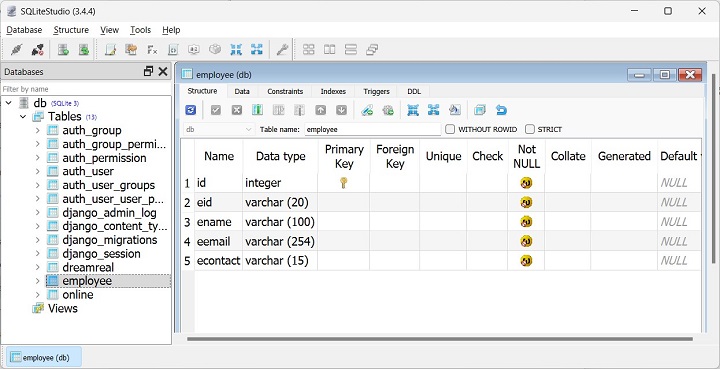
Eventually, you decide to add a new model class named Employee, as given below −
Leave a Reply