Like Linear Gradient Pattern, there are various types of gradient patterns that depict the way they’re flowed. The other types are Radial, Angular, Reflected, Diamond gradient patterns. In this chapter, we will learn about the Radial Gradient Pattern.
The Radial Gradient Pattern is another type of gradient pattern that starts from a center point and flows in a circular manner up to a radius. Simply put, the radial gradient contains two or more color stops in the form of concentric circles.
JavaFX also provides this type of color pattern to fill circular type of 2D shapes, like a regular circle or an ellipse etc.
Applying Radial Gradient Pattern
To apply a Radial Gradient Pattern to the nodes, instantiate the GradientPattern class and pass its object to the setFill(), setStroke() methods.
The constructor of this class accepts a few parameters, some of which are −
startX, startY − These double properties represent the x and y coordinates of the starting point of the gradient.
endX, endY − These double properties represent the x and y coordinates of the ending point of the gradient.
cycleMethod − This argument defines how the regions outside the color gradient bounds are defined by the starting and ending points and how they should be filled.
proportional − This is a Boolean Variable; on setting this property to true the start and end locations are set to a proportion.
Stops − This argument defines the color-stop points along the gradient line.
//Setting the radial gradient Stop[] stops =newStop[]{newStop(0.0,Color.WHITE),newStop(0.3,Color.RED),newStop(1.0,Color.DARKRED)};RadialGradient radialGradient =newRadialGradient(0,0,300,178,60,false,CycleMethod.NO_CYCLE, stops);
Example
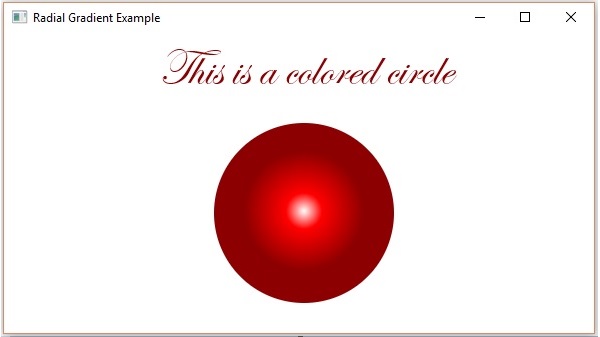
Following is an example which demonstrates how to apply a radial gradient pattern to the nodes in JavaFX. Here, we are creating a circle and a text nodes and applying gradient pattern to them.
Save this code in a file with the name RadialGradientExample.java.
importjavafx.application.Application;importjavafx.scene.Group;importjavafx.scene.Scene;importjavafx.scene.paint.Color;importjavafx.scene.paint.CycleMethod;importjavafx.scene.paint.RadialGradient;importjavafx.scene.paint.Stop;importjavafx.stage.Stage;importjavafx.scene.shape.Circle;importjavafx.scene.text.Font;importjavafx.scene.text.Text;publicclassRadialGradientExampleextendsApplication{@Overridepublicvoidstart(Stage stage){//Drawing a Circle Circle circle =newCircle();//Setting the properties of the circle
circle.setCenterX(300.0f);
circle.setCenterY(180.0f);
circle.setRadius(90.0f);//Drawing a text Text text =newText("This is a colored circle");//Setting the font of the text
text.setFont(Font.font("Edwardian Script ITC",50));//Setting the position of the text
text.setX(155);
text.setY(50);//Setting the radial gradient Stop[] stops =newStop[]{newStop(0.0,Color.WHITE),newStop(0.3,Color.RED),newStop(1.0,Color.DARKRED)};RadialGradient radialGradient =newRadialGradient(0,0,300,178,60,false,CycleMethod.NO_CYCLE, stops);//Setting the radial gradient to the circle and text
circle.setFill(radialGradient);
text.setFill(radialGradient);//Creating a Group object Group root =newGroup(circle, text);//Creating a scene object Scene scene =newScene(root,600,300);//Setting title to the Stage
stage.setTitle("Radial Gradient Example");//Adding scene to the stage
stage.setScene(scene);//Displaying the contents of the stage
stage.show();}publicstaticvoidmain(String args[]){launch(args);}}</code></pre>
Compile and execute the saved java file from the command prompt using the following commands.
On executing, the above program generates a JavaFX window as follows −
Example
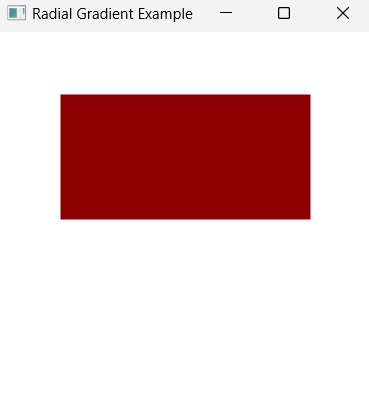
Radial Gradient Pattern does not work with shapes that are non-circular; i.e., you can only apply radial gradient on circular and elliptical shapes.
In the following example, let us try to apply the radial gradient pattern on a Rectangular shape. Save this code in a file with the name RectangleRadialGradient.java.
Leave a Reply